mkyong

mkyong

Software Engineer • Writer • Dad

20+ years hands-on, writing about Java, Spring, and AI. Every code example here is tested.

1,960 posts

Posts by mkyong

Problem Deployed on GAE production environment, when navigate from one page/view to another page/view, GAE shows error message “View xxx could not be restored“? JSF 2.1.7 Google App Engine SDK 1.6.3 P.S No problem at local GAE development. Solution By default, JSF 2 is using server for session management, and it’s not supported in GAE […]

Read more GAE + JSF : View /hello.xhtml could not be restored

Problem JSF application is able to deploy on local GAE environment, with following development environment : JSF 2.1.7 Google App Engine SDK 1.6.3 But hit error message while deployed on GAE production environment. Below is the logged error messages from GAE. com.sun.faces.config.ConfigureListener installExpressionFactory: Unable to instantiate ExpressionFactory ‘com.sun.el.ExpressionFactoryImpl’ E 2012-04-24 03:37:37.989 com.sun.faces.config.ConfigureListener contextInitialized: Critical error […]

Read more GAE + JSF : Unable to instantiate ExpressionFactory ‘com.sun.el.ExpressionFactoryImpl’

Problem Using Eclipse 3.7 + Google Plugin for Eclipse to develop GAE project, when created a .jsp file in “war” directory, Eclipse shows a cross error icon on top of the JSP file. In Eclipse problem view, it show “Your project must be configured to use a JDK in order to use JSPs.“. Solution To […]

Read more Your project must be configured to use a JDK in order to use JSPs

Problem Developing Struts2 on Google App Engine, in following environment. Struts 2.3.1.2 freemaker 2.3.18 JDK 1.6 Eclipse 3.7 + Google Plugin for Eclipse Google App Engine Java SDK 1.6.3.1 GAE complaints that javax.swing.tree.TreeNode is a restricted class in local development, if deployed on real GAE production environment, error message is gone. Caused by: java.lang.NoClassDefFoundError: javax.swing.tree.TreeNode […]

Read more javax.swing.tree.TreeNode is a restricted class

Problem Developing JSF (2.1.7) web application with Google App Engine (1.6.3), hits following error message : java.lang.NoClassDefFoundError: javax.naming.InitialContext is a restricted class. Please see the Google App Engine developer’s guide for more details. at com.google.appengine.tools.development.agent.runtime.Runtime.reject(Runtime.java:51) at com.sun.faces.config.WebConfiguration.processJndiEntries(WebConfiguration.java:687) at com.sun.faces.config.WebConfiguration.<init>(WebConfiguration.java:134) at com.sun.faces.config.WebConfiguration.getInstance(WebConfiguration.java:194) at com.sun.faces.config.ConfigureListener.contextInitialized(ConfigureListener.java:163) //… Solution Java clsss – javax.naming.InitialContext, is not supported in Google App […]

Read more GAE + JSF : javax.naming.InitialContext is a restricted class

Problem Developing Struts2 on Google App Engine, in following environment. Struts 2.3.1.2 JDK 1.6 Eclipse 3.7 + Google Plugin for Eclipse Google App Engine Java SDK 1.6.3.1 Just started a simple Struts2 hello world example, when access the action class, hit error “Error: result ‘null’ not found”, in both local development and real production GAE […]

Read more Struts 2 on GAE – Error: result ‘null’ not found

You can use command “appcfg download_app” to download uploaded application from GAE, see signature below : AppCfg [options] -A app_id [ -V version ] download_app <out-dir> AppCfg download example Assume you have uploaded an application with app_id “mkyong-springmvc” to GAE, to download it back on your computer, use following command : D:\appengine-java-sdk-1.6.3.1\bin>appcfg -A mkyong-springmvc download_app […]

Read more Download uploaded application from Google App Engine (GAE)

Problem Developing Struts2 (v 2.3.1.2) on Google App Engine (SDK v1.6.3.1), local development, hit “java.security.AccessControlException: access denied” error? Solution Normally, this is because you turn the “devMode on” in struts.xml file. File : struts.xml <?xml version="1.0" encoding="UTF-8" ?> <!DOCTYPE struts PUBLIC "-//Apache Software Foundation//DTD Struts Configuration 2.0//EN" "http://struts.apache.org/dtds/struts-2.0.dtd"> <struts> <constant name="struts.devMode" value="true" /> //… </struts> […]

Read more Struts 2 on GAE – java.security.AccessControlException: access denied

In this tutorials, we will show you how to install “Google Plugin for Eclipse“, in Eclipse 3.7 (Indigo). 1. Installation In Eclipse 3.7, click “Help” –> “Install New Software…“, copy and paste following URL : http://dl.google.com/eclipse/plugin/3.7 Note For other Eclipse version like 3.3, 3.4, 3.5, 3.6, please refer to this GAE Eclipse documentation. Figure : […]

Read more How to install Google Plugin for Eclipse

Problem While installing Google Plugin for Eclipse 3.7, via http://dl.google.com/eclipse/plugin/3.7 , it took almost half and hour and download and stopped at the end. A long list of error messages “.jar has been tampered!” are prompted in Eclipse. An error occurred while collecting items to be installed session context was:(profile=epp.package.jee, phase=org.eclipse.equinox.internal.p2.engine.phases.Collect, operand=, action=). No repository […]

Read more Google Plugin for Eclipse – jar has been tampered!

1. Problem While installing Google plugin for Eclipse, hit following weird error messages, and caused a long download time and stopped at the end. "Install download" has encountered a problem "Install download1" has encountered a problem "Install download2" has encountered a problem "Install download3" has encountered a problem "Install download4" has encountered a problem See […]

Read more Eclipse : “Install download1” has encountered a problem

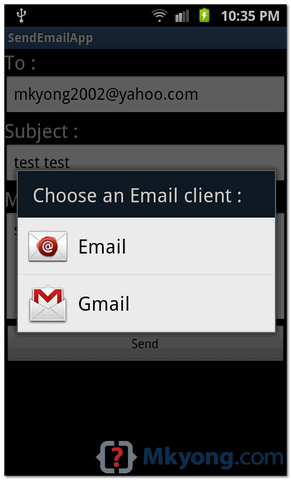
In Android, you can use Intent.ACTION_SEND to call an existing email client to send an Email. See following code snippets : Intent email = new Intent(Intent.ACTION_SEND); email.putExtra(Intent.EXTRA_EMAIL, new String[]{"[email protected]"}); email.putExtra(Intent.EXTRA_SUBJECT, "subject"); email.putExtra(Intent.EXTRA_TEXT, "message"); email.setType("message/rfc822"); startActivity(Intent.createChooser(email, "Choose an Email client :")); P.S This project is developed in Eclipse 3.7, and tested with Samsung Galaxy S2 (Android […]

Read more How to send Email in Android

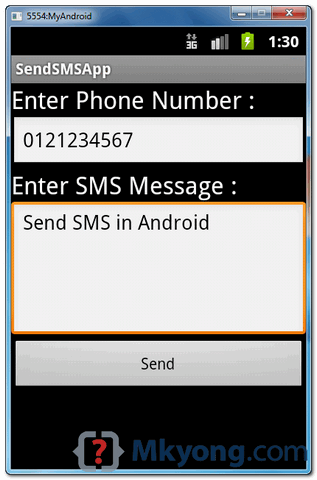
In Android, you can use SmsManager API or device’s Built-in SMS application to send a SMS message. In this tutorial, we show you two basic examples to send SMS message : SmsManager API SmsManager smsManager = SmsManager.getDefault(); smsManager.sendTextMessage("phoneNo", null, "sms message", null, null); Built-in SMS application Intent sendIntent = new Intent(Intent.ACTION_VIEW); sendIntent.putExtra("sms_body", "default content"); sendIntent.setType("vnd.android-dir/mms-sms"); […]

Read more How to send SMS message in Android

In Android, you can use PackageManager , hasSystemFeature() method to check if a device has camera, gps or other features. See full example of using PackageManager in an activity class. package com.mkyong.android; import android.app.Activity; import android.content.Context; import android.content.pm.PackageManager; import android.os.Bundle; import android.util.Log; public class FlashLightActivity extends Activity { @Override public void onCreate(Bundle savedInstanceState) { super.onCreate(savedInstanceState); […]

Read more Android : how to check if device has camera

In this tutorial, we show you how to turn on/off the phone camera led or flashlight in Android. See code snippets : 1. Turn on camera = Camera.open(); Parameters p = camera.getParameters(); p.setFlashMode(Parameters.FLASH_MODE_TORCH); camera.setParameters(p); camera.startPreview(); 2. Turn off camera = Camera.open(); Parameters p = camera.getParameters(); p.setFlashMode(Parameters.FLASH_MODE_OFF); camera.setParameters(p); camera.stopPreview(); And, put following permission on AndroidManifest.xml. <uses-permission […]

Read more How to turn on/off camera LED / flashlight in Android

A small Android tip to show you how to center button on screen. Wrap button in RelativeLayout, and set following attributes to “true“. android:layout_centerVertical="true" android:layout_centerHorizontal="true" Following is a full example to demonstrate the use of above tip to center a button on screen. 1. Android Layout A button in layout. File : res/layout/main.xml <?xml version="1.0" […]

Read more Android – How to center button on screen

In Android, Toast is a notification message that pop up, display a certain amount of time, and automtaically fades in and out, most people just use it for debugging purpose. Code snippets to create a Toast message : //display in short period of time Toast.makeText(getApplicationContext(), "msg msg", Toast.LENGTH_SHORT).show(); //display in long period of time Toast.makeText(getApplicationContext(), […]

Read more Android Toast example

In this tutorial, we will enchance the previous AlertDialog example, to make it able to accept user input, just like a PromptDialog. More specific, this is a custom AlertDialog example. See following steps : Create a prompt dialog layout (XML file). Attach the prompt dialog layout to AlertDialog.Builder. Attach the AlertDialog.Builder to AlertDialog. Done. P.S […]

Read more Android prompt user input dialog example

In this tutorial, we show you how to make a phone call in Android,and monitor the phone call states via PhoneStateListener. P.S This project is developed in Eclipse 3.7, and tested with Android 2.3.3. 1 Android Layout Files Simpel layout file, to display a button. File : res/layout/main.xml <?xml version="1.0" encoding="utf-8"?> <LinearLayout xmlns:android="http://schemas.android.com/apk/res/android" android:layout_width="fill_parent" android:layout_height="fill_parent" […]

Read more How to make a phone call in Android

In this tutorial, we will demonstrates the use of TabLayout to render 4 tabs – “Android”, “Windows”, “Apple” and “BlackBerry”, each tab contains a textview to display a simple message. P.S This project is developed in Eclipse 3.7, and tested with Android 2.3.3. 1. Tab Images Put 4 tab images in “res/drawable” folder. The tab […]

Read more Android TabLayout example

In Android, GridView let you arranges components in a two-dimensional scrolling grid. For detail attribute exaplanation, see GridView reference. In this tutorial, we will show you 2 common GridView examples : Normal way, just display text in GridView layout. Create a custom adapter to display image and text in GridView layout. P.S This project is […]

Read more Android GridView example

By default, Eclipse’s editor will not display line numbers, it’s no good for debugging. Here’s a tip to show you how to turn on the “display line numbers” feature in Eclipse. In Eclipse IDE, select “Windows” > “Preference” > “General” > “Editors” > “Text Editors” , check on the “Show line numbers” option. See result.

Read more How to display line numbers in Eclipse