In this tutorial, we will show you how to develop and deploy a Spring 3.0 MVC REST web application in Google App Engine (GAE) environment.
Tools and technologies used :
- Google App Engine Java SDK 1.6.3.1
- Spring 3.1.1
- JDK 1.6
- Eclipse 3.7 + Google Plugin for Eclipse
This example is going to reuse this Spring 3 MVC REST example, modify it and integrate with Google App Engine, you may also interest to read this – GAE + Java + Eclipse example
1. New Web Application Project
In Eclipse, create a new Web Application project, named as “SpringMVCGoogleAppEngine“.
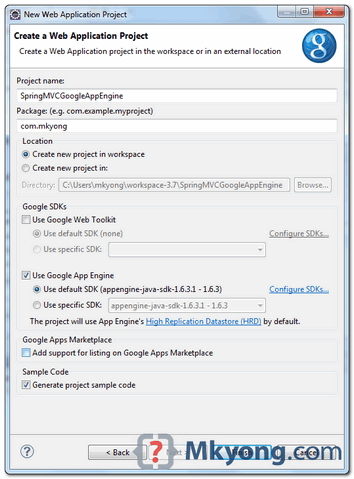
The “Google Plugin for Eclipse” will generate a sample of GAE project structure.
2. Spring 3.0 Dependencies
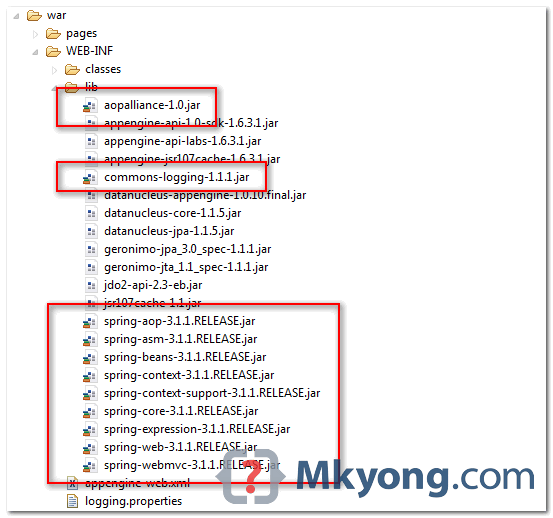
To use Spring MVC + REST in GAE, you need following jars
- aopalliance-1.0.jar
- commons-logging-1.1.1.jar
- spring-aop-3.1.1.RELEASE.jar
- spring-asm-3.1.1.RELEASE.jar
- spring-beans-3.1.1.RELEASE.jar
- spring-context-3.1.1.RELEASE.jar
- spring-context-support-3.1.1.RELEASE.jar
- spring-core-3.1.1.RELEASE.jar
- spring-expression-3.1.1.RELEASE.jar
- spring-web-3.1.1.RELEASE.jar
- spring-webmvc-3.1.1.RELEASE.jar
Copy and put it in “war/WEB-INF/lib” folder.
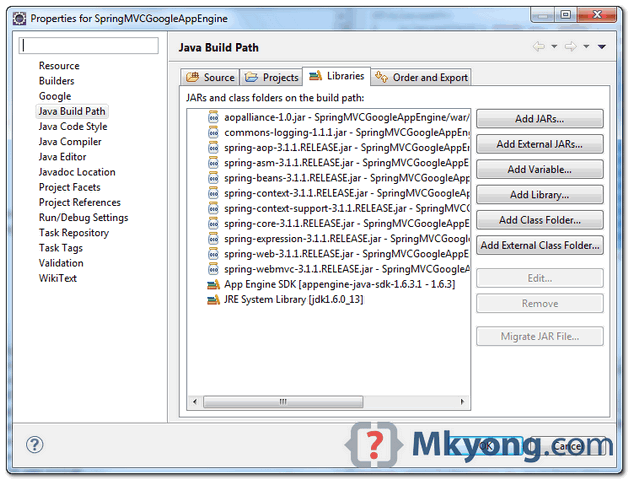
Add it to your project’s build path as well – right click on project folder, select “Properties“. Select “Java Build Path” -> “Libraries” tab, click “Add Jars” button and select above jars.
3. Spring Controller
3.1 Delete auto generated SpringMVCGoogleAppEngineServlet.java, you don’t need this.
3.2 Create a bean, act as controller in REST structure. In addition, DI a message into the “message” property.
File : src/com/mkyong/MovieController.java
package com.mkyong.controller;

import org.springframework.stereotype.Controller;
import org.springframework.ui.ModelMap;
import org.springframework.web.bind.annotation.PathVariable;
import org.springframework.web.bind.annotation.RequestMapping;
import org.springframework.web.bind.annotation.RequestMethod;

@Controller
@RequestMapping("/movie")
public class MovieController {

	//DI via Spring
	String message;

	@RequestMapping(value="/{name}", method = RequestMethod.GET)
	public String getMovie(@PathVariable String name, ModelMap model) {

		model.addAttribute("movie", name);
		model.addAttribute("message", this.message);

		//return to jsp page, configured in mvc-dispatcher-servlet.xml, view resolver
		return "list";

	}

	public void setMessage(String message) {
		this.message = message;
	}

}
4. JSP Pages
Create a list.jsp page, display the result.
File : war/list.jsp
<html>
<body>
	<h1>GAE + Spring 3 MVC REST example</h1>

	<h2>Movie : ${movie} , DI message : ${message}</h2>
</body>
</html>
5. Spring Configuration
Create a Spring XML bean configuration file, define the beans and view resolver.
File : war/WEB-INF/mvc-dispatcher-servlet.xml
<beans xmlns="http://www.springframework.org/schema/beans"
	xmlns:context="http://www.springframework.org/schema/context"
	xmlns:mvc="http://www.springframework.org/schema/mvc"
	xmlns:xsi="http://www.w3.org/2001/XMLSchema-instance"
	xsi:schemaLocation="
        http://www.springframework.org/schema/beans
        http://www.springframework.org/schema/beans/spring-beans-3.0.xsd
        http://www.springframework.org/schema/context
        http://www.springframework.org/schema/context/spring-context-3.0.xsd
        http://www.springframework.org/schema/mvc
        http://www.springframework.org/schema/mvc/spring-mvc-3.0.xsd">

	<!--
		Need DI a message into controller, so auto component scan is disabled,
		to avoid double create the movieController bean.
                Only controller need this hack.
	-->
	<context:component-scan base-package="com.mkyong.controller">
		<context:exclude-filter type="regex"
			expression="com.mkyong.controller.Movie.*" />
	</context:component-scan>

	<mvc:annotation-driven />

	<!-- Bean to show you Di in GAE, via Spring, also init the MovieController -->
	<bean class="com.mkyong.controller.MovieController">
		<property name="message">
			<value>Hello World</value>
		</property>
	</bean>

	<bean
	   class="org.springframework.web.servlet.view.InternalResourceViewResolver">
		<property name="prefix">
			<value>/pages/</value>
		</property>
		<property name="suffix">
			<value>.jsp</value>
		</property>
	</bean>

</beans>
6. web.xml
Update web.xml, integrate Spring framework.
File : war/WEB-INF/web.xml
<?xml version="1.0" encoding="utf-8"?>
<web-app xmlns:xsi="http://www.w3.org/2001/XMLSchema-instance"
xmlns="http://java.sun.com/xml/ns/javaee"
xmlns:web="http://java.sun.com/xml/ns/javaee/web-app_2_5.xsd"
xsi:schemaLocation="http://java.sun.com/xml/ns/javaee
http://java.sun.com/xml/ns/javaee/web-app_2_5.xsd" version="2.5">

	<servlet>
		<servlet-name>mvc-dispatcher</servlet-name>
		<servlet-class>
                    org.springframework.web.servlet.DispatcherServlet
                </servlet-class>
		<load-on-startup>1</load-on-startup>
	</servlet>

	<servlet-mapping>
		<servlet-name>mvc-dispatcher</servlet-name>
		<url-pattern>/</url-pattern>
	</servlet-mapping>

	<context-param>
		<param-name>contextConfigLocation</param-name>
		<param-value>/WEB-INF/mvc-dispatcher-servlet.xml</param-value>
	</context-param>

	<listener>
		<listener-class>
                    org.springframework.web.context.ContextLoaderListener
                </listener-class>
	</listener>

	<welcome-file-list>
		<welcome-file>index.html</welcome-file>
	</welcome-file-list>
</web-app>
7. Directory Structure
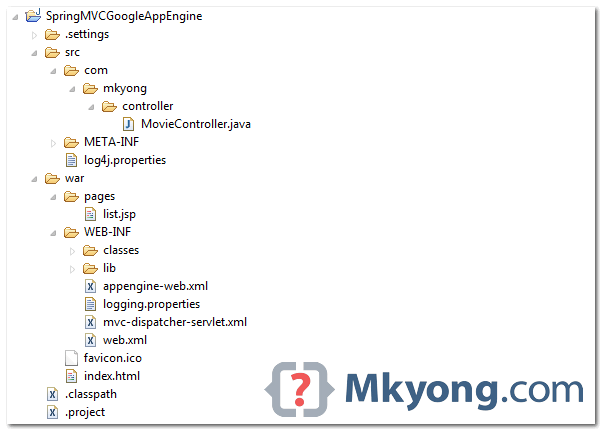
Review the final directory structure.
8. Run on Local
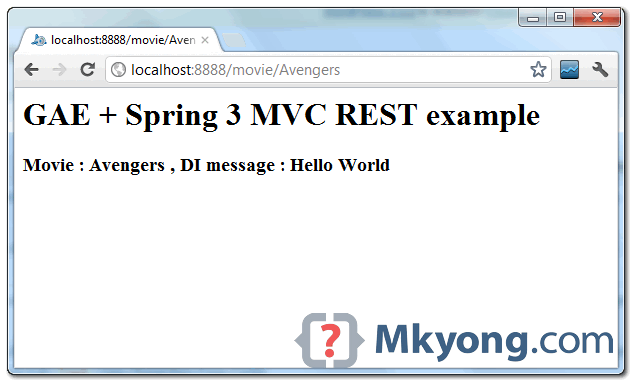
Right click on the project, run as “Web Application“.
URL : http://localhost:8888/movie/Avengers
9. Deploy on GAE
Update appengine-web.xml file, add your App Engine application ID.
File : war/WEB-INF/appengine-web.xml
<?xml version="1.0" encoding="utf-8"?>
<appengine-web-app xmlns="http://appengine.google.com/ns/1.0">
  <application>mkyong-springmvc</application>
  <version>1</version>

  <system-properties>
    <property name="java.util.logging.config.file"
          value="WEB-INF/logging.properties"/>
  </system-properties>

</appengine-web-app>
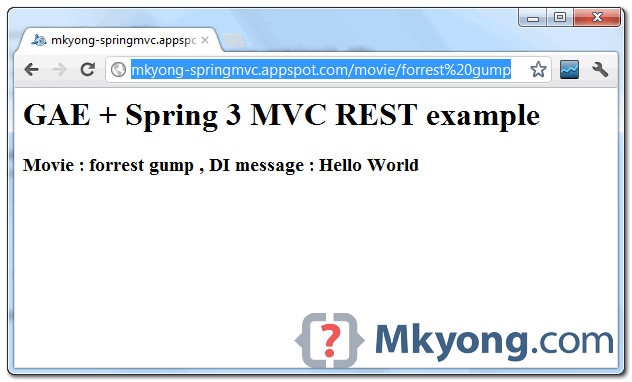
Select project, click on Google icon, “Deploy to App Engine“.
URL : http://mkyong-springmvc.appspot.com/movie/forrest%20gump
Download Source Code
Due to large file size, all Spring and GAE jars are excluded.

I have created an app-engine app where in I am loading properties files using Spring based configuration and using it in as “${app.id}”. When I run my app, all properties are getting loaded properly and my program works like charm but when I deploy the same application in Google App-Engine, I noticed that properties are not getting loaded and am getting null pointer exception. Does anyone has any pointer for this issue. I have googled a lot but not getting any correct solutions. Thanks !!
http://stackoverflow.com/a/37826145/3724864
Hello one question, GAE supports web applications with hibernate?. Thank You
I am unable to access the Servlet from the AppEngine, I request help …
———————————————————————————
Error: Server Error
The server encountered an error and could not complete your request.
Please try again in 30 seconds.
———————————————————————————
Did you get any solution for issue? I am getting same.
Error: Server Error
The server encountered an error and could not complete your request.
Please try again in 30 seconds.
Logs:-
org.springframework.web.context.ContextLoader initWebApplicationContext: Context initialization failed
org.springframework.beans.factory.BeanDefinitionStoreException: Failed to read candidate component class: file [/base/data/home/apps/s~indifantasycricket/2.382191145722035040/WEB-INF/classes/com/gyan/spot/controller/FantasyCricHomeCntrl.class]; nested exception is java.lang.IllegalArgumentException
at org.springframework.context.annotation.ClassPathScanningCandidateComponentProvider.findCandidateComponents(ClassPathScanningCandidateComponentProvider.java:281)
at org.springframework.context.annotation.ClassPathBeanDefinitionScanner.doScan(ClassPathBeanDefinitionScanner.java:242)
at org.springframework.context.annotation.ComponentScanBeanDefinitionParser.parse(ComponentScanBeanDefinitionParser.java:84)
at org.springframework.beans.factory.xml.NamespaceHandlerSupport.parse(NamespaceHandlerSupport.java:73)
at org.springframework.beans.factory.xml.BeanDefinitionParserDelegate.parseCustomElement(BeanDefinitionParserDelegate.java:1435)
at org.springframework.beans.factory.xml.BeanDefinitionParserDelegate.parseCustomElement(BeanDefinitionParserDelegate.java:1425)
at org.springframework.beans.factory.xml.DefaultBeanDefinitionDocumentReader.parseBeanDefinitions(DefaultBeanDefinitionDocumentReader.java:184)
at org.springframework.beans.factory.xml.DefaultBeanDefinitionDocumentReader.doRegisterBeanDefinitions(DefaultBeanDefinitionDocumentReader.java:140)
at org.springframework.beans.factory.xml.DefaultBeanDefinitionDocumentReader.registerBeanDefinitions(DefaultBeanDefinitionDocumentReader.java:111)
at org.springframework.beans.factory.xml.XmlBeanDefinitionReader.registerBeanDefinitions(XmlBeanDefinitionReader.java:493)
at org.springframework.beans.factory.xml.XmlBeanDefinitionReader.doLoadBeanDefinitions(XmlBeanDefinitionReader.java:390)
at org.springframework.beans.factory.xml.XmlBeanDefinitionReader.loadBeanDefinitions(XmlBeanDefinitionReader.java:334)
at org.springframework.beans.factory.xml.XmlBeanDefinitionReader.loadBeanDefinitions(XmlBeanDefinitionReader.java:302)
at org.springframework.beans.factory.support.AbstractBeanDefinitionReader.loadBeanDefinitions(AbstractBeanDefinitionReader.java:174)
at org.springframework.beans.factory.support.AbstractBeanDefinitionReader.loadBeanDefinitions(AbstractBeanDefinitionReader.java:209)
at org.springframework.beans.factory.support.AbstractBeanDefinitionReader.loadBeanDefinitions(AbstractBeanDefinitionReader.java:180)
at org.springframework.web.context.support.XmlWebApplicationContext.loadBeanDefinitions(XmlWebApplicationContext.java:125)
at org.springframework.web.context.support.XmlWebApplicationContext.loadBeanDefinitions(XmlWebApplicationContext.java:94)
at org.springframework.context.support.AbstractRefreshableApplicationContext.refreshBeanFactory(AbstractRefreshableApplicationContext.java:131)
at org.springframework.context.support.AbstractApplicationContext.obtainFreshBeanFactory(AbstractApplicationContext.java:537)
at org.springframework.context.support.AbstractApplicationContext.refresh(AbstractApplicationContext.java:451)
at org.springframework.web.context.ContextLoader.configureAndRefreshWebApplicationContext(ContextLoader.java:383)
at org.springframework.web.context.ContextLoader.initWebApplicationContext(ContextLoader.java:283)
at org.springframework.web.context.ContextLoaderListener.contextInitialized(ContextLoaderListener.java:112)
at org.mortbay.jetty.handler.ContextHandler.startContext(ContextHandler.java:548)
at org.mortbay.jetty.servlet.Context.startContext(Context.java:136)
at org.mortbay.jetty.webapp.WebAppContext.startContext(WebAppContext.java:1250)
at org.mortbay.jetty.handler.ContextHandler.doStart(ContextHandler.java:517)
at org.mortbay.jetty.webapp.WebAppContext.doStart(WebAppContext.java:467)
at org.mortbay.component.AbstractLifeCycle.start(AbstractLifeCycle.java:50)
at com.google.apphosting.runtime.jetty.AppVersionHandlerMap.createHandler(AppVersionHandlerMap.java:199)
at com.google.apphosting.runtime.jetty.AppVersionHandlerMap.getHandler(AppVersionHandlerMap.java:174)
at com.google.apphosting.runtime.jetty.JettyServletEngineAdapter.serviceRequest(JettyServletEngineAdapter.java:134)
at com.google.apphosting.runtime.JavaRuntime$RequestRunnable.run(JavaRuntime.java:484)
at com.google.tracing.TraceContext$TraceContextRunnable.runInContext(TraceContext.java:438)
at com.google.tracing.TraceContext$TraceContextRunnable$1.run(TraceContext.java:445)
at com.google.tracing.CurrentContext.runInContext(CurrentContext.java:220)
at com.google.tracing.TraceContext$AbstractTraceContextCallback.runInInheritedContextNoUnref(TraceContext.java:309)
at com.google.tracing.TraceContext$AbstractTraceContextCallback.runInInheritedContext(TraceContext.java:301)
at com.google.tracing.TraceContext$TraceContextRunnable.run(TraceContext.java:442)
at com.google.apphosting.runtime.ThreadGroupPool$PoolEntry.run(ThreadGroupPool.java:251)
at java.lang.Thread.run(Thread.java:724)
Caused by: java.lang.IllegalArgumentException
at org.springframework.asm.ClassReader.(Unknown Source)
at org.springframework.asm.ClassReader.(Unknown Source)
at org.springframework.asm.ClassReader.(Unknown Source)
at org.springframework.core.type.classreading.SimpleMetadataReader.(SimpleMetadataReader.java:52)
at org.springframework.core.type.classreading.SimpleMetadataReaderFactory.getMetadataReader(SimpleMetadataReaderFactory.java:80)
at org.springframework.core.type.classreading.CachingMetadataReaderFactory.getMetadataReader(CachingMetadataReaderFactory.java:101)
at org.springframework.context.annotation.ClassPathScanningCandidateComponentProvider.findCandidateComponents(ClassPathScanningCandidateComponentProvider.java:257)
… 41 more
I cannot run the project. The war folder shows an error.
Exception
com.google.apphosting.utils.config.AppEngineConfigException: appengine-web.xml does not contain a element.
for the maven build of this https://www.youtube.com/watch?v=JA_KxvCFhBg
why context component scan is not working
Hi,
Can you pls write a tutorial on how to consume external JSON REST service from your app deployed in Google App Engine. Say, you have a Spring web app which displays weather information based on the city name by calling the openweathermap.org/API JSON services.
Thanks in advance.
-Raj
I tried this. But on my eclipse it is not showing the archtypes for google app engine
Hi mkyong,
Could you please explain a little more what the following lines in mvc-dispatcher-servlet.xml are doing? You mentioned it stopping a double creation of the movieController bean but I didn’t quite understand why it would be created twice.
Thanks,
Steve
Ah my code paste was removed. I’m referring to the context:component-scan and mvc:annotation-driven tags. Thanks.
Hi,
I tried your tutorial but this is not working. I got the below error.
HTTP ERROR: 503
Problem accessing /movie/Avengers. Reason:
SERVICE_UNAVAILABLE
Can you please help me to solve this issue
Thanks.
Are you use port 8888? If yes, try change it to port 88. It works fine for me
the only way to get rid of temptation is to yield to it… i can resist everything but temptation. jaw crusher price http://jawcrushers.yolasite.com/
Hi,
Thanks for good tutorial.
I want to know GAE is support for Hibernate or not.
Thank you.
It is not supported.
Have a look to code.google.com/p/googleappengine/wiki/WillItPlayInJava
Perfect, clean, and robust tutorial. Thanks for sharing.
My IDE is JetBrains IntelliJ IDEA and I’m trying to deploy to the local App Engine development server from the SDK. I was receiving a “could not locate artifacts/…/appengine-web.xml” error on run. The fix is based on http://erikeldridge.wordpress.com/tag/appengine/
In IntelliJ IDEA, Ctrl+Shift+Alt+S and look in the “Facets” project settings on the left. You will have already setup a “web:war exploded” Facet and simply need to add appengine-web.xml and web.xml to the list of files in the Output Layout.
Hi Mkyong,
I need your help. I have a requirement in that I have to use AOP framework on both a client and server side. Here the client is android cellphone and server is GAE. What I want to do is need to offload a part of the android module to cloud for computation which consumes lots of battery, power and memory or else it will be run in android cellphone itself. please give some suggestions how to go about it. Thank you.
works on local, but doesn’t work when deployed to GAE!
sorry, used to wrong spring jars. changed to correct ones as mentioned by Mr Yong, now its working, thanks!
Here are the Jars, just downloaded from Maven repositories.
https://docs.google.com/open?id=0B3yWZxAiFGhzbjVOcEhLMDU4c0k
Thanks for this tutorial. It’s exactly what I needed and worked as described. As a side note, for Step 2 (Spring 3.0 Dependencies), I found the necessary jars on maven.
jm
hey ,
im looking for this jars .
can u please send me link or tell me how to get them .
thank
bar
The jars themselves are hosted on maven.org but sites like mvnrepository.com and grepcode.com provide links and background info for these files. Just google the name of one of the jars and you’ll see these third-party sites that link to the downloads from maven.org. Hope this helps.
I am a Java Er. and I want to read more on web services please suggest me….
REST web services or soap ?
if restful like this great example (Thanks!), a more fully featured example is here:
http://www.ibm.com/developerworks/webservices/library/wa-restful/index.html
Thanks for your example, look forward to using it…but was wondering if based on your experience, is there a best rest framework to rely upon ? i.e. spring mvc rest vs. spring rest templates vs. gae spring server…and nice to have would be control over format of serialized objects….
Thanks again.
-tony
i meant gae rest server not spring server
spring rest will be portable across platforms, in case you decide to scrap GAE, anyway.