Supabase gives you a free PostgreSQL database in the cloud. It is a normal Postgres database, so Spring Boot talks to it with the plain PostgreSQL driver.
You will build a REST API that can create, read, update, and delete books. Then you will test it.
Things you will use:
- Spring Boot 4.1.0
- Java 25
- Maven 3.9.6
- Supabase (free plan)
Table of contents:
- Create a Supabase project
- Make a schema and a table
- Get the JDBC connection string
- Project directory
- The pom.xml
- The application.properties
- The Book class
- The repository
- The CRUD controller
- The main class
- Run it
- Create a book
- Read all books
- Read one book
- Update a book
- Delete a book
- Ask for a book that is missing
- Tired of escaping quotes? Use a file
- Test the repository
- Test the controller
- Run the tests
- Why not the public schema?
- Download Source Code
- References
Create a Supabase project
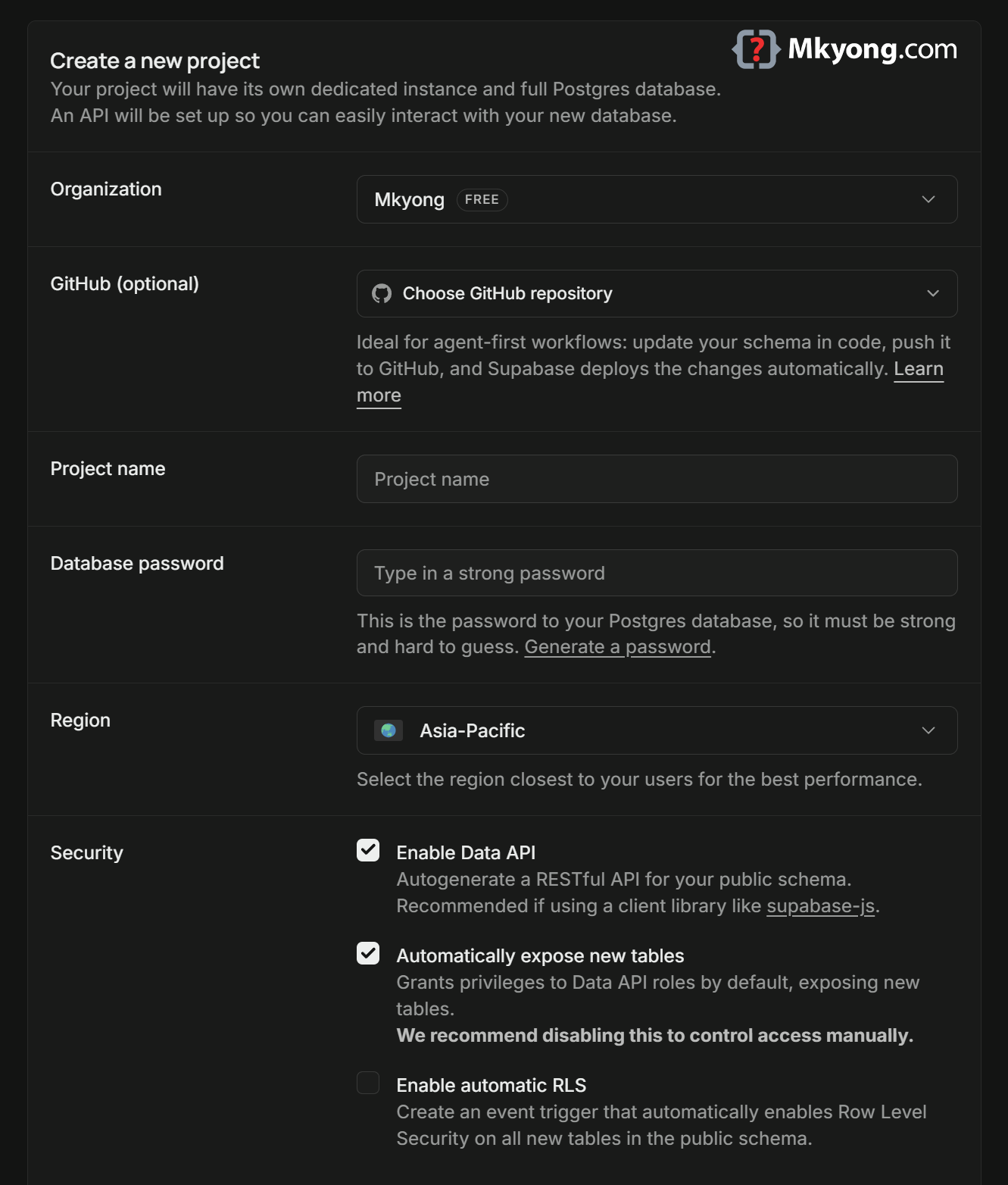
Go to prohects, and make a new project. Pick a region close to you.
Save the database password somewhere safe. You need it in a moment, and Supabase will not show it to you again.
Make a schema and a table
Supabase turns the public schema into an open Data API. You do not want your app tables sitting there by accident, so make your own schema called app.
Open the SQL Editor and run this.
-- Your own room, away from the public Data API
create schema if not exists app;

-- Make a table called "book" inside that room
create table app.book (
  id     bigserial primary key,   -- auto number, 1, 2, 3...
  title  text not null,           -- the book name
  author text not null            -- who wrote it
);

-- Put two books inside
insert into app.book (title, author) values
  ('Java 25 Basics', 'Mkyong'),
  ('Spring Boot 4 Guide', 'Mkyong');
Output:
Success. No rows returned
The table now lives in your Supabase database. Open the Table Editor, switch the schema dropdown from public to app, and you will see the two books.
Get the JDBC connection string
Click the green Connect button at the top of the dashboard. Selects DIrect Connection string*, Pick Session pooler, then the JDBC tab.
The connection string looks like this:
jdbc:postgresql://aws-0-ap-northeast-1.pooler.supabase.com:5432/postgres?user=postgres.pvnipyivxgducqrxzlsg&password=[YOUR-PASSWORD]&sslmode=require
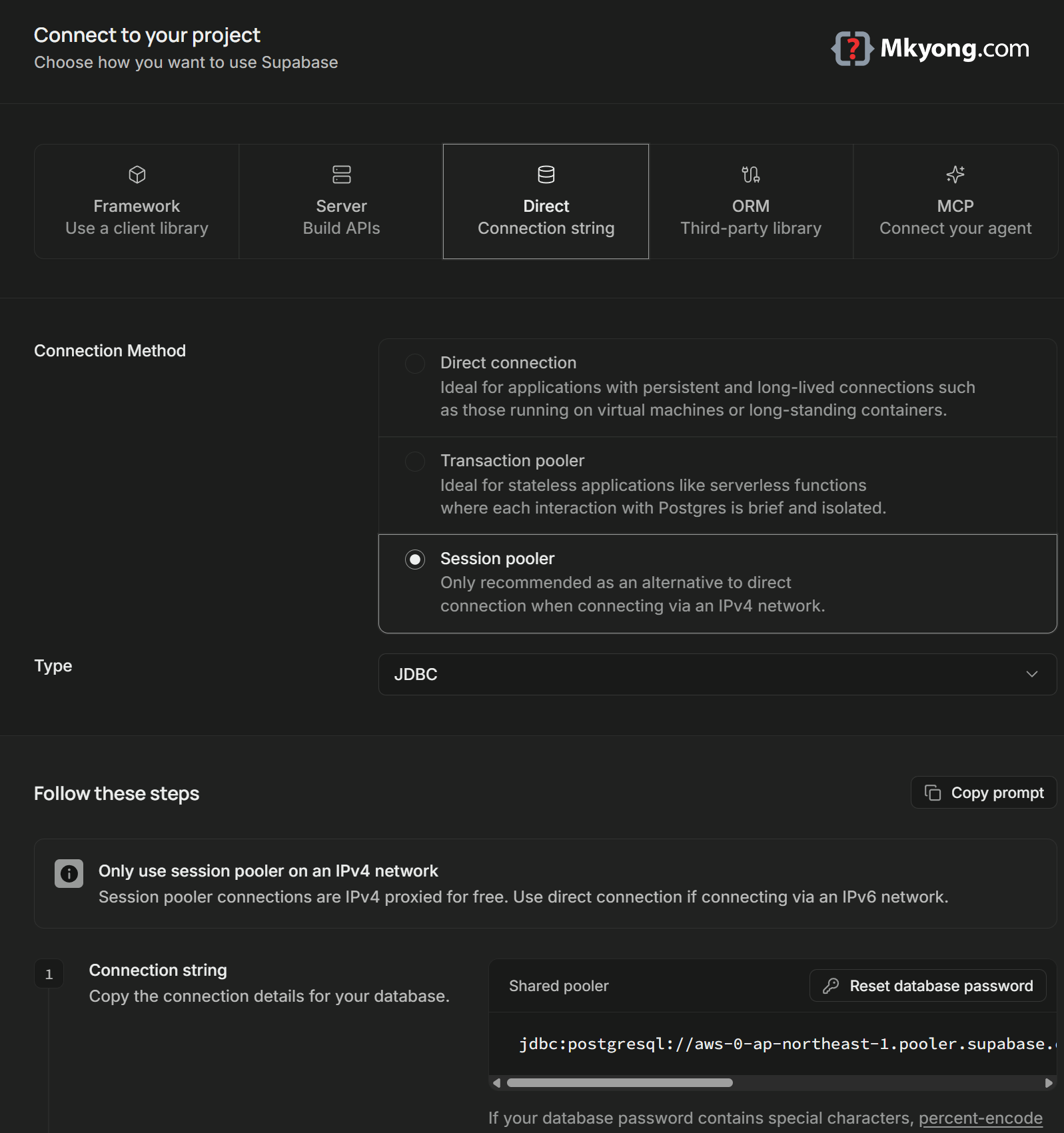
Three parts matter:
- Host –
aws-0-ap-northeast-1.pooler.supabase.com, your region may differ - Port –
5432, the session pooler - User –
postgres.pvnipyivxgducqrxzlsg, where the tail is your project ref
Use the session pooler, not port 6543. Spring Data JPA runs on Hibernate, and Hibernate uses server-side prepared statements. Supavisor in transaction mode (port 6543) does not support prepared statements. Port 5432 does support them, and it also works on IPv4-only networks.
Add sslmode=require yourself. The PostgreSQL JDBC driver defaults to prefer, which quietly falls back to a plain, unencrypted connection if the encrypted one fails. You do not want your password travelling in the clear.
Percent-encode odd characters in the password. If it contains &, #, ?, %, or a space, they must be percent-encoded, or the driver will read the string wrong.
For example, this password:
Test123$#456
Becomes this, where $ turns into %24 and # turns into %23:
Test123%24%23456
The finished string looks like this:
jdbc:postgresql://aws-0-ap-northeast-1.pooler.supabase.com:5432/postgres?user=postgres.pvnipyivxgducqrxzlsg&password=Test123%24%23456&sslmode=require
Now put the whole string in an environment variable, so your password never lands in Git.
export SUPABASE_DB_URL='jdbc:postgresql://aws-0-ap-northeast-1.pooler.supabase.com:5432/postgres?user=postgres.pvnipyivxgducqrxzlsg&password=YOUR-PASSWORD&sslmode=require'
The single quotes matter. Without them, your shell will eat the & characters and run the command in the background.
On Windows Command Prompt, use set, and wrap the name and the value together in one pair of double quotes.
set "SUPABASE_DB_URL=jdbc:postgresql://aws-0-ap-northeast-1.pooler.supabase.com:5432/postgres?user=postgres.pvnipyivxgducqrxzlsg&password=YOUR-PASSWORD&sslmode=require"
Without those quotes, Windows reads each & as "start a new command" and your URL falls apart. The value only lives in that one window, so set it again after you close it.
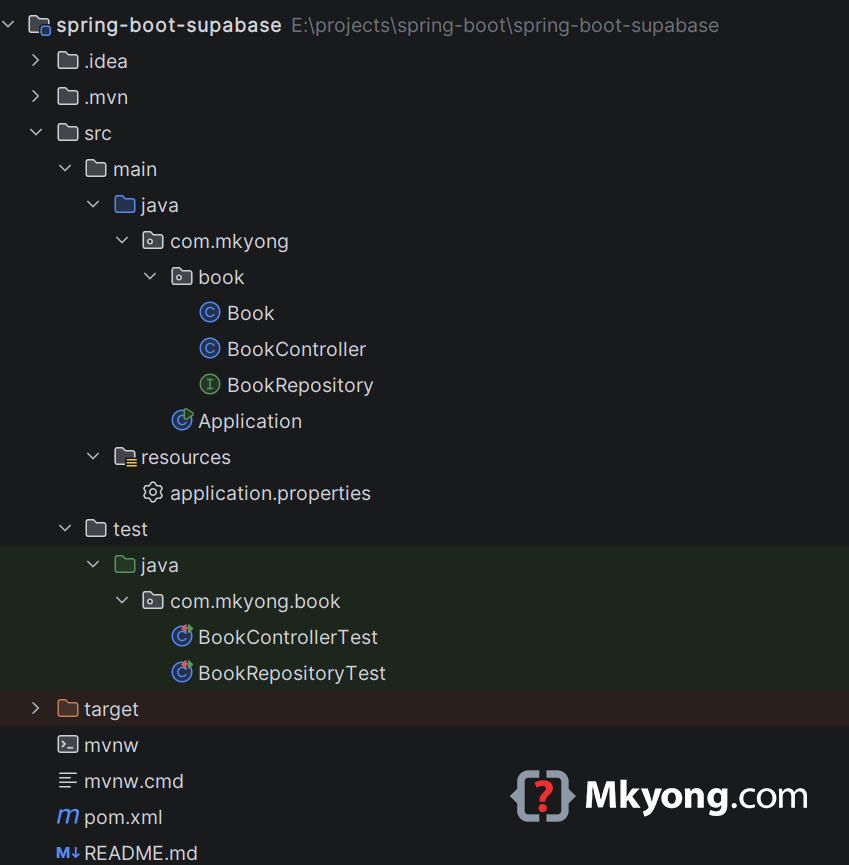
Project directory
The pom.xml
You need web, JPA, the PostgreSQL driver, and the test starters.
<?xml version="1.0" encoding="UTF-8"?>
<project xmlns="http://maven.apache.org/POM/4.0.0"
         xmlns:xsi="http://www.w3.org/2001/XMLSchema-instance"
         xsi:schemaLocation="http://maven.apache.org/POM/4.0.0
                             https://maven.apache.org/xsd/maven-4.0.0.xsd">
    <modelVersion>4.0.0</modelVersion>

    <groupId>com.mkyong</groupId>
    <artifactId>spring-boot-supabase</artifactId>
    <version>1.0</version>
    <packaging>jar</packaging>

    <!-- The parent picks matching versions for everything -->
    <parent>
        <groupId>org.springframework.boot</groupId>
        <artifactId>spring-boot-starter-parent</artifactId>
        <version>4.1.0</version>
        <relativePath/>
    </parent>

    <properties>
        <java.version>25</java.version>
    </properties>

    <dependencies>
        <!-- REST endpoints. In Spring Boot 3 this was called
             spring-boot-starter-web -->
        <dependency>
            <groupId>org.springframework.boot</groupId>
            <artifactId>spring-boot-starter-webmvc</artifactId>
        </dependency>

        <!-- Spring Data JPA, so you write less SQL -->
        <dependency>
            <groupId>org.springframework.boot</groupId>
            <artifactId>spring-boot-starter-data-jpa</artifactId>
        </dependency>

        <!-- The driver that speaks PostgreSQL -->
        <dependency>
            <groupId>org.postgresql</groupId>
            <artifactId>postgresql</artifactId>
            <scope>runtime</scope>
        </dependency>

        <!-- JUnit, AssertJ, Mockito -->
        <dependency>
            <groupId>org.springframework.boot</groupId>
            <artifactId>spring-boot-starter-test</artifactId>
            <scope>test</scope>
        </dependency>

        <!-- Gives you @WebMvcTest and MockMvc -->
        <dependency>
            <groupId>org.springframework.boot</groupId>
            <artifactId>spring-boot-starter-webmvc-test</artifactId>
            <scope>test</scope>
        </dependency>

        <!-- Gives you @DataJpaTest -->
        <dependency>
            <groupId>org.springframework.boot</groupId>
            <artifactId>spring-boot-starter-data-jpa-test</artifactId>
            <scope>test</scope>
        </dependency>
    </dependencies>

    <build>
        <plugins>
            <plugin>
                <groupId>org.springframework.boot</groupId>
                <artifactId>spring-boot-maven-plugin</artifactId>
            </plugin>
        </plugins>
    </build>
</project>
Supabase is plain Postgres, so there is no Supabase library to add.
Two things changed in Spring Boot 4. spring-boot-starter-web was renamed to spring-boot-starter-webmvc. And the test helpers were split up, so each slice now has its own test starter.
The application.properties
Point Spring at the environment variable and at the app schema.
# Read the URL from the environment, so no password lives in Git
spring.datasource.url=${SUPABASE_DB_URL}
spring.datasource.driver-class-name=org.postgresql.Driver

# You made the table by hand, so do not let Hibernate change it
spring.jpa.hibernate.ddl-auto=none

# Look for tables in "app", not in "public"
spring.jpa.properties.hibernate.default_schema=app

# Print the SQL so you can see what happens
spring.jpa.show-sql=true
The username and password ride inside the URL, so you do not need spring.datasource.username or spring.datasource.password.
The Book class
This class is a picture of one row in the app.book table.
package com.mkyong.book;

import jakarta.persistence.Entity;
import jakarta.persistence.GeneratedValue;
import jakarta.persistence.GenerationType;
import jakarta.persistence.Id;
import jakarta.persistence.Table;

@Entity               // This class maps to a table
@Table(name = "book") // The table is called "book"
public class Book {

    @Id // This field is the primary key
    @GeneratedValue(strategy = GenerationType.IDENTITY) // Postgres makes the number
    private Long id;

    private String title;
    private String author;

    // JPA needs an empty constructor
    public Book() {
    }

    public Book(String title, String author) {
        this.title = title;
        this.author = author;
    }

    public Long getId() {
        return id;
    }

    public String getTitle() {
        return title;
    }

    public void setTitle(String title) {
        this.title = title;
    }

    public String getAuthor() {
        return author;
    }

    public void setAuthor(String author) {
        this.author = author;
    }
}
You did not write app anywhere. The default_schema setting in application.properties adds it for you.
The repository
This interface is your toolbox of database commands. You do not write the code for it.
package com.mkyong.book;

import org.springframework.data.jpa.repository.JpaRepository;

import java.util.List;

// Spring writes findAll(), findById(), save(), deleteById() for you
public interface BookRepository extends JpaRepository<Book, Long> {

    // Spring reads this name and builds the SQL: where author = ?
    List<Book> findByAuthor(String author);
}
You only named the method. Spring Data JPA turned the name into SQL.
The CRUD controller
Now you open five doors on the web: create, read all, read one, update, and delete.
package com.mkyong.book;

import org.springframework.http.HttpStatus;
import org.springframework.web.bind.annotation.*;
import org.springframework.web.server.ResponseStatusException;

import java.util.List;

@RestController
@RequestMapping("/api/books") // Every URL here starts with /api/books
public class BookController {

    private final BookRepository repository;

    // Spring hands you the repository
    public BookController(BookRepository repository) {
        this.repository = repository;
    }

    // CREATE - POST /api/books
    @PostMapping
    @ResponseStatus(HttpStatus.CREATED) // Send 201 instead of 200
    public Book create(@RequestBody Book book) {
        return repository.save(book); // INSERT
    }

    // READ ALL - GET /api/books
    @GetMapping
    public List<Book> findAll() {
        return repository.findAll(); // SELECT
    }

    // READ ONE - GET /api/books/1
    @GetMapping("/{id}")
    public Book findOne(@PathVariable Long id) {
        return repository.findById(id)
                .orElseThrow(() -> notFound(id));
    }

    // UPDATE - PUT /api/books/1
    @PutMapping("/{id}")
    public Book update(@PathVariable Long id, @RequestBody Book input) {

        // Grab the old row first
        Book book = repository.findById(id)
                .orElseThrow(() -> notFound(id));

        // Change the fields
        book.setTitle(input.getTitle());
        book.setAuthor(input.getAuthor());

        return repository.save(book); // UPDATE
    }

    // DELETE - DELETE /api/books/1
    @DeleteMapping("/{id}")
    @ResponseStatus(HttpStatus.NO_CONTENT) // Send 204, no body
    public void delete(@PathVariable Long id) {
        if (!repository.existsById(id)) {
            throw notFound(id);
        }
        repository.deleteById(id); // DELETE
    }

    // One place to build the 404 error
    private ResponseStatusException notFound(Long id) {
        return new ResponseStatusException(
                HttpStatus.NOT_FOUND, "Book not found: " + id);
    }
}
Each method returns a Java object. Spring turns it into JSON for you.
The main class
This is the switch that starts everything.
package com.mkyong;

import org.springframework.boot.SpringApplication;
import org.springframework.boot.autoconfigure.SpringBootApplication;

@SpringBootApplication
public class Application {

    public static void main(String[] args) {
        SpringApplication.run(Application.class, args);
    }
}
This class sits in com.mkyong, one level above com.mkyong.book. Spring Boot scans downwards from here, so it finds the controller, the repository, and the entity.
Run it
Start the app with Maven.
cd spring-boot-supabase
mvn spring-boot:run
Output:
  .   ____          _            __ _ _
 /\\ / ___'_ __ _ _(_)_ __  __ _ \ \ \ \
( ( )\___ | '_ | '_| | '_ \/ _` | \ \ \ \
 \\/  ___)| |_)| | | | | || (_| |  ) ) ) )
  '  |____| .__|_| |_|_| |_\__, | / / / /
 =========|_|==============|___/=/_/_/_/

 :: Spring Boot ::                (v4.1.0)

INFO 12345 --- [main] com.mkyong.Application : Starting Application using Java 25
INFO 12345 --- [main] com.zaxxer.hikari.HikariDataSource : HikariPool-1 - Starting...
INFO 12345 --- [main] com.zaxxer.hikari.HikariDataSource : HikariPool-1 - Added connection org.postgresql.jdbc.PgConnection@24eecabf
INFO 12345 --- [main] com.zaxxer.hikari.HikariDataSource : HikariPool-1 - Start completed.
HHH10001005: Database info:
        Database JDBC URL [jdbc:postgresql://aws-0-ap-northeast-1.pooler.supabase.com:5432/postgres?user=postgres.pvnipyivxgducqrxzlsg&password=YOUR-PASSWORD&sslmode=require]
        Database driver: PostgreSQL JDBC Driver
        Database dialect: PostgreSQLDialect
        Database version: 17.6
        Default catalog/schema: postgres/public
        Autocommit mode: undefined/unknown
        Isolation level: READ_COMMITTED [default READ_COMMITTED]
        JDBC fetch size: none
        Pool: DataSourceConnectionProvider
        Minimum pool size: undefined/unknown
        Maximum pool size: undefined/unknown
INFO 12345 --- [main] o.s.b.web.server.tomcat.TomcatWebServer : Tomcat started on port 8080 (http) with context path '/'
INFO 12345 --- [main] com.mkyong.Application : Started Application in 3.07 seconds (process running for 3.263)
Start completed means Spring Boot is talking to Supabase.
Look at that Database JDBC URL line. Hibernate prints the whole string, password and all. Scrub it before you paste a log into a bug report or a chat room.
Create a book
Send a POST with a JSON body.
curl -X POST http://localhost:8080/api/books \
  -H "Content-Type: application/json" \
  -d '{"title":"Maven for Beginners","author":"Mkyong"}'
On Windows Command Prompt, single quotes do not work. Use double quotes, and put a \ in front of the quotes inside the JSON.
curl -X POST http://localhost:8080/api/books ^
  -H "Content-Type: application/json" ^
  -d "{\"title\":\"Maven for Beginners\",\"author\":\"Mkyong\"}"
Windows breaks a long line with a caret ^, not a backslash \. If you are in PowerShell, type curl.exe with the .exe, because plain curl there is a nickname for a different command.
Output:
{"id":3,"title":"Maven for Beginners","author":"Mkyong"}
Console output:
Hibernate: insert into app.book (author,title) values (?,?)
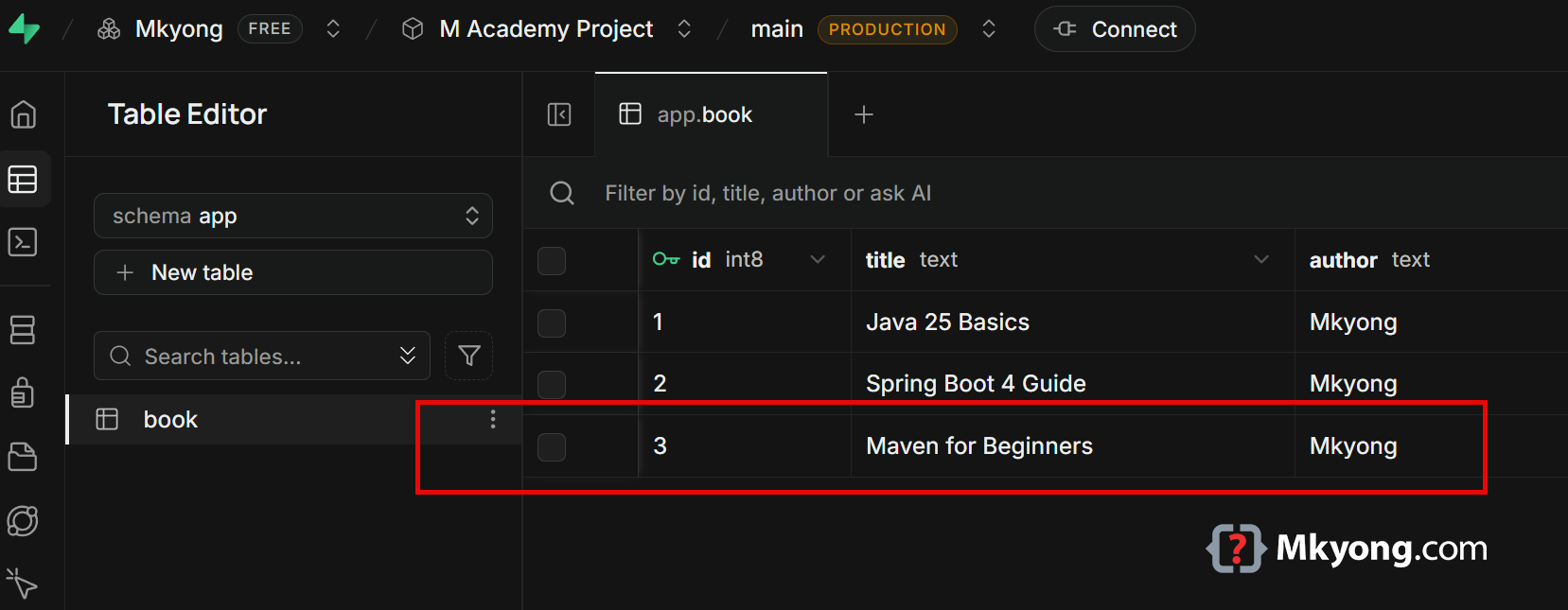
The id is 3 because Postgres made the number. Refresh the Table Editor and the new row is there.
Read all books
curl http://localhost:8080/api/books
This one has no JSON body, so it is the same on Windows. Only the commands that send data need the extra quoting.
Output:
[
  {"id":1,"title":"Java 25 Basics","author":"Mkyong"},
  {"id":2,"title":"Spring Boot 4 Guide","author":"Mkyong"},
  {"id":3,"title":"Maven for Beginners","author":"Mkyong"}
]
Console output:
Hibernate: select b1_0.id,b1_0.author,b1_0.title from app.book b1_0
Nothing was cached. The rows really came from Supabase.
Read one book
curl http://localhost:8080/api/books/1
Output:
{"id":1,"title":"Java 25 Basics","author":"Mkyong"}
findById asks for one row by its primary key, so it is fast.
Update a book
curl -X PUT http://localhost:8080/api/books/1 \
  -H "Content-Type: application/json" \
  -d '{"title":"Java 25 Basics, 2nd Edition","author":"Mkyong"}'
On Windows Command Prompt:
curl -X PUT http://localhost:8080/api/books/1 ^
  -H "Content-Type: application/json" ^
  -d "{\"title\":\"Java 25 Basics, 2nd Edition\",\"author\":\"Mkyong\"}"
Output:
{"id":1,"title":"Java 25 Basics, 2nd Edition","author":"Mkyong"}
Console output:
Hibernate: select b1_0.id,b1_0.author,b1_0.title from app.book b1_0 where b1_0.id=?
Hibernate: update app.book set author=?,title=? where id=?
Two queries ran. Hibernate read the row first, then wrote the change back.
Delete a book
curl -i -X DELETE http://localhost:8080/api/books/3
Output:
HTTP/1.1 204
Console output:
Hibernate: delete from app.book where id=?
Status 204 means "done, and there is nothing to show you." That is why the body is empty.
Ask for a book that is missing
curl -i http://localhost:8080/api/books/999
Output:
HTTP/1.1 404
Content-Type: application/problem+json

{"type":"about:blank","title":"Not Found","status":404,"detail":"Book not found: 999"}
ResponseStatusException turned into a clean 404. Spring Boot writes errors in the shape described by RFC 9457 Problem Details.
Tired of escaping quotes? Use a file
All those \" marks are easy to get wrong. Put the JSON in a file instead, and every shell reads it the same way.
{
  "title": "Maven for Beginners",
  "author": "Mkyong"
}
Save it in the folder where you run the command, then point curl at it with an @.
curl -X POST http://localhost:8080/api/books -H "Content-Type: application/json" -d "@book.json"
Output:
{"id":4,"title":"Maven for Beginners","author":"Mkyong"}
The @ means "read the body from this file." The same command works on Windows, macOS, and Linux, with no escaping at all.
Test the repository
This test talks to the real Supabase database, then throws the changes away.
package com.mkyong.book;

import org.junit.jupiter.api.Test;
import org.springframework.beans.factory.annotation.Autowired;
import org.springframework.boot.data.jpa.test.autoconfigure.DataJpaTest;
import org.springframework.boot.jdbc.test.autoconfigure.AutoConfigureTestDatabase;

import java.util.List;

import static org.assertj.core.api.Assertions.assertThat;

@DataJpaTest // Load only the JPA parts, not the whole app
// Do NOT swap in a fake in-memory database, use the real Supabase one
@AutoConfigureTestDatabase(replace = AutoConfigureTestDatabase.Replace.NONE)
class BookRepositoryTest {

    @Autowired
    private BookRepository repository;

    @Test
    void save_thenFindById_returnsTheBook() {

        // Write a new row
        Book saved = repository.save(new Book("Test Driven Java", "Mkyong"));

        // Postgres gave it a number
        assertThat(saved.getId()).isNotNull();

        // Read it back
        Book found = repository.findById(saved.getId()).orElseThrow();
        assertThat(found.getTitle()).isEqualTo("Test Driven Java");
    }

    @Test
    void findByAuthor_returnsOnlyThatAuthor() {

        repository.save(new Book("Clean Maven", "Mkyong"));
        repository.save(new Book("Some Other Book", "Someone Else"));

        List<Book> books = repository.findByAuthor("Mkyong");

        // Every book that came back belongs to Mkyong
        assertThat(books).isNotEmpty();
        assertThat(books).allMatch(b -> b.getAuthor().equals("Mkyong"));
    }
}
@DataJpaTest wraps each test in a transaction and rolls it back at the end. Your Supabase table looks exactly the same after the test finishes.
By default @DataJpaTest swaps your database for a fake in-memory one. Replace.NONE tells it to stop doing that, so the test really hits Supabase. Set SUPABASE_DB_URL first, or the test cannot connect.
Your ddl-auto=none setting still applies here, so the test cannot drop or rebuild your table. Leave that line alone.
Test the controller
This test never touches a database. It uses a pretend repository, so it runs in a blink.
package com.mkyong.book;

import org.junit.jupiter.api.Test;
import org.springframework.beans.factory.annotation.Autowired;
import org.springframework.boot.webmvc.test.autoconfigure.WebMvcTest;
import org.springframework.http.MediaType;
import org.springframework.test.context.bean.override.mockito.MockitoBean;
import org.springframework.test.web.servlet.MockMvc;

import java.util.List;
import java.util.Optional;

import static org.hamcrest.Matchers.hasSize;
import static org.mockito.ArgumentMatchers.any;
import static org.mockito.Mockito.verify;
import static org.mockito.Mockito.when;
import static org.springframework.test.web.servlet.request.MockMvcRequestBuilders.*;
import static org.springframework.test.web.servlet.result.MockMvcResultMatchers.*;

@WebMvcTest(BookController.class) // Load only this controller
class BookControllerTest {

    @Autowired
    private MockMvc mockMvc; // A fake browser

    @MockitoBean // A fake repository. In Spring Boot 4 this replaced @MockBean
    private BookRepository repository;

    @Test
    void getAll_returnsJsonArray() throws Exception {

        Book book = new Book("Java 25 Basics", "Mkyong");

        // Tell the fake repository what to answer
        when(repository.findAll()).thenReturn(List.of(book));

        mockMvc.perform(get("/api/books"))
                .andExpect(status().isOk())
                .andExpect(jsonPath("$", hasSize(1)))
                .andExpect(jsonPath("$[0].title").value("Java 25 Basics"));
    }

    @Test
    void post_returns201() throws Exception {

        Book book = new Book("New Book", "Mkyong");
        when(repository.save(any(Book.class))).thenReturn(book);

        mockMvc.perform(post("/api/books")
                        .contentType(MediaType.APPLICATION_JSON)
                        .content("{\"title\":\"New Book\",\"author\":\"Mkyong\"}"))
                .andExpect(status().isCreated())
                .andExpect(jsonPath("$.title").value("New Book"));
    }

    @Test
    void getOne_missingBook_returns404() throws Exception {

        // The fake repository finds nothing
        when(repository.findById(999L)).thenReturn(Optional.empty());

        mockMvc.perform(get("/api/books/999"))
                .andExpect(status().isNotFound());
    }

    @Test
    void delete_returns204() throws Exception {

        when(repository.existsById(1L)).thenReturn(true);

        mockMvc.perform(delete("/api/books/1"))
                .andExpect(status().isNoContent());

        // Check the controller really asked to delete row 1
        verify(repository).deleteById(1L);
    }
}
@WebMvcTest starts the web layer only, and @MockitoBean puts a fake BookRepository in its place. Spring Boot 4 removed @MockBean and @SpyBean in favour of @MockitoBean and @MockitoSpyBean.
Run the tests
export SUPABASE_DB_URL='jdbc:postgresql://...'
mvn test
On Windows Command Prompt:
set "SUPABASE_DB_URL=jdbc:postgresql://..."
mvn test
Output:
[INFO] -------------------------------------------------------
[INFO]  T E S T S
[INFO] -------------------------------------------------------
[INFO] Running com.mkyong.book.BookControllerTest
[INFO] Tests run: 4, Failures: 0, Errors: 0, Skipped: 0
[INFO] Running com.mkyong.book.BookRepositoryTest
[INFO] Tests run: 2, Failures: 0, Errors: 0, Skipped: 0
[INFO]
[INFO] Results:
[INFO]
[INFO] Tests run: 6, Failures: 0, Errors: 0, Skipped: 0
[INFO]
[INFO] BUILD SUCCESS
Six green tests. Four were fast because they used a fake repository, and two were slower because they crossed the internet to Supabase.
Why not the public schema?
Supabase turns the public schema into a REST API that anyone with your anon key can call. Row Level Security is the lock on that door.
Your Spring Boot app does not go through that door. It logs in as the postgres database user over JDBC, and that user is allowed to skip Row Level Security rules. So keep app tables in app, and guard the database password like a master key.
Download Source Code
$ git clone https://github.com/mkyong/spring-boot
$ cd spring-boot/spring-boot-supabase
$ set the environment variable SUPABASE_DB_URL
$ mvn spring-boot:run
References
- Supabase – Use Supabase with Spring Boot
- Supabase – Connect to your database
- Supabase – Supavisor FAQ
- Supabase – Row Level Security
- Spring Boot 4.0 Migration Guide
- Spring Boot – Testing
- Spring Data JPA Reference
- PostgreSQL JDBC Driver – Connecting
- Official Java Downloads (Java 25)
P.S This article is part of the Spring Boot 4 series, tested against Spring Boot 4.1.0 GA and Java 25.

No comments yet. Be the first to leave a comment!