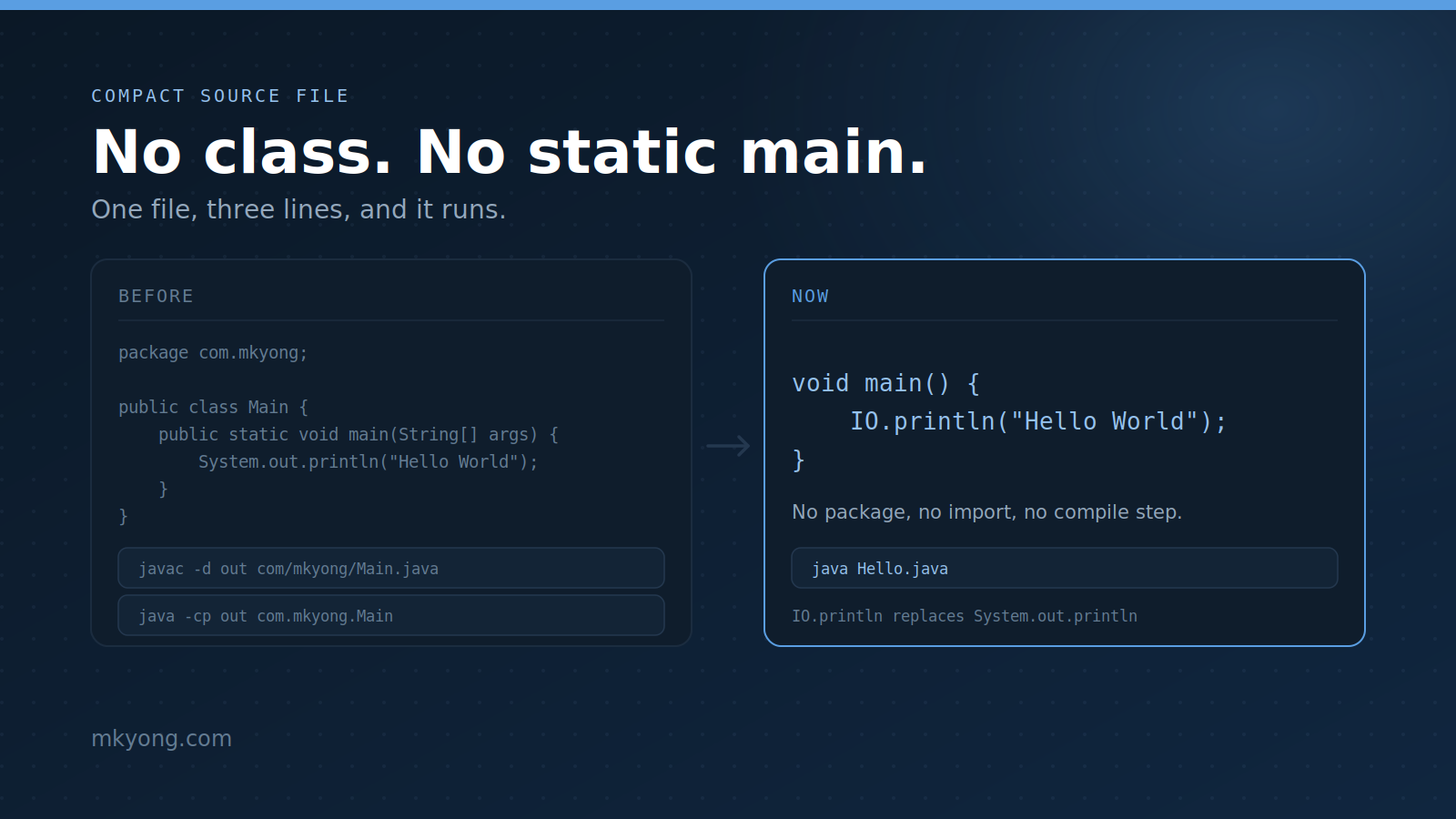
A Java file used to need a class and a long public static void main(String[] args) line. Now you can write a Java file with no class and no static main, and it still runs.
Printing got shorter too. System.out.println becomes IO.println, and there is nothing to import.
Things you will use:
- Java 25
- No build tool, no IDE (just a terminal)
Table of contents:
- The old way
- The new way: a compact source file
- Before and after
- Print with IO.print and IO.println
- What the compiler makes for you
- Can the file name and the class name be different?
- You can add fields and methods too
- No import needed for common classes
- Why there is no package line
- Instance main method in a normal class
- Which main runs first
- The class needs a no-argument constructor
- Read input with IO.readln
- Real-life use cases
- Which JDK do you need
- References
The old way
This is the classic Java hello world. Count how many words you must type before you print one line.
package com.mkyong;

public class Main {
    public static void main(String[] args) {
        System.out.println("Hello World");
    }
}
The file must sit in a folder named com/mkyong. Then you compile it, then you run it.
javac -d out com/mkyong/Main.java
java -cp out com.mkyong.Main
Output:
Hello World
It works, but a beginner must understand public, static, void, String[], class, folders, and the classpath before printing one line.
The new way: a compact source file
Now you can drop the class. A file that holds methods with no class around them is called a compact source file.
// A compact source file: no class, no public static void main
void main() {
    IO.println("Hello World");  // IO lives in java.lang, so no import
}
Run the file directly. You do not need to compile it first.
java Hello.java
Output:
Hello World
Two things happened. The compiler made a class for you, and the launcher made an object and called main() on it.
Before and after
Same program, same output. Here is what changed.
| Before | Now | |
|---|---|---|
| Class | public class Main { } |
none, you skip it |
| Entry point | public static void main(String[] args) |
void main() |
System.out.println("Hi") |
IO.println("Hi") |
|
Import for List |
import java.util.List; |
none |
| Folder | com/mkyong/Main.java |
anywhere |
| Compile | javac -d out com/mkyong/Main.java |
not needed |
| Run | java -cp out com.mkyong.Main |
java Hello.java |
| Lines of code | 7 | 3 |
You can still compile a compact source file if you want to. Nothing stops you.
javac Hello.java
java Hello
Output:
Hello World
Print with IO.print and IO.println
IO is a small class in java.lang, so it is always there. It has three methods and nothing else.
void main() {
    IO.print("Hello");        // print, no new line
    IO.print(", ");           // still the same line
    IO.println("World");      // print, then jump to a new line

    IO.println(42);           // any object works, not only text
    IO.println(List.of(1, 2, 3));
}
Output:
Hello, World
42
[1, 2, 3]
IO.print stays on the same line. IO.println ends the line. The third method is IO.readln, which reads what the user types, and you will use it later in this article.
What the compiler makes for you
The class is still there. You just did not type it. Compile the file and look inside with javap.
javac Hello.java
javap Hello.class
Output:
Compiled from "Hello.java"
final class Hello {
  Hello();
  void main();
}
The class name matches the file name. It is final, and it gets a free no-argument constructor.
Can the file name and the class name be different?
Yes, but only when you skip javac and let java run the source file. This trick is older than compact source files, and it still works.
// File is Runner.java, but the class is called Greeter
public class Greeter {
    void main() {
        IO.println("class Greeter inside file Runner.java");
    }
}
Run the file, do not compile it.
java Runner.java
Output:
class Greeter inside file Runner.java
Now compile the same file and the old rule comes back.
javac Runner.java
Output:
Runner.java:1: error: class Greeter is public, should be declared in a file named Greeter.java
public class Greeter {
       ^
1 error
So the rule is simple. java Runner.java does not care about the name. javac still does, for any public class.
For a compact source file the question does not even come up. There is no class name to type, so Java just borrows the file name.
You can add fields and methods too
A compact source file is not limited to main. You can put fields and helper methods at the top level.
String shopName = "Mkyong Store";  // a field, no class needed

// A helper method, called from main below
double total(List<Double> prices) {
    double sum = 0;
    for (double p : prices) {
        sum = sum + p;
    }
    return sum;
}

void main() {
    List<Double> prices = List.of(3.50, 1.25, 9.99);
    IO.println("Shop  : " + shopName);
    IO.println("Items : " + prices);
    IO.println("Total : " + total(prices));
}
Output:
Shop  : Mkyong Store
Items : [3.5, 1.25, 9.99]
Total : 14.74
Everything you wrote became a member of the hidden class. Here is the proof.
javac Cart.java
javap Cart.class
Output:
Compiled from "Cart.java"
final class Cart {
  java.lang.String shopName;
  Cart();
  double total(java.util.List<java.lang.Double>);
  void main();
}
No import needed for common classes
Did you notice there was no import java.util.List;? In a compact source file, Java gives you every public class from the java.base module for free.
void main() {
    List<String> names = List.of("ali", "beth", "chan");   // java.util.List
    Map<String, Integer> ages = Map.of("ali", 10);         // java.util.Map
    Path file = Path.of("data", "app.log");                // java.nio.file.Path

    IO.println(names);
    IO.println(ages);
    IO.println(file.getFileName());   // just the last part of the path
}
Output:
[ali, beth, chan]
{ali=10}
app.log
List, Map, and Path come from three different packages. In a compact source file, you get them all without typing a single import.
Why there is no package line
A compact source file has no package line. It always sits in the unnamed package. Try to add one and the compiler stops you.
package com.mkyong;   // not allowed in a compact source file

void main() {
    IO.println("hi");
}
Output:
Pkg.java:1: error: compact source file should not have package declaration
package com.mkyong;
^
1 error
error: compilation failed
This is fine for a small script. The moment you want a package, write a normal class again.
Instance main method in a normal class
The short main is not only for classless files. Any normal class can use it, package and all. Notice there is no static here.
public class Greeter {

    private String name = "Mkyong";   // an instance field

    // No public, no static, no String[] args
    void main() {
        IO.println("Hello, " + name);
        IO.println("Running inside: " + this.getClass().getName());
    }
}
Run it straight away.
java Greeter.java
Output:
Hello, Mkyong
Running inside: Greeter
Because main is not static, the launcher created a Greeter object first. That is why this works and why the field name is ready to use.
Which main runs first
You may keep both versions. Java picks the one that takes String[] args first.
public class Order {

    // Second choice
    void main() {
        IO.println("main() with no box was picked");
    }

    // First choice: it takes the words you typed
    void main(String[] args) {
        IO.println("main(String[] args) was picked");
        IO.println("You typed " + args.length + " words");
    }
}
Run it and pass two words.
java Order.java apple banana
Output:
main(String[] args) was picked
You typed 2 words
The rule is short. Java looks for main(String[] args), and only if it is missing does it look for main().
The class needs a no-argument constructor
To call a non-static main, Java must build an object. Hide the constructor and the program cannot start.
package com.mkyong;

public class Locked {

    private Locked() {}   // private, so nobody can make an object

    void main() {
        IO.println("never runs");
    }
}
Compile it and run the class.
javac -d out Locked.java
java -cp out com.mkyong.Locked
Output:
Error: no non-private zero argument constructor found in class com.mkyong.Locked
remove private from existing constructor or define as:
   public com.mkyong.Locked()
Remove the private and it runs. A class with no constructor at all is fine, because Java adds a free one.
Read input with IO.readln
The third IO method reads what the user types. No Scanner, no BufferedReader.
void main() {
    // Print the question and wait for the user to type
    String name = IO.readln("What is your name? ");
    IO.println("Nice to meet you, " + name);
}
Output:
What is your name? Mkyong
Nice to meet you, Mkyong
IO.readln returns the whole line as a String. Use Integer.parseInt if you need a number.
Real-life use cases
This is not only a toy for lessons. Here is a small tool that counts error lines in a log file. It uses Files and streams, still with no imports and no class.
void main(String[] args) throws Exception {
    Path file = Path.of(args[0]);                  // first word you typed
    List<String> lines = Files.readAllLines(file);

    // Keep only the lines that contain the word ERROR, then count them
    long errors = lines.stream()
            .filter(line -> line.contains("ERROR"))
            .count();

    IO.println("File   : " + file);
    IO.println("Lines  : " + lines.size());
    IO.println("Errors : " + errors);
}
Make a small log file and run it.
printf 'INFO started\nERROR disk full\nINFO ok\nERROR timeout\n' > app.log
java CountErrors.java app.log
Output:
File   : app.log
Lines  : 4
Errors : 2
One file, one command, no Maven and no src/main/java folder. Other good jobs for this style:
- A throwaway script that renames or cleans up files.
- A quick test of a new API before you build a real project.
- A tiny tool in a CI job or a Docker image that already has Java.
- Teaching material, where a class declaration would only get in the way.
Keep it small. Once the file grows past a few hundred lines, or you need packages, tests, or libraries, move back to a normal class.
Which JDK do you need
You need Java 25 or newer. It arrived in JDK 25 in September 2025, which is an LTS release, so it is safe to build on.
The feature did not appear from nowhere. It sat in preview for four releases and changed name three times.
| JDK | JEP | Name at the time | Status |
|---|---|---|---|
| 21 | 445 | Unnamed Classes and Instance Main Methods | Preview |
| 22 | 463 | Implicitly Declared Classes and Instance Main Methods | Preview |
| 23 | 477 | Implicitly Declared Classes and Instance Main Methods | Preview |
| 24 | 495 | Simple Source Files and Instance Main Methods | Preview |
| 25 | 512 | Compact Source Files and Instance Main Methods | Final |
On JDK 21 to 24 you had to switch the feature on by hand. On Java 25 you do not.
# JDK 21 - 24, preview only
java --enable-preview --source 24 Hello.java

# Java 25, no flag
java Hello.java
Two details moved late, so old blog posts will not compile on Java 25.
- The
IOclass did not exist until JDK 23, and it lived injava.iountil Java 25 moved it tojava.lang. - In JDK 23 and 24, the
IOmethods were imported for you, so people wroteprintln("Hi"). Java 25 stopped that. You now writeIO.println("Hi").
If you copy a JDK 21 era example and see cannot find symbol: method println, this is why. Add the IO. in front.
References
- JEP 512: Compact Source Files and Instance Main Methods
- Java 25 Downloads
- java.lang.IO API
- The java Command (single file source code programs)
- JEP 511: Module Import Declarations
- JEP 445: Unnamed Classes and Instance Main Methods (JDK 21 preview)
- JEP 477: Implicitly Declared Classes and Instance Main Methods (JDK 23 preview)
- JEP 495: Simple Source Files and Instance Main Methods (JDK 24 preview)
- JDK 25 Project Page
- Java Language Specification (Java SE 25)
P.S This article is tested with Java 25 (Temurin 25+36).

No comments yet. Be the first to leave a comment!