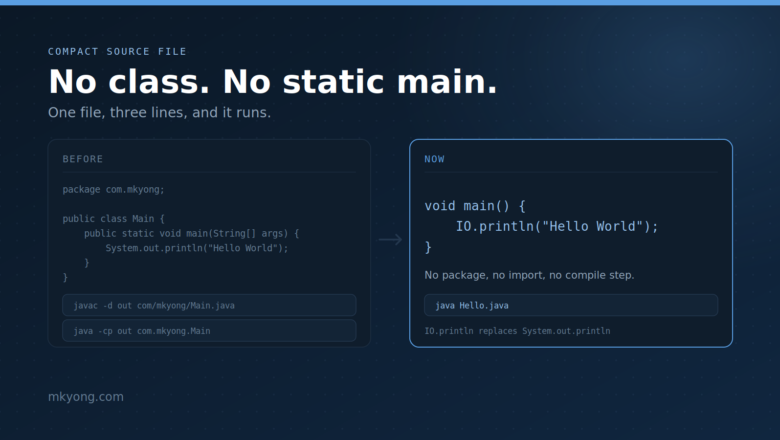
Java Compact Source File: No Class, No Static Main
Java compact source file example – a Java file with no class and no public static void main. Learn instance main methods, the IO class, and the launch order, with full runnable code and real output.
Java compact source file example – a Java file with no class and no public static void main. Learn instance main methods, the IO class, and the launch order, with full runnable code and real output.
In Java, we can use DateTimeFormatter to convert the FileTime to other custom date formats. public static String formatDateTime(FileTime fileTime) { LocalDateTime localDateTime = fileTime .toInstant() .atZone(ZoneId.systemDefault()) .toLocalDateTime(); return localDateTime.format( DateTimeFormatter.ofPattern("MM/dd/yyyy HH:mm:ss")); } 1. File Last Modified Time This example displays the last modified time of a file in a custom date format. GetLastModifiedTime.java package […]
For file path or directory separator, the Unix system introduced the slash character / as directory separator, and the Microsoft Windows introduced backslash character \ as the directory separator. In a nutshell, this is / on UNIX and \ on Windows. In Java, we can use the following three methods to get the platform-independent file […]
In Java, Serialization means converting Java objects into a byte stream; Deserialization means converting the serialized object’s byte stream back to the original Java object. Table of contents. 1. Hello World Java Serialization 2. java.io.NotSerializableException 3. What is serialVersionUID? 4. What is transient? 5. Serialize Object to File 6. Why need Serialization in Java? 7. […]
In Java, we can combine RandomAccessFile and FileChannel to lock a file before writing. LockFileAndWrite.java package com.mkyong; import java.io.File; import java.io.IOException; import java.io.RandomAccessFile; import java.nio.channels.FileLock; import java.util.concurrent.TimeUnit; public class LockFileAndWrite { public static void main(String[] args) { writeFileWithLock(new File("D:\\server.log"), "mkyong"); } public static void writeFileWithLock(File file, String content) { // auto close and release the […]
In Java, we can use the Apache Commons IO ReversedLinesFileReader to read the last few lines of a File. pom.xml <dependency> <groupId>commons-io</groupId> <artifactId>commons-io</artifactId> <version>2.6</version> </dependency> 1. Test Data A server log file sample d:\\server.log a b c d 1 2 3 4 5 2. Read Last Line 2.1 Read the last 3 lines of a […]
This article focus on a few of the commonly used methods to read a file in Java. Files.lines, return a Stream (Java 8) Files.readString, returns a String (Java 11), max file size 2G. Files.readAllBytes, returns a byte[] (Java 7), max file size 2G. Files.readAllLines, returns a List<String> (Java 8) BufferedReader, a classic old friend (Java […]
In Java, we can use Files.readAllBytes to read a file. byte[] content = Files.readAllBytes(Paths.get("app.log")); System.out.println(new String(content)); 1. Text File A Java example to write and read a normal text file. FileExample1.java package com.mkyong.calculator; import java.io.IOException; import java.nio.charset.Charset; import java.nio.charset.StandardCharsets; import java.nio.file.Files; import java.nio.file.Paths; import java.util.Arrays; import java.util.List; public class FileExample1 { public static void main(String[] […]
Two Java examples to show you how to list files in a directory : For Java 8, Files.walk Before Java 8, create a recursive loop to list all files. 1. Files.walk 1.1 List all files. try (Stream<Path> walk = Files.walk(Paths.get("C:\\projects"))) { List<String> result = walk.filter(Files::isRegularFile) .map(x -> x.toString()).collect(Collectors.toList()); result.forEach(System.out::println); } catch (IOException e) { e.printStackTrace(); […]
In Python, we can use os.walker or glob to create a find() like function to search or list files or folders in a specified directory and also it’s subdirectories. 1. os.walker 1.1 List all .txt files in a specified directory + subdirectories. import os path = ‘c:\\projects\\hc2\\’ files = [] # r=root, d=directories, f = […]
Python example to read a log file, line by line into a list. # With ‘\n’, [‘1\n’, ‘2\n’, ‘3’] with open(‘/www/logs/server.log’) as f: content = f.readlines() # No ‘\n’, [‘1’, ‘2’, ‘3’] with open(‘/www/logs/server.log’) as f: content = f.read().splitlines() 1. Read File -> List 1.1 A dummy log file. d:\\server.log a b c d 1 […]
In Python, we can use os.path.isfile() or pathlib.Path.is_file() (Python 3.4) to check if a file exists. 1. pathlib New in Python 3.4 from pathlib import Path fname = Path("c:\\test\\abc.txt") print(fname.exists()) # true print(fname.is_file()) # true print(fname.is_dir()) # false dir = Path("c:\\test\\") print(dir.exists()) # true print(dir.is_file()) # false print(dir.is_dir()) # true If check from pathlib import […]
In Java old days, it lacks of method to determine the free disk space on a partition. But this is changed since JDK 1.6 released, a few new methods – getTotalSpace(), getUsableSpace() and getFreeSpace(), are bundled with java.io.File to retrieve the partition or disk space detail. Example package com.mkyong; import java.io.File; public class DiskSpaceDetail { […]
A Java program to demonstrate the use of java.io.File setReadOnly() method to make a file read only. Since JDK 1.6, a new setWritable() method is provided to make a file to be writable again. Example package com.mkyong; import java.io.File; import java.io.IOException; public class FileReadAttribute { public static void main(String[] args) throws IOException { File file […]
A Java program to demonstrate the use of java.io.File isHidden() to check if a file is hidden. package com.mkyong; import java.io.File; import java.io.IOException; public class FileHidden { public static void main(String[] args) throws IOException { File file = new File("c:/hidden-file.txt"); if(file.isHidden()){ System.out.println("This file is hidden"); }else{ System.out.println("This file is not hidden"); } } } Note […]
This article shows how to convert a file into a hexadecimal (hex) representative format. for example, below is a text file. /path/to/text.txt ABCDEFG 12345678 !@#$%^&*() Testing only And we will convert the above file into the following hex format. 41 42 43 44 45 46 47 0D 0A 31 32 33 34 35 36 | […]
In Java, we can use the Java 1.7 FileVisitor or Apache Commons IO FileUtils.copyDirectory to copy a directory, which includes its sub-directories and files. This article shows a few of the common ways to copy a directory in Java. FileVisitor (Java 7+) FileUtils.copyDirectory (Apache commons-io) Custom Copy using Java 7 NIO and Java 8 Stream. […]
Here’s an example to check if a directory is empty. Example package com.mkyong.file; import java.io.File; public class CheckEmptyDirectoryExample { public static void main(String[] args) { File file = new File("C:\\folder"); if(file.isDirectory()){ if(file.list().length>0){ System.out.println("Directory is not empty!"); }else{ System.out.println("Directory is empty!"); } }else{ System.out.println("This is not a directory"); } } }
In Java, we can use the following two Files.createTempFile() methods to create a temporary file in the default temporary-file directory. Path createTempFile(Path dir, String prefix, String suffix, FileAttribute<?>… attrs) throws IOException Path createTempFile(String prefix, String suffix, FileAttribute<?>… attrs) throws IOException The default temporary file folder is vary on operating system. Windows – %USER%\AppData\Local\Temp Linux – […]
Java I/O tutorial with full example, including file , temporary file and directory manipulation, file serialization and compression with Zip or GZip.
In Java (@since 1.7), we can use the NIO Files.readAttributes to get all the file metadata, including the file creation date. Path file = Paths.get(fileName); BasicFileAttributes attr = Files.readAttributes(file, BasicFileAttributes.class); System.out.println("creationTime: " + attr.creationTime()); // creationTime: 2020-07-20T09:29:54.627222Z 1. Files.readAttributes (NIO) This example uses Files.readAttributes to print the file creation date. GetCreationDate1.java package com.mkyong.io.howto; import java.io.IOException; […]
This article shows four ways to copy a file in Java. Files.copy (NIO) Apache Commons IO Guava Plain Java In Java 7+, the NIO Files.copy is the simplest way to copy a file, because it is a built-in API. Before Java 7, the Apache Commons IO FileUtils.copyFile is a preferable solution because the legacy IO […]
In Java, we can use the NIO Files.delete() or Files.deleteIfExists() to delete a temporary file, it works the same like delete a regular text file. // create a temporary file Path path = Files.createTempFile(null, ".log"); // delete Files.delete(path); // or if(Files.deleteIfExists(path)){ // success }else{ // file does not exist } 1. Delete Temporary File – […]
In Java, we can use the NIO Files.delete(Path) and Files.deleteIfExists(Path) to delete a file. 1. Delete a file with Java NIO 1.1 The Files.delete(Path) deletes a file, returns nothing, or throws an exception if it fails. DeleteFile1.java package com.mkyong.io.file; import java.io.IOException; import java.nio.file.Files; import java.nio.file.Paths; public class DeleteFile1 { public static void main(String[] args) { […]
In Java, we can use BufferedWriter to write content into a file. // jdk 7 try (FileWriter writer = new FileWriter("app.log"); BufferedWriter bw = new BufferedWriter(writer)) { bw.write(content); } catch (IOException e) { System.err.format("IOException: %s%n", e); } Note If possible, uses Files.write instead, one line, simple and nice. List<String> list = Arrays.asList("Line 1", "Line 2"); […]
The temporary file is just a regular file created on a predefined directory. In Java, we can use the NIO Files.write() to write data to a temporary file. // create a temporary file Path tempFile = Files.createTempFile(null, null); // Writes a string to the above temporary file Files.write(tempFile, "Hello World\n".getBytes(StandardCharsets.UTF_8)); // Append List<String> content = […]
This article shows few Java examples to get the total number of lines in a file. The steps are similar: Open the file. Read line by line, and increases count + 1 each line. Close the file. Read the count. Test Java Methods: Files.lines BufferedReader LineNumberReader BufferedInputStream At the end of the article, we also […]
In this tutorial, we will show you three Java examples to construct a file path : File.separator or System.getProperty(“file.separator”) (Recommended) File file = new File(workingDir, filename); (Recommended) Create the file separator manually. (Not recommend, just for fun) 1. File.separator Classic Java example to construct a file path, using File.separator or System.getProperty(“file.separator”). Both will check the […]
In Java, we can use Files.size(path) to get the size of a file in bytes. // size in bytes long bytes = Files.size(path); 1. Files.size (NIO) This example uses NIO Files.size(path) to print the size of an image file (140 kb). GetFileSize.java package com.mkyong.io.howto; import java.io.IOException; import java.nio.file.Files; import java.nio.file.Path; import java.nio.file.Paths; public class GetFileSize […]
In Java, we can use System.getProperty("java.io.tmpdir") to get the default temporary file location. For Windows, the default temporary folder is %USER%\AppData\Local\Temp For Linux, the default temporary folder is /tmp 1. java.io.tmpdir Run the below Java program on a Ubuntu Linux. TempFilePath1 package com.mkyong.io.temp; public class TempFilePath1 { public static void main(String[] args) { String tmpdir […]
In Java, FileOutputStream is a bytes stream class that’s used to handle raw binary data. To write the data to file, you have to convert the data into bytes and save it to file. See below full example. package com.mkyong.io; import java.io.File; import java.io.FileOutputStream; import java.io.IOException; public class WriteFileExample { public static void main(String[] args) […]
In Java, file permissions are very OS specific: *nix , NTFS (windows) and FAT/FAT32, all have different kind of file permissions. Java comes with some generic file permission to deal with it. Check if the file permission allow : file.canExecute(); – return true, file is executable; false is not. file.canWrite(); – return true, file is […]
In Java, there are many ways to create and write to a file. Files.newBufferedWriter (Java 8) Files.write (Java 7) PrintWriter File.createNewFile Note I prefer the Java 7 nio Files.write to create and write to a file, because it has much cleaner code and auto close the opened resources. Files.write( Paths.get(fileName), data.getBytes(StandardCharsets.UTF_8)); 1. Java 8 Files.newBufferedWriter […]
File.listRoots() will list out all the available file system roots / drives in your current system. Example package com.mkyong.io; import java.io.File; public class App{ public static void main (String args[]) { File[] rootDrive = File.listRoots(); for(File sysDrive : rootDrive){ System.out.println("Drive : " + sysDrive); } } } Output Drive : A:\ Drive : C:\ Drive […]
Most people will read the file content and assign to StringBuffer or String line by line. Here’s another trick that may interest you – how to assign whole file content into a variable with one Java’s statement, try it 🙂 Example In this example, you will use DataInputStreamto convert all the content into bytes, and […]
In this example, the program will traverse the given directory and print out all the directories and files absolute path and name one by one. Example package com.mkyong.io; import java.io.File; public class DisplayDirectoryAndFile{ public static void main (String args[]) { displayIt(new File("C:\\Downloads")); } public static void displayIt(File node){ System.out.println(node.getAbsoluteFile()); if(node.isDirectory()){ String[] subNote = node.list(); for(String […]
In this article, we show you two ways to open a PDF file with Java. 1. rundll32 – Windows Platform Solution In Windows, you can use “rundll32” command to launch a PDF file, see example : package com.mkyong.jdbc; import java.io.File; //Windows solution to view a PDF file public class WindowsPlatformAppPDF { public static void main(String[] […]
This example shows how to use ObjectInputStream to read a serialized object from a file in Java, aka Deserialization. public static Object readObjectFromFile(File file) throws IOException, ClassNotFoundException { Object result = null; try (FileInputStream fis = new FileInputStream(file); ObjectInputStream ois = new ObjectInputStream(fis)) { result = ois.readObject(); } return result; } // Convert byte[] to […]
This example shows how to use ObjectOutputStream to write objects to a file in Java, aka Serialization. public static void writeObjectToFile(Person obj, File file) throws IOException { try (FileOutputStream fos = new FileOutputStream(file); ObjectOutputStream oos = new ObjectOutputStream(fos)) { oos.writeObject(obj); oos.flush(); } } Note More Java Serialization and Deserialization examples 1. Java object We can […]
In Java, you can implements the FilenameFilter, override the accept(File dir, String name) method, to perform the file filtering function. In this example, we show you how to use FilenameFilter to list out all files that are end with “.txt” extension in folder “c:\\folder“, and then delete it. package com.mkyong.io; import java.io.*; public class FileChecker […]