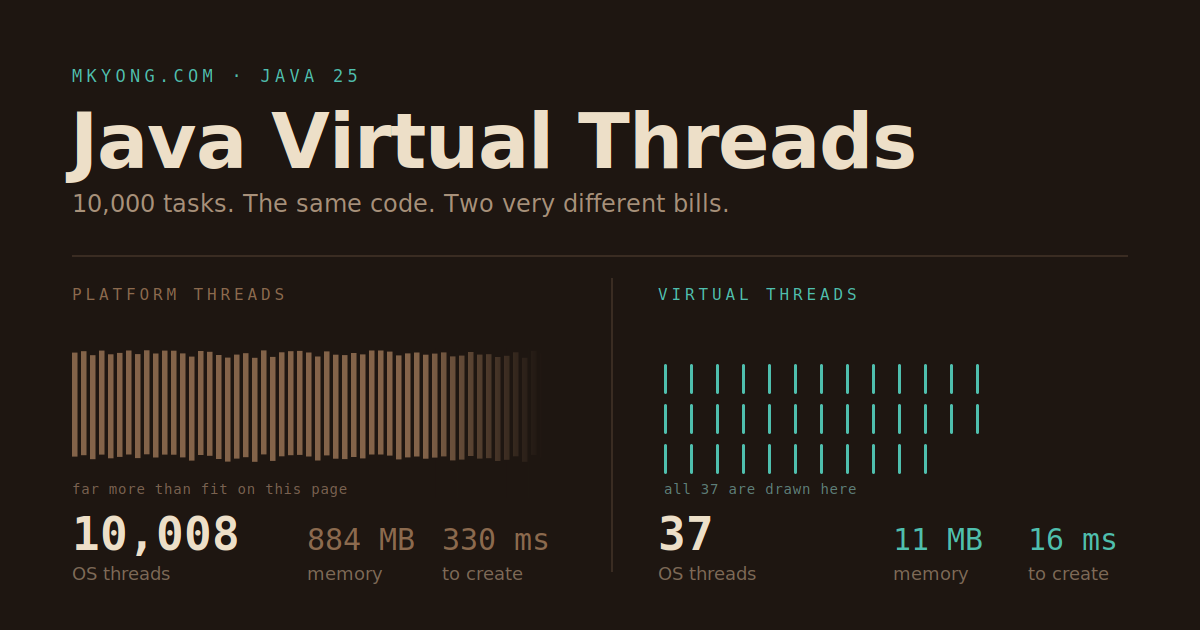
A virtual thread is a very cheap thread. You can make a million of them, and your computer will not complain. A normal thread is expensive, so ten thousand already costs you real memory.
This guide shows you how to use virtual threads with Java 25.
Things you will use:
- Java 25
- Spring Boot 4.1.0 (only for the last section)
Table of contents:
- What is a virtual thread?
- Why is a virtual thread so cheap?
- When did Java get virtual threads?
- Start one virtual thread
- Look inside a virtual thread
- Run 10,000 tasks at the same time
- A real problem: the slow shop
- The difference in one table
synchronizedis safe again- Turn it on in Spring Boot
- Two rules to remember
- Common questions
- References
What is a virtual thread?
Think of a restaurant. A platform thread is a waiter. Waiters are expensive, so you only hire 100. If a waiter stands and waits for the kitchen, that waiter is stuck.
A virtual thread is an order slip. Slips are cheap, so you can have a million. When an order waits for the kitchen, the waiter drops the slip and picks up another one.
Platform threads are not old or dead. A virtual thread needs a platform thread to carry it while it runs. The waiters are still there. You just stopped giving each customer their own waiter.
Why is a virtual thread so cheap?
Because a virtual thread is just an object in memory. A platform thread is a favour you ask the operating system for.
That is the whole answer. Here is the detail.
When you start a platform thread, the operating system has to book a stack of about 1 MB, build its own record of the thread, and put it in its list of things to run. That is a trip out of Java and into the kernel. It takes a long time in computer terms.
When you start a virtual thread, Java makes an object. No kernel, no booking, no waiting. It costs about the same as new ArrayList<>().
The stack is the real trick
This is the part that matters most.
| Platform thread | Virtual thread | |
|---|---|---|
| Where is the stack? | Booked by the operating system | On the Java heap, with your other objects |
| How big? | About 1 MB, decided before it runs | A few hundred bytes, and it grows |
| What if you go 50 methods deep? | Already paid for it | It grows right then |
| What when the thread ends? | The OS takes the stack back | The garbage collector takes it back |
A platform thread pays for 1 MB whether it uses 3 KB or 900 KB. Ten thousand threads means ten thousand of those bookings, and your operating system feels every one of them.
A virtual thread pays for what it actually uses, right now. That is why a million is a normal number.
Nothing is really free
The cost did not disappear. It moved.
A million parked virtual threads is a million live objects, and the garbage collector has to look at all of them. Every time a virtual thread steps off its carrier, Java copies its stack into the heap and back again later.
That is a good trade for code that waits. Garbage collection gets slowly heavier. The operating system thread limit is a brick wall you hit at full speed.
When did Java get virtual threads?
Java 21 got them for real, in September 2023. Before that they were a test feature you had to switch on.
The work began around 2017 in Project Loom, an OpenJDK side project. But the idea is much older than that, and Java threw it away once already. The last section tells that story.
So why bother with Java 25 if Java 21 already had them? Because of one bug. In Java 21, a virtual thread that waited inside a synchronized block got glued to its carrier thread. One old database driver could quietly cancel out the whole benefit. The synchronized section shows you that fix.
Start one virtual thread
You make a virtual thread with Thread.ofVirtual().
package com.mkyong;

public class Main {

    public static void main(String[] args) throws InterruptedException {

        // Make a virtual thread and start it right away
        Thread vt = Thread.ofVirtual().start(() -> {
            System.out.println("Hello from " + Thread.currentThread());
        });

        // Wait here until the virtual thread finishes its job
        vt.join();

        System.out.println("Main is " + Thread.currentThread());
    }
}
Output:
Hello from VirtualThread[#21]/runnable@ForkJoinPool-1-worker-1
Main is Thread[#1,main,5,main]
The #21 number may be different on your machine. Notice the word VirtualThread. That is your new thread. The ForkJoinPool-1-worker-1 part is the real thread carrying it, like the waiter carrying the order slip.
Look inside a virtual thread
You can give the thread a name and ask it questions.
package com.mkyong;

public class NameApp {

    public static void main(String[] args) throws InterruptedException {

        Thread vt = Thread.ofVirtual()
                .name("my-worker")            // give the thread a name
                .start(() -> {

                    Thread t = Thread.currentThread();

                    System.out.println("Name     : " + t.getName());
                    System.out.println("Id       : " + t.threadId());
                    System.out.println("Virtual? : " + t.isVirtual());   // true
                    System.out.println("Daemon?  : " + t.isDaemon());    // always true
                });

        vt.join();
    }
}
Output:
Name     : my-worker
Id       : 21
Virtual? : true
Daemon?  : true
isVirtual() tells you the truth. Virtual threads are always daemon threads, so they never keep your program alive on their own. That is why you need join().
Run 10,000 tasks at the same time
Use Executors.newVirtualThreadPerTaskExecutor(). It makes one brand new virtual thread for every task you give it.
package com.mkyong;

import java.time.Duration;
import java.util.concurrent.ExecutorService;
import java.util.concurrent.Executors;
import java.util.concurrent.atomic.AtomicInteger;

public class ManyApp {

    public static void main(String[] args) {

        // A counter that is safe when many threads touch it
        AtomicInteger counter = new AtomicInteger();

        long start = System.currentTimeMillis();

        // One new virtual thread for EACH task
        try (ExecutorService executor = Executors.newVirtualThreadPerTaskExecutor()) {

            for (int i = 0; i < 10_000; i++) {
                executor.submit(() -> {
                    Thread.sleep(Duration.ofSeconds(1)); // pretend to wait for a slow website
                    counter.incrementAndGet();           // add one
                    return null;
                });
            }

        } // the closing brace waits for all 10,000 tasks to finish

        long time = System.currentTimeMillis() - start;

        System.out.println("Tasks done : " + counter.get());
        System.out.println("Time taken : " + time + " ms");
    }
}
Output:
Tasks done : 10000
Time taken : 1148 ms
Ten thousand tasks, each sleeping one second, finished in about one second. All of them slept at the same time.
Prove it yourself
Do not take the word "cheap" from a blog post. Measure it.
First, a small helper that prints how much memory your program is holding.
package com.mkyong;

import com.sun.management.OperatingSystemMXBean;
import java.lang.management.ManagementFactory;

public class Memory {

    public static void print(String label) {

        Runtime rt = Runtime.getRuntime();

        // The Java heap only. Virtual thread stacks live here.
        long heap = rt.totalMemory() - rt.freeMemory();

        // The whole program. Platform thread stacks live here instead.
        OperatingSystemMXBean os =
                (OperatingSystemMXBean) ManagementFactory.getOperatingSystemMXBean();
        long process = os.getCommittedVirtualMemorySize();

        // How many real operating system threads exist right now
        int osThreads = ManagementFactory.getThreadMXBean().getThreadCount();

        System.out.println(label);
        System.out.println("  Heap used     : " + heap / 1024 / 1024 + " MB");
        System.out.println("  Whole program : " + process / 1024 / 1024 + " MB");
        System.out.println("  OS threads    : " + osThreads);
    }
}
Now two test files. They are the same except for one word.
package com.mkyong;

import java.util.concurrent.CountDownLatch;

public class PlatformThreadTest {

    static final int COUNT = 10_000;

    public static void main(String[] args) throws InterruptedException {

        Memory.print("Before");

        CountDownLatch ready = new CountDownLatch(COUNT); // counts threads that woke up
        CountDownLatch hold = new CountDownLatch(1);      // keeps them all alive

        long start = System.currentTimeMillis();

        for (int i = 0; i < COUNT; i++) {

            Thread.ofPlatform().start(() -> {             // <-- the only difference
                ready.countDown();
                try {
                    hold.await();                         // stand still until the test ends
                } catch (InterruptedException e) {
                    Thread.currentThread().interrupt();
                }
            });
        }

        ready.await(); // wait until all 10,000 are really alive

        long time = System.currentTimeMillis() - start;

        Memory.print("After");
        System.out.println("Made " + COUNT + " platform threads in " + time + " ms");

        hold.countDown(); // let every thread go home
    }
}
package com.mkyong;

import java.util.concurrent.CountDownLatch;

public class VirtualThreadTest {

    static final int COUNT = 10_000;

    public static void main(String[] args) throws InterruptedException {

        Memory.print("Before");

        CountDownLatch ready = new CountDownLatch(COUNT);
        CountDownLatch hold = new CountDownLatch(1);

        long start = System.currentTimeMillis();

        for (int i = 0; i < COUNT; i++) {

            Thread.ofVirtual().start(() -> {              // <-- the only difference
                ready.countDown();
                try {
                    hold.await();
                } catch (InterruptedException e) {
                    Thread.currentThread().interrupt();
                }
            });
        }

        ready.await();

        long time = System.currentTimeMillis() - start;

        Memory.print("After");
        System.out.println("Made " + COUNT + " virtual threads in " + time + " ms");

        hold.countDown();
    }
}
Tested on:
- Intel Core i7-14700F, 20 cores / 28 logical processors, 2.10 GHz
- 64 GB RAM
- Java 25
Output of PlatformThreadTest:
Before
  Heap used     : 12 MB
  Whole program : 1165 MB
  OS threads    : 8
After
  Heap used     : 255 MB
  Whole program : 2049 MB
  OS threads    : 10008
Made 10000 platform threads in 330 ms
Output of VirtualThreadTest:
Before
  Heap used     : 12 MB
  Whole program : 1165 MB
  OS threads    : 8
After
  Heap used     : 44 MB
  Whole program : 1176 MB
  OS threads    : 37
Made 10000 virtual threads in 16 ms
Read those numbers again
Put the two runs side by side.
| 10,000 threads | Platform | Virtual |
|---|---|---|
| Time to make them | 330 ms | 16 ms |
| Extra memory, whole program | 884 MB | 11 MB |
| Extra memory, heap | 243 MB | 32 MB |
| OS threads at the end | 10,008 | 37 |
Look at the OS thread count first. This is the clearest line in the whole test. Both programs had 10,000 threads doing the same job. The platform version told the operating system about every single one, so the count went to 10,008. The virtual version only needed 37, and most of those were already there. Java handled the other 10,000 by itself.
Those 37 are your carrier threads plus the helpers Java already had. The test machine has 28 logical processors, and Java makes about one carrier per processor. So 8 threads at the start, plus 28 carriers, lands almost exactly on 37. On a 4 core laptop you would see a much smaller number.
Then look at "Whole program". It grew by 884 MB for platform threads and 11 MB for virtual threads. That is 80 times less. The 884 MB is 10,000 stacks being booked from the operating system, one per thread. The virtual threads did not ask the operating system for anything.
Making them was 20 times faster. 330 ms against 16 ms. Every platform thread is a request that has to leave Java and go into the operating system. Every virtual thread is just an object.
Now change COUNT to 1_000_000 in the virtual thread file. It still works. Try the same number in the platform thread file and you will be waiting a long time before your machine gives up.
Three honest notes about these numbers
The heap figure is noisy. totalMemory() - freeMemory() counts live objects and rubbish that has not been cleaned up yet. Making 10,000 threads creates a lot of short-lived objects, so a good part of that 255 MB is just rubbish waiting for the garbage collector. Do not read it as "platform threads cost 243 MB of heap". Use the "Whole program" line for the real story.
"Whole program" is memory booked, not memory used. Your operating system may reserve a full stack per thread but only hand over the pages a thread really touches. So the true cost sits somewhere below that 884 MB, and the exact number changes between Windows, Linux, and macOS.
Nothing crashed. Ten thousand platform threads did not kill the machine. They were slower and much heavier, but they ran. The wall is real, it just sits further out than most blog posts claim, and where it sits depends on your operating system limits.
Your own numbers will be different. That is the point of running it.
A real problem: the slow shop
Now a real story. You run a shop. Every order does three slow things: check the stock, charge the card, send an email.
Here is the old way, with a pool of 200 real threads.
package com.mkyong;

import java.util.concurrent.ExecutorService;
import java.util.concurrent.Executors;

public class OldServer {

    static final int ORDERS = 1_000;

    public static void main(String[] args) {

        long start = System.currentTimeMillis();

        // 200 real OS threads share all the orders
        try (ExecutorService pool = Executors.newFixedThreadPool(200)) {

            for (int i = 1; i <= ORDERS; i++) {
                int id = i;
                pool.submit(() -> handleOrder(id));
            }
        }

        System.out.println("All orders done in " + (System.currentTimeMillis() - start) + " ms");
    }

    static Object handleOrder(int id) throws InterruptedException {
        Thread.sleep(300);  // check stock - waiting for a database
        Thread.sleep(400);  // charge card - waiting for a payment website
        Thread.sleep(300);  // send email  - waiting for a mail server
        return null;
    }
}
Output:
All orders done in 5041 ms
One order takes 1 second. But 1,000 orders took 5 seconds.
Why it is slow
You only have 200 threads. So 200 orders go first, then the next 200 wait in line. Five rounds, five seconds.
The sad part is that those 200 threads did nothing for that whole second. They just stood there waiting for someone else’s computer to answer.
So why not make the pool 1,000? You can. On the test machine 1,000 platform threads cost well under 100 MB, and nothing bad happens.
The real trouble is that you are guessing a number. 1,000 works until a busy day brings 1,200 orders, and then 200 customers are back in the queue. Pick 5,000 and you waste memory on a quiet day. There is no right answer, only a number you keep tuning.
The ceiling is real too, it just sits further out than people say. You measured it in the last section: 10,000 platform threads booked 884 MB. At 100,000 you are asking for many gigabytes of stack, plus whatever thread limit your operating system sets. Meanwhile 100,000 virtual threads is an ordinary afternoon.
Virtual threads delete the number. One thread per job, and nobody has to pick a pool size ever again.
The old fix that people did not enjoy
Before virtual threads, you fixed this by never waiting. You chopped the method into pieces and glued them back with CompletableFuture.
A real async call hands you a promise instead of an answer. Here a timer plays that part, so no thread ever stands still.
package com.mkyong;

import java.util.ArrayList;
import java.util.List;
import java.util.concurrent.CompletableFuture;
import java.util.concurrent.Executors;
import java.util.concurrent.ScheduledExecutorService;
import java.util.concurrent.TimeUnit;
import java.util.concurrent.atomic.AtomicInteger;

public class FutureServer {

    static final int ORDERS = 1_000;

    // A timer that finishes jobs later. No thread sits and waits.
    static final ScheduledExecutorService TIMER = Executors.newScheduledThreadPool(4);

    static final AtomicInteger DONE = new AtomicInteger();

    public static void main(String[] args) {

        long start = System.currentTimeMillis();

        List<CompletableFuture<String>> all = new ArrayList<>();

        for (int i = 1; i <= ORDERS; i++) {
            all.add(handleOrder(i));   // this returns straight away
        }

        // Wait here until every promise is kept
        CompletableFuture.allOf(all.toArray(new CompletableFuture[0])).join();

        System.out.println("Orders done : " + DONE.get());
        System.out.println("Time taken  : " + (System.currentTimeMillis() - start) + " ms");

        TIMER.shutdown();
    }

    // The three steps, glued together with thenCompose
    static CompletableFuture<String> handleOrder(int id) {
        return checkStock(id)
                .thenCompose(stock -> chargeCard(id))    // run after stock is done
                .thenCompose(receipt -> sendEmail(id))   // run after the card is charged
                .thenApply(sent -> {
                    DONE.incrementAndGet();
                    return sent;
                })
                .exceptionally(error -> {                // your catch block now lives here
                    System.out.println("Order " + id + " failed: " + error.getMessage());
                    return "failed-" + id;
                });
    }

    static CompletableFuture<String> checkStock(int id) {
        return later(300, "stock-ok-" + id);   // database
    }

    static CompletableFuture<String> chargeCard(int id) {
        return later(400, "paid-" + id);       // payment website
    }

    static CompletableFuture<String> sendEmail(int id) {
        return later(300, "mailed-" + id);     // mail server
    }

    // A fake slow call. It promises an answer later instead of waiting for it.
    static CompletableFuture<String> later(long ms, String answer) {
        CompletableFuture<String> promise = new CompletableFuture<>();
        TIMER.schedule(() -> promise.complete(answer), ms, TimeUnit.MILLISECONDS);
        return promise;
    }
}
Output:
Orders done : 1000
Time taken  : 1089 ms
One second. So it is fast. It solved the speed problem.
But look at what it cost you. One small method became six. The word return no longer means the answer is ready, it means a promise is ready. Your catch block turned into .exceptionally(...) at the bottom, far away from the line that broke. A for loop or an if in the middle of that chain is painful to write.
And it only helps if every library you call also hands back promises. One old database driver that waits, and you are stuck again.
The new fix
Same speed as the promise version, but you go back to OldServer and change one line. The handleOrder method does not change at all.
package com.mkyong;

import java.util.concurrent.ExecutorService;
import java.util.concurrent.Executors;

public class NewServer {

    static final int ORDERS = 1_000;

    public static void main(String[] args) {

        long start = System.currentTimeMillis();

        // One new virtual thread per order. No pool. No queue.
        try (ExecutorService pool = Executors.newVirtualThreadPerTaskExecutor()) {

            for (int i = 1; i <= ORDERS; i++) {
                int id = i;
                pool.submit(() -> handleOrder(id));
            }
        }

        System.out.println("All orders done in " + (System.currentTimeMillis() - start) + " ms");
    }

    // Exactly the same method as before. Nothing changed here.
    static Object handleOrder(int id) throws InterruptedException {
        Thread.sleep(300);
        Thread.sleep(400);
        Thread.sleep(300);
        return null;
    }
}
Output:
All orders done in 1067 ms
Five seconds became one second, and the code still reads top to bottom.
What just happened
When a virtual thread hits a waiting line like Thread.sleep(300), it hops off its carrier thread and parks itself in memory. The carrier is now free and grabs another virtual thread straight away.
When the 300 ms is over, the virtual thread jumps back onto any free carrier and carries on from the exact line where it stopped. So a small handful of real threads served all 1,000 orders.
Three versions, one job. OldServer was simple but slow. FutureServer was fast but hard to read. NewServer is both.
The difference in one table
Section 2 covered the cost side. This table is about how the two behave once they are running.
| Question | Platform thread | Virtual thread |
|---|---|---|
| Who makes it? | The operating system | Java itself |
| How many can you have? | Tens of thousands, and it costs you | Millions |
| What happens when it waits? | The whole thread is stuck doing nothing | It steps off and frees its carrier |
| Should you pool them? | Yes, they are expensive | No, make a new one every time |
| Daemon? | You choose | Always daemon, you cannot change it |
| Priority? | You can set it | Fixed, setPriority does nothing |
| Thread group? | You choose | A special fixed group |
| Who decides where it runs? | The operating system | The Java runtime |
| Best at | Doing work | Waiting for work |
You can see most of this yourself.
package com.mkyong;

public class InspectApp {

    public static void main(String[] args) throws InterruptedException {

        // The old kind. A real thread from the operating system.
        Thread platform = Thread.ofPlatform().name("old-style").unstarted(InspectApp::show);

        // The new kind. A cheap thread made by Java.
        Thread virtual = Thread.ofVirtual().name("new-style").unstarted(InspectApp::show);

        platform.start();
        platform.join();

        System.out.println();

        virtual.start();
        virtual.join();
    }

    static void show() {

        Thread t = Thread.currentThread();

        // Ask for the highest priority. Watch who listens.
        t.setPriority(Thread.MAX_PRIORITY);

        System.out.println("Name     : " + t.getName());
        System.out.println("Virtual? : " + t.isVirtual());
        System.out.println("Daemon?  : " + t.isDaemon());
        System.out.println("Priority : " + t.getPriority());
        System.out.println("Group    : " + t.getThreadGroup().getName());
    }
}
Output:
Name     : old-style
Virtual? : false
Daemon?  : false
Priority : 10
Group    : main

Name     : new-style
Virtual? : true
Daemon?  : true
Priority : 5
Group    : VirtualThreads
What those four lines tell you
Priority. Both threads asked for the highest priority. The platform thread got it and shows 10. The virtual thread shows 5, the normal value. Your request was quietly thrown away. This is not a bug. Java schedules virtual threads itself, and it does not offer priorities. If your code relies on setPriority, virtual threads will not do what you expect.
Daemon. The platform thread says false, so it keeps your program alive until it finishes. The virtual thread says true, and it is always true. setDaemon(false) on a virtual thread does nothing.
That matters more than it sounds. Java shuts down when the last non-daemon thread ends. Virtual threads never count, so Java will happily exit while a thousand of them are still working. This is why every example in this guide calls join(), or lets close() on the executor do the waiting.
Group. The old thread sits in the main group, the one you know. The virtual thread sits in a group called VirtualThreads that Java made for it. You cannot move it, and you cannot change that group’s maximum priority. Old code that walks thread groups to find threads will not see virtual threads at all.
Name. Both kept the name you gave them. But if you do not name a virtual thread, its name is an empty string, not Thread-0. Logging that prints the thread name will show a blank space. Name them, or log the thread id instead.
When to use each one
Pick a virtual thread when your code waits:
- A web server answering thousands of requests
- Calling another website or REST API
- Talking to a database with a normal blocking driver
- Reading or writing files
- Picking up messages from a queue
Pick a platform thread when your code thinks:
- Heavy maths, image work, video work, encryption
- Sorting or crunching a huge pile of data in memory
- A background loop that runs forever and never sleeps
- Code that needs a real priority or a custom stack size
For thinking work, size the pool to your CPU cores with Runtime.getRuntime().availableProcessors(). Extra threads will not make your CPU any faster.
`synchronized` is safe again
Old Java had a problem. When a virtual thread went to sleep inside a synchronized block, it glued itself to its carrier thread. People called this pinning. The waiter was stuck holding the slip.
JEP 491 fixed this in Java 24, so Java 25 is fine.
package com.mkyong;

public class SyncApp {

    private static final Object LOCK = new Object();

    public static void main(String[] args) throws InterruptedException {

        Thread vt = Thread.ofVirtual().start(() -> {

            synchronized (LOCK) {              // Java 21 to 23 got stuck here
                try {
                    Thread.sleep(500);         // a blocking call inside synchronized
                } catch (InterruptedException e) {
                    Thread.currentThread().interrupt();
                }
                System.out.println("Done inside synchronized: " + Thread.currentThread());
            }
        });

        vt.join();
    }
}
Output:
Done inside synchronized: VirtualThread[#21]/runnable@ForkJoinPool-1-worker-1
You no longer need to swap synchronized for ReentrantLock just to please virtual threads. Pick whichever one reads better.
Turn it on in Spring Boot
Spring Boot has supported virtual threads since version 3.2, released in November 2023. Spring Boot 4.1.0 uses the same switch.
It is one property.
# Run web requests, @Async jobs and @Scheduled jobs on virtual threads
spring.threads.virtual.enabled=true
Now write a normal controller. Nothing special.
package com.mkyong;

import org.springframework.web.bind.annotation.GetMapping;
import org.springframework.web.bind.annotation.RestController;

@RestController
public class BookController {

    @GetMapping("/books")
    public String findBooks() throws InterruptedException {

        Thread.sleep(300); // pretend to read from a database

        // Tell us which thread answered this request
        return "Handled by " + Thread.currentThread();
    }
}
Output, with the property off:
$ curl http://localhost:8080/books
Handled by Thread[#54,http-nio-8080-exec-1,5,main]
Output, with the property on:
$ curl http://localhost:8080/books
Handled by VirtualThread[#63,tomcat-handler-0]/runnable@ForkJoinPool-1-worker-1
The controller code never changed. Only the property did.
What that one property switches over
- Web requests. Tomcat and Jetty give each request its own virtual thread instead of borrowing one from a pool of 200.
@Asyncmethods. The task executor becomes a virtual thread one.@Scheduledjobs. Same idea for the scheduler.- Listeners. Kafka and RabbitMQ listener containers pick it up too.
One trap to watch
Your app can now handle 10,000 requests at once. Your database pool still has 10 connections. The queue just moved from the web server to the pool.
So when you turn this on, look at your connection pool size, your HTTP client limits, and anything else with a fixed number in it. Virtual threads do not remove those walls. They only stop threads from being the wall.
Two rules to remember
Do not pool virtual threads. A pool exists to share something expensive. Virtual threads are cheap, so make a new one every time. Always use newVirtualThreadPerTaskExecutor(), never newFixedThreadPool(...) with a virtual thread factory.
Go easy on ThreadLocal. A million threads means a million copies. Java 25 finalised Scoped Values as a lighter way to pass data down a call chain.
Common questions
Does this make my app faster?
No. It makes your app hold more at once.
Look back at the shop. One order took 1 second in both versions. Virtual threads did not shave a single millisecond off it. What changed is that 1,000 orders waited together instead of queuing in groups of 200.
So virtual threads help when threads were the thing holding you back. They do nothing for the speed of one request, nothing for heavy maths, and nothing for a database pool that only has 10 connections. Often you just move the queue somewhere else.
Why did Java not do this from the start?
It did. Then it threw them away.
Java 1.0 and 1.1 had green threads. Many Java threads shared one operating system thread. That is the same idea you are reading about today.
Java 1.3 dropped them. Oracle’s old Solaris guide gives two reasons.
- Your app could only use one processor. A four-processor machine sat mostly idle.
- If one thread called a slow native function, every other thread froze with it.
In 1998 that was the right call.
So why the long wait to bring them back? Two big jobs had to be done first.
Java had to learn to freeze a thread. Pick up a running thread, park it in memory, and wake it up later on a different carrier. That machinery did not exist.
The standard library had to be rewritten. Every waiting call, like Socket, InputStream and Thread.sleep, had to learn to park a virtual thread instead of blocking. That is thousands of methods.
Today’s version also runs on many carriers instead of one, so it uses all your cores. That is the part 1998 could not do.
Did big multi-core machines cause this?
They helped. They are not the main reason.
Cheap memory helped too. A million virtual threads means a million small stacks on the heap. That is fine with 8 GB. It was impossible with the 64 MB of 1998.
But the real reason is that your code waits much more than it used to.
In 2005 a request did some work and asked one database sitting next door. Today one request calls the login service, the stock service, a payment website, a cache, and then the database. Most of the time is spent waiting for other computers to answer.
Now here is the mismatch.
Your machine grew a lot. Cores went from 1 to 28. Memory went from 512 MB to 64 GB.
Threads did not get any lighter. Each one still books its own stack. You saw the bill earlier in this guide: 10,000 threads, 884 MB.
So you end up with a machine that could easily hold 100,000 waiting requests, and a thread model that charges you for every single one.
Want proof this is not really a hardware story? Virtual threads do nothing for heavy maths. Your cores stay just as busy either way. They only help code that waits.
Is this a new idea?
No, and Java is late to it.
Erlang shipped this idea in 1986 and still runs phone networks on it. Go has had goroutines since 2009. Kotlin has coroutines. C# solved the same problem with async and await.
Being late has one upside. Go, Erlang, and C# each asked you to learn new keywords. Java asked you to change one line and keep your normal for loop and try/catch.
References
- Official Java Downloads
- JEP 444: Virtual Threads
- Project Loom
- Oracle – Java Threads in the Solaris Environment (green threads)
- JEP 491: Synchronize Virtual Threads without Pinning
- JEP 506: Scoped Values
- Java SE 25 API – Thread
- Java SE 25 API – Executors
- Java SE 25 API – CompletableFuture
- Java SE 25 API – OperatingSystemMXBean
- Core Libraries – Virtual Threads Guide
- Spring Boot – Task Execution and Scheduling
- Spring Boot – Common Application Properties
- Spring Boot 3.2 Release Notes
- Java Scoped Values Example
P.S This article is tested against Java 25 and Spring Boot 4.1.0 GA, on an Intel Core i7-14700F with 64 GB RAM.

No comments yet. Be the first to leave a comment!