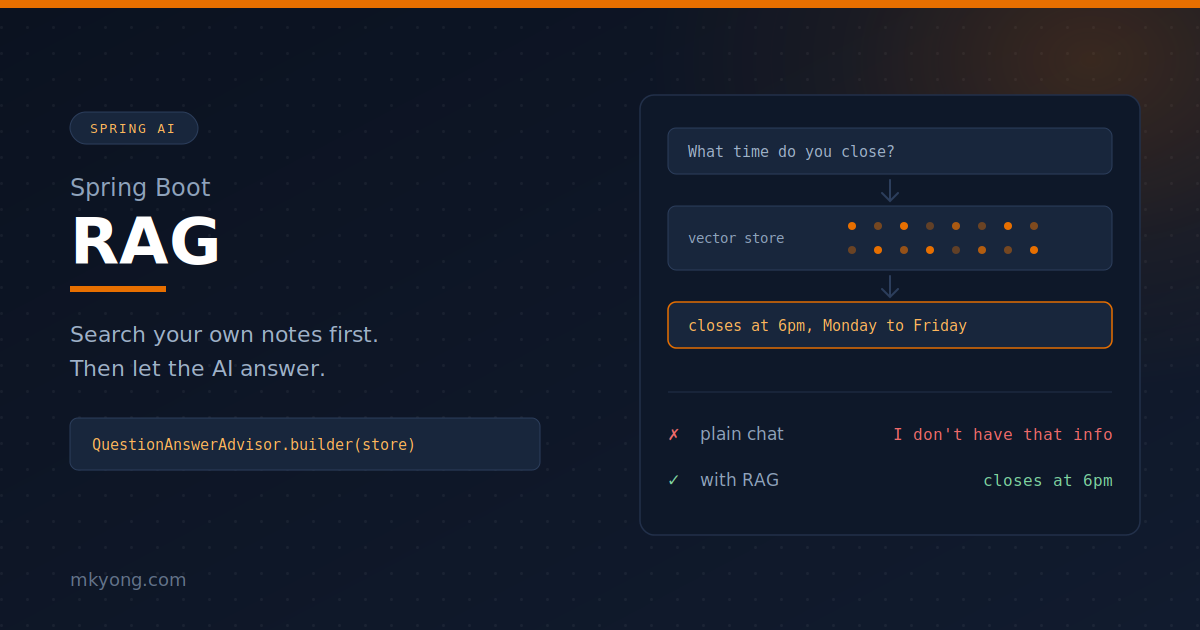
An AI model knows a lot, but it does not know your stuff. It has never seen your shop hours or your book prices.
RAG means: find the right notes first, then let the AI read them before it answers. It is like an open-book exam.
You will build a small book shop helper with Spring Boot and Spring AI.
Things you will use:
- Spring Boot 4.1.0
- Spring AI 2.0.0
- Java 25
- Maven 3.9.6
- OpenAI Key –
gpt-4o-mini
Table of contents:
- The words you need
- Where you would really use this
- Create the project
- Add your API key
- Make the box that holds your notes
- Put your notes inside
- Ask without RAG first
- Expose it as a REST endpoint
- See the difference
- See which notes the AI used
- Control how many notes get sent
- What happens under the hood
- Common errors
- Next steps
- Download Source Code
- References
The words you need
A few words show up all the time. Here they are in plain English.
- Embedding – turns text into a list of numbers, so the computer can measure "how close" two sentences are.
- Vector store – a box that holds those numbers and finds the closest matches.
- Advisor – a step that sits between your code and the AI. It can read the question on the way in, and read the answer on the way out.
- QuestionAnswerAdvisor – the RAG advisor. It searches the vector store and adds the matching notes to your question before it goes to the AI.
That is RAG. Find, then ask.
Where you would really use this
The book shop is a toy. The pattern behind it is not.
- Company helpdesk. Load your HR policy, leave rules, and claim forms. Staff ask "how many days of medical leave do I get" and get your answer, not a generic one.
- Product support. Load your user manuals and past support tickets. The bot answers "why does error E17 show up" from your own documents.
- Online shop. Load your stock list, prices, and delivery rules. Customers ask about a product in plain language instead of hunting through filters.
- Bank or clinic forms. Load the rules a staff member must follow, so the answer always matches the current policy, not last year’s.
- Your own notes. Load your meeting notes or study notes, then ask them questions later.
They all share one shape. Private text you own, a question in plain language, and an answer that must come from your text.
Create the project
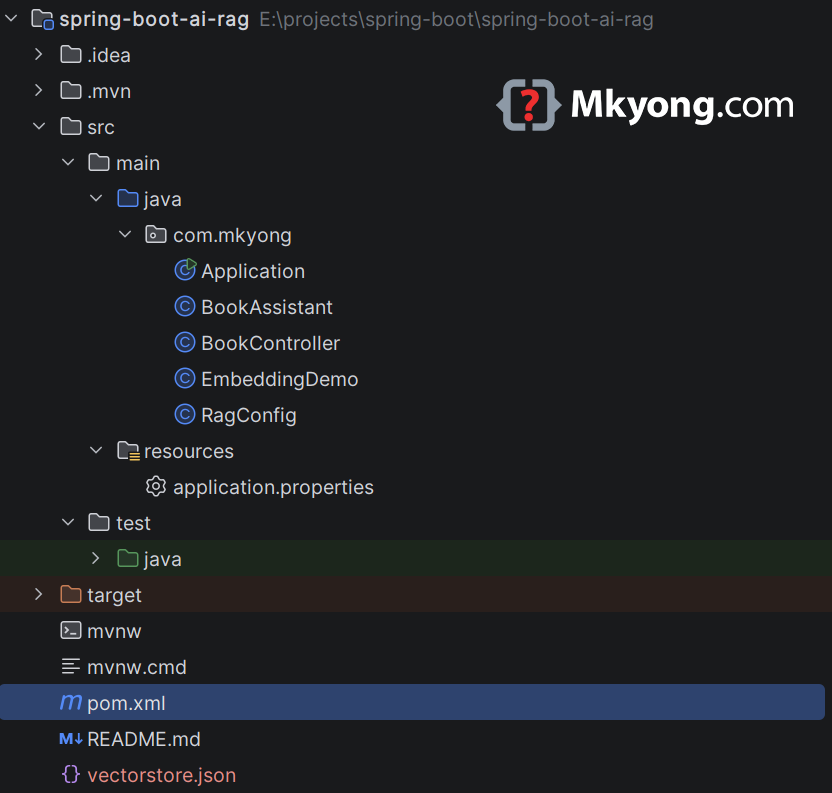
You will start with one pom.xml. It pulls in the web starter, the OpenAI models, and the RAG advisor.
<?xml version="1.0" encoding="UTF-8"?>
<project xmlns="http://maven.apache.org/POM/4.0.0"
         xmlns:xsi="http://www.w3.org/2001/XMLSchema-instance"
         xsi:schemaLocation="http://maven.apache.org/POM/4.0.0 https://maven.apache.org/xsd/maven-4.0.0.xsd">
    <modelVersion>4.0.0</modelVersion>

    <parent>
        <groupId>org.springframework.boot</groupId>
        <artifactId>spring-boot-starter-parent</artifactId>
        <version>4.1.0</version>
        <relativePath/>
    </parent>

    <groupId>com.mkyong</groupId>
    <artifactId>spring-boot-rag</artifactId>
    <version>1.0</version>

    <properties>
        <!-- Java 25 -->
        <java.version>25</java.version>
        <!-- Spring AI 2.0.x is the line that works with Spring Boot 4.x -->
        <spring-ai.version>2.0.0</spring-ai.version>
    </properties>

    <dependencies>
        <!-- In Spring Boot 4, the web starter is called spring-boot-starter-webmvc -->
        <dependency>
            <groupId>org.springframework.boot</groupId>
            <artifactId>spring-boot-starter-webmvc</artifactId>
        </dependency>

        <!-- Gives you a chat model AND an embedding model -->
        <dependency>
            <groupId>org.springframework.ai</groupId>
            <artifactId>spring-ai-starter-model-openai</artifactId>
        </dependency>

        <!-- Gives you QuestionAnswerAdvisor, the ready-made RAG helper -->
        <dependency>
            <groupId>org.springframework.ai</groupId>
            <artifactId>spring-ai-vector-store-advisor</artifactId>
        </dependency>
    </dependencies>

    <dependencyManagement>
        <dependencies>
            <!-- The BOM picks the right version for every Spring AI module -->
            <dependency>
                <groupId>org.springframework.ai</groupId>
                <artifactId>spring-ai-bom</artifactId>
                <version>${spring-ai.version}</version>
                <type>pom</type>
                <scope>import</scope>
            </dependency>
        </dependencies>
    </dependencyManagement>

    <build>
        <plugins>
            <plugin>
                <groupId>org.springframework.boot</groupId>
                <artifactId>spring-boot-maven-plugin</artifactId>
            </plugin>
        </plugins>
    </build>
</project>
Output:
$ mvn -v
Apache Maven 3.9.6
Java version: 25
The BOM does the version math for you. You never write a version on the Spring AI dependencies.
Add your API key
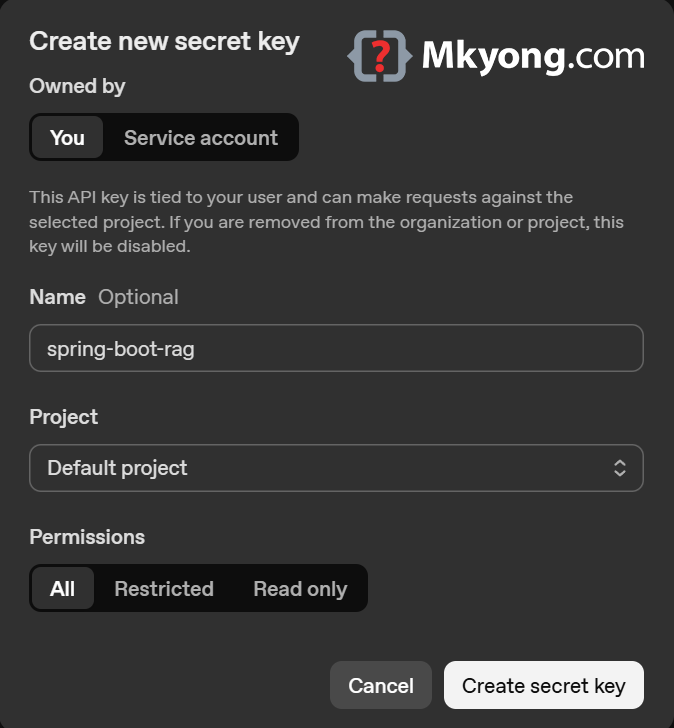
You need a key before any of this runs. Make one on the OpenAI API keys page.
- Log in, then click Create new secret key.
- Give it a name, like
spring-boot-rag. - Copy it the moment it appears. The page never shows it again.
The key starts with sk-. If you lose it, you do not recover it, you just make a new one.
A key alone is not enough. The API is pay as you go, so add a few dollars on the billing page, or you will hit the 429 error later in this article.
Now put it in your app. Never paste a key into the file. You read it from an environment variable instead.
# Reads the OPENAI_API_KEY environment variable
spring.ai.openai.api-key=${OPENAI_API_KEY}

# The model that writes the answer
spring.ai.openai.chat.options.model=gpt-4o-mini

# The model that turns your notes into numbers
spring.ai.openai.embedding.options.model=text-embedding-3-small
Set the variable before you run the app.
# Linux / macOS
$ export OPENAI_API_KEY=sk-your-key-here

# Windows Command Prompt
> set OPENAI_API_KEY=sk-your-key-here
Output:
$ echo $OPENAI_API_KEY
sk-your-key-here
The key stays outside your code, so you can safely push the project to GitHub.
Which OpenAI models can you pick?
Two properties, two different jobs. chat.options.model writes the answer. embedding.options.model turns text into numbers.
Chat models. The OpenAI Chat page lists every spring.ai.openai.chat.* property and names gpt-4o, gpt-4o-mini, gpt-4-turbo and friends. OpenAI keeps adding newer families on top, like the GPT-5 line and the o reasoning line. Any string OpenAI accepts, you can paste in.
# Cheap and fast. Used in this tutorial.
spring.ai.openai.chat.options.model=gpt-4o-mini

# Smarter, more expensive. Same code, just a different string.
# spring.ai.openai.chat.options.model=gpt-4o
Embedding models. OpenAI has three. The OpenAI Embeddings page covers the matching spring.ai.openai.embedding.* properties.
| Model | Numbers per note | Note |
|---|---|---|
text-embedding-3-small |
1536 | Cheapest. Used in this tutorial. |
text-embedding-3-large |
3072 | Better matching, costs more. |
text-embedding-ada-002 |
1536 | The old one. Only for old projects. |
Do not mix them. If you load your notes with one embedding model and search with another, the numbers do not line up and your matches turn to junk.
Model names change often, so ask your own account which ones your key can use.
$ curl https://api.openai.com/v1/models -H "Authorization: Bearer $OPENAI_API_KEY"
Output:
{
  "object": "list",
  "data": [
    { "id": "gpt-4o-mini", "object": "model", "owned_by": "system" },
    { "id": "gpt-4o", "object": "model", "owned_by": "system" },
    { "id": "text-embedding-3-small", "object": "model", "owned_by": "system" },
    { "id": "text-embedding-3-large", "object": "model", "owned_by": "system" }
  ]
}
That list is the truth for your key, today. The OpenAI models page explains what each one is good at.
Make the box that holds your notes
SimpleVectorStore keeps everything in memory. It is perfect for learning, and it is empty again every time you restart.
package com.mkyong;

import org.springframework.ai.embedding.EmbeddingModel;
import org.springframework.ai.vectorstore.SimpleVectorStore;
import org.springframework.ai.vectorstore.VectorStore;
import org.springframework.context.annotation.Bean;
import org.springframework.context.annotation.Configuration;

@Configuration
public class RagConfig {

    // Spring AI already made an EmbeddingModel for you, so just ask for it
    @Bean
    public VectorStore vectorStore(EmbeddingModel embeddingModel) {
        // A tiny in-memory vector store. Good for testing, not for production.
        return SimpleVectorStore.builder(embeddingModel).build();
    }
}
This bean makes no output on its own. The store needs the embedding model, because it must turn every note into numbers before it can save it.
Which vector store is this?
This tutorial uses SimpleVectorStore, a plain ArrayList in memory. It does a full scan on every search, so it is only for demos and tests.
Every store below plugs into the same VectorStore interface, so your Java code never changes. Only the bean and the starter change.
| Vector store | Docs |
|---|---|
| SimpleVectorStore (in memory) | source on GitHub |
| PGvector (PostgreSQL) | docs |
| Redis | docs |
| Elasticsearch | docs |
| OpenSearch | docs |
| MongoDB Atlas | docs |
| Neo4j | docs |
| Qdrant | docs |
| Milvus | docs |
| Chroma | docs |
| Weaviate | docs |
| Pinecone | docs |
| Apache Cassandra | docs |
| MariaDB | docs |
| Oracle Database | docs |
| Azure AI Search | docs |
| Azure Cosmos DB | docs |
| Amazon S3 Vectors | docs |
| Amazon Bedrock Knowledge Base | docs |
| Couchbase | docs |
| GemFire | docs |
| Typesense | docs |
The full, always-current list lives on the Vector Databases page.
Put your notes inside
Each note is a Document. When you call add(), Spring AI calls the embedding model and stores the numbers.
package com.mkyong;

import org.springframework.ai.document.Document;
import org.springframework.ai.vectorstore.VectorStore;
import org.springframework.boot.CommandLineRunner;
import org.springframework.stereotype.Component;

import java.util.List;

@Component
public class BookLoader implements CommandLineRunner {

    private final VectorStore vectorStore;

    public BookLoader(VectorStore vectorStore) {
        this.vectorStore = vectorStore;
    }

    @Override
    public void run(String... args) {

        // These are your private facts. No AI model has ever seen them.
        List<Document> notes = List.of(
                new Document("Mkyong Book Shop opens at 9am and closes at 6pm, Monday to Friday."),
                new Document("The book 'Java 25 in Action' costs RM 89 and is written by Ali Rahman."),
                new Document("The book 'Spring Boot 4 Recipes' costs RM 120 and has 480 pages."),
                new Document("Members get 15 percent off every book on the first Saturday of the month."),
                new Document("Mkyong Book Shop does not sell e-books, only paper books.")
        );

        // This one line turns all 5 notes into numbers and saves them
        vectorStore.add(notes);

        System.out.println("Loaded " + notes.size() + " notes into the vector store.");
    }
}
Output:
Loaded 5 notes into the vector store.
Your notes now live in the box, next to their numbers. Nothing has been sent to the chat model yet.
Where does the embedding actually run?
Not in Spring. Spring only makes the phone call.
That one line, vectorStore.add(notes), sends your five sentences over HTTPS to OpenAI’s servers.
OpenAI does the maths and sends back a list of numbers for each note. Spring stores those numbers.
Three things follow from that.
- It costs money. Loading notes is billed, not just chatting.
- It needs internet. No network, no startup.
- Your notes leave your computer. Do not embed passwords or customer data on a hobby key.
If the last point bothers you, run the embedding on your own machine instead. Spring AI ships an ONNX Transformers model that needs no key and no internet after the first download.
<!-- Swap this in place of the OpenAI embedding, notes stay on your PC -->
<dependency>
    <groupId>org.springframework.ai</groupId>
    <artifactId>spring-ai-starter-model-transformers</artifactId>
</dependency>
# The local ONNX model does the embedding, OpenAI still writes the answer
spring.ai.model.embedding=transformers
Output:
Loaded 5 notes into the vector store.
Same line of code, same result. Only the phone number changed. Ollama-embeddings is another local option if you already run it.
So why not use ONNX for everything?
Good question. Free and private sounds better than paid and remote.
Both turn text into numbers, but they are not the same size or the same quality. The ONNX starter defaults to all-MiniLM-L6-v2, a small model from 2021.
OpenAI text-embedding-3-small |
ONNX all-MiniLM-L6-v2 |
|
|---|---|---|
| Runs on | OpenAI’s servers | Your CPU |
| API key | Yes | No |
| Cost per note | A tiny fraction of a cent | Free |
| Internet | Every time | Only the first download |
| Numbers per note | 1536 | 384 |
| Text per note | About 8000 tokens | Cut off at 256 word pieces |
| Languages | Many | Mostly English |
| Your data | Leaves your PC | Stays on your PC |
You can see the size difference yourself. Print the length of one vector.
package com.mkyong;

import org.springframework.ai.embedding.EmbeddingModel;
import org.springframework.boot.CommandLineRunner;
import org.springframework.stereotype.Component;

@Component
public class EmbeddingDemo implements CommandLineRunner {

    private final EmbeddingModel embeddingModel;

    public EmbeddingDemo(EmbeddingModel embeddingModel) {
        this.embeddingModel = embeddingModel;
    }

    @Override
    public void run(String... args) {

        // Turn one sentence into numbers
        float[] numbers = embeddingModel.embed("Java 25 in Action");

        // Which model answered, and how many numbers came back
        System.out.println("Model  : " + embeddingModel.getClass().getSimpleName());
        System.out.println("Length : " + numbers.length);
    }
}
Output:
Model  : OpenAiEmbeddingModel
Length : 1536
Switch to spring.ai.model.embedding=transformers and run it again.
Output:
Model  : TransformersEmbeddingModel
Length : 384
More numbers means more room to store meaning. With 384 numbers the model still works fine for five short notes, but it gets fuzzier as your notes grow and as questions get less obvious.
The 256 limit matters too. all-MiniLM-L6-v2 chops anything longer, so half a long paragraph simply never gets read. OpenAI takes a whole page in one go.
So pick like this.
- OpenAI while learning, and for public content in many languages. You already have the key for chat, so it is zero extra setup.
- ONNX when the data is private, the budget is zero, or the app must run offline.
One warning before you switch. 1536 and 384 do not mix. If you load notes with one model and search with the other, every match is garbage.
SimpleVectorStore forgets on restart, so switching is free here. In a real database you must empty the table and load every note again, because the column was sized for the old model.
Embed once, reuse forever
Right now your app does not do that. It pays again every single restart.
BookLoader runs on every startup, and vectorStore.add(notes) calls OpenAI every time. Stop the app, start it again, and you just bought the same five vectors twice.
First, be clear about what Spring does at startup.
- Spring auto-creates an
EmbeddingModelbean. That is only a phone line to OpenAI. It embeds nothing. - Embedding happens only when your code calls
add()or runs a search.
So nothing is automatic. You choose when to pay.
SimpleVectorStore can write itself to a JSON file and read itself back. Save once, load forever.
package com.mkyong;

import org.springframework.ai.document.Document;
import org.springframework.ai.embedding.EmbeddingModel;
import org.springframework.ai.vectorstore.SimpleVectorStore;
import org.springframework.context.annotation.Bean;
import org.springframework.context.annotation.Configuration;

import java.io.File;
import java.util.List;

@Configuration
public class RagConfig {

    // The numbers land here, next to your pom.xml
    private static final File STORE_FILE = new File("vectorstore.json");

    @Bean
    public SimpleVectorStore vectorStore(EmbeddingModel embeddingModel) {

        SimpleVectorStore store = SimpleVectorStore.builder(embeddingModel).build();

        if (STORE_FILE.exists()) {
            // Reads numbers straight off your disk. No API call. No cost.
            store.load(STORE_FILE);
            System.out.println("Loaded vectors from " + STORE_FILE.getName());
        } else {
            // First run only. This is the one that costs money.
            store.add(notes());
            store.save(STORE_FILE);
            System.out.println("Embedded notes and saved to " + STORE_FILE.getName());
        }

        return store;
    }

    private List<Document> notes() {
        return List.of(
                new Document("Mkyong Book Shop opens at 9am and closes at 6pm, Monday to Friday."),
                new Document("The book 'Java 25 in Action' costs RM 89 and is written by Ali Rahman."),
                new Document("The book 'Spring Boot 4 Recipes' costs RM 120 and has 480 pages."),
                new Document("Members get 15 percent off every book on the first Saturday of the month."),
                new Document("Mkyong Book Shop does not sell e-books, only paper books.")
        );
    }
}
Delete BookLoader.java now. The bean above does its job.
First run.
$ mvn spring-boot:run

Embedded notes and saved to vectorstore.json
Started Application in 3.204 seconds
Stop it with Ctrl+C, then start it again.
$ mvn spring-boot:run

Loaded vectors from vectorstore.json
Started Application in 1.902 seconds
No API call this time. Faster too. Open the file and you can see why.
$ head -c 200 vectorstore.json

{"cbf3a2a1-...":{"id":"cbf3a2a1-...","text":"Mkyong Book Shop opens at 9am and closes at 6pm, Monday to Friday.","metadata":{},"embedding":[-0.021,0.014,0.038,
Your sentence and its 1536 numbers, sitting on your disk. That is the whole point of a vector store.
Two rules to remember.
- Change a note, delete the file. The old numbers describe the old sentence. Stale file, wrong answers.
- Change the embedding model, delete the file. 1536 numbers cannot be compared with 384.
One thing is still billed every time. Your question must also become numbers before the store can search.
So each call to /ask embeds one short sentence. That is tiny next to embedding a whole library.
For a real app, skip the file. A proper vector database like PGvector keeps the numbers in a table, so you only embed a document the day you add it.
Ask without RAG first
Build a plain ChatClient and ask about your shop. Watch it fail.
package com.mkyong;

import org.springframework.ai.chat.client.ChatClient;
import org.springframework.ai.chat.client.advisor.vectorstore.QuestionAnswerAdvisor;
import org.springframework.ai.vectorstore.VectorStore;
import org.springframework.stereotype.Service;

@Service
public class BookAssistant {

    private final ChatClient plainClient;   // no notes
    private final ChatClient ragClient;     // with notes

    public BookAssistant(ChatClient.Builder builder, VectorStore vectorStore) {

        // A normal chat client. It only knows what it learned during training.
        this.plainClient = builder.build();

        // mutate() copies the plain client, then adds the RAG advisor on top
        this.ragClient = this.plainClient.mutate()
                .defaultAdvisors(QuestionAnswerAdvisor.builder(vectorStore).build())
                .build();
    }

    // Asks the model directly
    public String askPlain(String question) {
        return this.plainClient.prompt()
                .user(question)
                .call()
                .content();
    }

    // Searches your notes first, then asks the model
    public String askWithRag(String question) {
        return this.ragClient.prompt()
                .user(question)
                .call()
                .content();
    }
}
This service makes no output on its own. Both clients talk to the same model. The only difference is the advisor.
Expose it as a REST endpoint
Two URLs, so you can compare the two answers yourself.
package com.mkyong;

import org.springframework.web.bind.annotation.GetMapping;
import org.springframework.web.bind.annotation.RequestParam;
import org.springframework.web.bind.annotation.RestController;

@RestController
public class BookController {

    private final BookAssistant assistant;

    public BookController(BookAssistant assistant) {
        this.assistant = assistant;
    }

    // No notes. The model guesses.
    @GetMapping("/ask-plain")
    public String askPlain(@RequestParam String q) {
        return assistant.askPlain(q);
    }

    // With notes. The model reads first.
    @GetMapping("/ask")
    public String ask(@RequestParam String q) {
        return assistant.askWithRag(q);
    }
}
package com.mkyong;

import org.springframework.boot.SpringApplication;
import org.springframework.boot.autoconfigure.SpringBootApplication;

@SpringBootApplication
public class Application {

    public static void main(String[] args) {
        SpringApplication.run(Application.class, args);
    }
}
Output:
$ mvn spring-boot:run

Loaded 5 notes into the vector store.
Tomcat started on port 8080 (http) with context path '/'
Started Application in 2.914 seconds
The app is up. The notes are loaded. Time to ask.
See the difference
You will ask this exact question both times:
How much is Java 25 in Action
In a URL, spaces become %20. So the question above turns into q=How%20much%20is%20Java%2025%20in%20Action.
First, the endpoint with no notes.
$ curl "http://localhost:8080/ask-plain?q=How%20much%20is%20Java%2025%20in%20Action"
Output:
As of my last update, I don't have real-time pricing data for specific books, including "Java 25 in Action." Prices for books can vary widely based on factors such as the retailer, format (e.g., paperback or e-book), and any ongoing discounts or promotions.

To find the current price, I recommend checking popular online retailers like Amazon, Barnes & Noble, or specialized bookstores. You can also check for availability at your local bookstore or library.
The model is polite, but useless. It has never seen your shop.
Now the same question, on the RAG endpoint.
$ curl "http://localhost:8080/ask?q=How%20much%20is%20Java%2025%20in%20Action"
Output:
The book 'Java 25 in Action' costs RM 89.
Try a second question, What time do you close on Friday, to prove it was not a lucky guess.
$ curl "http://localhost:8080/ask?q=What%20time%20do%20you%20close%20on%20Friday"
Output:
Mkyong Book Shop closes at 6pm on Friday.
Same model, same question. The second call searched your notes, glued the best ones onto your question, and the model just read the answer.
On Windows Command Prompt, use double quotes only:
curl "http://localhost:8080/ask?q=How much is Java 25 in Action".
AI answers are never identical word for word, so your wording will look a little different.
See which notes the AI used
Yes, you can look. The advisor drops the notes it found into a context map, under the key QuestionAnswerAdvisor.RETRIEVED_DOCUMENTS.
You reach that map by asking for chatClientResponse() instead of content().
package com.mkyong;

import org.springframework.ai.chat.client.ChatClient;
import org.springframework.ai.chat.client.ChatClientResponse;
import org.springframework.ai.chat.client.advisor.vectorstore.QuestionAnswerAdvisor;
import org.springframework.ai.document.Document;
import org.springframework.ai.vectorstore.VectorStore;
import org.springframework.stereotype.Service;

import java.util.List;

@Service
public class BookAssistant {

    private final ChatClient plainClient;   // no notes
    private final ChatClient ragClient;     // with notes

    public BookAssistant(ChatClient.Builder builder, VectorStore vectorStore) {
        this.plainClient = builder.build();
        this.ragClient = this.plainClient.mutate()
                .defaultAdvisors(QuestionAnswerAdvisor.builder(vectorStore).build())
                .build();
    }

    public String askPlain(String question) {
        return this.plainClient.prompt()
                .user(question)
                .call()
                .content();
    }

    public String askWithRag(String question) {
        return this.ragClient.prompt()
                .user(question)
                .call()
                .content();
    }

    // Same as askWithRag, but it also shows the notes behind the answer
    public String askAndShowNotes(String question) {

        // chatClientResponse() gives you the answer AND the advisor context
        ChatClientResponse response = this.ragClient.prompt()
                .user(question)
                .call()
                .chatClientResponse();

        // The advisor parked the matching notes under this key
        @SuppressWarnings("unchecked")
        List<Document> notesUsed = (List<Document>) response.context()
                .get(QuestionAnswerAdvisor.RETRIEVED_DOCUMENTS);

        StringBuilder out = new StringBuilder();
        out.append("ANSWER:\n");
        out.append(response.chatResponse().getResult().getOutput().getText());
        out.append("\n\nNOTES USED:\n");

        // Print every note the vector store handed over
        for (Document note : notesUsed) {
            out.append("- ").append(note.getText()).append("\n");
        }

        return out.toString();
    }
}
Add one more URL for it.
package com.mkyong;

import org.springframework.web.bind.annotation.GetMapping;
import org.springframework.web.bind.annotation.RequestParam;
import org.springframework.web.bind.annotation.RestController;

@RestController
public class BookController {

    private final BookAssistant assistant;

    public BookController(BookAssistant assistant) {
        this.assistant = assistant;
    }

    @GetMapping("/ask-plain")
    public String askPlain(@RequestParam String q) {
        return assistant.askPlain(q);
    }

    @GetMapping("/ask")
    public String ask(@RequestParam String q) {
        return assistant.askWithRag(q);
    }

    // Shows the answer plus the notes behind it
    @GetMapping("/ask-debug")
    public String askDebug(@RequestParam String q) {
        return assistant.askAndShowNotes(q);
    }
}
Ask How much is Java 25 in Action one more time.
$ curl "http://localhost:8080/ask-debug?q=How%20much%20is%20Java%2025%20in%20Action"
Output:
ANSWER:
The book 'Java 25 in Action' costs RM 89.

NOTES USED:
- The book 'Java 25 in Action' costs RM 89 and is written by Ali Rahman.
- The book 'Spring Boot 4 Recipes' costs RM 120 and has 480 pages.
- Members get 15 percent off every book on the first Saturday of the month.
- Mkyong Book Shop does not sell e-books, only paper books.
Now you can prove where the answer came from. Four notes went in, and the model used only the one that matched.
Look closely at the answer. The note also names the author, but you did not ask for that, so the model left it out.
It read all four notes and answered only your question.
Control how many notes get sent
By default the advisor grabs the top 4 notes. You can ask for fewer, and you can throw away weak matches.
This lives where the advisor is built, inside BookAssistant. Only the constructor changes.
package com.mkyong;

import org.springframework.ai.chat.client.ChatClient;
import org.springframework.ai.chat.client.advisor.SimpleLoggerAdvisor;
import org.springframework.ai.chat.client.advisor.vectorstore.QuestionAnswerAdvisor;
import org.springframework.ai.vectorstore.SearchRequest;
import org.springframework.ai.vectorstore.VectorStore;
import org.springframework.stereotype.Service;

@Service
public class BookAssistant {

    private final ChatClient plainClient;
    private final ChatClient ragClient;

    public BookAssistant(ChatClient.Builder builder, VectorStore vectorStore) {

        this.plainClient = builder.build();

        this.ragClient = this.plainClient.mutate()
                .defaultAdvisors(
                        QuestionAnswerAdvisor.builder(vectorStore)
                                .searchRequest(SearchRequest.builder()
                                        .topK(2)                  // send only the 2 closest notes
                                        .similarityThreshold(0.6) // 0 = accept anything, 1 = almost identical
                                        .build())
                                .build(),
                        new SimpleLoggerAdvisor())
                .build();
    }

    // the three ask methods stay exactly the same
}
Ask the debug endpoint again and count the notes.
$ curl "http://localhost:8080/ask-debug?q=How%20much%20is%20Java%2025%20in%20Action"
Output:
ANSWER:
The book 'Java 25 in Action' costs RM 89.

NOTES USED:
- The book 'Java 25 in Action' costs RM 89 and is written by Ali Rahman.
- The book 'Spring Boot 4 Recipes' costs RM 120 and has 480 pages.
Four notes became two, and the answer did not change.
Fewer notes means a shorter, cheaper question. Too few notes and the model may miss the answer, so try topK between 2 and 6.
What happens under the hood
One question travels through five steps.
Your question
   -> turned into numbers by the embedding model
   -> vector store finds the closest notes
   -> advisor pastes those notes above your question
   -> chat model reads them and writes the answer
Output:
Question : "How much is Java 25 in Action"
Found    : "The book 'Java 25 in Action' costs RM 89 and is written by Ali Rahman."
Answer   : The book 'Java 25 in Action' costs RM 89.
You never retrained the model. You just handed it the right page at the right time.
Common errors
Two errors hit almost everyone on the first run. Both come from the OpenAI Java client, not from your code.
401 Unauthorized
You start the app and it dies straight away.
Output:
com.openai.errors.UnauthorizedException: 401: Incorrect API key provided: ${OPENAI*****KEY}.
You can find your API key at https://platform.openai.com/account/api-keys.
        at com.openai.errors.UnauthorizedException$Builder.build(UnauthorizedException.kt:98) ~[openai-java-core-4.39.1.jar:4.39.1]
        at com.openai.core.handlers.ErrorHandler$errorHandler$1.handle(ErrorHandler.kt:59) ~[openai-java-core-4.39.1.jar:4.39.1]
Read the key in the message: ${OPENAI*****KEY}. That is not a key. That is your placeholder text, sent as-is.
OpenAI hides the middle of whatever it receives. So the app really posted the text ${OPENAI_API_KEY} instead of a secret.
The environment variable was empty when the JVM started.
Check it first.
# Linux / macOS
$ echo $OPENAI_API_KEY

# Windows Command Prompt
> echo %OPENAI_API_KEY%
Output:
(blank line, or the literal text %OPENAI_API_KEY%)
A blank line means the variable is not there. Three things cause this.
- You set the variable in one terminal, then ran the app in another one.
- You set it after your IDE was already open. Restart the IDE, so it picks up the new value.
- You are on Windows and typed
exportinstead ofset.
Set it again in the same window you will run from, then start the app.
$ export OPENAI_API_KEY=sk-your-real-key-here
$ mvn spring-boot:run
Output:
Loaded 5 notes into the vector store.
Started Application in 2.914 seconds
If the message shows sk-**** instead of ${OPENAI*****KEY}, the variable was found, but the key itself is wrong. Make a new one on the API keys page.
429 No credits remaining
The key works this time. The app still dies.
Output:
com.openai.errors.RateLimitException: 429: You have no credits remaining.
Add credits to continue using the API at https://platform.openai.com/settings/organization/billing/.
        at com.openai.errors.RateLimitException$Builder.build(RateLimitException.kt:98) ~[openai-java-core-4.39.1.jar:4.39.1]
        at com.openai.core.handlers.ErrorHandler$errorHandler$1.handle(ErrorHandler.kt:79) ~[openai-java-core-4.39.1.jar:4.39.1]
        at com.openai.core.handlers.ErrorHandler$errorHandler$1.handle(ErrorHandler.kt:46) ~[openai-java-core-4.39.1.jar:4.39.1]
        at com.openai.services.blocking.EmbeddingServiceImpl$WithRawResponseImpl.create(EmbeddingServiceImpl.kt:80) ~[openai-java-core-4.39.1.jar:4.39.1]
        at com.openai.services.blocking.EmbeddingServiceImpl.create(EmbeddingServiceImpl.kt:44) ~[openai-java-core-4.39.1.jar:4.39.1]
The name says RateLimitException, but the text gives the real reason. Your account has no money in it.
The API is pay as you go. A ChatGPT Plus subscription does not pay for it.
Look at the last two lines of the stack trace. EmbeddingServiceImpl means this blew up inside vectorStore.add(notes), before any chat happened.
Loading your notes costs money too.
Add credits on the billing page, then run it again.
Output:
Loaded 5 notes into the vector store.
Started Application in 3.107 seconds
Five short notes cost a fraction of a cent to embed, so the smallest top-up is plenty for this tutorial.
Next steps
SimpleVectorStore forgets everything on restart. For a real app, swap it for a database that remembers, like PGvector or Redis.
You also do not have to type notes by hand. The ETL pipeline can read PDFs, JSON, and web pages and chop them into small documents for you.
Download Source Code
$ git clone https://github.com/mkyong/spring-boot.git
$ cd spring-boot/spring-boot-ai-rag
$ mvn spring-boot:run
References
- Spring AI – Retrieval Augmented Generation (RAG)
- Spring AI – Getting Started
- Spring AI – Vector Databases
- Spring AI – Advisors API
- Spring AI – Chat Models
- Spring AI – Chat Models Comparison
- Spring AI – Embedding Models
- Spring AI – OpenAI Chat
- Spring AI – OpenAI Embeddings
- Spring AI – ONNX Transformers Embeddings
- OpenAI – Models
- OpenAI – API keys
- Spring AI – Chat Client API
- OpenAI – API error codes
- Spring AI 2.0.0 GA release notes
- Spring AI – Upgrade Notes (1.1.x to 2.0.0)
- Spring Boot 4.1 Reference Documentation
- Official Java Downloads
P.S This article is part of the Spring Boot 4 series, tested against Spring Boot 4.1.0 GA and Java 25.

No comments yet. Be the first to leave a comment!