In Spring 3, old RequestMapping class is enhanced to support RESTful features, which makes Spring developers easier to develop REST services in Spring MVC.
In this tutorial, we show you how to use Spring 3 MVC annotations to develop a RESTful style web application.
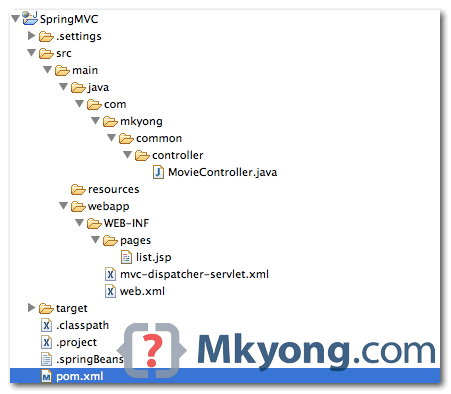
1. Project Directory
Review the project folder structure.
2. Project Dependency
To develop REST in Spring MVC, just include the core Spring and Spring MVC dependencies.
pom.xml
	<properties>
		<spring.version>3.0.5.RELEASE</spring.version>
	</properties>

	<dependencies>

		<!-- Spring 3 dependencies -->
		<dependency>
			<groupId>org.springframework</groupId>
			<artifactId>spring-core</artifactId>
			<version>${spring.version}</version>
		</dependency>

		<dependency>
			<groupId>org.springframework</groupId>
			<artifactId>spring-web</artifactId>
			<version>${spring.version}</version>
		</dependency>

		<dependency>
			<groupId>org.springframework</groupId>
			<artifactId>spring-webmvc</artifactId>
			<version>${spring.version}</version>
		</dependency>

	</dependencies>

</project>
3. REST Controller
For Spring RESTful, you need PathVariable, RequestMapping and RequestMethod. Following code should be self-explanatory.
MovieController.java
package com.mkyong.common.controller;

import org.springframework.stereotype.Controller;
import org.springframework.ui.ModelMap;
import org.springframework.web.bind.annotation.PathVariable;
import org.springframework.web.bind.annotation.RequestMapping;
import org.springframework.web.bind.annotation.RequestMethod;

@Controller
@RequestMapping("/movie")
public class MovieController {

	@RequestMapping(value = "/{name}", method = RequestMethod.GET)
	public String getMovie(@PathVariable String name, ModelMap model) {

		model.addAttribute("movie", name);
		return "list";

	}

	@RequestMapping(value = "/", method = RequestMethod.GET)
	public String getDefaultMovie(ModelMap model) {

		model.addAttribute("movie", "this is default movie");
		return "list";

	}

}
4. JSP Views
A JSP page to display the value.
list.jsp
<html>
<body>
	<h1>Spring 3 MVC REST web service</h1>

	<h2>Movie Name : ${movie}</h2>
</body>
</html>
5. Demo
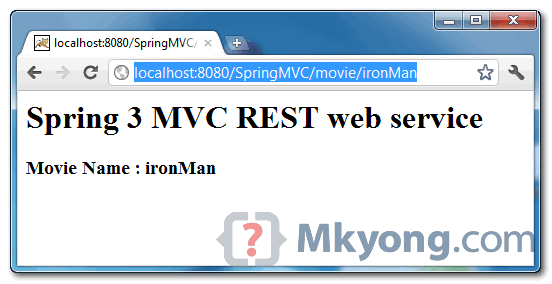
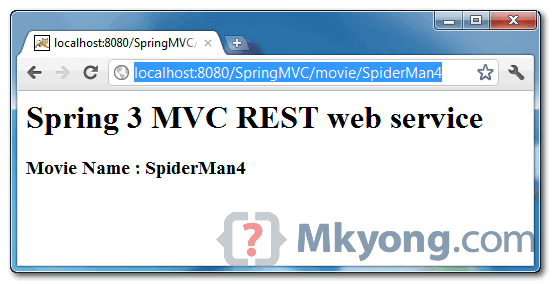
See REST URLs demonstration.
URL : http://localhost:8080/SpringMVC/movie/ironMan
URL : http://localhost:8080/SpringMVC/movie/SpiderMan4
Download Source Code
Download it – Spring3MVC-REST-HelloWorld-Example.zip (7 KB)

I just imported this as java project and when i execute the given url in this page after deploying the project in server its showing 404 error. i really don’t understand the reason for this. please check every thing once before u give download option to someone
Excellent article Mkyong,
Your article provides a step wise guide on how to use Spring 3 MVC annotations to develop RESTful web service application. It is very helpful for beginners to develop simple Hello world REST example. Restful web services are language independent way to exchange infomation between different devices. Restful web services are getting popular day by day as compared to SOAP web services. I am also running a blog (java2blog) which also provides relevant information about Spring rest example. It also covers frequently asked web service interview questions and answers.
This tutorial is very helpful. I learn alot from this. Thanks to author
Mr.Nirajan is right
Yes, Worked Fine
I don’t think it is a REST. The response of a RESTful web service is either in JSON or XML. The response should not be in jsp like you presented. And specially, this is just an Spring MVC Hello World.
i agree with you !
you r correct 🙂
I have imported the same downloaded project into eclipse,while running,it is showing the error as “java Exception has occurred”classnotfoundException
someone help me plz,I am new to this concept.
This is how to generate documentation using Swagger, after creating the Rest API:
http://opentechcode.blogspot.com/2015/09/generating-rest-services-documentation.html
consult this for errors in list.jsp:
http://stackoverflow.com/questions/22756153/the-superclass-javax-servlet-http-httpservlet-was-not-found-on-the-java-build
Just been looking at the hello world tutorial as well at : https://mkyong.com/spring3/spring-3-mvc-hello-world-example/
I could not find any difference other than in this tutorial a value called {name} is being passed. Can anyone tell me… is the normal hello world program also a REST request?
How to compile this project?
SpringMVC:> mvn clean install
Hello sir;
I am new to Spring with REST call.
so try to learn this from your above example but am facing Requested HTTP URI not found issue,
means when am trying provide a external resource link for My CSS and JQuery file it not able to load these files to my jsp. but if change the :from
dispatch
/
—-To—–
dispatch
*.html
then my CSS and JQuery files are working but rest Call is not working
please any one help me out………………………
By downloading and importing project into eclipse it works fine. But how to create the project with same directory structure ? We created new-> dynamic web project. But it has different directory structure.
Need Help! I did everything mentioned here and the url says noHandler found! Any thoughts.
you are awesome, your examples are startup for me thanks again
i did everything ..it worked for the first time but it stopped working …so sometimes even you follow the instructions but you should clean the tomcat or whatever server used. After which, it worked fine…thanks
It worked fine for me. Thanks
It works as expected, but I`m figuring out that the spring context is loaded several times, you can see on output log.
INFO: Initializing Spring root WebApplicationContext
Sep 18, 2013 12:59:39 PM org.springframework.web.context.ContextLoader initWebApplicationContext
INFO: Root WebApplicationContext: initialization started
…
INFO: Root WebApplicationContext: initialization completed in 850 ms
Sep 18, 2013 12:59:40 PM org.apache.catalina.core.ApplicationContext log
INFO: Initializing Spring FrameworkServlet ‘mvc-dispatcher’
Sep 18, 2013 12:59:40 PM org.springframework.web.servlet.FrameworkServlet initServletBean
INFO: FrameworkServlet ‘mvc-dispatcher’: initialization started
…
INFO: FrameworkServlet ‘mvc-dispatcher’: initialization completed in 158 ms
Sep 18, 2013 12:59:40 PM org.apache.catalina.startup.HostConfig deployDirectory
INFO: Deploying web application directory /Users/oswaldo/opt/Tomcat/webapps/Spring-MVC
Sep 18, 2013 12:59:40 PM org.apache.catalina.core.ApplicationContext log
INFO: Initializing Spring root WebApplicationContext
…
INFO: Root WebApplicationContext: initialization completed in 637 ms
Sep 18, 2013 12:59:41 PM org.apache.catalina.core.ApplicationContext log
INFO: Initializing Spring FrameworkServlet ‘mvc-dispatcher’
Sep 18, 2013 12:59:41 PM org.springframework.web.servlet.FrameworkServlet initServletBean
INFO: FrameworkServlet ‘mvc-dispatcher’: initialization started
…
INFO: FrameworkServlet ‘mvc-dispatcher’: initialization completed in 152 ms
Sep 18, 2013 12:59:41 PM org.apache.coyote.AbstractProtocol start
I think there is something wrong here
The downloaded .zip does not work. There needs to be a modification in the mvc-dispatcher-servlet.xml to make this work. the property name=”prefix” should have the value /WEB-INF/ removed or it will not work.
It should look like this:
/jsp/
.jsp
Thank you and it is excellent Tech Article .. It useful for Spring learner
It works perfectly. Thanks!!!
Thanks for a wonderful post.
This post will be helpful if any one interested to see how the spring framework supports JSON output from the restful web service
http://www.smashplus.info/2013/05/restful-web-service-in-spring-framework.html
Quick and dirty but doesn’t really explain much. As with SpringMVC tutorial some setup instructions would be nice. You might have named the project SpringMVCRest to differentiate it from the SpringMVC project tutorial and avoid namespace conflicts.
Can you upload spring + Hibernate+ RestFull implementation please.
Thanks for the great example!
If I may, I have one observation regarding getDefaultMovie’s @RequestMapping; use an empty string instead of a single forward slash.
@RequestMapping(value = "", method = RequestMethod.GET)
	public String getDefaultMovie(ModelMap model) {
The reason is while “localhost:8080/SpringMVC/movie/” displays the default movie message “localhost:8080/SpringMVC/movie” returns 404.
When an empty string is used, both return default movie message.
There are a lot of comments, sorry if this was previously stated.
Nice Observation! It worked.. Thanks Sean!
@mykong… thanks for the tutorial, its simple and perfect, worked like a charm. Great work!
java.lang.illegalstateexception no parameter name specified for argument of type java.lang.string i got this exception
When i changed the code from this
@RequestMapping(value = “/{name}”, method = RequestMethod.GET)
public String getMovie(@PathVariable String name, ModelMap model) {
to this its working now have to add (@PathVariable(“name”))
java.lang.illegalstateexception no parameter name specified for argument of type java.lang.string i got this exception
When i changed the code from this
@RequestMapping(value = “/{name}”, method = RequestMethod.GET)
public String getMovie(@PathVariable String name, ModelMap model) {
to this its working now have to add (@PathVariable(“name”))
@RequestMapping(value = “/{name}”, method = RequestMethod.GET)
public String getMovie(@PathVariable(“name”) String name, ModelMap model) {
I have a doubt. The example looks like normal web application but still serves as RESTful service. Here I see there is no reference implementation for JAX-RS is used. So, can I assume that JAX-RS standards are not required or irrelevant with Spring 3.0?
Nice articles…Y dont you make it available on github only…
I am newbie to Java and Spring, and i love Mkyong for for his wonderful tutorials and examples. It helps me a lot.
how can i use cxf with spring mvc can u provide a full article on that ?
Nice little guide but you forgot to show and describle one of the most important parts of setting up a Restful web application and that is the mvc dispatcher and web.xml files.
Without this, the application wont work and the people here using this example as a starting point will strugle to play around and develope this app further.
Please update your post and include details about the web.xml file and teh dispatcher!
this is vital as a user can then tweak and add more controllers, more mappings and change the mapping patterns completely
Thank u so much. as i wasted so much time, trying running this proj.
Tried running
$ mvn
Got [ERROR] No goals have been specified for this build.
Hi, If I understand it correctly, its spring mvc , I do not see any REST service call. could you please upload correct examples.
This is restful webservice example. Restful webservice in Spring works mostly on Spring MVC configuration. method = RequestMethod.GET …this is used in restful webservice’get method.
Gr8 tutorial. Gave me the project structure i needed to base my project off.
In problem it gives a warning as org.eclipse.jdt.USER_LIBRARY/Spring3.0.5 will not be exported or published. Runtime ClassNotFoundExceptions may result.
its shows 404 error to me…
Hi Mkyong,
Thanks for the example. It is very simple. Can you please provide code for standalone client for the same example.
Thanks,
Vijay
Thanks, this is the best minimal Spring MVC app I have seen.
IG Group have recently open-sourced their RESTdoclet solution, which is specifically aimed at services built using Spring’s REST framework. We use this internally to automatically generate documentation for all our RESTful services and publish these via an internal web portal.
It includes a working sample application demonstrating several Spring 3 REST features.
More info here: http://ig-group.github.com/RESTdoclet/
Robert @ IG Group
It doesnt seem to work for me, can you explain why? I have copied your example exactly but adding anything to the end of the URL results in a 404 error instead of calling the controller method.
I have also noticed that if I dont include the movie part at all, so just http://localhost:8080/SpringMVC/movie then that works but… the name is always returned as just index. Adding anything like Superman etc just results in a 404 error.
Great Stuff. Whenever I need something explained in simple terms I look for your examples. Thanks
I encountered the same problem :
no mapping found for HTTP Request with URI [/SpringMVC/movie/ironman] in DispatcherServlet with name ‘mvc-dispatcher’
solved it. Change the controller a bit :
1) remove the @RequestMapping before class declaration
2) change the annotation in the method of the controller
@RequestMapping(value=”movie/{name}”, method = RequestMethod.GET)
and it works perfectly.
Can you repost the zip of the project? It is not working for me and I continue to get the same error.
thanks,
–K
Got it!
http://localhost:8080/SpringMVC/ was throwing a 404
http://localhost:8080/SpringMVC/movie also was a 404
but
http://localhost:8080/SpringMVC/movie/ironman works!
Hi Kudjo,
Your first link is not working because in the source file of MovieController
following code is missing
@RequestMapping(value = “/”, method = RequestMethod.GET)
public String getDefaultMovie(ModelMap model) {
model.addAttribute(“movie”, “this is default movie”);
return “list”;
}
If you add this code your first link will start working.Your second link is wrong so it should not work
Thanks
Vijay
Sorry One correction. After adding this code use this link http://localhost:8080/SpringMVC/movie/ instead of your first two link.This should work.
If you see the source code you will come to know why this link is correct and your first two links are wrong
From application context we get
http://localhost:8080/SpringMVC
now from @RequestMapping(“/movie”) we will append “/movie”
i.e. http://localhost:8080/SpringMVC/movie
from this method
@RequestMapping(value = “/”, method = RequestMethod.GET)
public String getDefaultMovie(ModelMap model) {
model.addAttribute(“movie”, “this is default movie”);
return “list”;
}
we get “/”, which we add to above url so final url for default is
http://localhost:8080/SpringMVC/movie/
I hope it is clear now
thanks,
Vijay
I do not understand how it works for you.
I have downloaded and does not work.
I have made changes siggested to RUDY and still get this:
WARN org.springframework.web.servlet.PageNotFound – No mapping found for HTTP request with URI [/SpringMVC/movie/ironman] in DispatcherServlet with name ‘mvc-dispatcher’
It is very simple example which is good. But it does not work, therefore not that much help.
are you using jetty? I saw this error in jetty. but run it in tomcat in working.
You are the best!
Simple, clear, works =)
Hi Mkyong,
Thanks for your examples.
These are pretty nice.
Can you upload spring + Hibernate+ RestFull implementation please.
Thanks
Shyam
Thanks for a wonderful post. This really helped me speed up my development.
Thanks,
Triguna
Tejasco.
I need to pass a URL as parameter, since URL has forward slashes it is interpreting wrongly. Below is the error message.
WARN org.springframework.web.servlet.PageNotFound – No mapping found for HTTP request with URI [/sbasvc/misc/linkcheck/url/http://www.abc.com/index.html] in DispatcherServlet with name ‘miscellaneous’
Can someone suggest me how to resolve this issue.
Great post!
Thanks!
I downloaded it, but isn’t working fine…
http://localhost:8080/SpringMVC/movie/SpiderMan4 sends a 404 page error.