Spring 3, ContentNegotiatingViewResolver, is an interesting view resolver, which allow you to output a same resource (content or data) to different type of views like JSP, XML, RSS, JSON and etc. Put it simple, see following web requested URL, which will return in different views.
https://mkyong.com/fruit/banana.rss, returned as RSS file.https://mkyong.com/fruit/banana.xml, returned as XML file.https://mkyong.com/fruit/banana.json, returned as JSON file.https://mkyong.com/fruit/banana, returned to your default view resolver.
This ContentNegotiatingViewResolver first determine “which view resolver should return by file extension”, if no view is match, then use the default view resolver. Read this Spring documentation to study how it works.
In this tutorial, we show you how to use ContentNegotiatingViewResolver. At the end of this tutorial, a same model will be returned in different views – XML, JSON, RSS and JSP, based on it’s requested file extension.
Technologies used :
- Spring 3.0.5.RELEASE
- Jackson 1.7.1
- Rome 1.0.0
- JDK 1.6
- Maven 3
- Eclipse 3.6
JAXB is bundled in JDK1.6, so, you don’t need to include it manually.
1. Project Dependency
Declares following dependencies in your Maven pom.xml file.
	<properties>
		<spring.version>3.0.5.RELEASE</spring.version>
	</properties>

	<dependencies>

		<!-- Spring 3 dependencies -->
		<dependency>
			<groupId>org.springframework</groupId>
			<artifactId>spring-core</artifactId>
			<version>${spring.version}</version>
		</dependency>

		<dependency>
			<groupId>org.springframework</groupId>
			<artifactId>spring-web</artifactId>
			<version>${spring.version}</version>
		</dependency>

		<dependency>
			<groupId>org.springframework</groupId>
			<artifactId>spring-webmvc</artifactId>
			<version>${spring.version}</version>
		</dependency>

		<!-- Jackson JSON Mapper -->
		<dependency>
			<groupId>org.codehaus.jackson</groupId>
			<artifactId>jackson-mapper-asl</artifactId>
			<version>1.7.1</version>
		</dependency>

		<!-- RSS -->
		<dependency>
			<groupId>net.java.dev.rome</groupId>
			<artifactId>rome</artifactId>
			<version>1.0.0</version>
		</dependency>

	</dependencies>

</project>
2. Model
A Pojo, annotated with JAXB annotation, so that it can output in XML file. Besides, later we use this model to display in different views.
package com.mkyong.common.model;

import javax.xml.bind.annotation.XmlElement;
import javax.xml.bind.annotation.XmlRootElement;

@XmlRootElement(name = "fruit")
public class Fruit {

	String name;
	int quality;

	public String getName() {
		return name;
	}

	@XmlElement
	public void setName(String name) {
		this.name = name;
	}

	public int getQuality() {
		return quality;
	}

	@XmlElement
	public void setQuality(int quality) {
		this.quality = quality;
	}

	public Fruit(String name, int quality) {
		this.name = name;
		this.quality = quality;
	}

	public Fruit() {
	}

}
3. JSON and XML View
To output JSON and XML views, you don’t need to do any extra works, Spring MVC will handle the conversion automatically. Read this Spring MVC and XML, and Spring MVC and JSON examples.
4. RSS View
To output RSS View, you need to extend AbstractRssFeedView. Read this Spring 3 MVC and RSS example to know how it works.
package com.mkyong.common.rss;

import java.util.ArrayList;
import java.util.List;
import java.util.Map;
import javax.servlet.http.HttpServletRequest;
import javax.servlet.http.HttpServletResponse;
import org.springframework.web.servlet.view.feed.AbstractRssFeedView;
import com.mkyong.common.model.Fruit;
import com.sun.syndication.feed.rss.Channel;
import com.sun.syndication.feed.rss.Content;
import com.sun.syndication.feed.rss.Item;

public class RssFeedView extends AbstractRssFeedView {

	@Override
	protected void buildFeedMetadata(Map<String, Object> model, Channel feed,
		HttpServletRequest request) {

		feed.setTitle("Sample Title");
		feed.setDescription("Sample Description");
		feed.setLink("http://google.com");

		super.buildFeedMetadata(model, feed, request);
	}


	@Override
	protected List<Item> buildFeedItems(Map<String, Object> model,
			HttpServletRequest request, HttpServletResponse response)
			throws Exception {

		Fruit fruit = (Fruit) model.get("model");
		String msg = fruit.getName() + fruit.getQuality();

		List<Item> items = new ArrayList<Item>(1);
		Item item = new Item();
		item.setAuthor("mkyong");
		item.setLink("https://mkyong.com");

		Content content = new Content();
		content.setValue(msg);

		item.setContent(content);

		items.add(item);

		return items;
	}
}
5. JSP View
A JSP page to display the model data.
File : list.jsp
<html>
<body>
	<h1>Spring @MVC ContentNegotiatingViewResolver</h1>

	Fruit Name : ${model.name} <br />
	Fruit Quality : ${model.quality}

</body>
</html>
6. Controller
Spring controller, to generate a “fruit” model and return it.
package com.mkyong.common.controller;

import org.springframework.stereotype.Controller;
import org.springframework.ui.ModelMap;
import org.springframework.web.bind.annotation.PathVariable;
import org.springframework.web.bind.annotation.RequestMapping;
import org.springframework.web.bind.annotation.RequestMethod;
import com.mkyong.common.model.Fruit;

@Controller
@RequestMapping("/fruit")
public class FruitController {

	@RequestMapping(value="{fruitName}", method = RequestMethod.GET)
	public String getFruit(@PathVariable String fruitName, ModelMap model) {

		Fruit fruit = new Fruit(fruitName, 1000);
		model.addAttribute("model", fruit);

		return "list";

	}

}
7. ContentNegotiatingViewResolver example
The code should be self-explanatory. However, you have to define the “order” property, where lower value get higher priority. In this case, when a URL is requested, Spring MVC will use “ContentNegotiatingViewResolver” (order=1) to return a suitable view (based on file extension declared in “mediaTypes” property), if not match, then use “InternalResourceViewResolver” (order=2) to return a default JSP page.
<beans xmlns="http://www.springframework.org/schema/beans"
	xmlns:context="http://www.springframework.org/schema/context"
	xmlns:mvc="http://www.springframework.org/schema/mvc"
	xmlns:xsi="http://www.w3.org/2001/XMLSchema-instance"
	xsi:schemaLocation="
        http://www.springframework.org/schema/beans
        http://www.springframework.org/schema/beans/spring-beans-3.0.xsd
        http://www.springframework.org/schema/context
        http://www.springframework.org/schema/context/spring-context-3.0.xsd
        http://www.springframework.org/schema/mvc
        http://www.springframework.org/schema/mvc/spring-mvc-3.0.xsd">

	<context:component-scan base-package="com.mkyong.common.controller" />

	<mvc:annotation-driven />

	<bean class="org.springframework.web.servlet.view.ContentNegotiatingViewResolver">
	  <property name="order" value="1" />
	  <property name="mediaTypes">
		<map>
		   <entry key="json" value="application/json" />
		   <entry key="xml" value="application/xml" />
		   <entry key="rss" value="application/rss+xml" />
		</map>
	  </property>

	  <property name="defaultViews">
		<list>
		  <!-- JSON View -->
		  <bean
			class="org.springframework.web.servlet.view.json.MappingJacksonJsonView">
		  </bean>

		  <!-- RSS View -->
		  <bean class="com.mkyong.common.rss.RssFeedView" />

		  <!-- JAXB XML View -->
		  <bean class="org.springframework.web.servlet.view.xml.MarshallingView">
			<constructor-arg>
				<bean class="org.springframework.oxm.jaxb.Jaxb2Marshaller">
				   <property name="classesToBeBound">
					<list>
					   <value>com.mkyong.common.model.Fruit</value>
					</list>
				   </property>
				</bean>
			</constructor-arg>
		  </bean>
		 </list>
	  </property>
	  <property name="ignoreAcceptHeader" value="true" />

	</bean>

	<!-- If no extension matched, use JSP view -->
	<bean
		class="org.springframework.web.servlet.view.InternalResourceViewResolver">
		<property name="order" value="2" />
		<property name="prefix">
			<value>/WEB-INF/pages/</value>
		</property>
		<property name="suffix">
			<value>.jsp</value>
		</property>
	</bean>

</beans>
8. Demo
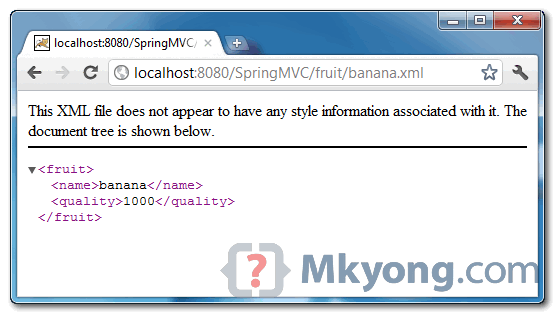
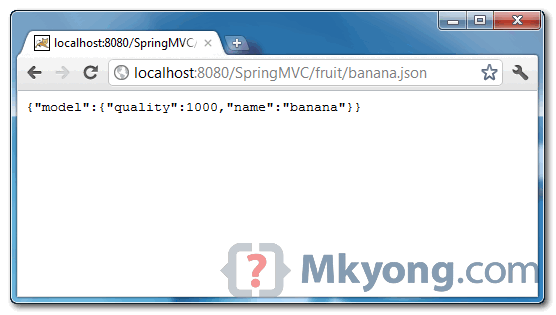
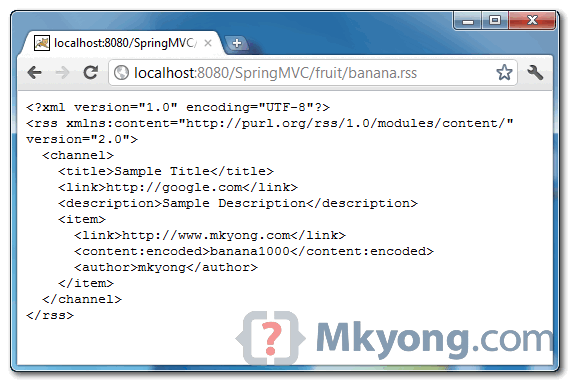
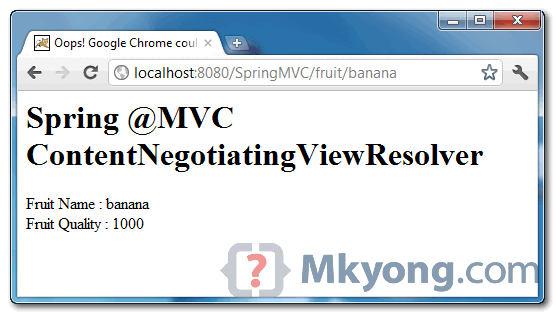
Same model and display in different views, via ContentNegotiatingViewResolver.
http://localhost:8080/SpringMVC/fruit/banana.xml , display as XML file.
http://localhost:8080/SpringMVC/fruit/banana.json , display as JSON file.
http://localhost:8080/SpringMVC/fruit/banana.rss , display as RSS file.
http://localhost:8080/SpringMVC/fruit/banana , display as JSP page.

I have Error happen at rssfeed. java class i update jar not resolved
org.springframework.beans.factory.CannotLoadBeanClassException: Cannot find class [com.mkyong.common.rss.RssFeedView] for bean with name ‘com.mkyong.common.rss.RssFeedView#660e0f08’ defined in ServletContext resource [/WEB-INF/spring-dispatcher-servlet.xml]; nested exception is java.lang.ClassNotFoundException: com.mkyong.common.rss.RssFeedView
at org.springframework.beans.factory.support.AbstractBeanFactory.resolveBeanClass(AbstractBeanFactory.java:1351)
at org.springframework.beans.factory.support.AbstractAutowireCapableBeanFactory.createBean(AbstractAutowireCapableBeanFactory.java:455)
at org.springframework.beans.factory.support.BeanDefinitionValueResolver.resolveInnerBean(BeanDefinitionValueResolver.java:299)
… 39 more
Caused by: java.l
how to implement it if we are using jdk1.5
I use @Configuration config
source code
@Bean
public ViewResolver viewResolver() throws JAXBException {
Jaxb2Marshaller marshaller = new Jaxb2Marshaller();
marshaller.setClassesToBeBound(XMLClass1.class, XMLClass2.class);
MarshallingView marshallingView = new MarshallingView(marshaller);
marshaller.setMarshallerProperties(
Collections.singletonMap(javax.xml.bind.Marshaller.JAXB_ENCODING, “GBK”));
contentNegotiatingViewResolver.setDefaultViews(Arrays.asList(marshallingView));
//but xml delecaration always ” xml version=”1.0″ encoding=”UTF-8″ standalone=”yes”
}
how to do change others encoding
I want to use the above example with tiles view. Please let me know how can i use tiles view along with all other views
Hello MKYong,
Thanks for the example,Very Helpful.
I’ve created a clientApp for your “spring-3-mvc-contentnegotiationviewresolver-example”, here i’ve created a same class as your example class “Banana.java”.
I want to map the response of this “http://localhost:8080/SpringMVC/fruit/banana.json” to my Banana class.
The exception i’m facing with this is getting an Unrecognized property named “model” in your response. Please help me to resolve this.
Code:-
String url = “http://localhost:8080/SpringMVC/fruit/banana.json”;
Banana banana = restTemplate.getForObject(url,Banana.class);
spring-config.xml is having MappingJacksonHttpMessageConverter configured with RestTemplate.
Problem:- Response is having an Extra Element named “model” that is not in our Banana class.
please assist.
It seems not work in my local.
Due miss the spring-oxm dependency
org.springframework
spring-oxm
${spring.version}
I use spring => 3.2.2.RELEASE.
<dependency>
<groupId>org.springframework</groupId>
<artifactId>spring-oxm</artifactId>
<version>${spring.version}</version>
</dependency>
Hi all
I am just change property name=”packagesToScan” instead of “classesToBeBound”
for org.springframework.oxm.jaxb.Jaxb2Marshaller
however it’s not working. error shows bellow javax.servlet.ServletException: Unable to locate object to be marshalled in model:
any suggestion?
Thanks all
Hello,
Let’s say that we have also vegetable controller, and for vegetable controller we would like use a different implementation of AbstractRssFeedView. Is it possible to tell the ContentNegotiatingViewResolver to use different implementation for different controllers
IF fruit USE com.mkyong.common.rss.RssFeedView
IF vegetable USE com.mkyong.common.rss.SpecialVegetableRssFeedView
I cannot find an example
Thank You
The article was very good, but I have a couple of quick questions if you would be kind enough to answer
1. what is the function or ‘return “list”;’ in the controller? It seems that the view resolver takes its direction from the url extension or the default phrase. What does it do here?
2. If I try to parse the json in a client, I receive an error parsing
{“Fruit”:{“name”:”banana”,”quality”:1000}}
If in my client, I do this
ObjectMapper mapper = new ObjectMapper();
Fruit fruit = mapper.readValue(entity.getContent(), Fruit.class);
or even
Fruit[] fruit = mapper.readValue(entity.getContent(), Fruit[].class);
I get an exception “Caused by: org.codehaus.jackson.JsonParseException: Unexpected character (‘<' (code 60)): expected a valid value (number, String, array, object, 'true', 'false' or 'null')
Any ideas on this?
Thanks
This was a very good article, and really helped me out.
There are two things that might be obvious, but not to me:
1. What is the value of the ‘return “list”;’ in the controller? It seems like the view resolver bases all information on the Accept header or default.
2. I wrote a client to consume the services, but it really doesn’t like the json format
{“Fruit”:{“name”:”banana”,”quality”:1000}}
If I try to read this even as a simple junit test, it can’t parse the json
ObjectMapper mapper = new ObjectMapper();
Fruit fruit = mapper.readValue(entity.getContent(), Fruit.class);
Hi Mkyong,
This is really a great post and very helpful. Is it possible to do everything in one method. For example:
i have one end point which serves as XML, json or html.
Thanks
Can any one tell me the reason why we are invoking with http://localhost:8080/SpringMVC/fruit/banana.xml
http://localhost:8080/SpringMVC/fruit/banana.rss
http://localhost:8080/SpringMVC/fruit/banana.json {.xml,.rss,.json } extensions..after all banana is the value as the input..
I would like to get response as XML with http://localhost:8080/SpringMVC/fruit/banana this URL what should i do? Please help me out……
Hi I am getting following error when hit the url ‘http://localhost:8080/SpringMVC/fruit/banana.xml’.
Unable to locate object to be marshalled in model {org.springframework.validation.BindingResult.model=org.springframework.validation.BeanPropertyBindingResult: 0 errors, model=com.mkyong.common.model.Fruit@169f57e}
Pls Help.
You can use public @ResponseBody Banana getFruit(){}
and must be incluided in your xml file(dispatche-servlet)
must be included in your dispatcher servlet
Hi,
To get rid of model you just need to create a new class which will extend MappingJacksonJsonView and override filterModel method.
Then, in you dispatcher.xml you need to update your bean class “org.springframework.web.servlet.view.json.MappingJacksonJsonView” to the new one you just created.
Hope it will help.
I cant run this application.
when i type url “http://localhost:8080/SpringMVC/fruit/mango.xml”
i got error Handler processing failed; nested exception is java.lang.NoSuchMethodError: org.springframework.oxm.Marshaller.supports(Ljava/lang/Class;)Z
please help me out..
Hi,
Do you have this in your pom.xml:
org.springframework.ws
spring-ws
1.5.0
?
Did you do “mvn install”? Did it work?
Hi Mkyong,
First I would like to thank you for your posts on your website! You did a great job!
About this ContentNegotiatingViewResolver, I’d like to know if it’s possible to put a list of object in the modelMap instead of a simple Object. If yes, what sould be the code to iterate on list on JSP side.
Fro example, something like this:
@Controller
@RequestMapping("/fruit")
public class FruitController {

	@RequestMapping(value="{id}", method = RequestMethod.GET)
	public String getFruitById(@PathVariable BigDecimal id, ModelMap model) {

		final ApplicationContext appContext = new ClassPathXmlApplicationContext("SpringBeans.xml");

		FruitBo fruitBo = (FruitBo) appContext.getBean("fruitBo");
		Fruit f = fruitBo.findById(id);
		model.addAttribute(f);

		return "fruit";
	}

	@RequestMapping(method = RequestMethod.GET)
	public String getFruitAll(ModelMap model) {
		final ApplicationContext appContext = new ClassPathXmlApplicationContext("SpringBeans.xml");
		FruitBo fruitBo = (FruitBo) appContext.getBean("fruitBo");
		List<Fruit> fruit = fruitBo.findAll();
		model.addAttribute(fruit);

		return "fruits";
	}
}
Thanks a lot,
Yes You can do that,
1)- In “dispatcher-servlet.xml” – viewResolver bean add this property
.
2)- in FruitController
replace – model.addAttribute(fruit); with
model.put(“fruitList”, fruit); // key Value Pair.
3)- In Jsp page you have to import JSTL Libraries like below
. and
4)- put your list and itrate over it in jsp page using JSTL like below :
${FRUIT.name}
${FRUIT.quality}
All The Best…!!!
Is there anyone who find the solution to get rid of “model” in json result?
@James: Just try to return the resultant data in a List.
Thanks Deepak but I don’t understand your explanation.
Do you means that return the data itself rather than “list”?
But the method getFruit returns String type, how can I return Fruit type which is variable fruit .
public class FruitController {
@RequestMapping(value=”{fruitName}”, method = RequestMethod.GET)
public String getFruit(@PathVariable String fruitName, ModelMap model) {
Fruit fruit = new Fruit(fruitName, 1000);
model.addAttribute(“model”, fruit);
return “list”;
}
}
Please let me know if I understood wrong.
Thanks
I have the same question.Does anyone know how to do get ride of the annoying {‘model’
Hi
Great post, exactly what I was looking for 🙂
However, it all works except for the jsp view… just get a 404 and a message in the log saying..
WARNING: No mapping found for HTTP request with URI [/view-resolver/WEB-INF/pages/list.jsp] in DispatcherServlet with name ‘view-resolver’
Any ideas ?
Cheers
Graeme
Ooops My bad…. created my own version of the project and had /* in the servlet mapping instead of /
Interesting though that it only causes the jsp view to fail
I had the same issue as you but now I’ve changed the servlet mapping to / it works great now. I guess only the jsp was failing as the .json and .xml url’s had an extension where as /fruit doesn’t have an extension but it now means no need for .htm or .do in urls 🙂
Hi,
Don’t work for post method.I wan’t post method example.Help me.
Hi. Very nice post. Now, I have a question: there is a way of avoid to display the attribute name on the JSON view? I mean, in this example, I don’t want to see ‘{“model”:’
Thanks!
Is there anyone who find the solution to get rid of “model”?
Hi,
It works great when executed in Springs 2.7.1 toolkit but fails with the below error when executed in Springs toolkit 2.9 –
Error:
SEVERE: Context initialization failed
org.springframework.beans.factory.BeanCreationException: Error creating bean with name ‘org.springframework.web.servlet.view.ContentNegotiatingViewResolver#0’
servlet file here again
First, it is a great article, I appreciate your efforts and passion. I am trying exactly similar to your post, but xstream parser. Even with json portion commented, I always get json content only no matter what extension is specified at the end (.xml/.json). I was wondering should I move using JAXB instead xstream
Here is the servlet.xml file
<!–
–>
<!–
–>
com.xyz.model.messenger.XYZMessage
<!–
–>
@RequestMapping(value = “/publishMessage”, method = RequestMethod.POST)
@ResponseBody
public XYZMessage publishMessage(@RequestBody String xml) {
//System.out.println(“Message Received–>” + xml);
log.debug(“Publish Message Received\n” + xml);
XYZMessage XYZMessage = XStreamParser.convertToXYZMessage(xml);
try{
MessageValidator.validatePublishedMessage(vpnsMessage);
}catch(Exception e){
}
return XYZMessage ;
}
I apreciate your help
in your controller, try remove @Responsebody for the .xml
Great article, one of the best I have found. One question – what if I want to restrict the content type for a particular controller. For example I want a controller to only respond only to json request. I edited the mvc-dispatcher-servlet.xml to respect headers: and created a controller:
@Controller
@RequestMapping("/api")
public class ApiController {

@RequestMapping(value="{aName}", method = RequestMethod.GET, headers = {"Accept=application/json"})
	public String doApi(@PathVariable String aName,	ModelMap model) {

		Fruit fruit = new Fruit(aName, 1000);
		model.addAttribute("model", fruit);

		return "list";

	}

}
but a call to …/api/test.json yields
HTTP Status 404, The requested resource () is not available.
Is this a possible tasks?
Thanks!
If i change RequestMethod.GET to RequestMethod.Post rss feed opening as new file in browser . Can anypone help me. I need to pass 3 RSS feed url from UI to backend using post method. Here I am getting problem.