In Spring 3, you can enable “mvc:annotation-driven” to support JSR303 bean validation via @Valid annotation, if any JSR 303 validator framework on the classpath.
Hibernate Validator is the reference implementation for JSR 303
In this tutorial, we show you how to integrate Hibernate validator with Spring MVC, via @Valid annotation, to perform bean validation in a HTML form.
Technologies used :
- Spring 3.0.5.RELEASE
- Hibernate Validator 4.2.0.Final
- JDK 1.6
- Eclipse 3.6
- Maven 3
1. Project Dependencies
Hibernate validator is available at JBoss public repository.
	<repositories>
		<repository>
			<id>JBoss repository</id>
			<url>http://repository.jboss.org/nexus/content/groups/public/</url>
		</repository>
	</repositories>

	<properties>
		<spring.version>3.0.5.RELEASE</spring.version>
	</properties>

	<dependencies>

		<!-- Spring 3 dependencies -->
		<dependency>
			<groupId>org.springframework</groupId>
			<artifactId>spring-core</artifactId>
			<version>${spring.version}</version>
		</dependency>

		<dependency>
			<groupId>org.springframework</groupId>
			<artifactId>spring-web</artifactId>
			<version>${spring.version}</version>
		</dependency>

		<dependency>
			<groupId>org.springframework</groupId>
			<artifactId>spring-webmvc</artifactId>
			<version>${spring.version}</version>
		</dependency>

		<!-- Hibernate Validator -->
		<dependency>
			<groupId>org.hibernate</groupId>
			<artifactId>hibernate-validator</artifactId>
			<version>4.2.0.Final</version>
		</dependency>

	</dependencies>
2. JSR303 Bean Validation
A simple POJO, annotated with Hibernate validator annotation.
Refer to this Hibernate validator documentation for detail explanation
package com.mkyong.common.model;

import org.hibernate.validator.constraints.NotEmpty;
import org.hibernate.validator.constraints.Range;

public class Customer {

	@NotEmpty //make sure name is not empty
	String name;

	@Range(min = 1, max = 150) //age need between 1 and 150
	int age;

	//getter and setter methods

}
3. Controller + @Valid
For validation to work, just annotate the “JSR annotated model object” via @Valid. That’s all, other stuff is just a normal Spring MVC form handling.
package com.mkyong.common.controller;

import javax.validation.Valid;
import org.springframework.stereotype.Controller;
import org.springframework.ui.ModelMap;
import org.springframework.validation.BindingResult;
import org.springframework.web.bind.annotation.RequestMapping;
import org.springframework.web.bind.annotation.RequestMethod;
import com.mkyong.common.model.Customer;

@Controller
@RequestMapping("/customer")
public class SignUpController {

	@RequestMapping(value = "/signup", method = RequestMethod.POST)
	public String addCustomer(@Valid Customer customer, BindingResult result) {

		if (result.hasErrors()) {
			return "SignUpForm";
		} else {
			return "Done";
		}

	}

	@RequestMapping(method = RequestMethod.GET)
	public String displayCustomerForm(ModelMap model) {

		model.addAttribute("customer", new Customer());
		return "SignUpForm";

	}

}
4. Error Message
By default, if validation failed.
@NotEmptywill display “may not be empty”@Rangewill display “must be between 1 and 150”
You can override it easily, create a properties with “key” and message. To know which @annotation bind to which key, just debug it and view value inside “BindingResult result“. Normally, the key is “@Annotation Name.object.fieldname“.
File : messages.properties
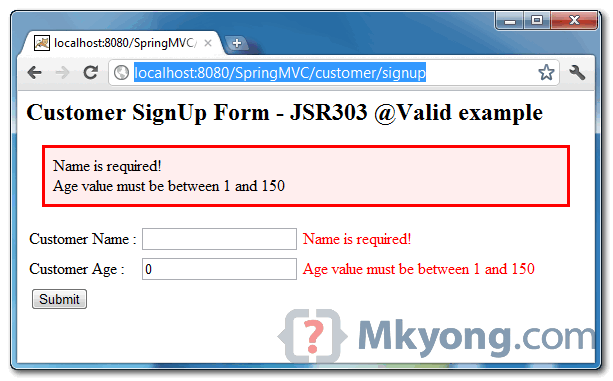
NotEmpty.customer.name = Name is required!
Range.customer.age = Age value must be between 1 and 150
5. mvc:annotation-driven
Enable “mvc:annotation-driven” to make Spring MVC supports JSR303 validator via @Valid, and also bind your properties file.
<beans xmlns="http://www.springframework.org/schema/beans"
	xmlns:context="http://www.springframework.org/schema/context"
	xmlns:mvc="http://www.springframework.org/schema/mvc"
        xmlns:xsi="http://www.w3.org/2001/XMLSchema-instance"
	xsi:schemaLocation="
        http://www.springframework.org/schema/beans
        http://www.springframework.org/schema/beans/spring-beans-3.0.xsd
        http://www.springframework.org/schema/context
        http://www.springframework.org/schema/context/spring-context-3.0.xsd
        http://www.springframework.org/schema/mvc
        http://www.springframework.org/schema/mvc/spring-mvc-3.0.xsd">

	<context:component-scan base-package="com.mkyong.common.controller" />

         <!-- support JSR303 annotation if JSR 303 validation present on classpath -->
	<mvc:annotation-driven />

	<bean id="viewResolver"
		class="org.springframework.web.servlet.view.InternalResourceViewResolver">
		<property name="prefix">
			<value>/WEB-INF/pages/</value>
		</property>
		<property name="suffix">
			<value>.jsp</value>
		</property>
	</bean>

        <!-- bind your messages.properties -->
	<bean class="org.springframework.context.support.ResourceBundleMessageSource"
		id="messageSource">
		<property name="basename" value="messages" />
	</bean>

</beans>
6. JSP Pages
Last one, normal JSP page with Spring form tag library.
File : SignUpForm.jsp
<%@ taglib prefix="form" uri="http://www.springframework.org/tags/form"%>
<html>
<head>
<style>
.error {
	color: #ff0000;
}

.errorblock {
	color: #000;
	background-color: #ffEEEE;
	border: 3px solid #ff0000;
	padding: 8px;
	margin: 16px;
}
</style>
</head>

<body>
	<h2>Customer SignUp Form - JSR303 @Valid example</h2>

	<form:form method="POST" commandName="customer" action="customer/signup">
		<form:errors path="*" cssClass="errorblock" element="div" />
		<table>
			<tr>
				<td>Customer Name :</td>
				<td><form:input path="name" /></td>
				<td><form:errors path="name" cssClass="error" /></td>
			</tr>
			<tr>
				<td>Customer Age :</td>
				<td><form:input path="age" /></td>
				<td><form:errors path="age" cssClass="error" /></td>
			</tr>
			<tr>
				<td colspan="3"><input type="submit" /></td>
			</tr>
		</table>
	</form:form>

</body>
</html>
File : Done.jsp
<html>
<body>
	<h2>Done</h2>
</body>
</html>
6. Demo
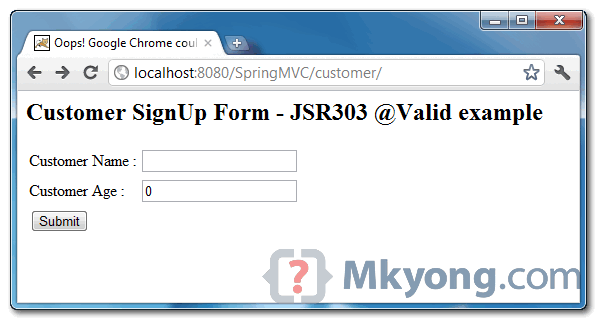
URL : http://localhost:8080/SpringMVC/customer – Customer form page, with 2 text boxes for name and age.
URL : http://localhost:8080/SpringMVC/customer/signup – If you didn’t fill in the form and click on the “submit” button, your customized validation error messages will be displayed.

Howdy just wanted to give you a quick heads up. The words in your article seem to be running off the screen in Ie. gcgkfdededggdecf
message can be configured to read from the property file, but how to have the values (Min, Max, Range, Pattern, etc.) in the property files?
I don’t want the sizes to be hardcoded in the java class
can @Valid and @Requestmapping annotations be used together?
how can i use validation in your customer signup.jsp without hibernate validation and message.properties file in spring3???
I made this project. link : http://blog.naver.com/vest2004/220332230651
I am facing an issue while implementing the same with ajax call..can anybody help me?
http://stackoverflow.com/questions/28656093/spring-4-0-form-validation-issue-using-ajax/28656201?noredirect=1#
this is the link of the question.
Hi mkYong,
I have one question , In Validation Examples you creating references of Customer Model class in.
-1) controllers POST() @Valid Customer customer, here reference is customer.
-2) in controllers GET() ,model.addAttribute(“customer”, new Customer()); here key is customer.
-3) in messages.property file in another example you created NotEmpty.customer.age = age is required, here also we found customer.
-4) In SignUpForm.jsp you mentioned commandName=”customer”,
I am confusing about that command name “customer”. i am not getting to whom that command name pointing?
And most important question is :
Will i have to match all the references of Customer with the same name in Controller’s GET() / Controller’s POST() / messages.properties file/ command name in jsp page ?
let me simplify my question, Can we write
@Valid Customer CUSTOMER, in controllers POST() method and
model.addAttribute(“customer”, new Customer()); in controllers GET() method
commandName=”Customer” in jsp page and
NotEmpty.CusTomeR.age = age is required. in messages.property file …???
why or why not ?
this code is not working it gives 404 status code after clicking the submit button in customer page.
please help me any one how to resolve this problem.
I tried to follow your example but can’t get to work with SpringFramework 4.0.2 in JBoss 7.1.1.Final.
BindingResult always returns false.
Could you please, help?
Is there a way the validation for one parameter could be dependent on the validation of another parameter?
Hi MK,
Thanks for the above example.
My application uses only @RequestParam instead of a command class.
Suppose the above example the request is like below :
@RequestMapping(value = “/signup”, method = RequestMethod.POST)
public ModelAndView addCustomer(@RequestParam(“name”) String custName,@RequestParam(“age”) String custAge,BindingResult result){
….
}
How would you validate the requestparams and display the errors in the input page.
Note : Inorder to get the Input page (/someinoutaction.do) is expensive and calls Web Services.
Hi MK,
Thanks for the above example.
My application uses only @RequestParam instead of a command class.
Suppose the above example the request is like below :
@RequestMapping(value = “/signup”, method = RequestMethod.POST)
public ModelAndView addCustomer(@RequestParam(“name”) String custName,@RequestParam(“age”) String custAge,BindingResult result){
….
}
How would you validate the requestparams and display the errors in the input page.
Note : Inorder to get the Input page (/someinoutaction.do) is expensive and calls Web Services.
Just a quick thank you for your great tutorials. You help many people with them I’m sure 🙂
Thanks alot! I was actually looking for replacing message string in jpa entity with property file value.
I have Tried with injecting apache commonconfig bean to entity through aop. But they gave me errors like we cannot inject any new class as property in entity if it is not a column in the associated table.Then I tried with static resource bundle, getting value from the bundle. But, the message attribute needed constant expression. Finally I have seen your example.
How do you know that we can override the default message? What would you made to think like that? Please guide me how to read and think in the way of compiler / interpretor /
Container? How can we adopt such way of thinking..
awaiting your response..
Thanks and Regards
Venkatram
After wasting hours trying to find an example of how to make the error messages for @Valid friendly / custom I thought I should add it here. The trick is to but your key in {} as in @NotEmpty(message = “{err.msg}”) Otherwise it returns the key instead of the text for the translated key.
pre tag lost in reply. Trying escaped.
Note for the custom error message keys to work, if you do not have already, you will need to add:
<bean id=”messageSource”
class=”org.springframework.context.support.ReloadableResourceBundleMessageSource”>
<property name=”basename”
value=”WEB-INF/classes/messages” />
<property name=”defaultEncoding” value=”UTF-8″ />
</bean>
<bean id=”validator” class=”org.springframework.validation.beanvalidation.LocalValidatorFactoryBean”>
<property name=”validationMessageSource” ref=”messageSource” />
</bean>
<mvc:annotation-driven validator=”validator” />
To your servlet.xml
hi avatar,
how can i use validation in your customer signup.jsp without hibernate validation and message.properties file in spring3??? can u solve such type of requirement???
Thanks, nice post.
Using @Valid results in a HTTP 400 response for me
Hi,
I am getting this error when i am deploying my application.
WARNING: No mapping found for HTTP request with URI [/] in DispatcherServlet with name ‘mvc-dispatcher’.
I’m pretty sure this setup will barf if someone were to enter a non-integer into the “age” form field , like the letter “A”, and tried to submit.
Can we implement jsr 303 validation with ajax instead of form submit in spring
thanks
gill
Hi, your tutorial is very helpful, but I wanna ask you what should I do if I have a insert book page, which has a dropdownlist controller bound data from database. In controller, when (result.hasError()) return ‘true’, if i return ‘book’, the error message display very well, but the data of dropdownlist has been lost. Can you help me?
Hi,
Thanks for sharing helpful tutorial.
I have a bean which contains two fields password and confirm password.
I compare these fields and add below code if they are different.
result.rejectValue("password", "exception.registration.password.mismatch","Password Mismatch");However, this message doesn’t display on JSP in fact it isn’t added to errors.
Can you please guide as soon as possible?
Thanks
Problem Resolved !! 🙂
Its not mentioned that this example would require a validations-api jar as well. After looking at the Pom.xml I thought this is all what is needed and spent a couple of hours trying to figure out why my project is showing error.
Is there a option to this Hibernate validation or any annotated validation framework in standalone Java application using Spring 3.0 framework . Thanks.
I have down loaded same project and imported into eclipse.
But I’m not getting any errors for bad inputs also. Can any body help me on this.
The following code always returning false.
Thanks
Sunil
sorry! ,
After coping hibernate jar into server lib , working fine.
Anyway Thanks MkYoung 🙂
I have the validation working to the point it validates and generates error, but I can’t get it back to my jsp page. If I just return a reference to the page it gives me a 404. If I return a redirect to the page it goes to the page but with no errors. This is in applying your tutorial to my own project.
The start of the function in my controller is as follows
@RequestMapping(value = "/createProject", method = RequestMethod.POST) public String createProject(HttpServletRequest request, HttpServletResponse response, @Valid Project project, BindingResult result) { if(result.hasErrors()) { //request.setAttribute("errors", errors); return "project/creatProject"; }Of note I am using an internalResourceViewResolver in my xml. Can it be done with that view resolver?
Never mind got it sorted out. Typo in createProject.
Wonderful work! That is the kind of information that are supposed to be shared across the net.
Disgrace on the seek engines for no longer positioning this submit higher!
Come on over and discuss with my site . Thanks =)
Hi, thanks for you example.
Let one comment.
When me print (example)
Name: a
Age: 180
I’m redirect to “http://localhost:8080/customer/customer/signup”
with “Error 404 The requested resource is not available.”
(sorry for my english)
I get the same result as ColorAnt. The first time pressing ‘Submit Query’ on the SignUpForm.jsp, the subsequent URL and mapping to the controller is fine. The first time, the URL is: http://localhost:8080/customer/signup.
The second time, if I purposefully input incorrect data again, and press ‘Submit Query’ on the SignUpForm.jsp again, the URL is http://localhost:8080/customer/customer/signup.
And I have not spent too long a time trying to figure out a solution.
This worked:
And then, set the URL for the action this way:
<c:url value="/customer/signup" var="theAction" />
<form:form method="POST" commandName="customer" action="${theAction}">
For certain, not an elegant solution – but one that works.
I’ve got problem. I imported this project like a maven project, but when I start this application http://localhost:8080/SpringMVC/customer show 404 – /SpringMVC/customer. But I tried write my app with using this tutorial, validate working but I cannot see errors messages in my form 🙁
Solved, with your tutorial there was a problem with Tomcat now it works, my probles resolved too..thanks for you tutorial 🙂
It is very helpful that you have taken the time to provide these Spring MVC tutorials across your web site. Great work!
I suggest adding usage of ${pageContext.request.contextPath}/ to the form action on SignUpForm.jsp
action="${pageContext.request.contextPath}/customer/signup"Without this, entering invalid inputs and hitting Submit twice in a row will lead to an error (404 page not found, No mapping found for HTTP request with URI [/SpringMVC/customer/customer/signup – note double reference to “customer”). Of course, that may just be the way that I am deploying it — i.e. via the Maven Tomcat plugin, i.e. mvn tomcat:run
Thanks for your feedback 🙂
Thank you @Chris!
Thanks, Chris… that’s exactly what i was looking for… solved my issue.
and also thanks to mkyong… simple, clear and helpful tutorial
Thanks for this! I encounter this kind of problem several times and really do not know what causes the problem. When putting this code of yours into mine,everything works like a magic. Thanks a lot.
hey there and thank you in your info ? I’ve certainly picked up anything new from right here. I did on the other hand experience a few technical points the usage of this site, since I skilled to reload the website a lot of instances prior to I may get it to load properly. I were brooding about if your hosting is OK? Now not that I’m complaining, however slow loading circumstances instances will sometimes affect your placement in google and could damage your high-quality score if ads and marketing with Adwords. Well I am including this RSS to my e-mail and can look out for much extra of your respective exciting content. Make sure you replace this once more very soon..
Hi,
Would like to know if there is any way for suppressing the validations whenever they are not required for a particular transaction ?
Your response is eagerly awaited .
Thanks
Pratyusha
I too would like to know how/if at all possible it is to do this
Hi, can you let me know how to validate the variable that contains object reference? for eg I want to validate Address domain object which is referred in Customer class as given below.
public class Customer { String name; int age; Address address; //getter and setter methods } public class Address{ String postcode; int houseNumber; String roadName; //getter and setter methods }Hi
i am trying the same example but in case of error when i redirect to the previous page(in your example it is signup page) i got the error
the second time i am not adding the attribute in model map
Here is the controller class
package com.bansal.controller; import javax.validation.Valid; import org.springframework.beans.factory.annotation.Autowired; import org.springframework.stereotype.Controller; import org.springframework.ui.Model; import org.springframework.ui.ModelMap; import org.springframework.validation.BindingResult; import org.springframework.web.bind.annotation.RequestMapping; import org.springframework.web.bind.annotation.RequestMethod; import com.bansal.model.MyModel; import com.bansal.model.UserInformation; @Controller public class MyController { String formName; MyModel modelObject; @Autowired MyController(MyModel passedModel) { modelObject = passedModel; } @RequestMapping(value = "/RegistartionPage") public String showRegistarionForm(ModelMap model) { model.addAttribute("NewRegistrationPageModel", new UserInformation()); return "NewRegistrationPageView"; } @RequestMapping(value = "/showInformation", method = RequestMethod.POST) public String showInformation(@Valid UserInformation userInfo, BindingResult result,ModelMap model) { if (result.hasErrors()) { return "NewRegistrationPageView"; } model.addAttribute( "UserInfomationPageModel",userInfo); return "UserInfomationPageView"; } } <preHi,
I tried the example, it compiles and runs, however when I just click SUBMIT with no values entered in the form, the bean does not validate. There is no error, and it just passes through the Done page.
Any suggestions would be appreciated.
Thanks J
Same problem here. Find any solution yet?
Previous version had “signup” point to a wrong path, try download the example-2, just tested in my development environment, it’s working fine.
Hi,
Could you please explain how to test the validator code with Spring3.0.6 and Junit4.8.2??
I have a junit test class which tests a SpringMVC Controller (springmvc 3.x). I intend to test the JSR 303 validation using Junit and Spring, using annotations.
I am using the following jars for validation:
validation-api 1.0.0.GA and hibernate-validator 4.2.0.Final
Here’s the code snippet:
LoginController:

public ModelAndView authenticate(HttpServletRequest request,
			@Valid LoginForm loginForm, BindingResult result) {

....

if (result.hasErrors()) {
  //Redirect to error page
}

...
}
LoginForm: public class LoginForm implements Serializable { @NotNull(message="User Name cannot be null") @Size(min = 4, max = 30,message = "User Name must be of length 4") private String username; @NotNull(message="Password cannot be null") @Size(min = 6, max = 30,message = "Password must be of length 6") private String password; //Remaining fields }LoginControllerTest: @ContextConfiguration(locations = { "classpath:/spring/app-context-test.xml" }) @RunWith(SpringJUnit4ClassRunner.class) public class LoginControllerTest extends AbstractTransactionalJUnit4SpringContextTest{ @Autowired private LoginController loginController; @Test public final void testAuthenticateWithNullParameters() { BindingResult result = new DirectFieldBindingResult(loginForm, "loginForm"); loginForm.setUsername(null); loginForm.setPassword(null); ModelAndView mav = loginController.authenticate(mockHttpServletRequest,loginForm, result); ModelAndViewAssert.assertViewName(mav, "userLogin"); //Expecting 2 errors here assertEquals(2, result.getErrorCount()); } }Could you please help us how to go about this?
Thanks & Regards,
Suresh S
hi, I can’t deploy this war file to jboss 6.
Here is shown as follow:
22:31:05,856 INFO [org.jboss.web.tomcat.service.deployers.TomcatDeployment] deploy, ctxPath=/SpringMVC 22:31:05,910 INFO [org.apache.catalina.core.ContainerBase.[jboss.web].[localhost].[/SpringMVC]] Initializing Spring root WebApplicationContext 22:31:05,989 ERROR [STDERR] SLF4J: slf4j-api 1.6.x (or later) is incompatible with this binding. 22:31:05,990 ERROR [STDERR] SLF4J: Your binding is version 1.5.5 or earlier. 22:31:05,990 ERROR [STDERR] SLF4J: Upgrade your binding to version 1.6.x. or 2.0.x 22:31:05,990 ERROR [org.springframework.web.context.ContextLoader] Context initialization failed: org.springframework.beans.factory.BeanCreationException: Error creating bean with name 'org.springframework.validation.beanvalidation.LocalValidatorFactoryBean#0': Invocation of init method failed; nested exception is java.lang.NoSuchMethodError: org.slf4j.impl.StaticLoggerBinder.getSingleton()Lorg/slf4j/impl/StaticLoggerBinder; at org.springframework.beans.factory.support.AbstractAutowireCapableBeanFactory.initializeBean(AbstractAutowireCapableBeanFactory.java:1420) [:3.0.6.RELEASE] at org.springframework.beans.factory.support.AbstractAutowireCapableBeanFactory.doCreateBean(AbstractAutowireCapableBeanFactory.java:519) [:3.0.6.RELEASE]The solution is stated in your error message
Hi i the above application is working good . But how to restrict username with only character. suppose if i am entering the any interger value instead of character the above application is working . how can i validate only character is there any annotation to restrict only character.
I think this example has some problems,
in the file : SignUpForm.jsp
Customer SignUp Form – JSR303 @Valid example
the action maybe can’t get the
URL : http://localhost:8080/SpringMVC/customer – Customer form page, with 2 text boxes for name and age
in this page when i click the submit button i got a 404 error,the url like:
http://localhost:8080/SpringMVC/signup
is there anywhere should to be modified
@weirongjia
same problem with me if anybody find problem please reply
thanks in advance
I modified the origin code as below
it seems work
.error {
color: #ff0000;
}
.errorblock {
color: #000;
background-color: #ffEEEE;
border: 3px solid #ff0000;
padding: 8px;
margin: 16px;
}
Spring JSR303
Customer SignUp Form – JSR303 @Valid example
<form:form method="post" commandName="stu" action= "”>
Name
Password
Age
email
form:form method=”post” commandName=”stu” action= “”
hey i really unable to understand what u r trying to explain me.. sorry but i cant get u.
please post in proper format
it worked when i set action of form to “customer/signup” not only “signup”
@weirongjia is right, thanks, the screenshot is point to “customer/signup” as well, just no idea why jsp action will point to “signup”? My fault, and sorry for any inconvenience caused.
Article updated and tested, it’s working fine now.