In Spring 3, one of the feature of “mvc:annotation-driven“, is support for convert object to/from XML file, if JAXB is in project classpath.
In this tutorial, we show you how to convert a return object into XML format and return it back to user via Spring @MVC framework.
Technologies used :
- Spring 3.0.5.RELEASE
- JDK 1.6
- Eclipse 3.6
- Maven 3
JAXB is included in JDK6, so, you do not need to include JAXB library manually, as long as object is annotated with JAXB annotation, Spring will convert it into XML format automatically.
1. Project Dependencies
No extra dependencies, you need to include Spring MVC in your Maven pom.xml only.
	<properties>
		<spring.version>3.0.5.RELEASE</spring.version>
	</properties>

	<dependencies>

		<!-- Spring 3 dependencies -->
		<dependency>
			<groupId>org.springframework</groupId>
			<artifactId>spring-core</artifactId>
			<version>${spring.version}</version>
		</dependency>

		<dependency>
			<groupId>org.springframework</groupId>
			<artifactId>spring-web</artifactId>
			<version>${spring.version}</version>
		</dependency>

		<dependency>
			<groupId>org.springframework</groupId>
			<artifactId>spring-webmvc</artifactId>
			<version>${spring.version}</version>
		</dependency>

	</dependencies>
2. Model + JAXB
A simple POJO model and annotated with JAXB annotation, later convert this object into XML output.
package com.mkyong.common.model;

import javax.xml.bind.annotation.XmlElement;
import javax.xml.bind.annotation.XmlRootElement;

@XmlRootElement(name = "coffee")
public class Coffee {

	String name;
	int quanlity;

	public String getName() {
		return name;
	}

	@XmlElement
	public void setName(String name) {
		this.name = name;
	}

	public int getQuanlity() {
		return quanlity;
	}

	@XmlElement
	public void setQuanlity(int quanlity) {
		this.quanlity = quanlity;
	}

	public Coffee(String name, int quanlity) {
		this.name = name;
		this.quanlity = quanlity;
	}

	public Coffee() {
	}

}
3. Controller
Add “@ResponseBody” in the method return value, no much detail in the Spring documentation.
As i know, when Spring see
- Object annotated with JAXB
- JAXB library existed in classpath
- “mvc:annotation-driven” is enabled
- Return method annotated with @ResponseBody
It will handle the conversion automatically.
package com.mkyong.common.controller;

import org.springframework.stereotype.Controller;
import org.springframework.web.bind.annotation.PathVariable;
import org.springframework.web.bind.annotation.RequestMapping;
import org.springframework.web.bind.annotation.RequestMethod;
import org.springframework.web.bind.annotation.ResponseBody;
import com.mkyong.common.model.Coffee;

@Controller
@RequestMapping("/coffee")
public class XMLController {

	@RequestMapping(value="{name}", method = RequestMethod.GET)
	public @ResponseBody Coffee getCoffeeInXML(@PathVariable String name) {

		Coffee coffee = new Coffee(name, 100);

		return coffee;

	}

}
4. mvc:annotation-driven
In one of your Spring configuration XML file, enable “mvc:annotation-driven“.
<beans xmlns="http://www.springframework.org/schema/beans"
	xmlns:context="http://www.springframework.org/schema/context"
	xmlns:mvc="http://www.springframework.org/schema/mvc"
	xmlns:xsi="http://www.w3.org/2001/XMLSchema-instance"
	xsi:schemaLocation="
        http://www.springframework.org/schema/beans
        http://www.springframework.org/schema/beans/spring-beans-3.0.xsd
        http://www.springframework.org/schema/context
        http://www.springframework.org/schema/context/spring-context-3.0.xsd
        http://www.springframework.org/schema/mvc
        http://www.springframework.org/schema/mvc/spring-mvc-3.0.xsd">

	<context:component-scan base-package="com.mkyong.common.controller" />

	<mvc:annotation-driven />

</beans>
Alternatively, you can declares “spring-oxm.jar” dependency and include following
MarshallingView, to handle the conversion. With this method, you don’t need annotate @ResponseBody in your method.
<beans ...>
	<bean class="org.springframework.web.servlet.view.BeanNameViewResolver" />

	<bean id="xmlViewer"
		class="org.springframework.web.servlet.view.xml.MarshallingView">
		<constructor-arg>
		  <bean class="org.springframework.oxm.jaxb.Jaxb2Marshaller">
			<property name="classesToBeBound">
				<list>
					<value>com.mkyong.common.model.Coffee</value>
				</list>
			</property>
		  </bean>
		</constructor-arg>
	</bean>
</beans>
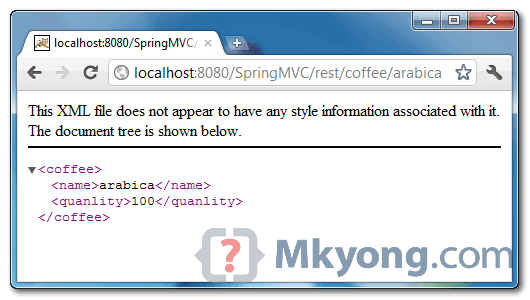
5. Demo
URL : http://localhost:8080/SpringMVC/rest/coffee/arabica

You have a problem writing this way? How do'<'output number?
Hi All, I follow the same code and project executed successfully, but I’m unable to get XML format output, its output on browser is “arabika 100”
In the other browsers example works perfect in any case: with “.xml” and without “.xml”
Thank you so much! You example help me a lot!!
Could i make a little notice : if you want the example works in IE browser – use in the end “.xml”. I mean value of RequestMapping
I want to add one information to the xml header. I used
It did not help
Want to add
My text is not appearing.
I basically want to add a Doctype with a reference to a dtd file in the Doctype element
I am using servlet with Spring as given below. This class has a field which has been AutoWired. I want to use xml configuration for this class and remove off annotation completely . Please let me know how to do this
@Controller(“oauth2Servlet”)
final public class Oauth2Servlet extends HttpServlet implements HttpRequestHandler
…… Web.xml configuration
Oauth2Servlet
oauth2Servlet
org.springframework.web.context.support.HttpRequestHandlerServlet
1
oauth2Servlet
/oauth2
public @ResponseBody Coffee getCoffeeInXML(@RequestBody Coffee coffee){
String name = coffee.getname;
int name = coffee.getQuantity;
}
Is this correct way to use @RequestBody xml to pojo mapping
In Spring MVC
i use AJAX
want @controller return “Object also convert XML-String”
(response header text/plain not application/xml)
how to set spriong config
Hi it is working fine for list also,
Write a wrapper class for coffee its working , great tutorial , thanks for help
Hi I am getting a 406 error, please help
in this case.
How to change “coffee Object” the other xml declaration
how to set xml data use another encoding
when i run the application . it breaks on hitting the specified url. Pls help.
Hi Mark change config to follow .will not working why?
com.mkyong.common.model
Hi Mark change config to follow .will not working why?
com.mkyong.common.model
Hi Mark change config to packagesToScan it’s not working anything need pay attention to?
<pre lang="language" I am getting below error , while using above example in my system, I have jdk1.6 that is why i did not include any jaxb in my classpath.
Thanks alot Mr.MKYong
Ah, seem like fine following the case which return is collection:
@ResponseBody @RequestMapping(value="/name/{name}", produces = "application/xml", method= RequestMethod.GET) public EmployeeList getEmployeeByName(Model model, @PathVariable String name){ List<Employee> e = empService.selectEmployeeByName(name); EmployeeList abc= new EmployeeList(e); // EmployeeList just is List return abc; }Additionally, in dispatcher file:
<bean class="org.springframework.oxm.jaxb.Jaxb2Marshaller"> <property name="classesToBeBound"> <list> <value>com.abc.Employee</value> <value>com.abc.EmployeeList</value> </list> </property> </bean>I solved the problem, thank you very much for your answer, thank the authors often articles
I tried for a List and could not make it to work.
Please help with a working code.
You mentioned EmployeeList is just a list…. could you please post that code ?
Many thanks
Thanks for this tutorial..
It really helped me a lot in setting up Spring restful services..
Great tutorial… i got problems when i do for a List. i’d made a Coffees wrapper class for the list but i got repeated elements 🙁
Simple and Effective tutorial!.. Keep up the good work Mr.young
What if i want to return collection of coffee ?
I have same question, too.