By default, Eclipse’s editor will not display line numbers, it’s no good for debugging. Here’s a tip to show you how to turn on the “display line numbers” feature in Eclipse.
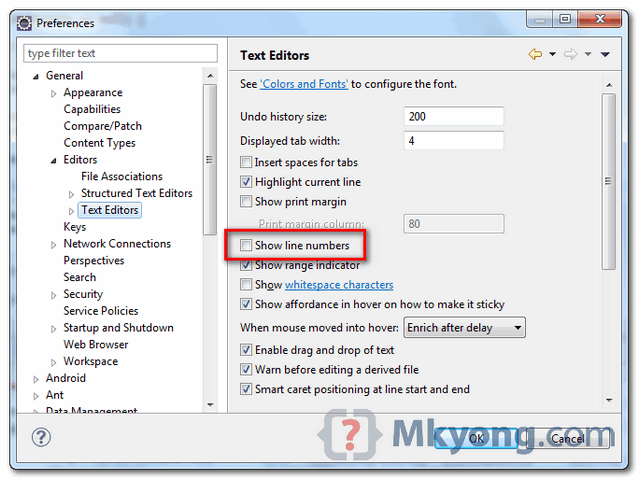
In Eclipse IDE, select “Windows” > “Preference” > “General” > “Editors” > “Text Editors” , check on the “Show line numbers” option.
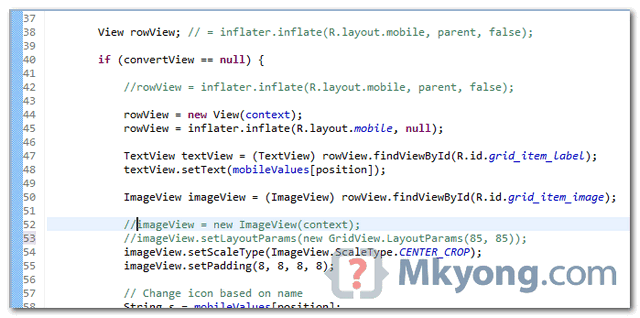
See result.

why IDEs dont do this by default I’ll never know . _.
TY!!
thanks
Ok
thanks, it was clear and simple
Thank you, it would be hard to find it without your help.
thanks
thank you thank you thank you
thanks mate.!!! thanks a ton.!!!
thanks 🙂
Thank U very much, I perfectly got it.
thanks
Thumbs Up. They bury it deep.
thanks….for saving time
Thanks! easy to understand.
thanks your help
I want to thank you for the clear and easy steps. It took me about a minute or so following your directions.
THANKS for your service!!!!
Its working for me
thanks
Hi Sir,
Your post solved my problem.Thank You.
~Chaitanya
Thanks it solves my problem easily!!!
You, sir, have helped me in my journeys to code a minecraft client. 😉 love you man
thanks men
Very helpful – I’m surprised that eclipse doesn’t display line-numbers by default, essential for de-bug especially as line-numbers are reported in LogCat. Thanks again, Neil
Thanks. Really help
Thank you!! 🙂
Perfect! Thanks.
This website is Excellent. Thanks a lot…!
Is there any other websites for C++ similar to this?
In Mac OS , you have to go Eclipse > Preferences > General > Editors > Text Editors or use short command “CMD+,” and than follow General > Editors > Text Editors
you are awesome 🙂
Thanks for the lot of helpful postings
Thanks for the tip on line numbers!
Thanks for the tip,you always have the answer!!
Another way to do this is:
In a File, Right click on Left Gray Bar and choose Show Line Numbers.
Thank you, Sri, this was what I needed!
in this file
[workspace].metadata.plugins\org.eclipse.core.runtime.settings\org.eclipse.ui.editors.prefs
make sure the parameter
lineNumberColor=0,0,0
is NOT 255,255, 255, which is white