How to decompile class in Java

This article shows how to decompile Java class in Eclipse IDE, IntelliJ IDEA, and command line. Table of contents 1. Java Decompilers 2. Decompile Java class in Eclipse IDE 3. Decompile Java class in IntelliJ IDEA 4. Decompile Java class in Command Line (FernFlower) 5. References 1. Java Decompilers Java decompiler can convert .class files …

Read more

No more mvn eclipse:eclipse, what’s next?

The Apache Maven Eclipse Plugin is retired, no more following commands # support eclipse ide $ mvn eclipse:eclipse # web project $ mvn eclipse:eclipse -Dwtpversion=2.0 What is the equivalent in Eclipse IDE? 1. Solution Please use Eclipse Maven Integration (m2e). Latest Eclipse IDE has bundled the m2e plugin : 2. How to use m2e? The …

Read more

Eclipse IDE – No compiler is provided in this environment. Perhaps you are running on a JRE rather than a JDK?

Maven compile a project in Eclipse IDE, but hits the following error messages : $ mvn clean compile [ERROR] COMPILATION ERROR : [INFO] ————————————————————- [ERROR] No compiler is provided in this environment. Perhaps you are running on a JRE rather than a JDK? [INFO] 1 error [INFO] ————————————————————- [INFO] ———————————————————————— [INFO] BUILD FAILURE [INFO] ———————————————————————— …

Read more

Eclipse – How to know this class belongs to which JAR

For example, I want to know this SpringBootApplication class belongs to which JAR or dependency : import org.springframework.boot.SpringApplication; import org.springframework.boot.autoconfigure.SpringBootApplication; @SpringBootApplication public class SpringBootWebApplication { public static void main(String[] args) throws Exception { SpringApplication.run(SpringBootWebApplication.class, args); } } Solution In Eclipse IDE, double clicks on the class name, press CTRL + SHIFT + T (win/*nix) or …

Read more

How to change Eclipse theme

In this tutorial, we will show you how to change the Eclipse Theme. Tools used : Eclipse 4.4 Luna, works on earlier version. Eclipse Color Theme Plugin Figure : This is how your final Eclipse IDE looks like 1. Install Eclipse Color Theme Plugin Install the theme plugin and restart Eclipse. Eclipse menu -> Help …

Read more

Maven – Get source code for Jar

In Maven, you can get source code for project dependencies in most IDEs like this : $ mvn dependency:sources $ mvn dependency:resolve -Dclassifier=javadoc Get source code for Jar Get javadoc for Jar, normally, developers don’t provide this. 1. Eclipse IDE In Eclipse IDE, it’s better to use the maven eclipse plugin: $ mvn eclipse:eclipse -DdownloadSources=true …

Read more

Where is Eclipse deploy web application – Tomcat

By default Eclipse deploys web application to a internal plugin folder called wtpwebapps, which is located in the following directory : {Your_Workspace}/.metadata/.plugins/org.eclipse.wst.server.core/tmp{number}/wtpwebapps #Example 1 – Windows C:\Users\mkyong\workspace\.metadata\.plugins\org.eclipse.wst.server.core\tmp0\wtpwebapps #Example 2 – Mac OSX /Users/mkyong/Documents/workspace/.metadata/.plugins/org.eclipse.wst.server.core/tmp0/wtpwebapps How it works In Server view, double clicks on the “Tomcat Server”, the deployment work is defined in the Server Locations To …

Read more

How to debug Ant Ivy project in Eclipse IDE

In this tutorial, we will show you how to debug an Ant-Ivy web project in Eclipse IDE. Technologies used : Eclipse 4.2 Eclipse Tomcat Plugin Ant 1.9.4 Apache IvyDE Spring 4.1.3.RELEASE Note Previous Ant Spring MVC web project will be reused. 1. Install Apache IvyDE Install Apache IvyDE, it integrates Ivy into Eclipse IDE. Restart …

Read more

How to configure hot deploy in Eclipse

In this tutorial, we will show you how to configure Eclipse debugger to support hot deploy, hot swap or hot code replace without restarting the Server, this speed development a lot. Environment : Eclipse 4.4 (Supported in older version as well) Eclipse Tomcat Plugin 1. Hot deploy example Review a simple hot deploy example, code …

Read more

Eclipse – red-x icon didn’t display on project explorer

In Eclipse IDE, If a project contains errors, a small “red-x” icon will be displayed in the files that are causing the error. This useful feature is supported in Java related perspectives only, for example, “Package Explorer”. 1. Problem Personally, I prefer to use the “Project Explorer” perspective (pure folder structure), but the “red-x” icon …

Read more

Eclipse – SimpleTagSupport was not found on the Java Build Path

Here is the development environment Eclipse 4.3 Kepler Java 1.7 Spring 3.2, a MVC project using JSP view. 1. Problem Recently, Eclipse IDE is prompting following error message on top of all of the .tag file. The superclass "javax.servlet.jsp.tagext.SimpleTagSupport" was not found on the Java Build Path. See figure : P.S The SimpleTagSupport class is …

Read more

Eclipse + Tomcat – java.lang.OutOfMemoryError: Java heap space

In Eclipse IDE, run a Java web application with Tomcat server plugin, but the console prompts Exception in thread "x" java.lang.OutOfMemoryError: Java heap space 1. Solution – Increase Heap Size in Tomcat By default, Tomcat allocated a small amount of heap size. To solve it, you need to increase the Tomcat’s heap size manually. 1.1 …

Read more

Eclipse – java.lang.OutOfMemoryError: Java heap space

This article shows how to solve the java.lang.OutOfMemoryError: Java heap space in Eclipse IDE. Table of contents 1. Eclipse – OutOfMemoryError: Java heap space 2. Temporary fix – Increase the heap size 3. eclipse.ini 4. The solution, find the reason behind the heap size error. 5. References 1. Eclipse – OutOfMemoryError: Java heap space In …

Read more

Eclipse – How to attach JDK source code

This article shows you how to attach the JDK source code in Eclipse IDE. In Eclipse, select Windows -> Preferences -> Java -> Installed JREs , expands rt.jar, select “Source attachment” and find the src.zip from your disk drive. P.S JDK source code is inside the src.zip. Note You may interest at this article – …

Read more

Access restriction: The type BASE64Encoder is not accessible due to restriction

Problem Downloaded a Java sample from Alexa API on Amazon service, imports it into Eclipse, but unable to compile and hits following “Access restriction” errors : Access restriction: The type BASE64Encoder is not accessible due to restriction on required library /System/Library/Java/JavaVirtualMachines/1.6.0.jdk/Contents/Classes/classes.jar P.S Using JDK 1.6 and Eclipse IDE 4.2 import sun.misc.BASE64Encoder; // Access restriction error …

Read more

Convert Java Project to Web Project in Eclipse

This tutorial shows you how to convert a Java project to Java web application project in Eclipse 4.2, it should work in older version as well. 1. Java Project A simple Java project. 2. Project Facets Right click on the project properties. Select “Project Facets“, and click “convert to faceted form…” Check “Dynamic Web Module” …

Read more

Eclipse code assist in Maven pom.xml

By default, code assist in editing a pom.xml is NOT supported in Eclipse IDE. It make Maven project hard to maintain, and who will remember who all those tags? Solution You need a pom.xml Maven editor, which is available in m2eclipse plugin. In Eclipse, menu, select “Help” -> “Install New Software”, and put following m2eclipse …

Read more

Generate getters and setters in Eclipse IDE

Still busy writing setters and getters method manually? Actually, Eclipse IDE is able to help you generate the setters and getters method automatically, and this feature is bundle with Eclipse IDE long time ago, surprisingly, many Java developers are not aware of it? See following steps to show you how. 1. Java Pojo A simple …

Read more

PrimeFaces code completion in Eclipse IDE

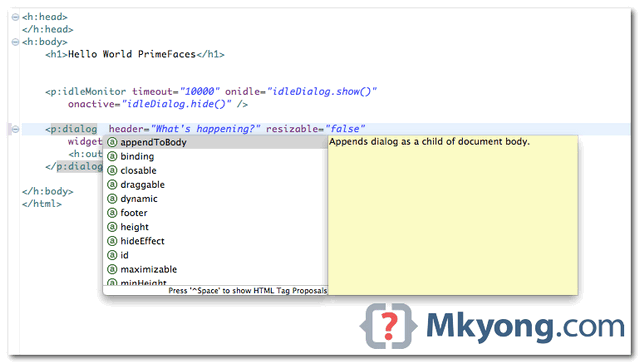
In Eclipse, as long as your JSF + PrimeFaces project with JSF facet enabled, the PrimeFaces code completion is available automatically. Figure : PrimeFaces code assist in Eclipse IDE Tools Tested : JSF 2.1.11 Eclipse 4.2 PrimeFaces 3.3 Figure : Steps to enable JSF facet in Eclipse IDE. For detail instruction to configure JSF facet, …

Read more

Eclipse IDE – Tomcat version 6.0 only supports J2EE 1.2, 1.3, 1.4, and Java EE 5 Web modules

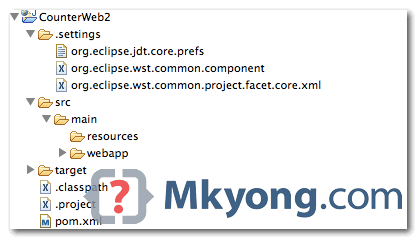
Problem Import a Java web project in Eclipse, build with Maven, once create a Tomcat server instance, unable to add the Java web project, and showing Tomcat version 6.0 only supports J2EE 1.2, 1.3, 1.4, and Java EE 5 Web modules Tools used : Eclipse Juno 4.2 Tomcat 6.0.35 JDK 1.6 Solution In project, “.settings” …

Read more

Maven M2_REPO is non modifiable

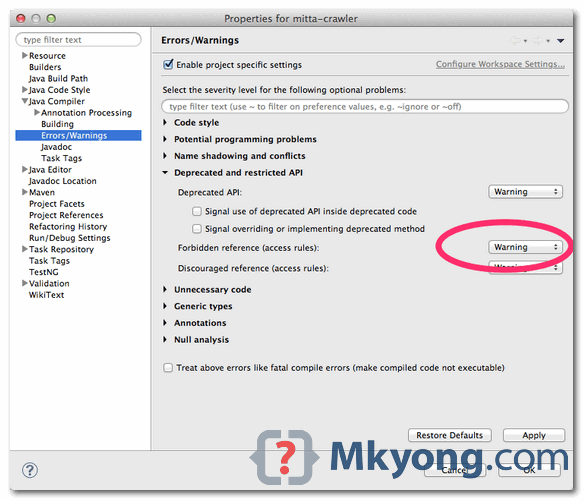
Problem Forgot what i did, may be installed m2eclipse plguin, it made the M2_REPO classpath variable is unable to edit. Select Windows -> Preferences -> Java -> Build Path -> Classpath Variables. Eclipse come with embedded Maven and have this M2_REPO classpath variable default non modifiable also. Figure – M2_REPO is non modifiable Solution To …

Read more

Google Plugin for Eclipse – jar has been tampered!

Problem While installing Google Plugin for Eclipse 3.7, via http://dl.google.com/eclipse/plugin/3.7 , it took almost half and hour and download and stopped at the end. A long list of error messages “.jar has been tampered!” are prompted in Eclipse. An error occurred while collecting items to be installed session context was:(profile=epp.package.jee, phase=org.eclipse.equinox.internal.p2.engine.phases.Collect, operand=, action=). No repository …

Read more

Eclipse : “Install download1” has encountered a problem

1. Problem While installing Google plugin for Eclipse, hit following weird error messages, and caused a long download time and stopped at the end. "Install download" has encountered a problem "Install download1" has encountered a problem "Install download2" has encountered a problem "Install download3" has encountered a problem "Install download4" has encountered a problem See …

Read more

How to remove unused imports in Eclipse

Often times, after code refactor or bug fixed, Eclipse IDE will show a yellow underline for all unsed imports at the top of your class and said “The import xxx is never used“. To remove those unused imports automatically, just click on the class and press the shortcut “Ctrl + Shift + O” to initilize …

Read more

How to display line numbers in Eclipse

By default, Eclipse’s editor will not display line numbers, it’s no good for debugging. Here’s a tip to show you how to turn on the “display line numbers” feature in Eclipse. In Eclipse IDE, select “Windows” > “Preference” > “General” > “Editors” > “Text Editors” , check on the “Show line numbers” option. See result.

Attach Android source code to Eclipse IDE

By default, Android SDK or Eclipse ADT plugin are not bundle with any Android’s source code for debugging. In Eclipse IDE, step into any Android class will prompt no source code attach, see following screen : Solution According to this official Android source code article, it’s shocked that we need to use “repo” to download …

Read more

Integrate Maven with Eclipse via External Tool Configuration

During Eclipse development, it’s not practical to go outside of the Eclipse’s environment and execute Maven command in external console. In this article, we show you how to integrate Maven command with Eclipse IDE, via Eclipse’s “External Tool Configuration“. Normally, this external tool is used to run external command within Eclipse environment, and it works …

Read more

How to enable Subversion (SVN) in Eclipse IDE

Eclipse IDE has build-in integration with Concurrent Versions System (CVS), but not Subversion (SVN). Here’s a guide to show you how to make Eclipse IDE support Subversion (SVN) via Subclipse plugin. 1. Subclipse Plugin Visit this link : http://subclipse.tigris.org/ , click on the “Download and Install” tab. Get the “Eclipse update site URL” for Subclipse …

Read more

How to trace SOAP message in Eclipse IDE

In SOAP web service, each HTTP request or response encapsulates a SOAP envelope, these messages are easy to trace by using Eclipse IDE, build-in “TCP/IP monitor” tool. The idea is host another server in between the client and server to perform port forward function to intercept the HTTP traffic. 1. Normal SOAP envelope flows In …

Read more

How to make Eclipse IDE supports JSF 2.0

In Eclipse Ganymede (v3.4) or Galileo (v3.5), it supports until JSF 1.2 only. For JSF 2.0, upgrade your Eclipse to version Helios (v3.6) onward, it has full support of Java EE 6 support, including JSF 2.0. Here’s a quick guide to show you how to enable JSF 2.0 features like code assist and visual JSF …

Read more

Eclipse : Web Deployment Assembly & Maven dependencies issue

Problem In Eclipse 3.5 or early version, in order to deployed the Maven dependencies to the correct “/WEB-INF/lib” folder, you have to configure the dependencies via “Java EE Module Dependencies”, and the updated “.classpath” file will look like following : File : “.classpath”, by Java EE Module Dependencies… … <classpathentry kind="var" path="M2_REPO/javax/servlet/jsp/jsp-api/2.1/jsp-api-2.1.jar" sourcepath="M2_REPO/javax/servlet/jsp/jsp-api/2.1/jsp-api-2.1-sources.jar"> <attributes> <attribute …

Read more