This article shows you how to attach the JDK source code in Eclipse IDE.
In Eclipse, select Windows -> Preferences -> Java -> Installed JREs , expands rt.jar, select “Source attachment” and find the src.zip from your disk drive.
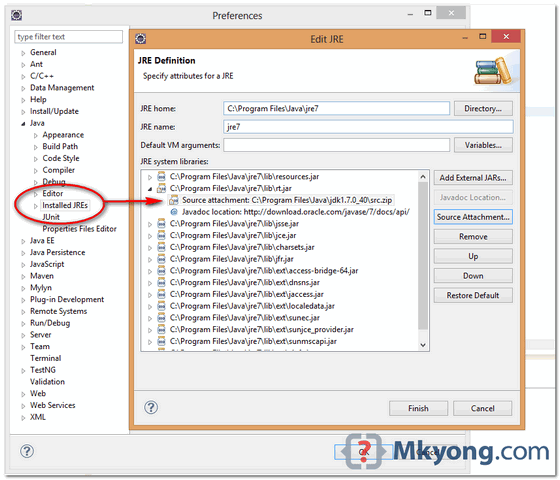
P.S JDK source code is inside the src.zip.
Note
You may interest at this article – where to download JDK source code.
You may interest at this article – where to download JDK source code.

Please write a pots for java8 on this topic. I am not able to do this with java8 even after going through lot of post
Thanks
Thank you very much, i was struggling to attach source file. i spent approx 2 hours to attach source file. once again thank you very much
Me salvás siempre!!!
Sos una masa, chinito!!!
Thanks for helping me!
🙂
hey thanks worked for me
I didn’t find the source code for JDK 1.8. I find only javafx-src.zip, which doesn’t have the entire set.
thx 🙂
Worked good. I had to move my src.zip file from users > nathan > program files > java > jdk7 > bin > src.zip to workspace > my project. I didn’t even have to refresh the file list (selecting src.zip file to attach prompt).
Thank you so much!