Problem
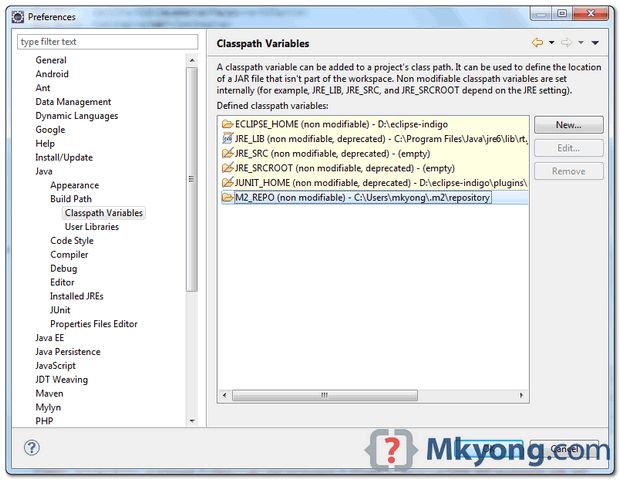
Forgot what i did, may be installed m2eclipse plguin, it made the M2_REPO classpath variable is unable to edit. Select Windows -> Preferences -> Java -> Build Path -> Classpath Variables.
Eclipse come with embedded Maven and have this M2_REPO classpath variable default non modifiable also.
Figure – M2_REPO is non modifiable
Solution
To modify the M2_REPO value, you need to change it at Eclipse’s Maven configuration page. Select Windows -> Preferences -> Maven -> User Settings.
Figure – Change it to another Maven repository.
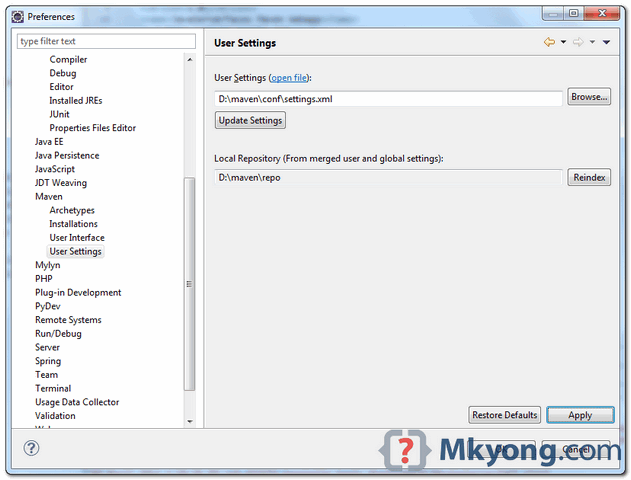
Once above value is updated, it will update the M2_REPO classpath variable automatically.
For Mac OSX Eclipse users
The “preferences” is at menu, Eclipse -> Preferences -> Maven -> User Settings.
The “preferences” is at menu, Eclipse -> Preferences -> Maven -> User Settings.

Thanks mkyong!!
After maven User settings update, M2_REPO classpath variable is not getting reflected still showing default m2 path.
anyway its working with remapped m2 🙂
Thanks, very nice! You saved my day 😉
bots comments below…. this does not work
thanks this helped
great !!!!!!! its Working, Thanks
it seems not working if the user settings.xml uses an environment variable to indicate the repository like ${MYHOME}/.m2/repository
it works fine for me, thanks !
HI Mkyong
je te remercie beauoup pour ce tutorial . I received an error when I ran the batch command by CommandLineShareJobRunner
here is the commad that I have executed
C:UserspcDesktopSpringBatchExample4target>java -cp “target/dependency-jars/*:target/spring-batch.jar” org.springframework.batch.core.launch.support.Command
LineJobRunner spring/batch/jobs/job-read-files.xml readJob
Erreur : impossible de trouver ou charger la classe principale org.springframewo
rk.batch.core.launch.support.CommandLineJobRunner
and as always – you just have the answer – my third visit here today…click on the ads here so he can get something in return people !
Thanks a lot MKYONG….you really explain everything well !!!!
Thank you MKYONG, This website has gr8 infomation on technologies and problem solving too..
I added external maven in eclipse and also add new variable in java->classpath variables. but still mvn is not recognized.. ???
I don’t know why, but it didn’t work for me. Its showing me the new path under user settings but the variable M2_REPO is still having same old value 🙁
Please help.
Make sure you have C:/your/local/maven/repository element in your settings.xml
Thank you so much for this suggestion, Arun. It saved me a lot of trouble.
BUT you’ll have to ‘Restart’ Eclipse before this change is taken into effect…!
Just want to say thank you very much, it all works, your steps are easy to follow, I love the way there is more than one way to get things done, you have helped me a lot. Have a nice day!!
Perfect answer !!
awsome…
Thanks
Thanks it is useful .
thanks – to the point answer.
EXCELLENT!!!! THANKS.
Yay! (Same issue =])
awsome…
Thanks a ton !
Ur post helped to fix the problem finally(had a bad time searchin for right website)
Thanks again
That’s cool! Thanks for saving my time..