Maven compile a project in Eclipse IDE, but hits the following error messages :
$ mvn clean compile

[ERROR] COMPILATION ERROR :
[INFO] -------------------------------------------------------------
[ERROR] No compiler is provided in this environment. Perhaps you are running on a JRE rather than a JDK?
[INFO] 1 error
[INFO] -------------------------------------------------------------
[INFO] ------------------------------------------------------------------------
[INFO] BUILD FAILURE
[INFO] ------------------------------------------------------------------------
[INFO] Total time: 0.859 s
[INFO] Finished at: 2018-10-03T15:56:43+08:00
[INFO] ------------------------------------------------------------------------
P.S Tested with Maven 3.5.3 and Eclipse SimRel 2018-09
By default, Eclipse configured the JRE automatically.
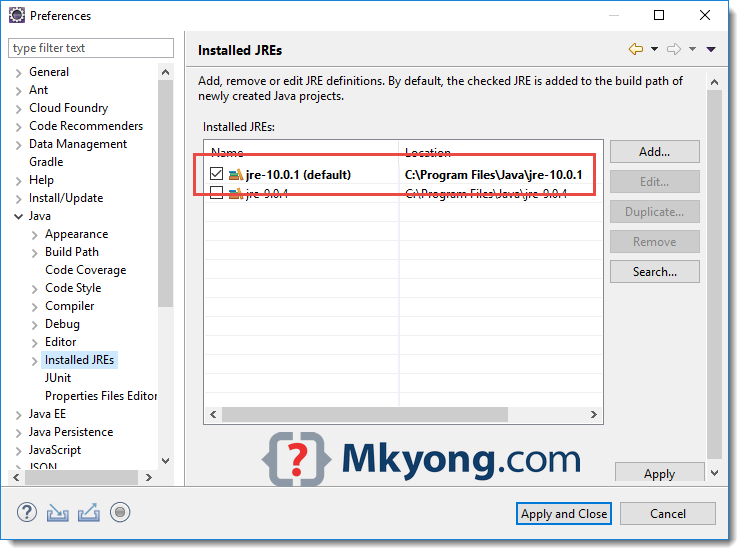
Solution
Maven needs JDK to compile project. Make sure you have installed/downloaded JDK and add it into Eclipse IDE as installed JRE.
1. Windows -> Preferences -> Java -> Installed JREs -> Add… , select a JDK folder.
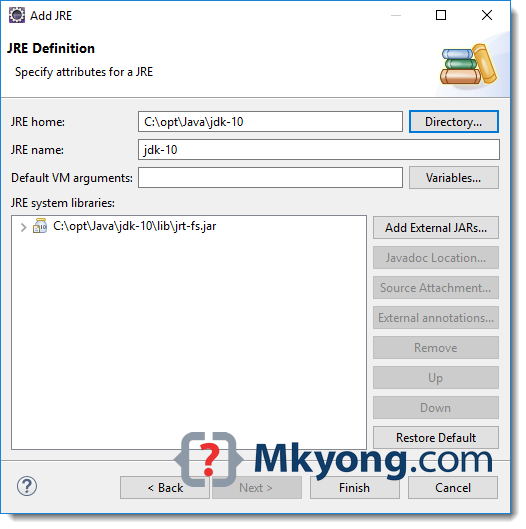
2. Add a new JDK as JRE and checked it.
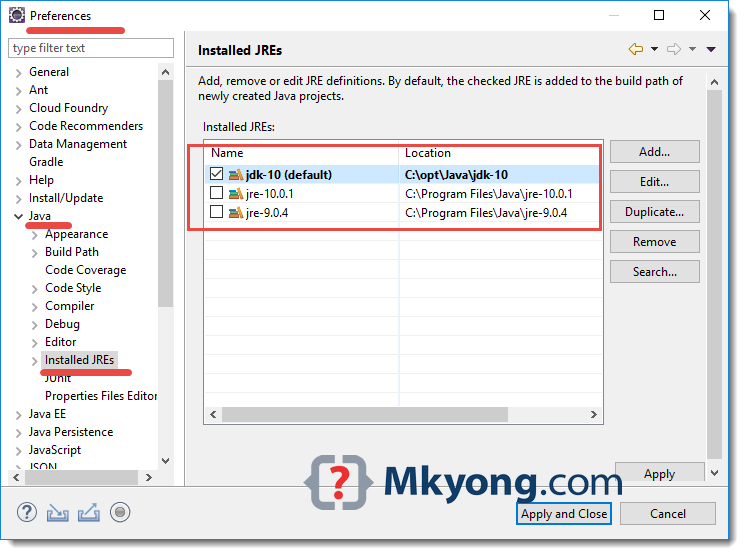
Done. Recompile it again.

Hi,
getting error while doing clean install on Maven project. How to resolve this issue?
[ERROR] Failed to execute goal org.apache.maven.plugins:maven-surefire-plugin:2.12.4:test (default-test) on project MavenDemoTest: Execution default-test of goal org.apache.maven.plugins:maven-surefire-plugin:2.12.4:test failed: Plugin org.apache.maven.plugins:maven-surefire-plugin:2.12.4 or one of its dependencies could not be resolved: Failed to collect dependencies at org.apache.maven.plugins:maven-surefire-plugin:jar:2.12.4 -> org.apache.maven.surefire:surefire-booter:jar:2.12.4: Failed to read artifact descriptor for org.apache.maven.surefire:surefire-booter:jar:2.12.4: Could not transfer artifact org.apache.maven.surefire:surefire-booter:pom:2.12.4 from/to central (https://repo.maven.apache.org/maven2): No appropriate protocol (protocol is disabled or cipher suites are inappropriate) -> [Help 1]
org.apache.maven.lifecycle.LifecycleExecutionException: Failed to execute goal org.apache.maven.plugins:maven-surefire-plugin:2.12.4:test (default-test) on project MavenDemoTest: Execution default-test of goal org.apache.maven.plugins:maven-surefire-plugin:2.12.4:test failed: Plugin org.apache.maven.plugins:maven-surefire-plugin:2.12.4 or one of its dependencies could not be resolved: Failed to collect dependencies at org.apache.maven.plugins:maven-surefire-plugin:jar:2.12.4 -> org.apache.maven.surefire:surefire-booter:jar:2.12.4
at org.apache.maven.lifecycle.internal.MojoExecutor.execute(MojoExecutor.java:224)
at org.apache.maven.lifecycle.internal.MojoExecutor.execute(MojoExecutor.java:153)
at org.apache.maven.lifecycle.internal.MojoExecutor.execute(MojoExecutor.java:145)
thank you. working for me
Thanks a lot @mkyong for this useful tip. It saved me a lot for my RestAPI automation maven project.
Thanks for the tip. I wonder what sense it makes nowadays to maintain a separation between JRE and JDK, it complicates our life just to save a few MB of disk space