By default Eclipse deploys web application to a internal plugin folder called wtpwebapps, which is located in the following directory :
{Your_Workspace}/.metadata/.plugins/org.eclipse.wst.server.core/tmp{number}/wtpwebapps

#Example 1 - Windows
C:\Users\mkyong\workspace\.metadata\.plugins\org.eclipse.wst.server.core\tmp0\wtpwebapps

#Example 2 - Mac OSX
/Users/mkyong/Documents/workspace/.metadata/.plugins/org.eclipse.wst.server.core/tmp0/wtpwebapps
How it works
In Server view, double clicks on the “Tomcat Server”, the deployment work is defined in the Server Locations
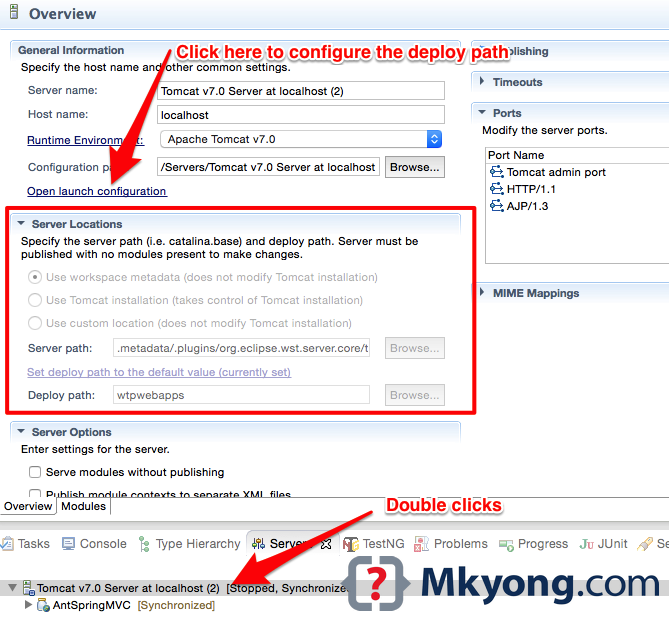
To edit the default behaviors, clicks on the Open Launch Configuration, select Arguments tab, the deploy path is defined in the VM arguments :
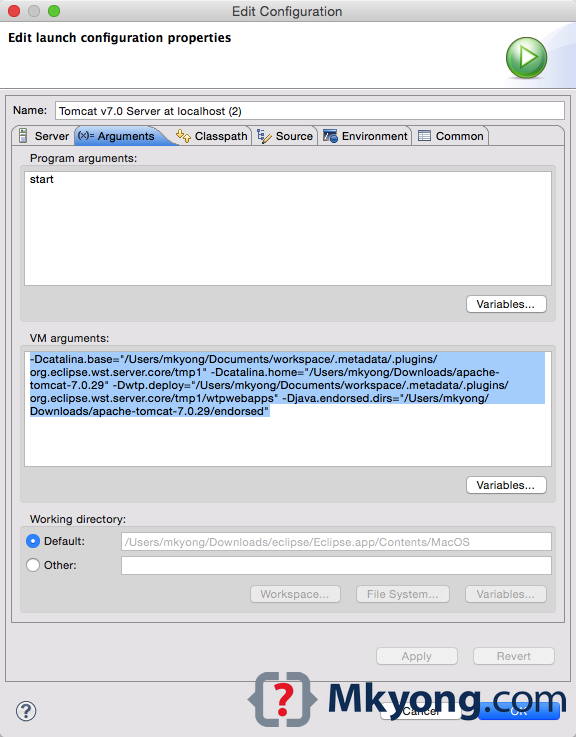
VM arguments :
-Dcatalina.base="/Users/mkyong/Documents/workspace/.metadata/.plugins/org.eclipse.wst.server.core/tmp1"
-Dcatalina.home="/Users/mkyong/Downloads/apache-tomcat-7.0.29"
-Dwtp.deploy="/Users/mkyong/Documents/workspace/.metadata/.plugins/org.eclipse.wst.server.core/tmp1/wtpwebapps"
-Djava.endorsed.dirs="/Users/mkyong/Downloads/apache-tomcat-7.0.29/endorsed"

Hi I can see that tem0 is getting created when i launch an application but i have created a Users.dat file from the server using the statement
File file = new File(“Users.dat”);
now when i run my applicaiton 2nd time i can see that the dat file still existes in the server even though i have dleleted the server and tryed to run again the dat file is still present i am unable to locate that file to modify or delete it permanently.
Please help me asap.
is there a way for intellij?
Check the “out” folder while configuring the server in IntelliJ. It corresponds to the wtpwebapps folder in eclipse.
Great post, thanks for share
Thanks. It’s clear and useful.
Thanks for sharing these information. Your blogs have been very useful for me while working on unfamiliar technologies. Keep up the good work.
Regards,
Venkatesh
Thank you very useful!
Great information. How does the working directory shown at the bottom of your second screenshot relate to the other arguments (base, home, deploy, endorsed)?
Mkyong your site is brilliant. I learning from you everyday a new thing. I wanted to ask of you if you could write a tutorial as to how to debug the Tomcat Source code in Eclipse. I have been trying this for long and haven’t made a break through. This would assist all of us to understand the internals of servlets and tomcat.
Thanks in advance,
Harry
Very useful indeed. Thank you very much.
Welcome
ty
Thanks Mkyong…!!! For my Web-Applications every time when i visited to “www.mkyong.com” I got new and useful information. Thanks again….
Welcome.