If you run or debug a web project in Eclipse, the project name will be the default context root. For example, a project named “springmvc”, the default context root will be
http://localhost:8080/springmvc
Technologies tested :
- Eclipse 4.4
- Eclipse Tomcat server plugin
- Maven 3
- Gradle 2.0
The context root tell you the URL of a deployed web application.
http://localhost:8080/{context_root}
In this tutorial, we will show you a few ways to update the web project context root in the Eclipse IDE.
1. Eclipse – Web Project Settings
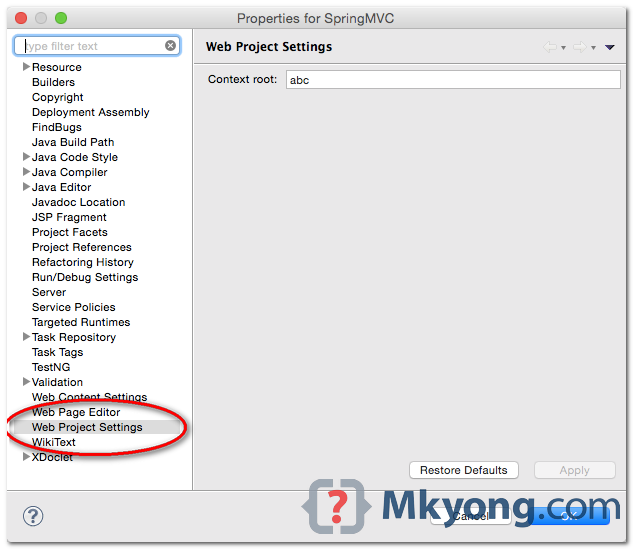
1.1 Right click on the project, select Properties, Web Project Settings, update the context root here.
1.2 Remove your web app from the server and add it back. The context root should be updated.
1.3 If step 2 is failing, delete the server, create a new server and add back the web app.
New context root : http://localhost:8080/abc
2. Eclipse – Web Modules
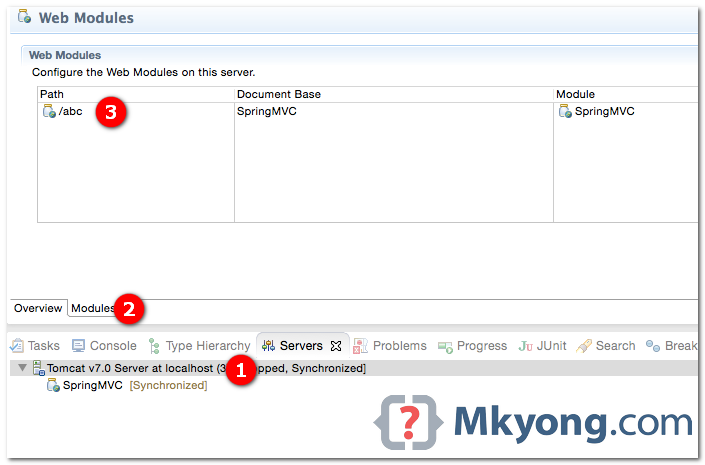
2.1 Double click on the Eclipse server plugin.
2.2 Clicks on the Modules tab.
2.3 Update the Path.
2.4 Done. Restart the server.
New context root : http://localhost:8080/abc
3. Maven Eclipse Plugin
3.1 Define the new context root in wtpContextName.
	<plugin>
		<groupId>org.apache.maven.plugins</groupId>
		<artifactId>maven-eclipse-plugin</artifactId>
		<version>2.9</version>
		<configuration>
			<wtpversion>2.0</wtpversion>
			<wtpContextName>abc</wtpContextName>
		</configuration>
	</plugin>
3.2 Issue below command to recreate the Eclipse settings.
$ mvn eclipse:cleanEclipse eclipse:eclipse
4. Gradle Eclipse Plugin
4.1 Define the eclipse wtp settings.
apply plugin: 'java'
apply plugin: 'war'
apply plugin: 'eclipse-wtp'

//For Eclipse IDE only
eclipse {

  wtp {
    component {
      contextPath = 'abc'
    }

  }
}
4.2 Issue below command to recreate the Eclipse settings.
$ gradle clenEclipse eclipse

4.Gradle Eclipse Plugin helps me a lot. Thanks
According to my testing, your 3.2 needs to be updated to something like the following:
eclipse:myeclipse-clean and then eclipse:myeclipse
This is for Maven Eclipse Plugin version 2.10
Adding and removing from server is a definite miss we do. Thanks once again.
MUY BUENO!