Eclipse IDE has build-in integration with Concurrent Versions System (CVS), but not Subversion (SVN). Here’s a guide to show you how to make Eclipse IDE support Subversion (SVN) via Subclipse plugin.
1. Subclipse Plugin
Visit this link : http://subclipse.tigris.org/ , click on the “Download and Install” tab. Get the “Eclipse update site URL” for Subclipse plugin, for example http://subclipse.tigris.org/update_1.6.x
2. Eclipse IDE
In Eclipse IDE (Helios version), top menu, select “Help” –> “Install New Software…”. And puts http://subclipse.tigris.org/update_1.6.x in the “work with” textbox and click on the “Add” button. Select all components and install it.
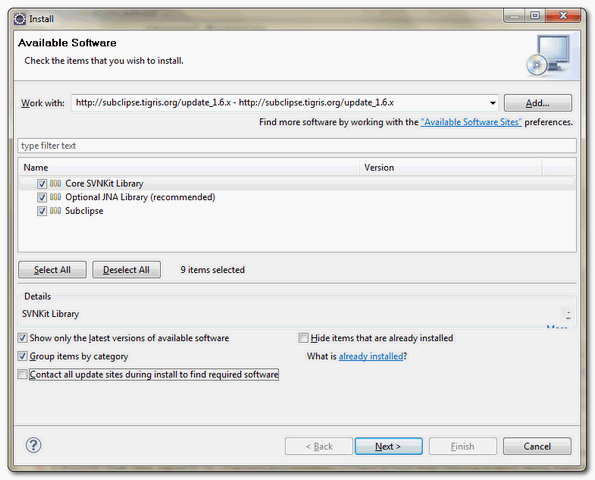
Restart Eclipse IDE to take effect.
3. Test SVN in Eclipse
Eclipse IDE, top menu, select “Windows” –> “Open Perspective” –> “Other…”, choose “SVN Repositories“.
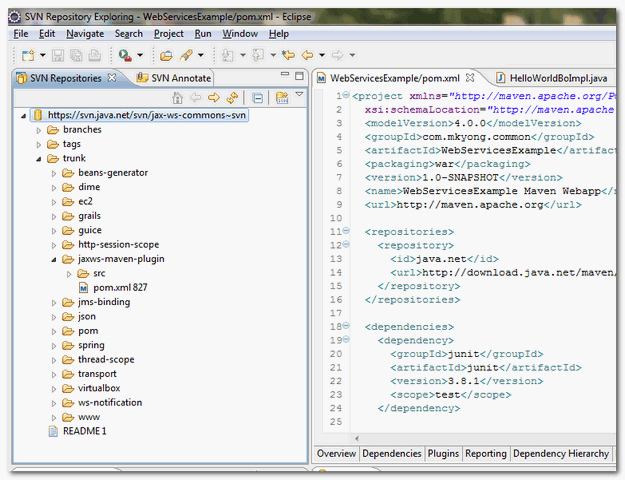
Now, you can perform SVN functionality in this “SVN Repositories” perspective.

Thank you …You are keep on sharing knowledge. Keep it up.
It works fine with me.. thanks..
awesomeeee..thanks.
As always, the best!. Thank you.
It works fine. But… now what? 🙁
Team ,
Am getting this error while check in can anybosy help me 🙂
svn: Server sent unexpected return value (500 Internal Server Error) in response to POST request for ‘/svn/***/!svn/me’
Thanks,
Maddy
In mine case your provided url is not working and i find this http://www.eclipse.org/subversive/latest-releases.php and its working 100%
Direct URL
http://download.eclipse.org/technology/subversive/1.1/update-site/
Thanks .. Very useful…
very useful…….
This worked perfectly. Thanks.
Hi Mkyong I want maintain both SVN server as well client can you please tell the requirements for this and here I have not taken any external server based on SVN server port number I need to provide URL to access the code from trunk and branch after install both eclipse plugin and SVN server software I got following Exception and I don’t know how to place code into repository…Could you please send me some explanation and requirements of software’s and steps to install SVN server and client
Exception is:
Command: Import C:\Users\Nani\Desktop to http://ipaddress:port/Users/Nani/System/wmb/Tasks
Error: Unable to connect to a repository at URL
Error: ‘http://ipaddress:port/Users/Nani/System/wmb/Tasks’
Error: OPTIONS of ‘http://ipaddress:port/Users/Nani/System/wmb/Tasks’: could not
Error: connect to server (http://ipaddress:port)
Completed!:
your an IT gaint and thanks for helping us.
Very nice post. I just stumbled upon your blog and wanted to say that I have really enjoyed surfing around your blog posts. In any case I’ll be subscribing in your feed and I hope you write once more soon!