In last tutorial, you created a Java project with Maven, but that project is not able to import into Eclipse IDE, because it is not Eclipse style project.
Here’s a guide to show you how to convert the Maven generated Java project to Eclipse supported style project.
1. mvn eclipse:eclipse
It’s really easy to do it. Navigate to your Java project folder, where pom.xml file is placed. And issue this command :
mvn eclipse:eclipse
See a full example :
D:\workspace-new\maven-test\mkyong-core>mvn eclipse:eclipse
[INFO] Scanning for projects...
[INFO] Searching repository for plugin with prefix: 'eclipse'.
[INFO] ------------------------------------------------------------------------
[INFO] Building mkyong-core
[INFO]    task-segment: [eclipse:eclipse]
[INFO] ------------------------------------------------------------------------
[INFO] Preparing eclipse:eclipse
[INFO] No goals needed for project - skipping
[INFO] [eclipse:eclipse {execution: default-cli}]
[INFO] Using Eclipse Workspace: D:\workspace-new
[INFO] no substring wtp server match.
[INFO] Using as WTP server : Apache Tomcat v6.0
[INFO] Adding default classpath container: org.eclipse.jdt.launching.JRE_CONTAINER
[INFO] Not writing settings - defaults suffice
[INFO] Wrote Eclipse project for "mkyong-core" to D:\workspace-new\maven-test\mkyong-core.
[INFO]
[INFO] ------------------------------------------------------------------------
[INFO] BUILD SUCCESSFUL
[INFO] ------------------------------------------------------------------------
[INFO] Total time: 5 seconds
[INFO] Finished at: Thu Apr 14 22:47:38 SGT 2011
[INFO] Final Memory: 7M/14M
[INFO] ------------------------------------------------------------------------
If this is your first time to run this command, it may take some time to download all required dependency to convert your project to Eclipse style project.
2. Verify Java Project
After that, you will notice two new files are created – “.classpath” and “.project“. Both files are created for Eclipse IDE.
File : .classpath
<classpath>
  <classpathentry kind="src" path="src/test/java"
           output="target/test-classes" including="**/*.java"/>
  <classpathentry kind="src" path="src/main/java" including="**/*.java"/>
  <classpathentry kind="output" path="target/classes"/>
  <classpathentry kind="var" path="M2_REPO/junit/junit/3.8.1/junit-3.8.1.jar"
	   sourcepath="M2_REPO/junit/junit/3.8.1/junit-3.8.1-sources.jar"/>
  <classpathentry kind="con" path="org.eclipse.jdt.launching.JRE_CONTAINER"/>
</classpath>
Did you notice a “M2_REPO” classpath variable is generated? For first time, you have to add this M2_REPO classpath variable to your Eclipse IDE. Otherwise, Eclipse will raise error about your imported project later.
File : .project
<projectDescription>
  <name>mkyong-core</name>
  <comment/>
  <projects/>
  <buildSpec>
    <buildCommand>
      <name>org.eclipse.jdt.core.javabuilder</name>
    </buildCommand>
  </buildSpec>
  <natures>
    <nature>org.eclipse.jdt.core.javanature</nature>
  </natures>
</projectDescription>
3. Import into Eclipse IDE
Now, import it into Eclipse IDE, follow below steps :
In Eclipse IDE, menu bar , File -> Import… -> General -> Existing Projects into Workspace -> select root directory (select your project folder) -> Done.
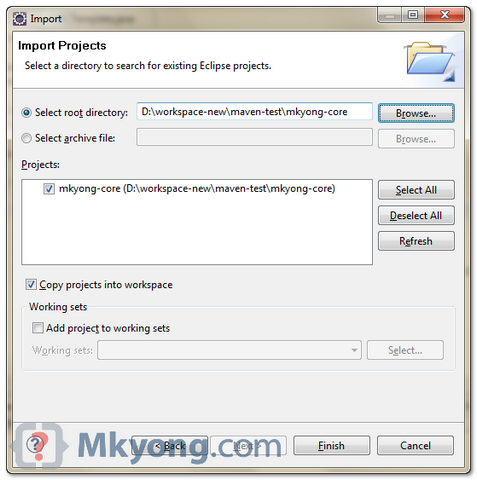
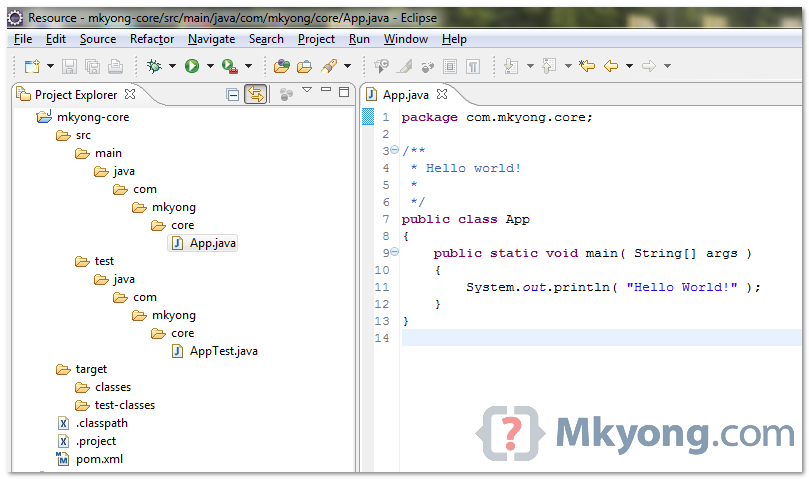
Your Maven generated Java project is imported into Eclipse IDE, you can start your development now.

mvn eclipse:eclipse is deprecated, is there any alternative?
Hi Mkyong,
I am getting the following error after doing mvn eclipse:eclipse.
[INFO] ————————————————————————
[INFO] BUILD FAILURE
[INFO] ————————————————————————
[INFO] Total time: 01:05 min
[INFO] Finished at: 2015-01-06T10:21:53-06:00
[INFO] Final Memory: 44M/326M
[INFO] ————————————————————————
[ERROR] Failed to execute goal org.apache.maven.plugins:maven-eclipse-plugin:2.9
:eclipse (default-cli) on project aimsweb-browser: Execution default-cli of goal
org.apache.maven.plugins:maven-eclipse-plugin:2.9:eclipse failed. NullPointerException -> [Help 1]
[ERROR]
[ERROR] To see the full stack trace of the errors, re-run Maven with the -e switch.
[ERROR] Re-run Maven using the -X switch to enable full debug logging.
[ERROR]
[ERROR] For more information about the errors and possible solutions, please read the following articles:
Can anybody help me please?
hi, when i am trying to convert mvn project to eclipse this error is comming:
[INFO] Scanning for projects…
[INFO] Reactor build order:
[INFO] Biometric Integration API
[INFO] Authentication XSD Model
[INFO] UID Protobuf Model
[INFO] Authentication Client Library
[INFO] Aadhaar Authentication – Sample GUI
[INFO] Aadhaar Authentication Reference Sample Application
[INFO] Searching repository for plugin with prefix: ‘eclipse’.
[INFO] ————————————————————————
[INFO] Building Biometric Integration API
[INFO] task-segment: [eclipse:eclipse]
[INFO] ————————————————————————
[INFO] Preparing eclipse:eclipse
[INFO] No goals needed for project – skipping
[INFO] [eclipse:eclipse {execution: default-cli}]
[INFO] Using Eclipse Workspace: /home/madhu/Desktop
[INFO] Adding default classpath container: org.eclipse.jdt.launching.JRE_CONTAINER
[INFO] Wrote settings to /home/madhu/Desktop/sas/uidai-auth-client-1.6-src/uidai-biometric-integration-api/.settings/org.eclipse.jdt.core.prefs
[INFO] Wrote Eclipse project for “uidai-biometric-integration-api” to /home/madhu/Desktop/sas/uidai-auth-client-1.6-src/uidai-biometric-integration-api.
[INFO]
[INFO] ————————————————————————
[INFO] Building Authentication XSD Model
[INFO] task-segment: [eclipse:eclipse]
[INFO] ————————————————————————
[INFO] Preparing eclipse:eclipse
[INFO] [jaxb2:xjc {execution: default}]
[INFO] No changes detected in schema or binding files – skipping source generation.
[INFO] [eclipse:eclipse {execution: default-cli}]
[INFO] Using Eclipse Workspace: /home/madhu/Desktop
[INFO] Adding default classpath container: org.eclipse.jdt.launching.JRE_CONTAINER
[INFO] Wrote settings to /home/madhu/Desktop/sas/uidai-auth-client-1.6-src/uidai-auth-xsd-model/.settings/org.eclipse.jdt.core.prefs
[INFO] Wrote Eclipse project for “uidai-auth-xsd-model” to /home/madhu/Desktop/sas/uidai-auth-client-1.6-src/uidai-auth-xsd-model.
[INFO]
[INFO] ————————————————————————
[INFO] Building UID Protobuf Model
[INFO] task-segment: [eclipse:eclipse]
[INFO] ————————————————————————
[INFO] Preparing eclipse:eclipse
[INFO] [antrun:run {execution: generate-sources}]
[INFO] Executing tasks
[INFO] ————————————————————————
[ERROR] BUILD ERROR
[INFO] ————————————————————————
[INFO] An Ant BuildException has occured: Execute failed: java.io.IOException: Cannot run program “protoc” (in directory “/home/madhu/Desktop/sas/uidai-auth-client-1.6-src/uidai-auth-proto-model”): java.io.IOException: error=2, No such file or directory
[INFO] ————————————————————————
[INFO] For more information, run Maven with the -e switch
[INFO] ————————————————————————
[INFO] Total time: 6 seconds
[INFO] Finished at: Wed Nov 13 14:28:18 IST 2013
[INFO] Final Memory: 18M/33M
[INFO] ————————————————————————
Hi MkYong,
Am getting “Using Eclipse Workspace: null” while executing mvn eclipse:eclipse. kindly tell me how can i overcome this. waiting for your reply
Hello mkyong,
I am not able to create EAR and WAR module using maven. I am using command prompt to do so.
I have created a mvn project with the below structure:
D:.
????????SampleProject-ear
????????SampleProject-war
????????src
?? ????????main
?? ?? ????????java
?? ?? ?? ????????com
?? ?? ?? ?? ????????aexp
?? ?? ?? ?? ????????sampleProject
?? ?? ?? ?? ????????web
?? ?? ?? ?? ????????controller
?? ?? ?? ????????META-INF
?? ?? ????????resources
?? ?? ????????webapp
?? ?? ????????META-INF
?? ?? ????????resources
?? ?? ?? ????????images
?? ?? ?? ????????styles
?? ?? ????????WEB-INF
?? ?? ????????config
?? ?? ????????views
?? ????????test
?? ????????java
?? ????????com
?? ????????aexp
?? ????????sampleProject
?? ????????web
?? ????????controller
????????target
????????classes
????????generated-sources
????????annotations
It does not have any .classpath and .project file. How to make this an proper EAR and WAR module to be imported in eclipse without using any plugin.
Thanks for your help.
Hi MKyong:
Do you have any tutorial using artifactory/maven. and m2e plugin. We are trying to convert the current project using maven, and artifacotry is a repo. So far you are the best simple example and easy to follow. Many thanks
Hi MKY, thanks for your all tuts. I did it same way as explained, i created a maven project, building, packaging and running, everything works fine in command line, but then I tried to import into STS (v2.9.2) it failed with below error.
Failure to transfer org.apache.maven.plugins:maven-resources-plugin:pom:2.4.3 from http://repo1.maven.org/maven2 was cached in the local repository, resolution will not be reattempted until the update interval of central has elapsed or updates are forced. Original error: Could not transfer artifact org.apache.maven.plugins:maven-resources-plugin:pom:2.4.3 from/to central (http://repo1.maven.org/maven2): The operation was cancelled.
Could not calculate build plan: Plugin org.apache.maven.plugins:maven-resources-plugin:2.4.3 or one of its dependencies could not be resolved: Failed to read artifact descriptor for org.apache.maven.plugins:maven-resources-plugin:jar:2.4.3 pom.xml /NumberGenerator line 1 Maven Build Problem
sdd
sorry actually i just tested the validation
Im having an error when executing mvn eclipse:eclipse
i have war,jar,ear all , in maven structured , i want to convrt this project into normal java project. ur command mvn eclipse:eclipse is not working for this scenario..
thanks any help..
I think you can have only one project in maven. It is either a Java project (JAR) or a Enterprise Web project (EAR) or a Web project (WAR). Please change the POM accordingly to reflect the type of project you want in . Since I didn’t find any reply for this I am replying the thread for anybody who can find some use.
On the other hand, if you are talking about modules, like JAR to be added to WAR lib path then you have to create a POM on the parent directory and establish the modules. You can check for more info on that in the maven website on adding modules.
Hi Mkyong,
When I do mvn eclipse:eclipse, It shows build successful, but it shows eclipse workspace:null. When I try to import the project into eclipse , it does not show .classpath and .project files in IDE, and project shows error.
Could you please help me with this issue.
Thanks in advance.
Great stuff…. i was able to solve dependency issue between between maven and eclipse based project.
Hello mkyong,
I have added dependent project in my project via pom.xml entry. But those are downloaded as jar where I can find .class file only.
Please let me know what changes I need to do(in pom.xml or anywhere) to see the source code(.java) as well.
Thanks in advance.
Regards,
Anirban
when i enter
you should get inside the folder where pom.xml is there, then you have to run mvn eclipse:eclipse. it will work
Great stuff and thanks
Then import the maven project in eclipse I can not see the files, the classpath and the project
Great tutorial,thanks.Solved my problem
Hi I followed the same mkyoung tutorial and facing the following build issue. My expectation was that it will download all the necessary libs and i would not be setting any config for this.
Can some one help me to resolved the following issue.
Description Resource Path Location Type
Unbound classpath variable: ‘M2_REPO/junit/junit/3.8.1/junit-3.8.1.jar’ in project ‘mkyong-core’ mkyong-core Build path Build Path Problem
The project cannot be built until build path errors are resolved mkyong-core Unknown Java Problem
[solved]
Your MAVEN folder doens’t include the junit folder and thus the junit jar file.
Here’s how it goes…
After importing the project in eclipse IDE.
1. create a classpath variable:
windows->preference->java->buildPath->classpath Variables
-> click New button and define “M2_REPO” for value “C:/Program Files/Apache Software Foundation/apache-maven-3.0.4” or your path to maven repo
2. within your maven Repo : (right where your bin folder is defined)
create (junit/junit/junit-4.10.jar)
a. create folder junit
b. again create folder junit inside “junit”
c. copy the junit-4.10.jar file to that path.
3. reconfigure the build path to target the junit directory
4. change the POM.xml
have a look inside and change 3.8.10 or whatever version no.. to the latest one that you will be downloading .. in mine case it was 4.10.
that’s it..!!! Thanks mkyong… 🙂
Thanks Mkyong for this nice tutorial. I am new in Maven use. And therefore having some qurstions. Will be glad if u answer:
In this tutorial, It is nice that I got Java Project now. Previously everytime while I was even pressing F3 upon keeping cursor on any function call, was getting: “The resource is not on the build path of a Java project”.
Now can u plz tell me, after writing all the code, how can i run the project in my local server (here websphere) (I mean, how can i create an EAR file) and how can i debug?
Finally if i am done with everything then how can i build a Maven project from my working Java Project?
Thank u very much Mkyong
or just install IDEA and open the pom.xml directly….
IntelliJ IDEA? You’re rich man! Just wonder why need to use IDE to modify the pom.xml?
With XSD support, pom.xml xml syntax is very easily to customize or modify.
Or install m2eclipse
yes, m2eclipse is good, i installed it as well, but i didn’t use much of the features provided.
In Maven, i used to modify the pom.xml manually and it’s more faster without go through the UI. For some frequent commands, i put in Eclipse external tool. It just make m2eclipse rather “not a must have” tool for me.
How about you? What are you use m2eclipse for?
Please mkyong,
when i imported the project for the firt time and then i run the project using : run as => Build Maven i gotn this failure :
SLF4J: Failed to load class “org.slf4j.impl.StaticLoggerBinder”.
SLF4J: Defaulting to no-operation (NOP) logger implementation
SLF4J: See http://www.slf4j.org/codes.html#StaticLoggerBinder for further details.
[INFO] Scanning for projects…
[INFO]
[INFO] ————————————————————————
[INFO] Building StrutsExample Maven Webapp 1.0-SNAPSHOT
[INFO] ————————————————————————
[INFO] ————————————————————————
[INFO] BUILD FAILURE
[INFO] ————————————————————————
[INFO] Total time: 0.141s
[INFO] Finished at: Fri Apr 05 11:14:47 CEST 2013
[INFO] Final Memory: 2M/4M
[INFO] ————————————————————————
[WARNING] The requested profile “mavenProfile” could not be activated because it does not exist.
[ERROR] Unknown lifecycle phase “mavenGoal”. You must specify a valid lifecycle phase or a goal in the format : or :[:]:. Available lifecycle phases are: validate, initialize, generate-sources, process-sources, generate-resources, process-resources, compile, process-classes, generate-test-sources, process-test-sources, generate-test-resources, process-test-resources, test-compile, process-test-classes, test, prepare-package, package, pre-integration-test, integration-test, post-integration-test, verify, install, deploy, pre-site, site, post-site, site-deploy, pre-clean, clean, post-clean. -> [Help 1]
[ERROR]
[ERROR] To see the full stack trace of the errors, re-run Maven with the -e switch.
[ERROR] Re-run Maven using the -X switch to enable full debug logging.
[ERROR]
[ERROR] For more information about the errors and possible solutions, please read the following articles:
[ERROR] [Help 1] http://cwiki.apache.org/confluence/display/MAVEN/LifecyclePhaseNotFoundException
i didnt make my first maven build untill now, then i couldnt continue to develop
Help please .
Hi Mkyong:
Do you have any quick tutorial to work with artifactory/maven. and m2e plugin to eclipse.
WE have j2ee project , big project, tons of jars files, so we need to configure to use maven. Many thanks in advance