Normally, when you use Maven command mvn eclipse:eclipse to convert existing Java project to support Eclipse project, Maven will create the entire dependency classpath by using the M2_REPO variable, which is not defined in Eclipse by default.
Nothing special, M2_REPO is just a normal “classpath variable” in Eclipse to find your local Maven repository.
Here, we show you two ways to add M2_REPO classpath variable into Eclipse IDE.
1. Add M2_REPO Manually
Define and add M2_REPO classpath variable manually into Eclipse IDE. Follow below steps :
- Eclipse IDE, menu bar
- Select Window > Preferences
- Select Java > Build Path > Classpath Variables
- Click on the new button > defined a new M2_REPO variable and point it to your local Maven repository
- Done.
2. Add M2_REPO Automatically – eclipse:configure-workspace
Alternatively, you can define and add M2_REPO via Maven command “eclipse:configure-workspace“.
mvn -Declipse.workspace="your Eclipse Workspace" eclipse:configure-workspace
See an example :
C:\>mvn -Declipse.workspace="C:\Users\mkyong\workspace" eclipse:configure-workspace
[INFO] Scanning for projects...
[INFO] Searching repository for plugin with prefix: 'eclipse'.
[INFO] ------------------------------------------------------------------------
[INFO] Building Maven Default Project
[INFO]    task-segment: [eclipse:configure-workspace] (aggregator-style)
[INFO] ------------------------------------------------------------------------
[INFO] [eclipse:configure-workspace {execution: default-cli}]
[INFO] ------------------------------------------------------------------------
[INFO] BUILD SUCCESSFUL
[INFO] ------------------------------------------------------------------------
[INFO] Total time: 1 second
[INFO] Finished at: Thu Apr 14 20:45:17 SGT 2011
[INFO] Final Memory: 9M/112M
[INFO] ------------------------------------------------------------------------
Done.
Verify M2_REPO is Added
Review classpath variable to verify that the M2_REPOis added into Eclipse IDE.
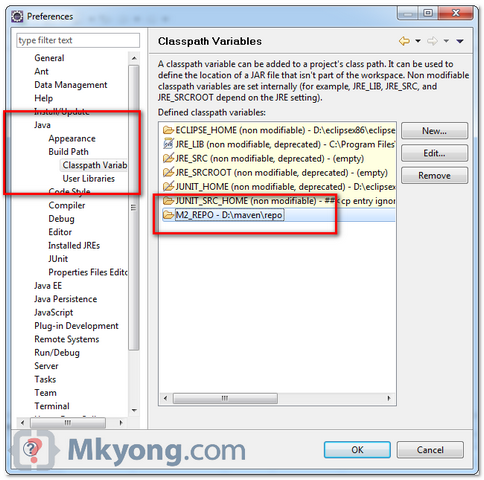
You need to add this M2_REPO classpath variable once only, and this variable is shared among all of your Eclipse’s workspace.
The old “
eclipse:add-maven-repo” command is deprecated , and not working anymore. Uses “eclipse:configure-workspace” instead.

Thank You Brother!
maven sucks
Can you tell me why my module projects are not being showed as maven project inside the parent maven project? I have Eclipse Neon where that parent project was created, there I can see the correct project structure, but when I open in another Eclipse (like the Java-2019-09) the module projects are seen as normal folders and not as project.
The m2e Eclipse plugin also registers the M2_REPO variable. However, please note that “eclipse:eclipse”-generated projects are not compatible with m2e so even if you have m2e, you should *not* convert these project to Maven projects in Eclipse.
The “mvn eclipse:eclipse” command even generates a comment to the .project file:
NO_M2ECLIPSE_SUPPORT: Project files created with the maven-eclipse-plugin are not supported in M2Eclipse.
thanks a lot
Nice!
Hi,
I have created maven home and java home in environmental variables. Can i use that in eclipse? maven plugin which has pom.xml is different from maven setting in environmental variables?
Iam new to android-ndk.
Iam trying to build pure c code by using android-ndk finally its working.
Now Iam trying to call assembly file from that c code but Iam getting errors.
Iam using Linux_GCC
/* This is my Android.mk file */
LOCAL_PATH := $(call-mydir)
include $(CLEAR_VARS)
LOCAL_MODULE := Sample
LOCAL_SRC_FILES := test.c assembly.S
LOCAL_ARM_MODE := arm
LOCAL_LD_LIBS := -llog
include $(BUILD SHARED_LIBS)
TARGET_ARCH_ABI == armabi-v7a
/* This is my application.mk file */
APP_OPTIM := debug
APP_ABI := armeabi armeabi-v7a x86
APP_STL := gnustl_static
/* This is my c file */
extern int assembly(int a);
int main(void)
{
int a = 5, b = 10, c, d;
c = a * b;
d = assembly(c);
printf(” d = %d”, d);
return(0);
}
/* my assembly file */
.text
.global assembly
assembly:
stmfd sp!, {r4-r12, lr}
add r4, r0, r1
mul r3, r0, r2
ldmfd sp!, {r4-r12, PC}
In order to build assembly I added following
Project –> Properties–> c/c++ build –> settings
GCC Assembler: added -arch i386 -g after as
GCC C Compiler: added -m32 after gcc
GCC C Linker: added -m32 after gcc
in debug configuration settings i have select c/c++ application as default/Sample
while building project it is showig error as Sample/default/Sample is not found.
I reffered few sites in those i observed they select c/c++ application as project/obj/local/armeabi/app_process
but i didn’t found app_process in that path in my project.
Hope somebody will help me regarding this.
THANKS
Thank you
Thanks
Awesome tutorial mkyong…..
Thanks this helped!
Thank You!
Thanks so much mate God help you.
Gr8 work yong!
nice blogs
Hi MkYong,
Are you familiar with Eclipse Application developer installation if yes. I am making response file for pacakges installation. It keeps not accepting the repositories. I tried to create the response file: eclipse>ibmimc.exe -record c:\temp\1.xml -skipInstall e:\data
it recorded the first repository. When I tried to fill rest of the repository it give me error saying these repositories are not acceptable. My issues is embedding the repositories and all the options in a response file so it silently install the Eclipse and its 3 developer environments.
Please email me if you have a response.
Many thanks in advances.
Asher
Thanks this helped me out today.
hi m,
I hv added the m2_repo as you said. Manually and automatically. it also shown in classpath too. but it doen’t resolve dependencies still i have to resolve those manually by adding external jars. do you have any idea why is this happening
This was very helpful. Thanks!
Hi mkyong 🙂
I have already installed maven and it had by default added .m2 directory in c: drive in the Document and Settings…. folders
but as now the link to change the maven repository path is coming hidden in eclipse
Can i still change it by any other means ???
Please revert me back soon
In Maven, change the setting.xml like this : https://mkyong.com/maven/where-is-maven-local-repository/
Hi ,
Could you please tell me how this would change the value of M2_REPO variable in eclipse ? I am also facing the same issue.Even I have changed the settings.xml , stilll I can see the old default value of this variable.
Regards,
Vijayendra Bhati
i think you need to change proxy settings if you have or change the usename and password of your local system in that in settings.xml file.
Hi,
Your Eclipse IDE must have come with in built Maven. You can change the maven setting in your eclipse using following steps.
Window -> Preferences -> Maven -> Installations -> Add -> Provide path of your maven installation
Thanks,
Sameer