In Android, you can use SmsManager API or device’s Built-in SMS application to send a SMS message. In this tutorial, we show you two basic examples to send SMS message :
- SmsManager API
SmsManager smsManager = SmsManager.getDefault(); smsManager.sendTextMessage("phoneNo", null, "sms message", null, null); - Built-in SMS application
	Intent sendIntent = new Intent(Intent.ACTION_VIEW);
	sendIntent.putExtra("sms_body", "default content");
	sendIntent.setType("vnd.android-dir/mms-sms");
	startActivity(sendIntent);
Of course, both need SEND_SMS permission.
<uses-permission android:name="android.permission.SEND_SMS" />
P.S This project is developed in Eclipse 3.7, and tested with Samsung Galaxy S2 (Android 2.3.3).
The Built-in SMS application solution is the easiest way, because you let device handle everything for you.
1. SmsManager Example
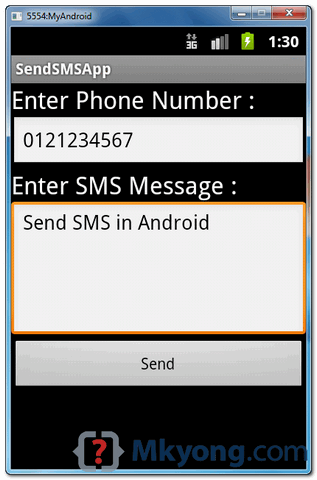
Android layout file to textboxes (phone no, sms message) and button to send the SMS message.
File : res/layout/main.xml
<?xml version="1.0" encoding="utf-8"?>
<LinearLayout xmlns:android="http://schemas.android.com/apk/res/android"
    android:id="@+id/linearLayout1"
    android:layout_width="fill_parent"
    android:layout_height="fill_parent"
    android:orientation="vertical" >

    <TextView
        android:id="@+id/textViewPhoneNo"
        android:layout_width="wrap_content"
        android:layout_height="wrap_content"
        android:text="Enter Phone Number : "
        android:textAppearance="?android:attr/textAppearanceLarge" />

    <EditText
        android:id="@+id/editTextPhoneNo"
        android:layout_width="fill_parent"
        android:layout_height="wrap_content"
        android:phoneNumber="true" >
    </EditText>

    <TextView
        android:id="@+id/textViewSMS"
        android:layout_width="wrap_content"
        android:layout_height="wrap_content"
        android:text="Enter SMS Message : "
        android:textAppearance="?android:attr/textAppearanceLarge" />

    <EditText
        android:id="@+id/editTextSMS"
        android:layout_width="fill_parent"
        android:layout_height="wrap_content"
        android:inputType="textMultiLine"
        android:lines="5"
        android:gravity="top" />

    <Button
        android:id="@+id/buttonSend"
        android:layout_width="fill_parent"
        android:layout_height="wrap_content"
        android:text="Send" />

</LinearLayout>
File : SendSMSActivity.java – Activity to send SMS via SmsManager.
package com.mkyong.android;

import android.app.Activity;
import android.os.Bundle;
import android.telephony.SmsManager;
import android.view.View;
import android.view.View.OnClickListener;
import android.widget.Button;
import android.widget.EditText;
import android.widget.Toast;

public class SendSMSActivity extends Activity {

	Button buttonSend;
	EditText textPhoneNo;
	EditText textSMS;

	@Override
	public void onCreate(Bundle savedInstanceState) {
		super.onCreate(savedInstanceState);
		setContentView(R.layout.main);

		buttonSend = (Button) findViewById(R.id.buttonSend);
		textPhoneNo = (EditText) findViewById(R.id.editTextPhoneNo);
		textSMS = (EditText) findViewById(R.id.editTextSMS);

		buttonSend.setOnClickListener(new OnClickListener() {

			@Override
			public void onClick(View v) {

			  String phoneNo = textPhoneNo.getText().toString();
			  String sms = textSMS.getText().toString();

			  try {
				SmsManager smsManager = SmsManager.getDefault();
				smsManager.sendTextMessage(phoneNo, null, sms, null, null);
				Toast.makeText(getApplicationContext(), "SMS Sent!",
							Toast.LENGTH_LONG).show();
			  } catch (Exception e) {
				Toast.makeText(getApplicationContext(),
					"SMS faild, please try again later!",
					Toast.LENGTH_LONG).show();
				e.printStackTrace();
			  }

			}
		});
	}
}
File : AndroidManifest.xml , need SEND_SMS permission.
<?xml version="1.0" encoding="utf-8"?>
<manifest xmlns:android="http://schemas.android.com/apk/res/android"
    package="com.mkyong.android"
    android:versionCode="1"
    android:versionName="1.0" >

    <uses-sdk android:minSdkVersion="10" />

    <uses-permission android:name="android.permission.SEND_SMS" />

    <application
        android:debuggable="true"
        android:icon="@drawable/ic_launcher"
        android:label="@string/app_name" >
        <activity
            android:label="@string/app_name"
            android:name=".SendSMSActivity" >
            <intent-filter >
                <action android:name="android.intent.action.MAIN" />
                <category android:name="android.intent.category.LAUNCHER" />
            </intent-filter>
        </activity>
    </application>

</manifest>
See demo :
2. Built-in SMS application Example
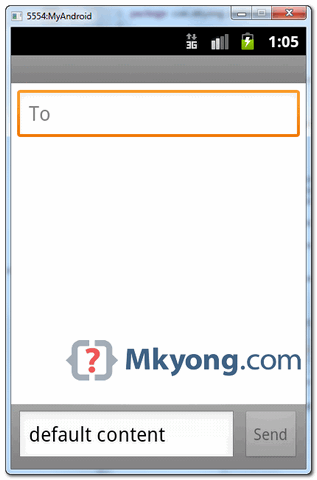
This example is using the device’s build-in SMS application to send out the SMS message.
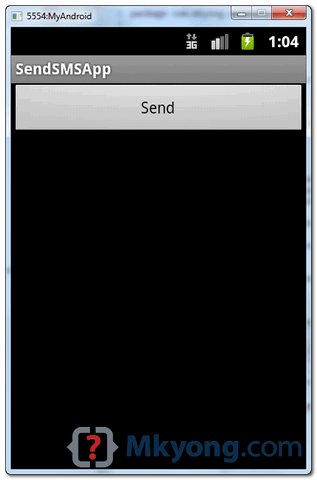
File : res/layout/main.xml – A button only.
<?xml version="1.0" encoding="utf-8"?>
<LinearLayout xmlns:android="http://schemas.android.com/apk/res/android"
    android:id="@+id/linearLayout1"
    android:layout_width="fill_parent"
    android:layout_height="fill_parent"
    android:orientation="vertical" >

    <Button
        android:id="@+id/buttonSend"
        android:layout_width="fill_parent"
        android:layout_height="wrap_content"
        android:text="Send" />

</LinearLayout>
File : SendSMSActivity.java – Activity class to use build-in SMS intent to send out the SMS message.
package com.mkyong.android;

import android.app.Activity;
import android.content.Intent;
import android.os.Bundle;
import android.view.View;
import android.view.View.OnClickListener;
import android.widget.Button;
import android.widget.Toast;

public class SendSMSActivity extends Activity {

	Button buttonSend;

	@Override
	public void onCreate(Bundle savedInstanceState) {
		super.onCreate(savedInstanceState);
		setContentView(R.layout.main);

		buttonSend = (Button) findViewById(R.id.buttonSend);

		buttonSend.setOnClickListener(new OnClickListener() {

			@Override
			public void onClick(View v) {

				try {

				     Intent sendIntent = new Intent(Intent.ACTION_VIEW);
				     sendIntent.putExtra("sms_body", "default content");
				     sendIntent.setType("vnd.android-dir/mms-sms");
				     startActivity(sendIntent);

				} catch (Exception e) {
					Toast.makeText(getApplicationContext(),
						"SMS faild, please try again later!",
						Toast.LENGTH_LONG).show();
					e.printStackTrace();
				}
			}
		});
	}
}
See demo :

How to handle dual sim phones?
If I am implementing either of the above features as one of the fragments, what changes I am supposed to do?
hello
i am writing sample program in Android Studio for Sending SMS.
that is good for android version 4.5 and lower than.
and not working in android 5 and upper and fail program.
please help me.
whta to do if i have a link of sms service provider for sending bulk message and if want to integrate this with my app to sen d same message to multipale users
hi,
i tried your code but am getting “SMS faild,please try again” i.e the catch part
So what is the solution.Help me out
As you may have read, his project has been “tested with Samsung Galaxy S2 (Android 2.3.3).”
Due to change in Google policies, this code should only work on older Android versions.
You shouldn’t expect this code to work on newer Android (i.e. KitKat, Lollipop and Marshmallow).
SMS can not be sent by Emulator. We should use real android device for sending sms
Hi!
I’m trying to run the above written program almost the same way you’ve written here but the SMS is not being sent, but I’m getting the (Toast) message that “SMS Sent!”
I’m using android:versionCode=”1″ and android:versionName=”1.0″,
Please help.
Thanks in Advance.
regards,
how can i receive acknowledgment when i send SMS with eclipse ADT
hello all,
i am developing a new application. it needs mobile number verification. is anyone know how to send message using SMSGateway(API). Plz help me
Hi i am alireza.i can write code to send smsmessage via java but i want to send smsmessage via java code without saving or show in device inbox can you help me??
My email: [email protected]
try {
SmsManager smsManager = SmsManager.getDefault();
smsManager.sendTextMessage(phoneNo, null, sms, null, null);
Toast.makeText(getApplicationContext(), “SMS Sent!”,
Toast.LENGTH_LONG).show();
} catch (Exception e) {
Toast.makeText(getApplicationContext(),
“SMS faild, please try again later!”,
Toast.LENGTH_LONG).show();
e.printStackTrace();
}
Your are nice. when i feel any problem then i look over you site. Sms send is one of the best.
My question is that I have made this. But problem is that when i send sms to any mobile it cut off some money from my balance.
Isn’t sms send is free in android?
My emulator running properly by this code, but the number is not finding any SMS
. Does this work only on Android phone
How can I prevent the SmsManager from adding it to the device SMS history? I am trying to make an app that send SMS in the background. But I don’t want the sent SMS to be added to the SMS history. I am using the SmsManager (using the following code) but the sent message gets added to the history.
SmsManager smsManager = SmsManager.getDefault();
smsManager.sendTextMessage(“phoneNo”, null, “sms message”, null, null);
How can I prevent it from adding the sent SMS to the device SMS history?
hello, iam trying to build an app by which we can send a notification free of cost. please help me
thank you! works like a charm!
Very good man!!
when the button is pressed, how to make send a fixed message to a fixed number? nothing editable! just a single button?
Thank you!
Hello.. I use to try this code.. but the number which i mentioned is not receving SMS .. code is working fine and Toast’s the message which i declared.. is there any format to giv e the number whiel entering.. please help me out.. please.. 🙁
enter the country code too then it will work
Is there any specific format for example 91-989932.. or 9198999 with no special charachters?I am not getting if I write num with no special charachters.Pls help me out
use trim method along with ur string(phoneno) it’ll change 91-943 to 91943.. Hope this help you 🙂
good tutorial
ya
How to send sms by choosing contact from contact list.. plz help me
you will need to look at this
http://developer.android.com/training/contacts-provider/retrieve-names.html
hello thks a lot for your tutoriel
I’m trying to develope android application and i need to receive the sms in my application not in message application how can i doo that heeelp please
Simple and great! Thanks very much!
it’s working fine for short message (at least 67 character) after that not working even i used multipart function of SmsManager class. pls help…..
thanks for the tutorial mkyong.
Thank you very much,
How we can recive a SMS and use its text and tel number?
Using sendTextMessage() method we can send message and it works fine.but how cal i sent free sms .I make birthday wish app so message must be sent free .please give me suggest.
hi all!
– On Built-in SMS application Example, I want default sent to the phone number how? in the above example only sms_body default.
plessee help me………….
Add this:
sendIntent.putExtra(“address”, “0123456789”);
Intent sendintent=new Intent(android.content.Intent.ACTION_VIEW,Uri.Parse(“smsto:number”));
StartActivity(sendintent);
good work buddy…. 🙂
Thank you very much! Both codes work for me 🙂
Did you recieve the message on other phone ????
The message is not sent to other number. Only the Toast says ‘SMS Sent’.
iam trying to develope an andriod APPS,
if i store all myfrends birthday information in this andriod APPS, year once i set this APP automatically the message will be displayed on particular date,can u please give me the guidelines..recording this apps
Dear
your attchment has no code. further more Procedure no 2 is not clear i think u miss some step
Nice example .
Thanks
what is the code to count the sms in our inbox
please reply
thanks in advance
Great example. Thanks alot.
Thanks mkyong… Even this http://www.compiletimeerror.com/2013/06/send-sms-in-android-example.html might help… Have a look…
how to create an sms app that will automatically send message to default contact after reading through any text file
Hi mkyong
I tried your sms sen example and set phone no. to “12345..9” Mobile real number
and message to “hi there, it s a test…”
and loaded it and run it on my android Moibile… but unfortunatly I received hudge of sms messages
I killed and unstalled the application to stop receiving sms
is there a simple way to do that … set a defaultphone numer & message text then press send button and it does it once ??
thank you
I’m truly enjoying the design and layout of your blog. It’s a very
easy on the eyes which makes it much more enjoyable for me to come here and visit more
often. Did you hire out a designer to create your theme?
Superb work!
hi,
In android it is possible to send database value as a message.
I trying to make a small application ,in that application i am trying to give one facility to user,
If user forgot password of this application,If i click on forget password button then i want send message to user,
password and user phone no take from database.
if it is possible then you tell me solution.
Excuse me, can you help me about make a program send MMS in android??? Thankyu very much…
Hi I followed the steps they provided to send message to mobile number…
but its nt going ,so can you plse help me
Hi,
It’s possible to create a form when i got a sms from a number phone i must enter a login and password for read it ?
you can help me ?
thank you very mutch
hello
can i create an app that send a predefined SMS to a predefined number by clinking on a button?
regards
Do you still need help? I can help you if you want…
Sir i like ur second sms application, but onele one changes is i want send sms to multiple contacs instead of one by using predifined text and contact, the message has to be sent only on single click on send button please help me its urgent……….
thank you
Hi all, I have one query, which of these two methods or ways to send sms for free? I have to develop an application that simulates the sending of sms … the idea is to set up an application to send sms to the same cell.
Hola a todos, mi consulta es la siguiente con cual de estos dos metodos para enviar sms es gratis.
Tengo que desarrollar una aplicacion que simule el envio de sms, seria tener una aplicacion que envie mensajes al mismo celular.
it’s working for me.great tutorial..very very appreciated.
My fone didn receive the sms. is there any format that shud i send it like +91 or 0 in the prefix of mobile number???
We’re on the same situation man.
Hi,
How to do send SMS, then at my inbox also have the message I send?
Thank u. always appreciate your lesson.
I really like this website.
i want make application on android which is that if i record voice than stop recording .some voice is automaticallly listen append after the end of the recording voice,,,,,,it also pith also like tom cat application
SEND_SMS Permission is ONLY NEEDED by THIS:
        SmsManager smsManager = SmsManager.getDefault();
	smsManager.sendTextMessage("phoneNo", null, "sms message", null, null);
and NOT by this :
Intent sendIntent = new Intent(Intent.ACTION_VIEW); sendIntent.putExtra("sms_body", "default content"); sendIntent.setType("vnd.android-dir/mms-sms"); startActivity(sendIntent);To Clarify, the first one sends directly without notifying, however, the second one, transfers the user to the actual usual sms screen.
Hi There,
Brilliant article,
I am tyring to retrieve text from 5 filed and send it to another mobile device but having problem
So i have the following text fields
Field 1 :
Feild 2 :
Field 3 :
Field 4 :
Field 5 :
How can i send the data from these fields in 1 SMS ?
Field 1 : “text”
Field 2 : “text”
Field 3 : “text”
Field 4 : “text”
Field 5 : “text”
Please help ? My code is as follows
package com.example.taxiappnew; import android.app.Activity; import android.app.PendingIntent; import android.content.BroadcastReceiver; import android.content.Context; import android.content.Intent; import android.content.IntentFilter; import android.os.Bundle; import android.telephony.gsm.SmsManager; import android.view.View; import android.widget.Button; import android.widget.EditText; import android.widget.Toast; @SuppressWarnings("deprecation") public class SmsMain extends Activity { Button btnSendSMS; EditText txtPhoneNo; EditText txtMessage; EditText txtPickup; /** Called when the activity is first created. */ @Override public void onCreate(Bundle savedInstanceState) { super.onCreate(savedInstanceState); setContentView(R.layout.activity_sms_main); btnSendSMS = (Button) findViewById(R.id.btnSendSMS); txtPhoneNo = (EditText) findViewById(R.id.txtPhoneNo); txtMessage = (EditText) findViewById(R.id.txtMessage); txtPickup = (EditText) findViewById(R.id.txtPickup); btnSendSMS.setOnClickListener(new View.OnClickListener() { public void onClick(View v) { String phoneNo = txtPhoneNo.getText().toString(); String Pickup = txtPickup.getText().toString(); String message = txtMessage.getText().toString(); if (phoneNo.length()>0 && message.length()>0) if (Pickup.length()>0) sendSMS(phoneNo,Pickup, message); else Toast.makeText(getBaseContext(), "Please enter both phone number and message.", Toast.LENGTH_SHORT).show(); } }); } //---sends an SMS message to another device--- private void sendSMS(String phoneNumber, String Pickup, String message) { String SENT = "SMS_SENT"; String DELIVERED = "SMS_DELIVERED"; PendingIntent sentPI = PendingIntent.getBroadcast(this, 0, new Intent(SENT), 0); PendingIntent deliveredPI = PendingIntent.getBroadcast(this, 0, new Intent(DELIVERED), 0); //---when the SMS has been sent--- registerReceiver(new BroadcastReceiver(){ @Override public void onReceive(Context arg0, Intent arg1) { switch (getResultCode()) { case Activity.RESULT_OK: Toast.makeText(getBaseContext(), "SMS sent", Toast.LENGTH_SHORT).show(); break; case SmsManager.RESULT_ERROR_GENERIC_FAILURE: Toast.makeText(getBaseContext(), "Generic failure", Toast.LENGTH_SHORT).show(); break; case SmsManager.RESULT_ERROR_NO_SERVICE: Toast.makeText(getBaseContext(), "No service", Toast.LENGTH_SHORT).show(); break; case SmsManager.RESULT_ERROR_NULL_PDU: Toast.makeText(getBaseContext(), "Null PDU", Toast.LENGTH_SHORT).show(); break; case SmsManager.RESULT_ERROR_RADIO_OFF: Toast.makeText(getBaseContext(), "Radio off", Toast.LENGTH_SHORT).show(); break; } } }, new IntentFilter(SENT)); //---when the SMS has been delivered--- registerReceiver(new BroadcastReceiver(){ public void onReceive(Context arg0, Intent arg1) { switch (getResultCode()) { case Activity.RESULT_OK: Toast.makeText(getBaseContext(), "SMS delivered", Toast.LENGTH_SHORT).show(); break; case Activity.RESULT_CANCELED: Toast.makeText(getBaseContext(), "SMS not delivered", Toast.LENGTH_SHORT).show(); break; } } }, new IntentFilter(DELIVERED)); String message1 = "Phone number : phoneNumber, SmsManager sms = SmsManager.getDefault(); sms.sendTextMessage(phoneNumber, null, null, sentPI, deliveredPI); } }my question is that when i write a sms in EditText of sms app i want that the lenght of sms show in TextView continuously.And the limit of sms lenght is 160 char. For example when i write a first character it show 1/1 in TextView and when i write second character it show 2/1 and so on. How can i do this anyone reply me thanks.
Tis we can do by Using EditText onTextChangeListener to count the text length. If the text length is within 160 chars. we’ll show it as 160/1. If it exceeds more than that we may show according to the text length. Support if you want to set the text count to 160 means in the edittext property set maxLength as 160.
Thanks for this nice tutorial. I got my app working now.Meanwhile i am looking to detect a message from specific number. do you have any idea about that..Or do you have any post at Broadcast receiver
That’s right, any tutorial on how to receive SMS ?
thanks
I’ve been using code from here:
http://www.apriorit.com/our-company/dev-blog/227-handle-sms-on-android
and it works well. The encryption/decryption portion I didn’t need, but I just commented that part out.
If you want to exchange thoughts, questions, answers on sending/receiving SMS, feel free to contact me at kellydcarter at yahoo dot com. Possibly we can help each other climb this learning curve.
how about receiving sms? do you have example ?
thanks
very thanks for tutorial, and next again a read inbox message tutorial thanks
How can i retrieve the mobile contacts in the drop-down on typing the number or name??
If I use a loop to send 10 SMS messages, I do not get reliable results. I always get back RESULTS_OK on send, but not always for every message. For example, if I send 10 messages, I may get back 7 RESULTS_OK and no failure messages. Also, usually 1-3 messages are never received, even if all 10 sent messages gave RESULTS_OK. Delaying (for example, 2 seconds) between sending of messages does not help. Are there any “tricks” to making SMS message sending more reliable?
nice job! mkyong ..
Hi guys.
Please! If you write in english language, have you on your mind that a lot of people shouldn’t understend to yours “u” as ‘you’ and others … Many people around world speak with other language and thes make english too dificult to read and understen the text …
Thanks for right english (how you see – I also do battle with english) 🙂
Thanks for sharing . Im search this article in the web and find your blog.
ooh pal.
you are perfect.
thank you for the tutorialsss.
REGARS
Hi,
How to send an sms to multiple receipients from my contacts.?
Help me…
Thanks in advance…
Regards,
Habeeb
hi…i need to send an text via default sender i mean either msg,fb…for that how to write code for the button…
There is no apk file in zip folder
Hi,
I am using sending SMS via SMSManager. But I have problem with noncounting sended SMS.
I need send SMS without save it to everywhere – it works. But also I want counting sended SMS – in system (for examle via CallMeter or DroidStat) – it don’t work.
Thanks for reason.
hi,
how to send a msg from java application to mobile?I tried but it is not successed..
can u please give me the guidelines…regrading this issue inorder to solve the prob.
thanks for advance.
i am trying ur code but sms cant send through emulator to a mobile device .
is there need of android mobile only?
right now i can use these code and in that enter only hi text and send it to my mobile no but it doesn’t in use so plz tell me what i can do?
Hey Aparna
If you want test this example on real device, all you need to install this to ur device. If u want to test this on sdk emulator, u need open one more emulator,and you can see the number of this emulator (ex:5556 or 5554) use this number like phone a phone number,when u send from emulator,u will receive sms on another emulator ( ex: 5554 to 5556)