In this tutorial, we show you how to make a phone call in Android,and monitor the phone call states via PhoneStateListener.
P.S This project is developed in Eclipse 3.7, and tested with Android 2.3.3.
1 Android Layout Files
Simpel layout file, to display a button.
File : res/layout/main.xml
<?xml version="1.0" encoding="utf-8"?>
<LinearLayout xmlns:android="http://schemas.android.com/apk/res/android"
    android:layout_width="fill_parent"
    android:layout_height="fill_parent"
    android:orientation="vertical" >

    <Button
        android:id="@+id/buttonCall"
        android:layout_width="wrap_content"
        android:layout_height="wrap_content"
        android:text="call 0377778888" />

</LinearLayout>
2. Activity
Use below code snippet to make a phone call in Android.
	Intent callIntent = new Intent(Intent.ACTION_CALL);
	callIntent.setData(Uri.parse("tel:0377778888"));
	startActivity(callIntent);
File : MainActivity.java – When the button is call, make a phone to 0377778888.
package com.mkyong.android;

import android.app.Activity;
import android.content.Intent;
import android.net.Uri;
import android.os.Bundle;
import android.view.View;
import android.view.View.OnClickListener;
import android.widget.Button;

public class MainActivity extends Activity {

	private Button button;

	public void onCreate(Bundle savedInstanceState) {

		super.onCreate(savedInstanceState);
		setContentView(R.layout.main);

		button = (Button) findViewById(R.id.buttonCall);

		// add button listener
		button.setOnClickListener(new OnClickListener() {

			@Override
			public void onClick(View arg0) {

				Intent callIntent = new Intent(Intent.ACTION_CALL);
				callIntent.setData(Uri.parse("tel:0377778888"));
				startActivity(callIntent);

			}

		});

	}

}
3 Android Manifest
To make a phone call, Android need CALL_PHONE permission.
<uses-permission android:name="android.permission.CALL_PHONE" />
File : AndroidManifest.xml
<?xml version="1.0" encoding="utf-8"?>
<manifest xmlns:android="http://schemas.android.com/apk/res/android"
    package="com.mkyong.android"
    android:versionCode="1"
    android:versionName="1.0" >

    <uses-sdk android:minSdkVersion="10" />

	<uses-permission android:name="android.permission.CALL_PHONE" />

    <application
        android:icon="@drawable/ic_launcher"
        android:label="@string/app_name" >

        <activity
            android:label="@string/app_name"
            android:name=".MainActivity" >
            <intent-filter >
                <action android:name="android.intent.action.MAIN" />
                <category android:name="android.intent.category.LAUNCHER" />
            </intent-filter>
        </activity>
    </application>

</manifest>
4. PhoneStateListener example
Ok, now we update the above activity, to monitor the phone call states, when a phone call is ended, come back to the original activity (actually, it just restart the activity). Read comment, it should be self-explanatory.
Run it and refer to the logcat console to understand how
PhoneStateListener works.
File : MainActivity.java
package com.mkyong.android;

import android.app.Activity;
import android.content.Context;
import android.content.Intent;
import android.net.Uri;
import android.os.Bundle;
import android.telephony.PhoneStateListener;
import android.telephony.TelephonyManager;
import android.util.Log;
import android.view.View;
import android.view.View.OnClickListener;
import android.widget.Button;

public class MainActivity extends Activity {

	final Context context = this;
	private Button button;

	public void onCreate(Bundle savedInstanceState) {

		super.onCreate(savedInstanceState);
		setContentView(R.layout.main);

		button = (Button) findViewById(R.id.buttonCall);

		// add PhoneStateListener
		PhoneCallListener phoneListener = new PhoneCallListener();
		TelephonyManager telephonyManager = (TelephonyManager) this
			.getSystemService(Context.TELEPHONY_SERVICE);
		telephonyManager.listen(phoneListener,PhoneStateListener.LISTEN_CALL_STATE);

		// add button listener
		button.setOnClickListener(new OnClickListener() {

			@Override
			public void onClick(View arg0) {

				Intent callIntent = new Intent(Intent.ACTION_CALL);
				callIntent.setData(Uri.parse("tel:0377778888"));
				startActivity(callIntent);

			}

		});

	}

	//monitor phone call activities
	private class PhoneCallListener extends PhoneStateListener {

		private boolean isPhoneCalling = false;

		String LOG_TAG = "LOGGING 123";

		@Override
		public void onCallStateChanged(int state, String incomingNumber) {

			if (TelephonyManager.CALL_STATE_RINGING == state) {
				// phone ringing
				Log.i(LOG_TAG, "RINGING, number: " + incomingNumber);
			}

			if (TelephonyManager.CALL_STATE_OFFHOOK == state) {
				// active
				Log.i(LOG_TAG, "OFFHOOK");

				isPhoneCalling = true;
			}

			if (TelephonyManager.CALL_STATE_IDLE == state) {
				// run when class initial and phone call ended,
				// need detect flag from CALL_STATE_OFFHOOK
				Log.i(LOG_TAG, "IDLE");

				if (isPhoneCalling) {

					Log.i(LOG_TAG, "restart app");

					// restart app
					Intent i = getBaseContext().getPackageManager()
						.getLaunchIntentForPackage(
							getBaseContext().getPackageName());
					i.addFlags(Intent.FLAG_ACTIVITY_CLEAR_TOP);
					startActivity(i);

					isPhoneCalling = false;
				}

			}
		}
	}

}
Update Android Manifest file again, PhoneStateListener need READ_PHONE_STATE permission.
<uses-permission android:name="android.permission.READ_PHONE_STATE" />
File : AndroidManifest.xml
<?xml version="1.0" encoding="utf-8"?>
<manifest xmlns:android="http://schemas.android.com/apk/res/android"
    package="com.mkyong.android"
    android:versionCode="1"
    android:versionName="1.0" >

    <uses-sdk android:minSdkVersion="10" />

    <uses-permission android:name="android.permission.CALL_PHONE" />
    <uses-permission android:name="android.permission.READ_PHONE_STATE" />

    <application
        android:icon="@drawable/ic_launcher"
        android:label="@string/app_name" >

        <activity
            android:label="@string/app_name"
            android:name=".MainActivity" >
            <intent-filter >
                <action android:name="android.intent.action.MAIN" />
                <category android:name="android.intent.category.LAUNCHER" />
            </intent-filter>
        </activity>
    </application>

</manifest>
5. Demo
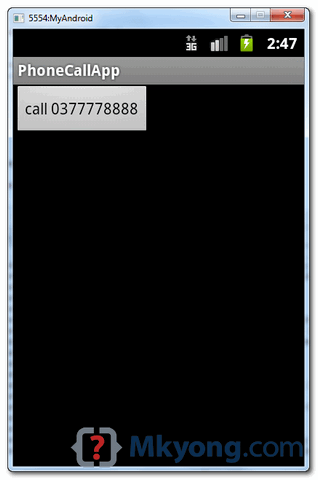
Activity started, just display a button.
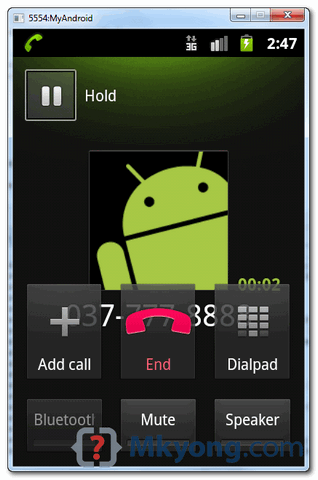
When button is clicked, make a phone call to 0377778888.
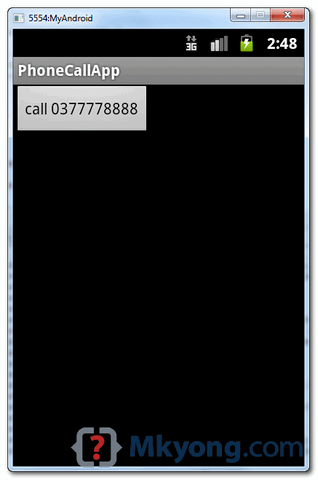
When phone call is hang out or ended, restart the main activity.

Hello there.
Call Voice Changer
how to write a program like. Can You Share a Simple Example.
dear MKYONG..
i want to Ask about How to create merge calls in android..
For Android 6.0 Marshmallow it’s not working …
what are the things which i have to add in coding for Android 6.0 Marshmallow….
Do you know ho to use a button inside Recyclerview (make a phonecall when i click on the button of each cardview ) i mean like contacts . when i click on button of the first cardview make phonecall(11111) and when i click on button of the second cardview make phonecall(22222) . how i can do that ? pleas answer me …
how to do that (make a phone call ) when we have a recyclerview ???
You have to make the button available in each item of the recycler view by inflating it each time in the adapter… Then give the button you’ve inflated an onClick listener… It automatically sets it for each item that passes through the adapter
hi is there are way to make a video call by editing this code?
error coming in calling ,unfortunately stopped. running app from Android Lolipop Mobile
THX. Its Work..
how can i add two phone call this program
Good one for sharing you knowledge with us.. can we make an app, so that once we will call from the native dialer then the request number should come into our application and then on the basis of number what its .will give a response and then dial that number.??
Hi,
Thanks very nice example ,
in add on this how to perform like in this example we have fixed number and we are doing call on that,
other then that if we like to join some bridges or other calls which require some input like give your conference id and conference password to join bridge
so if we know these details and rather then putting that again and again for each call we save this by some name like canada_bridge as a contact
and do a call on that
Thanks
disable the forwarding call
Thank You…
ji i want to make a Internet call using sip api in android pls teach and give the whole code
Thanks mkyong, Very helpful.
Wanted to know if there is a way to make the loudspeaker ON at deafult.
Great example. Unfortunately, on making the phone call, we always switch to the actual built -in phone application.
I want to avoid this, or at the very least hide the dialer pad button. The user SHOULD NOT have the option to enter a phone#.
Do you know of a way to achieve this? i.e. keep the actual built-in phone application in the background (I would need to add buttons for speaker, and end call in the primary application)
thanks
This app is for android phone only
Thank You. It worked.
hai i have used your code and it working properly but i have one doubt in your app you r restarting app when call ends here in my case i am having two activities and it goes to launcher activity(activity 1) but i want to go activity 2 after call ends any suggestion from you waiting for replay
hi, im also having the same problem, in case you figured it out, please help me.
Hello! I’m Socheat.
I live in Cambodia.
I’m student.
I want to ask you. I write the code follow your code is complete but when I run this code on my android why it always show (Unfortunately, has stop) please answer my question.
Tank you!
Thank you very much.
Hi
Can you please let me know how can i get numbersfrom int array to call.like i got a list of names and numbers so when i click on listview item,it calls the number stored in that position in an array
Simple, Objective , Effective, thank you very much.
the best ever
very very helpful
thanks!!!!!!!!!!!
Very nice Example very very help fully………….
Thanks. Really a nice and helpful tutorial
After going over a few of the blog posts on your web
site, I seriously appreciate your way of blogging. I saved it to my bookmark site list and will be checking back in the near future.
Please visit my web site too and let me know what you think.
hi.
app is working fine.i have put eg “111155” number to call and after “end call” its comes to main activity which i want.
but for any other call eg “65464646” when i end it call my apps main activity even after exiting the app before i dialed 65464646..
for any subsequent end call it calls my app only ..but when i end my app from apps setting ie force close ..it does not call my app..
awesome tutorial, I really like your website.
I have a question about the code below, it should be create a new activity but restart activity,right?
//restart app
i.addFlags(Intent.FLAG_ACTIVITY_CLEAR_TOP);
Could we have a tutorial about google cloud messages in adroind please?
how can i change this number with some name like Customer Care?
String tmp = “tel:” + text; //text is the customer care number
Intent callIntent = new Intent(Intent.ACTION_CALL);
callIntent.setData(Uri.parse(tmp));
startActivity(callIntent);
Special case for multi sim/network phones.
What if I wanted to preset either Sim1 or Sim2. And I chose Sim1 as default for my application?
Because the above case applies seamlessly (which means that when I press the button it makes the call directly) but on multi sims, it visits the dialer first to choose one sim before you can successfully make a call.
Any help would be appreciated. Thanks!
Great tutorial!
i dont think that multi-sim Android devices exist :))))
getting the issue if there is no sim card in phone what I have to do for this? please help me……
I think you don’t have to do anything, OS will tell you no sim on device.
How to make call activity to check prepaid phone balance or secret android code ?
Can you tell me how to change “0377778888” -> “*#*#4636#*#*” for call up ?
.
.
.
.
.
.
.
Or change “0377778888? -> “*101#” for check monney ;))
Hallo grate tutorial. Sorry for my english. But I need more help. I need to end this call from my application.Is it possible. Thank you for any answer. Can you contact me on my mail marek @ gollner . cz
PhoneCallListener phoneListener = new PhoneCallListener();
Should be PhoneStateListener()
Sorry i noted my mistake
Hi, I have this code to make a phone call:
if (intent == null){
intent = new Intent(Intent.ACTION_CALL);
intent.setFlags(Intent.FLAG_ACTIVITY_NEW_TASK);
intent.setData(Uri.parse(“tel:” + phone));
}
this.startActivity(intent);
During the “phone call” the user is able to back to my activity where this code is located. (on a click button)
If user press this button during the “phone call” then a second ‘phone call’ begins in hold state.
I know that I can get the current status phone with TelephonyManager, and with this status I can disable the button if status = CALL_STATE_OFFHOOK, but what I want, is reopen the OUTGOING CALL SCREEN. Like the click on ‘notification bar’ when you have an active ‘phone call’.
I don’t want to hang up, (I know about the restrictions) I just want to reopen the calling screen.
Do you know how to reopen the calling screen ?
Thank you
very useful tutorial
I’m try to adup your code to mine but it doesn’t recognize the “PhoneCallListener”
public class ButtonView extends FrameLayout  {
.
.
PhoneCallListener phoneListener = new PhoneCallListener();
TelephonyManager telephonyManager = (TelephonyManager) this.getSystemService(Context.TELEPHONY_SERVICE);
telephonyManager.listen(phoneListener,PhoneStateListener.LISTEN_CALL_STATE);
.
.
}
i get “PhoneCallListener cannot be resolved to a type” what is the problem ?
ok I solved that one but there is a littel problem
when I end the call , I get to the main menu and not back to my app
wht could by the problem ?
Thank you sir…..great tutorial
Hello, it’s possible send tones via voice uplink or receive audio via voice downlink?
I tried so many times, but when i make a call the only tones i can send it’s the DTMF tones of the dial pad of PhoneApp. If you have a suggestion about, please reply.
Congrats, hjordao.
is it necessary to write “tel” in program if i doesnt writes the “tel” then it application stops and causes exception.so please tell me the use of “tel”
Thanks a tonn for such a amazing article on Android.
Expect lot more to come. 🙂
Another wonderful post Sir.
With the similar idea, simple ‘Dialer’ application can also be created. Take a look at this post for more info: http://android.programmerguru.com/simple-dialer-application/
how if the phone number take from contact?
im’m sorry if my english is ambigous.
How to end call after 30 minutes please
Thanks for code
its very clear and straight forward to understand
Excellent Tutorial… 🙂 🙂
I have a college project in Android, that to answer an incoming call, just close phone to your ear, that’s it.
To answer/end a call, don’t touch screen any more !
To answer a incoming call, just close the phone to your ear.
To end call during a call, just turn the phone over.
How can I do this…Please help me with source code of android…
Please reply me fast…
Thanks in advance…
I have one doubt.
Why call is not going to any mobile from emulator.
If any other mechanism is there than please help me.
Thanks In Advance…..
If you are able to make the call via emulator, who is going to pay the telco? 🙂
Amazing tutorial. Learned a lot from this.
Thanks, still many Android tutorials are pending.
Hi mkyong,
in case of outgoing call answered i am not able to get alert means log or toast.. my requirement is i want calculate outgoing call duration please help me
in case of incoming call duration is working fine… i am facing problem for only in case of outgoing call answered. TelephonyManager.CALL_STATE_OFFHOOK is for when i ll dial that time only it is notifying.. i need when answered
Hi,
thanks for the clear tutorial.
For me it works, except after ending a call, it doent return to the last actvity. Instead, after ending a call, phone gets locked and after unlocking the screen, it returns to the app main activity (the first one), not to the activity that launched a call.
Any idea or solution?
I am also getting like you. How to make it to come back to the last activity?
same problem… help
Thanks..
It was really helpful for me..
Can this app run on pc?? or only in mobile??
Plz Reply..
Dear,
This app is for android phone only