For Android development on real device like Samsung Galaxy S2, you need to install Samsung OEM driver or USB driver. This Android OEM driver documentation will guide you where to download it… but the guide is not easy to follow.
Actually, the “Samsung USB driver” is included in the software called “Samsung Kies or PC Sync“. The following guide will show you how and where to get it.
P.S This example is using Windows 7 and Samsung Galaxy S2.
1. Samsung Phone Model
Most Samsung websites ask about your phone model to download the software. The phone model number is available on the back of your phone, see figure below :
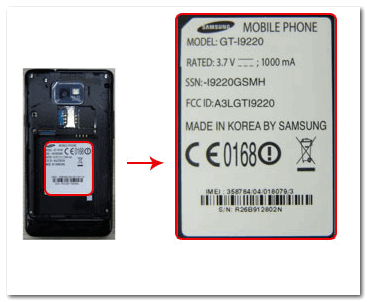
P.S Picture above is captured from Samsung website.
The phone model number of my Samsung galaxy s2 is “GT-19100“.
2. Samsung Website
Go to Samsung official website : http://www.samsung.com, it will redirect to your local Samsung website automatically. Find “Support” –> “Download“, or something similar.
3. Download Samsung Kies (USB Driver)
Type your phone model number or phone name to find suitable “Samsung Kies” to download. See figure below :
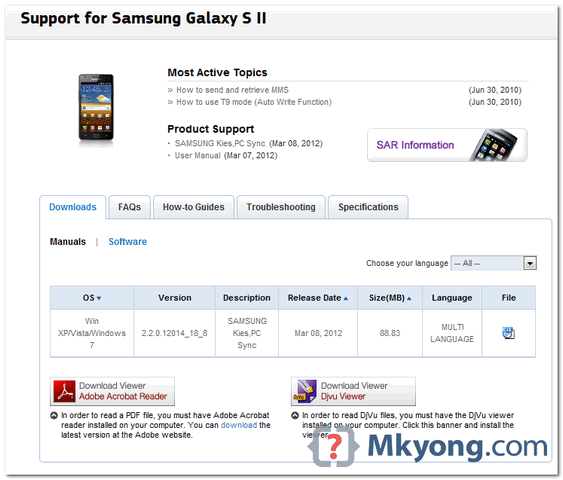
Get “Samsung Kies” and install on your Windows, the “Samsung USB driver” will be installed together.
Done. Now you can debug your Android application on Samsung Galaxy S2.

I have read so many things for the development of iOS devices from the site Apple iPhone Support and knew many things. So for any development of Android in your Samsung phone, you need to download Samsung USB driver. So you have to know the proper place from where you can download the USB driver.
i WILL COME BACK SOON
when installing kies it says there’s a new version… why wouldn’t I want the new version…. it didn’t work
thank you machi 🙂 this helped me save a lot of time.
I’d like the drivers without having to install kies. It’s such a bloating piece of crap
wtf are you talking about lol
Thankq.
Many thanks for this useful link and information!
I am tired of this loading and reloading USB driver. Should I smash my Samsung device to the floor?
yess pls fool only people like u can do that
you fool supporting such a worst company.. all the devices having tons of bugs..
That is certainly genuinely fascinating, That you are a good extremely specialist writer. We’ve joined up with ones give plus crunches intended for in search of further of this fantastic post. In addition, I’ve discussed your web site during my social support systems
usb mass storage is not working in MY samsung galaxys2 GT-I9100G Phone pls halp me what i will do
my phone was not supported in pc or laptop
To post source code in comment, uses
tag, for examples :
I am troubled with connecting my mobile device Galaxy S GT-I9000 with my PC. This problem is repeating again and again. Don’t you have a lasting solution??
Have you tried uninstalling the installed drivers, and reinstalling?
Thank you so much for your article. I spent hours last night trying to get the USB driver thing working on my Galaxy S2 without success. This did it! Now I can test apps on the device.
Yes, I LIKE IT
Thanks so much… was aimlessly searching for driver seperately but Kies did the trick! am able to debug on my mobile now 😀
The best article. Just check Samsung website to be sure how to make step 2 more clear. Keep it high …
thanx alot…
thanx
I was looking for USB drivers to avoid the Stupid and Slow Kies, thank you. ¬¬
hail to that
Thank you!!
Thank you
Thanks for the info.. but should i be downloading kies on every platform that i use my s2 on?
Thanks for your Info. I’m use Galaxy ACE.