javax.swing.tree.TreeNode is a restricted class

Problem Developing Struts2 on Google App Engine, in following environment. Struts 2.3.1.2 freemaker 2.3.18 JDK 1.6 Eclipse 3.7 + Google Plugin for Eclipse Google App Engine Java SDK 1.6.3.1 GAE complaints that javax.swing.tree.TreeNode is a restricted class in local development, if deployed on real GAE production environment, error message is gone. Caused by: java.lang.NoClassDefFoundError: javax.swing.tree.TreeNode …

Read more

GAE + JSF : javax.naming.InitialContext is a restricted class

Problem Developing JSF (2.1.7) web application with Google App Engine (1.6.3), hits following error message : java.lang.NoClassDefFoundError: javax.naming.InitialContext is a restricted class. Please see the Google App Engine developer’s guide for more details. at com.google.appengine.tools.development.agent.runtime.Runtime.reject(Runtime.java:51) at com.sun.faces.config.WebConfiguration.processJndiEntries(WebConfiguration.java:687) at com.sun.faces.config.WebConfiguration.<init>(WebConfiguration.java:134) at com.sun.faces.config.WebConfiguration.getInstance(WebConfiguration.java:194) at com.sun.faces.config.ConfigureListener.contextInitialized(ConfigureListener.java:163) //… Solution Java clsss – javax.naming.InitialContext, is not supported in Google App …

Read more

Struts 2 on GAE – Error: result ‘null’ not found

Problem Developing Struts2 on Google App Engine, in following environment. Struts 2.3.1.2 JDK 1.6 Eclipse 3.7 + Google Plugin for Eclipse Google App Engine Java SDK 1.6.3.1 Just started a simple Struts2 hello world example, when access the action class, hit error “Error: result ‘null’ not found”, in both local development and real production GAE …

Read more

Download uploaded application from Google App Engine (GAE)

You can use command “appcfg download_app” to download uploaded application from GAE, see signature below : AppCfg [options] -A app_id [ -V version ] download_app <out-dir> AppCfg download example Assume you have uploaded an application with app_id “mkyong-springmvc” to GAE, to download it back on your computer, use following command : D:\appengine-java-sdk-1.6.3.1\bin>appcfg -A mkyong-springmvc download_app …

Read more

Maven M2_REPO is non modifiable

Problem Forgot what i did, may be installed m2eclipse plguin, it made the M2_REPO classpath variable is unable to edit. Select Windows -> Preferences -> Java -> Build Path -> Classpath Variables. Eclipse come with embedded Maven and have this M2_REPO classpath variable default non modifiable also. Figure – M2_REPO is non modifiable Solution To …

Read more

Struts 2 on GAE – java.security.AccessControlException: access denied

Problem Developing Struts2 (v 2.3.1.2) on Google App Engine (SDK v1.6.3.1), local development, hit “java.security.AccessControlException: access denied” error? Solution Normally, this is because you turn the “devMode on” in struts.xml file. File : struts.xml <?xml version="1.0" encoding="UTF-8" ?> <!DOCTYPE struts PUBLIC "-//Apache Software Foundation//DTD Struts Configuration 2.0//EN" "http://struts.apache.org/dtds/struts-2.0.dtd"> <struts> <constant name="struts.devMode" value="true" /> //… </struts> …

Read more

How to install Google Plugin for Eclipse

In this tutorials, we will show you how to install “Google Plugin for Eclipse“, in Eclipse 3.7 (Indigo). 1. Installation In Eclipse 3.7, click “Help” –> “Install New Software…“, copy and paste following URL : http://dl.google.com/eclipse/plugin/3.7 Note For other Eclipse version like 3.3, 3.4, 3.5, 3.6, please refer to this GAE Eclipse documentation. Figure : …

Read more

Google Plugin for Eclipse – jar has been tampered!

Problem While installing Google Plugin for Eclipse 3.7, via http://dl.google.com/eclipse/plugin/3.7 , it took almost half and hour and download and stopped at the end. A long list of error messages “.jar has been tampered!” are prompted in Eclipse. An error occurred while collecting items to be installed session context was:(profile=epp.package.jee, phase=org.eclipse.equinox.internal.p2.engine.phases.Collect, operand=, action=). No repository …

Read more

Eclipse : “Install download1” has encountered a problem

1. Problem While installing Google plugin for Eclipse, hit following weird error messages, and caused a long download time and stopped at the end. "Install download" has encountered a problem "Install download1" has encountered a problem "Install download2" has encountered a problem "Install download3" has encountered a problem "Install download4" has encountered a problem See …

Read more

How to send Email in Android

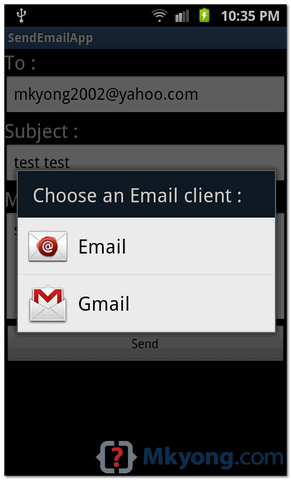
In Android, you can use Intent.ACTION_SEND to call an existing email client to send an Email. See following code snippets : Intent email = new Intent(Intent.ACTION_SEND); email.putExtra(Intent.EXTRA_EMAIL, new String[]{"[email protected]"}); email.putExtra(Intent.EXTRA_SUBJECT, "subject"); email.putExtra(Intent.EXTRA_TEXT, "message"); email.setType("message/rfc822"); startActivity(Intent.createChooser(email, "Choose an Email client :")); P.S This project is developed in Eclipse 3.7, and tested with Samsung Galaxy S2 (Android …

Read more

How to send SMS message in Android

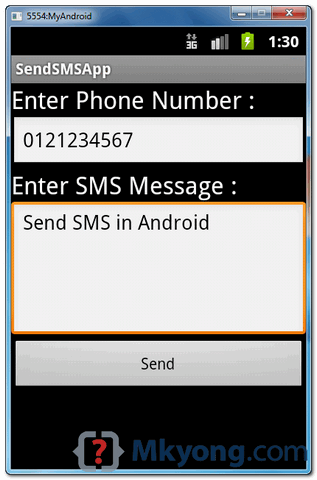
In Android, you can use SmsManager API or device’s Built-in SMS application to send a SMS message. In this tutorial, we show you two basic examples to send SMS message : SmsManager API SmsManager smsManager = SmsManager.getDefault(); smsManager.sendTextMessage("phoneNo", null, "sms message", null, null); Built-in SMS application Intent sendIntent = new Intent(Intent.ACTION_VIEW); sendIntent.putExtra("sms_body", "default content"); sendIntent.setType("vnd.android-dir/mms-sms"); …

Read more

Android : how to check if device has camera

In Android, you can use PackageManager , hasSystemFeature() method to check if a device has camera, gps or other features. See full example of using PackageManager in an activity class. package com.mkyong.android; import android.app.Activity; import android.content.Context; import android.content.pm.PackageManager; import android.os.Bundle; import android.util.Log; public class FlashLightActivity extends Activity { @Override public void onCreate(Bundle savedInstanceState) { super.onCreate(savedInstanceState); …

Read more

How to turn on/off camera LED / flashlight in Android

In this tutorial, we show you how to turn on/off the phone camera led or flashlight in Android. See code snippets : 1. Turn on camera = Camera.open(); Parameters p = camera.getParameters(); p.setFlashMode(Parameters.FLASH_MODE_TORCH); camera.setParameters(p); camera.startPreview(); 2. Turn off camera = Camera.open(); Parameters p = camera.getParameters(); p.setFlashMode(Parameters.FLASH_MODE_OFF); camera.setParameters(p); camera.stopPreview(); And, put following permission on AndroidManifest.xml. <uses-permission …

Read more

Android – How to center button on screen

A small Android tip to show you how to center button on screen. Wrap button in RelativeLayout, and set following attributes to “true“. android:layout_centerVertical="true" android:layout_centerHorizontal="true" Following is a full example to demonstrate the use of above tip to center a button on screen. 1. Android Layout A button in layout. File : res/layout/main.xml <?xml version="1.0" …

Read more

Android Toast example

In Android, Toast is a notification message that pop up, display a certain amount of time, and automtaically fades in and out, most people just use it for debugging purpose. Code snippets to create a Toast message : //display in short period of time Toast.makeText(getApplicationContext(), "msg msg", Toast.LENGTH_SHORT).show(); //display in long period of time Toast.makeText(getApplicationContext(), …

Read more

Android debugging on real device

This tutorial will show you how to debug Android application on a real Android-powered device (mobile phone). Tools and environment in this tutorial : Eclipse IDE 3.7 + ADT Plugin Samsung Galaxy S2 Windows 7 Summary steps to debug on device : Download Google USB Driver (if using Android Developer Phones (ADP)) Download OEM USB …

Read more

Android custom dialog example

In this tutorial, we show you how to create a custom dialog in Android. See following steps : Create a custom dialog layout (XML file). Attach the layout to Dialog. Display the Dialog. Done. P.S This project is developed in Eclipse 3.7, and tested with Android 2.3.3. Note You may also interest to read this …

Read more

Where to download Samsung Galaxy S2 USB driver ?

For Android development on real device like Samsung Galaxy S2, you need to install Samsung OEM driver or USB driver. This Android OEM driver documentation will guide you where to download it… but the guide is not easy to follow. Actually, the “Samsung USB driver” is included in the software called “Samsung Kies or PC …

Read more

Android prompt user input dialog example

In this tutorial, we will enchance the previous AlertDialog example, to make it able to accept user input, just like a PromptDialog. More specific, this is a custom AlertDialog example. See following steps : Create a prompt dialog layout (XML file). Attach the prompt dialog layout to AlertDialog.Builder. Attach the AlertDialog.Builder to AlertDialog. Done. P.S …

Read more

Android alert dialog example

In this tutorial, we show you how to display an alert box in Android. See flowing Steps : First, use the AlertDialog.Builder to create the alert box interface, like title, message to display, buttons, and button onclick function Later attach above builder to AlertDialog and display it. Done. P.S This project is developed in Eclipse …

Read more

How to make a phone call in Android

In this tutorial, we show you how to make a phone call in Android,and monitor the phone call states via PhoneStateListener. P.S This project is developed in Eclipse 3.7, and tested with Android 2.3.3. 1 Android Layout Files Simpel layout file, to display a button. File : res/layout/main.xml <?xml version="1.0" encoding="utf-8"?> <LinearLayout xmlns:android="http://schemas.android.com/apk/res/android" android:layout_width="fill_parent" android:layout_height="fill_parent" …

Read more

Android WebView example

Android’s WebView allows you to open an own windows for viewing URL or custom html markup page. In this tutorial, you will create two pages, a page with a single button, when you clicked on it, it will navigate to another page and display URL “google.com” in WebView component. P.S This project is developed in …

Read more

Android TabLayout example

In this tutorial, we will demonstrates the use of TabLayout to render 4 tabs – “Android”, “Windows”, “Apple” and “BlackBerry”, each tab contains a textview to display a simple message. P.S This project is developed in Eclipse 3.7, and tested with Android 2.3.3. 1. Tab Images Put 4 tab images in “res/drawable” folder. The tab …

Read more

How to remove unused imports in Eclipse

Often times, after code refactor or bug fixed, Eclipse IDE will show a yellow underline for all unsed imports at the top of your class and said “The import xxx is never used“. To remove those unused imports automatically, just click on the class and press the shortcut “Ctrl + Shift + O” to initilize …

Read more

Android GridView example

In Android, GridView let you arranges components in a two-dimensional scrolling grid. For detail attribute exaplanation, see GridView reference. In this tutorial, we will show you 2 common GridView examples : Normal way, just display text in GridView layout. Create a custom adapter to display image and text in GridView layout. P.S This project is …

Read more

How to display line numbers in Eclipse

By default, Eclipse’s editor will not display line numbers, it’s no good for debugging. Here’s a tip to show you how to turn on the “display line numbers” feature in Eclipse. In Eclipse IDE, select “Windows” > “Preference” > “General” > “Editors” > “Text Editors” , check on the “Show line numbers” option. See result.

Java try-with-resources example

This article shows you how to use try-with-resources in Java. Table of contents: 1 Java try-with-resources before and after 2. try-with-resources with single resource 3. try-with-resources with multiple resources 3.1 JDBC example. 4. Custom resource with AutoCloseable interface 5. Resource open and closing order 6. Java 9 – final or effectively final variables Download Source …

Read more

How to read file in Java – FileInputStream

In Java, we use FileInputStream to read bytes from a file, such as an image file or binary file. Topics FileInputStream – Read a file FileInputStream – Remaining bytes FileInputStream – Better performance FileInputStream vs BufferedInputStream InputStreamReader – Convert FileInputStream to Reader FileInputStream – Read a Unicode file Note However, all the below examples use …

Read more

Android ListView example

In Android, ListView let you arranges components in a vertical scrollable list. In this tutorial, we will show you 2 ListView examples : Normal way to display components in ListView. Custom array adapter to customize the item display in ListView. P.S This project is developed in Eclipse 3.7, and tested with Android 2.3.3. 1. Normal …

Read more

How to use mkyong tutorial

Recently, received many emails for mkyong.com tutorials, about how to deploy the project to Tomcat, build the project with Maven, and also how to import it into Eclipse IDE. Actually, almost all the mkyong.com tutorials are developed in Eclipse IDE (3.6 or 3.7), build with Maven (version 2 or 3) and deploy to Tomcat. At …

Read more

How to set default activity for Android application

In Android, you can configure the starting activity (default activity) of your application via following “intent-filter” in “AndroidManifest.xml“. See following code snippet to configure a activity class “logoActivity” as the default activity. File : AndroidManifest.xml <activity android:label="Logo" android:name=".logoActivity" > <intent-filter > <action android:name="android.intent.action.MAIN" /> <category android:name="android.intent.category.LAUNCHER" /> </intent-filter> </activity> For example, let said you have …

Read more

Attach Android source code to Eclipse IDE

By default, Android SDK or Eclipse ADT plugin are not bundle with any Android’s source code for debugging. In Eclipse IDE, step into any Android class will prompt no source code attach, see following screen : Solution According to this official Android source code article, it’s shocked that we need to use “repo” to download …

Read more

Android activity – from one screen to another screen

In Android, an activity is represent a single screen. Most applications have multiple activities to represent different screens, for example, one activity to display a list of the application settings, another activity to display the application status. Note Refer to this official Android activity article to understand more about Android activity. In this tutorial, we …

Read more