PrimeFaces – Open Window By Dropdown Selection

Technology: Primefaces it’s java based web framework to develop web applications using java. It’s one of the compliance frameworks for JSF, there are many other frameworks like omnifaces, richfaces. Primefaces has rich UI components. In this tutorial primefaces, maven, java8, glasifish servers are used. Use case: If you want to open a new page by …

Read more

JSF 2 + Log4j Integration Example

In this tutorial, we will show you how to integrate the log4j framework with the JSF 2.x web application. JSF is using java.util.logging, you need extra works to redirect the logging from JSF’s java.util.logging to log4j, with a serious penalty of performance, make sure use this trick only during local development or debugging environment. Review …

Read more

Spring @Autowired into JSF custom validator

Here’s the scenario, create a custom JSF validator, injects a bean via Spring’s @Autowired. UsernameValidator.java – Custom JSF validator package com.mkyong.user; import javax.faces.application.FacesMessage; import javax.faces.component.UIComponent; import javax.faces.context.FacesContext; import javax.faces.validator.FacesValidator; import javax.faces.validator.Validator; import javax.faces.validator.ValidatorException; import org.springframework.beans.factory.annotation.Autowired; import org.springframework.context.annotation.Scope; import org.springframework.stereotype.Component; import com.mkyong.user.bo.UserService; @Component @Scope("request") @FacesValidator("UsernameValidator") public class UsernameValidator implements Validator { @Autowired UserService userService; @Override public …

Read more

How to get JSF id via jQuery

See a simple JSF example : <h:form id="signup-form"> <h:inputText id="email" value="#{beanBean.email}" /> </h:form> It will generates following HTML code : <input id="signup-form:email" type="text" /> Uses jQuery selector to get the email id, but failed. <script> jQuery(document).ready(function($) { $(‘#signup-form:email’).checkEmailFormat(); }); </script> Solution This is a well-known problem to integrate JSF and jQuery – the colon “:” …

Read more

PrimeFaces focus error field automatically

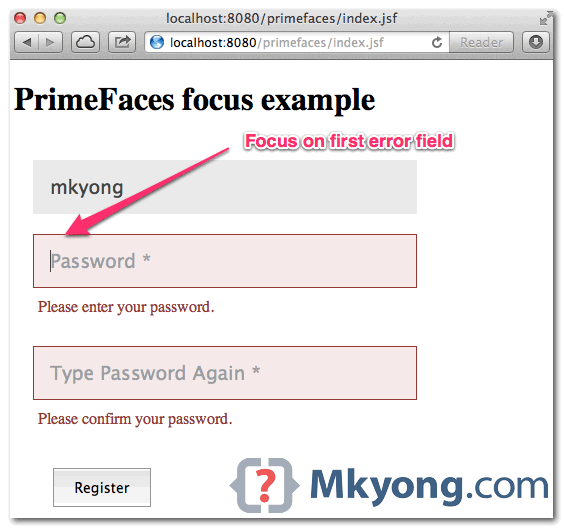
In PrimeFaces, if focus component <p:focus> is enabled : When page is loaded, it will focus on first visible input field; If validation failed, it will focus on first error field automatically. It works very nice, and a must use component in form handling. Just wonder why don’t make it enable by default? In this …

Read more

PrimeFaces + JSF Email validator example

To validate email, uses JSF <f:validateRegex>, and puts following regular expression. This regex should be able to validates most of the email format, and I’m using it for few projects. Email Regular Expression ^[_A-Za-z0-9-\+]+(\.[_A-Za-z0-9-]+)*@[A-Za-z0-9-]+(\.[A-Za-z0-9]+)*(\.[A-Za-z]{2,})$ P.S For detail explanation, refer to this how to validate email address with regular expression. In this tutorial, we will show …

Read more

PrimeFaces – Watermark on text input

In PrimeFaces, your can use <p:watermark> to display watermark effect on input field. This watermark component is using HTML5 placeholder attribute in supported browsers like Safari, Chrome and Firefox, and fall back to JavaScript solution for non-support browser like IE. Display watermark text in input field <p:inputText id="username" required="true" label="username" size="40" value="#{userBean.username}" /> <p:watermark for="username" …

Read more

How to override PrimeFaces CSS?

Often times, you may need to override default PrimeFaces CSS with your pretty customize values. In this example, we will show you how to override PrimeFaces error message style. Debug with FireBug, the PF’s error messages style are from primefaces.css primefaces.css .ui-message-info, .ui-message-error, .ui-message-warn, .ui-message-fatal { border: 1px solid; margin: 0px 5px; padding: 2px 5px; …

Read more

Resource ordering in PrimeFaces

Since PrimeFaces 3.0, it provides a very customizable resource ordering. See following order : 1. “first” facet if defined. <f:facet name="first"> <!– load css, js or others –> </f:facet> 2. PrimeFaces – JSF registered CSS. 3. PrimeFaces – Theme CSS. 4. “middle” facet if defined. <f:facet name="middle"> <!– load css, js or others –> </f:facet> …

Read more

Download PrimeFaces ShowCase and Source Code

The PrimeFaces showcase is showing how to use the entire 100+ PrimeFaces components, which is impressive! Actually, you can download the entire PrimeFaces showcase web application (in war) and source code, and deploy on your local server for testing or further study. Here we show you how. 1. Visit Maven Repository The entire PrimeFaces showcase …

Read more

PrimeFaces compress and combine JavaScript and CSS

In this tutorial, we will show you how to use PrimeFaces extensions – Maven plugin, to compress and combine JavaScript and CSS files, a web resources optimization example, to make web site load faster. Tool tested : PrimeFaces 3.3 PrimeFaces-Extensions 0.5 Maven 3.0.3 Note This guide is example-driven, for detail explanation and all other plugin …

Read more

Remove all default CSS styling from PrimeFaces

By default, PrimeFaces will return total of four files, 2 css files and 2 Javascript files. <link type="text/css" rel="stylesheet" href="/primefaces/faces/javax.faces.resource/theme.css?ln=primefaces-aristo" /> <link type="text/css" rel="stylesheet" href="/primefaces/faces/javax.faces.resource/primefaces.css?ln=primefaces" /> <script type="text/javascript" src="/primefaces/faces/javax.faces.resource/jquery/jquery.js?ln=primefaces"></script> <script type="text/javascript" src="/primefaces/faces/javax.faces.resource/primefaces.js?ln=primefaces"></script> Some people don’t like the default PrimeFaces CSS file and wonder how to remove it? Solution You are allow to remove only the …

Read more

Create a custom theme in PrimeFaces

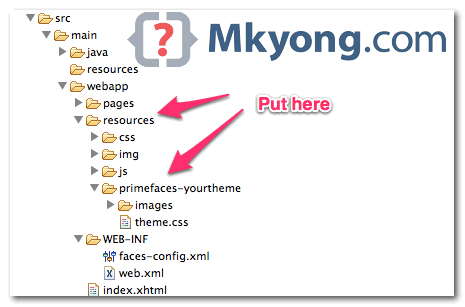
PrimeFaces is using jQuery ThemeRoller framework, and it comes with 30+ pre-defined themes, visit all available themes, before create a custom theme. In this tutorial, we will show you how to create a custom theme and apply it in PrimeFaces. 1. ThemeRoller CSS Framework Visit jQuery ThemeRoller, play around the value to customize your theme, …

Read more

Changing theme in PrimeFaces

PrimeFaces is using jQuery ThemeRoller CSS theme framework, and come with 30+ pre-designed themes that you can download and apply in seconds. In this tutorial, we will show you how to change a theme n PriceFaces. There are two ways to change a theme : Using Maven to download and apply. Download manually and apply. …

Read more

PrimeFaces : java.io.IOException: Not in GZIP format

Recently, testing on PrimeFaces’ idleMonitor component. <!DOCTYPE html> <html xmlns="http://www.w3.org/1999/xhtml" xmlns:h="http://java.sun.com/jsf/html" xmlns:f="http://java.sun.com/jsf/core" xmlns:ui="http://java.sun.com/jsf/facelets" xmlns:p="http://primefaces.org/ui"> <h:head> </h:head> <h:body> <h1>PrimeFaces and idleMonitor</h1> <p:growl id="messages" showDetail="true" sticky="true" /> <p:idleMonitor timeout="10000" update="messages"> <p:ajax event="idle" listener="#{idleBean.idleListener}" update="messages" /> </p:idleMonitor> </h:body> </html> Problem After 10 seconds, console prompts java.io.IOException: Not in GZIP format? That’s weird, what GZIP to do iwith idleMonitor …

Read more

PrimeFaces code completion in Eclipse IDE

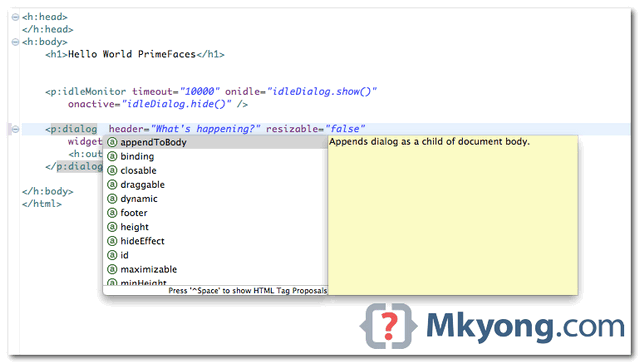
In Eclipse, as long as your JSF + PrimeFaces project with JSF facet enabled, the PrimeFaces code completion is available automatically. Figure : PrimeFaces code assist in Eclipse IDE Tools Tested : JSF 2.1.11 Eclipse 4.2 PrimeFaces 3.3 Figure : Steps to enable JSF facet in Eclipse IDE. For detail instruction to configure JSF facet, …

Read more

PrimeFaces idleMonitor example

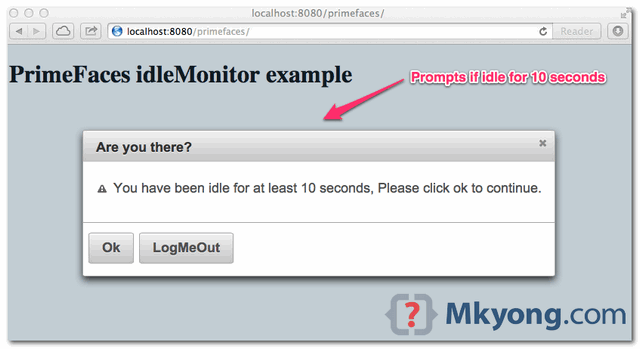
The idleMonitor component, monitor user action and fire when user goes idle or active again. By default, the idle time is set to 5 minutes (300000 ms), and you can customize the duration via timeout attribute like below : <!– fire if user idle for 10 seconds –> <p:idleMonitor timeout="10000" onidle="idleDialog.show()" /> In this tutorial, …

Read more

PrimeFaces hello world example

In this tutorial, we will show you how to create a JSF 2 + PrimeFaces wed project, the final output is display a “hello world” string in PrimeFaces editor component. Tools used : JSF 2.1.11 Primefaces 3.3 Eclipse 4.2 Maven 3 Tested on Tomcat 7 Note PrimeFaces only requires a JAVA 5+ runtime and a …

Read more

How to get ServletContext in JSF 2

The ServletContext class is important in web application, often times, you need this class get the information of current deployed servlet container. Here’s a trick to show you how to get ServletContext in JSF2, via FacesContext. ServletContext servletContext = (ServletContext) FacesContext .getCurrentInstance().getExternalContext().getContext(); References ServletContext JavaDoc FacesContext JavaDoc

JSF 2 + Quartz 2 example

In this tutorial, we show you how to run a Quartz job during JSF web application via QuartzInitializerListener listener class in Quartz library. This solution is not only works with JSF 2, the concept is applicable on almost all standard Java web application. Tools Used : JSF 2.1.11 Quartz 2.1.5 Maven 3 Eclipse 4.2 Tomcat …

Read more

JSF 2.0 + JDBC integration example

Here’s a guide to show you how to integrate JSF 2.0 with database via JDBC. In this example, we are using MySQL database and Tomcat web container. Directory structure of this example 1. Table Structure Create a “customer” table and insert five dummy records. Later, display it via JSF h:dataTable. SQL commands DROP TABLE IF …

Read more

javax.naming.NameNotFoundException: Name jdbc is not bound in this Context

Problem JSF 2.0 web application, a managed bean uses @Resource to inject the “jdbc/mkyongdb” datasource into a ds property. @ManagedBean(name="customer") @SessionScoped public class CustomerBean implements Serializable{ //resource injection @Resource(name="jdbc/mkyongdb") private DataSource ds; When deployed to Tomcat 6, it hits following error messages for the MySQL datasource configuration. com.sun.faces.mgbean.ManagedBeanCreationException: An error occurred performing resource injection on …

Read more

JSF 2 + Spring 3 integration example

In this tutorial, we will show you how to integrate JSF 2.0 with Spring 3 using : JSF XML faces-config.xml Spring annotations JSR-330 standard injection Tools and technologies used : JSF 2.1.13 Spring 3.1.2.RELEASE Maven 3 Eclipse 4.2 Tomcat 6 or 7 1. Directory Structure A standard Maven project for demonstration. 2. Project Dependencies Declares …

Read more

Composite Components in JSF 2.0

Since JSF 2.0, it’s very easy to create a reusable component, known as composite components. In this tutorial, we show you how to create a simple composite components (stored as “register.xhtml“), which is an user registration form, includes name and email text fields (h:inputText) and a submit button (h:commandButton). In addition, we also show you …

Read more

Multiple Components Validator in JSF 2.0

In JSF, there is no official way to validate multiple components or fields. To solve it, you need to create a custom validator. In this tutorial, we will show you two unofficial ways to create a validator to validate multiple components – password and confirm password. Two ways : 1. Register PostValidateEvent, puts validation inside. …

Read more

JSF 2 PreRenderViewEvent example

In JSF 2.0, you can attach a javax.faces.event.PreRenderViewEvent system event to perform custom task before a view root (JSF page) is display. Let see a complete PreRenderViewEvent example below : 1. Managed Bean Create a normal bean, contains a method signature “public void method-name(ComponentSystemEvent event)“, later you will ask listener to call this method. In …

Read more

JSF 2 PostConstructApplicationEvent and PreDestroyApplicationEvent example

Since JSF 2.0, you can register javax.faces.event.PostConstructApplicationEvent and javax.faces.event.PreDestroyApplicationEvent system event to manipulate the JSF application life cycle. 1. PostConstructApplicationEvent – Perform a custom post-configuration after application has started. 2. PreDestroyApplicationEvent – Perform a custom cleanup task before application is about to be shut down. Note In JSF, you can’t depends on the standard ServletContextListeners …

Read more

4 ways to pass parameter from JSF page to backing bean

As i know,there are 4 ways to pass a parameter value from JSF page to backing bean : Method expression (JSF 2.0) f:param f:attribute f:setPropertyActionListener Let see example one by one : 1. Method expression Since JSF 2.0, you are allow to pass parameter value in the method expression like this #{bean.method(param)}. JSF page… <h:commandButton …

Read more

JSF 2 setPropertyActionListener example

In JSF, “f:setPropertyActionListener” tag is allow you to set a value directly into the property of your backing bean. For example, <h:commandButton action="#{user.outcome}" value="Submit"> <f:setPropertyActionListener target="#{user.username}" value="mkyong" /> </h:commandButton> In above JSF code snippets, if the button is clicked, it will set the “mkyong” value to the “username” property via setUsername() method. @ManagedBean(name="user") @SessionScoped public …

Read more

JSF 2 attribute example

In JSF, “f:attribute” tag allow you to pass a attribute value to a component, or a parameter to a component via action listener. For example, 1. Assign a attribute value to a component. <h:commandButton"> <f:attribute name="value" value="Click Me" /> </h:commandButton> //is equal to <h:commandButton value="Click Me" /> 2. Assign parameter to a component and get …

Read more

JSF 2 param example

In JSF, “f:param” tag allow you to pass a parameter to a component, but it’s behavior is different depends on which type of component it’s attached. For example, 1. f:param + h:outputFormat If attach a “f:param” tag to “h:outputFormat“, the parameter is specifies the placeholder. <h:outputFormat value="Hello,{0}. You are from {1}."> <f:param value="JSF User" /> …

Read more

JSF 2 actionListener example

In JSF, “Action Events” are fired by clicking on a button or link component, e.g h:commandButton or h:commandLink. actions vs action listeners Do not confuse these two tags, actions is used to perform business logic and navigation task; While action listeners are used to perform UI interface logic or action invoke observation. Common use case …

Read more

JSF 2 message and messages example

In JSF, you can output message via following two messages tags : h:message – Output a single message for a specific component. h:messages – Output all messages in current page. See following JSF 2.0 example to show the use of both “h:message” and “h:messages” tags to display the validation error message. JSF page… <?xml version="1.0" …

Read more

JSF 2 internationalization example

In JSF application, you can change your application locale programmatically like this : //this example change locale to france FacesContext.getCurrentInstance().getViewRoot().setLocale(new Locale(‘fr’); It makes JSF support for internationalization or multiple languages easily. Complete JSF internationalization example In this tutorial, we show you a JSF 2.0 web application, which display a welcome page, retrieve a welcome message …

Read more

Access a managed bean from event listener – JSF

Problem How can a JSF event listener class access another managed bean? See scenario below : JSF page… <h:selectOneMenu value="#{country.localeCode}" onchange="submit()"> <f:valueChangeListener type="com.mkyong.CountryValueListener" /> <f:selectItems value="#{country.countryInMap}" /> </h:selectOneMenu> country managed bean… package com.mkyong; import java.io.Serializable; import javax.faces.bean.ManagedBean; import javax.faces.bean.SessionScoped; @ManagedBean(name="country") @SessionScoped public class CountryBean implements Serializable{ private String localeCode; public void setLocaleCode(String localeCode) { this.localeCode …

Read more

JSF 2 valueChangeListener example

When user make changes in input components, such as h:inputText or h:selectOneMenu, the JSF “value change event” will be fired. Two ways to implement it : 1. Method binding – In input component, specified a bean’s method directly in the “valueChangeListener” attribute. JSF… <h:selectOneMenu value="#{bean.value}" onchange="submit()" valueChangeListener="#{bean.valueChangeMethod}"> <f:selectItems value="#{bean.values}" /> </h:selectOneMenu> Java… The method which …

Read more

Custom validator in JSF 2.0

In this article, we will show you how to create a custom validator in JSF 2.0 Steps Create a validator class by implements javax.faces.validator.Validator interface. Override validate() method. Assign an unique validator ID via @FacesValidator annotation. Reference custom validator class to JSF component via f:validator tag. A detail guide to create a custom validator name …

Read more

Custom converter in JSF 2.0

In this article, we show you how to create a custom converter in JSF 2.0. Steps 1. Create a converter class by implementing javax.faces.convert.Converter interface. 2. Override both getAsObject() and getAsString() methods. 3. Assign an unique converter ID with @FacesConverter annotation. 4. Link your custom converter class to JSF component via f:converter tag. Custom converter …

Read more