In this tutorial, we show you how to run a Quartz job during JSF web application via QuartzInitializerListener listener class in Quartz library. This solution is not only works with JSF 2, the concept is applicable on almost all standard Java web application.
Tools Used :
- JSF 2.1.11
- Quartz 2.1.5
- Maven 3
- Eclipse 4.2
- Tomcat 7
The previous JSF 2.0 hello world example is reused, and we will enhance it to support Quartz job via QuartzInitializerListener listener class.
P.S This tutorial is only focus on Quartz integration, for JSF, please read above JSF hello world example.
1. Project Folder
Review the final project directory structure.
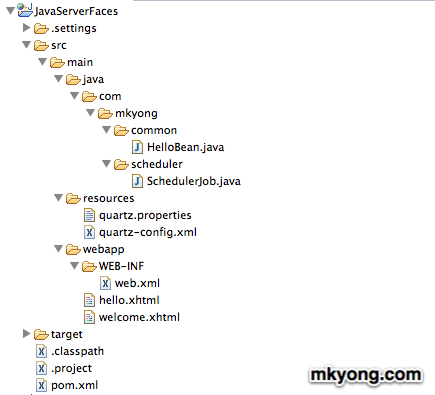
2. Dependencies
To deploy on Tomcat, you need many JSF dependencies. Read XML comments for detail.
File : pom.xml
<dependencies>
...
                <!-- JSF 2 libraries -->
		<dependency>
			<groupId>com.sun.faces</groupId>
			<artifactId>jsf-api</artifactId>
			<version>2.1.11</version>
		</dependency>
		<dependency>
			<groupId>com.sun.faces</groupId>
			<artifactId>jsf-impl</artifactId>
			<version>2.1.11</version>
		</dependency>

		<dependency>
			<groupId>javax.servlet</groupId>
			<artifactId>jstl</artifactId>
			<version>1.2</version>
		</dependency>

		<dependency>
			<groupId>javax.servlet</groupId>
			<artifactId>servlet-api</artifactId>
			<version>2.5</version>
		</dependency>

		<dependency>
			<groupId>javax.servlet.jsp</groupId>
			<artifactId>jsp-api</artifactId>
			<version>2.1</version>
		</dependency>

                <!-- Tomcat 6 need this -->
		<dependency>
			<groupId>com.sun.el</groupId>
			<artifactId>el-ri</artifactId>
			<version>1.0</version>
		</dependency>

		<!-- Quartz scheduler framework -->
		<dependency>
			<groupId>org.quartz-scheduler</groupId>
			<artifactId>quartz</artifactId>
			<version>2.1.5</version>
		</dependency>

		<!-- Quartz need transaction -->
		<dependency>
			<groupId>javax.transaction</groupId>
			<artifactId>jta</artifactId>
			<version>1.1</version>
		</dependency>
...
3. Quartz Job
Create a Quartz job class. This class is going to schedule and run later.
File : SchedulerJob.java
package com.mkyong.scheduler;

import org.quartz.Job;
import org.quartz.JobExecutionContext;
import org.quartz.JobExecutionException;

public class SchedulerJob implements Job {

	@Override
	public void execute(JobExecutionContext context)
		throws JobExecutionException {

		System.out.println("JSF 2 + Quartz 2 example");

	}

}
4. Quartz Configuration
Create quartz.properties and quartz-config.xml, put it in resources “folder” (Maven structure), for non-Maven project, make sure it can be locate at project classpath.
File : quartz.properties – Configure Quartz instance and read the settings from quartz-config.xml
org.quartz.scheduler.instanceName = MyScheduler
org.quartz.threadPool.threadCount = 3
org.quartz.jobStore.class = org.quartz.simpl.RAMJobStore
org.quartz.plugin.jobInitializer.class =org.quartz.plugins.xml.XMLSchedulingDataProcessorPlugin
org.quartz.plugin.jobInitializer.fileNames = quartz-config.xml
org.quartz.plugin.jobInitializer.failOnFileNotFound = true
File : quartz-config.xml – Configure trigger to run com.mkyong.scheduler.SchedulerJob
<?xml version="1.0" encoding="UTF-8"?>

<job-scheduling-data
	xmlns="http://www.quartz-scheduler.org/xml/JobSchedulingData"
	xmlns:xsi="http://www.w3.org/2001/XMLSchema-instance"
	xsi:schemaLocation="http://www.quartz-scheduler.org/xml/JobSchedulingData
	http://www.quartz-scheduler.org/xml/job_scheduling_data_1_8.xsd"
	version="1.8">

	<schedule>
		<job>
			<name>AJob</name>
			<group>AGroup</group>
			<description>Print a welcome message</description>
			<job-class>com.mkyong.scheduler.SchedulerJob</job-class>
		</job>

		<trigger>
			<cron>
				<name>dummyTriggerName</name>
				<job-name>AJob</job-name>
				<job-group>AGroup</job-group>
				<!-- It will run every 5 seconds -->
				<cron-expression>0/5 * * * * ?</cron-expression>
			</cron>
		</trigger>
	</schedule>
</job-scheduling-data>
For detail explanation, please read this Quartz configuration reference article.
5. Integrate Quartz
This is where the integration happened. Declared org.quartz.ee.servlet.QuartzInitializerListener as listener class in web.xml file.
File : web.xml
<?xml version="1.0" encoding="UTF-8"?>
<web-app ...>

	<listener>
		<listener-class>
			org.quartz.ee.servlet.QuartzInitializerListener
		</listener-class>
	</listener>

</web-app>
6. Demo
During project start up, Quartz is started and run the scheduled job every 5 seconds.
Jul 26, 2012 3:32:18 PM org.apache.coyote.AbstractProtocol start
INFO: Starting ProtocolHandler ["http-bio-8080"]
Jul 26, 2012 3:32:18 PM org.apache.coyote.AbstractProtocol start
INFO: Starting ProtocolHandler ["ajp-bio-8009"]
Jul 26, 2012 3:32:18 PM org.apache.catalina.startup.Catalina start
INFO: Server startup in 3591 ms
JSF 2 + Quartz 2 example
JSF 2 + Quartz 2 example
JSF 2 + Quartz 2 example

quartz running on glassfish server but no print out
AJob
AGroup
Print a welcome message
com.mkyong.scheduler.SchedulerJob
dummyTriggerName
AJob
AGroup
0/5 * * * * ?
if i change 0/5 * * * * ? to 0 1 * * * ? this is not working it show like this DEBUG QuartzSchedulerThread:268 – batch acquisition of 0 triggers for five seconds it’s working
oh, i mean it in JSF!
hi there, how can i set automatic job stop after it runs?
Hi mkyong,
I have problem to integrate JSF 2 + Quartz + JBoss Seam(CDI).
I made your example ok, however in my aplication the @Injected is null. How i get the instancia the object injected ?
Because the quartz this out of the cicle CDI or JSF2. How can I solve this problem?
when I declared org.quartz.ee.servlet.QuartzInitializerListener as listener class in web.xml file and I run my project and I received 404. Help me!
Well that doesn’t have much to do with JSF. Try solving the problem of access to the FacesContext from a Quartz job for a more interesting article!
Hey Friends ,
Me too , l have same errors like that , when l run my application :
org.quartz.SchedulerException: ThreadPool class not specified.
at org.quartz.impl.StdSchedulerFactory.instantiate(StdSchedulerFactory.java:789)
at org.quartz.impl.StdSchedulerFactory.getScheduler(StdSchedulerFactory.java:1465)
at org.quartz.ee.servlet.QuartzInitializerListener.contextInitialized(QuartzInitializerListener.java:152)
at org.apache.catalina.core.StandardContext.listenerStart(StandardContext.java:4779)
at org.apache.catalina.core.StandardContext.startInternal(StandardContext.java:5273)
at org.apache.catalina.util.LifecycleBase.start(LifecycleBase.java:150)
at org.apache.catalina.core.ContainerBase$StartChild.call(ContainerBase.java:1566)
at org.apache.catalina.core.ContainerBase$StartChild.call(ContainerBase.java:1556)
at java.util.concurrent.FutureTask$Sync.innerRun(FutureTask.java:334)
at java.util.concurrent.FutureTask.run(FutureTask.java:166)
at java.util.concurrent.ThreadPoolExecutor.runWorker(ThreadPoolExecutor.java:1110)
at java.util.concurrent.ThreadPoolExecutor$Worker.run(ThreadPoolExecutor.java:603)
at java.lang.Thread.run(Thread.java:722)
can anyone tell me , fram what this problem coming,???????????????,
If you are using TomCat, add the Quartz’s jars into directory libs of tomcat too.