In this article, we will show you how to create a custom validator in JSF 2.0
Steps
- Create a validator class by implements
javax.faces.validator.Validatorinterface. - Override
validate()method. - Assign an unique validator ID via
@FacesValidatorannotation. - Reference custom validator class to JSF component via
f:validatortag.
A detail guide to create a custom validator name “EmailValidator” – to validate email address via Java regular expression.
1. Folder Structure
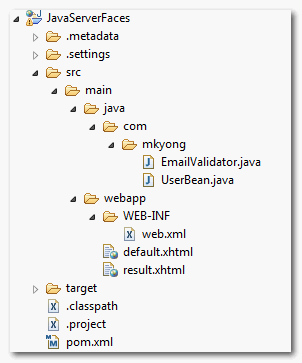
Directory structure of this project.
2. Validator class
Create a custom validator class and implements javax.faces.validator.Validator interface.
package com.mkyong;

import javax.faces.validator.Validator;
public class EmailValidator implements Validator{
	//...
}
Overrides the validate() method.
public class EmailValidator implements Validator{

	public void validate(FacesContext context, UIComponent component,
			Object value) throws ValidatorException {
		//...
	}
}
Assign an unique validator ID with @FacesValidator.
package com.mkyong;

import javax.faces.validator.Validator;

@FacesValidator("com.mkyong.EmailValidator")
public class EmailValidator implements Validator{
	//...
}
See a full custom validator class :
package com.mkyong;

import java.util.regex.Matcher;
import java.util.regex.Pattern;

import javax.faces.application.FacesMessage;
import javax.faces.component.UIComponent;
import javax.faces.context.FacesContext;
import javax.faces.validator.FacesValidator;
import javax.faces.validator.Validator;
import javax.faces.validator.ValidatorException;

@FacesValidator("com.mkyong.EmailValidator")
public class EmailValidator implements Validator{

	private static final String EMAIL_PATTERN = "^[_A-Za-z0-9-]+(\\." +
			"[_A-Za-z0-9-]+)*@[A-Za-z0-9]+(\\.[A-Za-z0-9]+)*" +
			"(\\.[A-Za-z]{2,})$";

	private Pattern pattern;
	private Matcher matcher;

	public EmailValidator(){
		  pattern = Pattern.compile(EMAIL_PATTERN);
	}

	@Override
	public void validate(FacesContext context, UIComponent component,
			Object value) throws ValidatorException {

		matcher = pattern.matcher(value.toString());
		if(!matcher.matches()){

			FacesMessage msg =
				new FacesMessage("E-mail validation failed.",
						"Invalid E-mail format.");
			msg.setSeverity(FacesMessage.SEVERITY_ERROR);
			throw new ValidatorException(msg);

		}

	}
}
Above is a custom validator class, with id com.mkyong.EmailValidator. If email is invalid, returns FacesMessage error message.
For detail explanation about the email regular expression pattern, please refer to this “Validate E-mail with Java regular expression” article.
3. Managed Bean
A normal managed bean named “user”, nothing special here.
package com.mkyong;

import java.io.Serializable;
import javax.faces.bean.ManagedBean;
import javax.faces.bean.SessionScoped;

@ManagedBean(name="user")
@SessionScoped
public class UserBean implements Serializable{

	String email;

	public String getEmail() {
		return email;
	}

	public void setEmail(String email) {
		this.email = email;
	}

}
4. JSF Page
Reference above custom validator to JSF component via “validatorId” attribute in f:validator tag.
If you need
@Autowired into JSF custom validator, uses binding, instead of validatorId. Read this post – Spring @Autowired into JSF custom validator.
<?xml version="1.0" encoding="UTF-8"?>
<!DOCTYPE html PUBLIC "-//W3C//DTD XHTML 1.0 Transitional//EN"
"http://www.w3.org/TR/xhtml1/DTD/xhtml1-transitional.dtd">
<html xmlns="http://www.w3.org/1999/xhtml"
      xmlns:h="http://java.sun.com/jsf/html"
      xmlns:f="http://java.sun.com/jsf/core"
      >
    <h:body>

    <h1>Custom validator in JSF 2.0</h1>

	  <h:form>

		<h:panelGrid columns="3">

		  Enter your email :

		  <h:inputText id="email" value="#{user.email}"
			size="20" required="true" label="Email Address">

			<f:validator validatorId="com.mkyong.EmailValidator" />

		  </h:inputText>

		  <h:message for="email" style="color:red" />

		</h:panelGrid>

		<h:commandButton value="Submit" action="result" />

	   </h:form>

    </h:body>
</html>
<?xml version="1.0" encoding="UTF-8"?>
<!DOCTYPE html PUBLIC "-//W3C//DTD XHTML 1.0 Transitional//EN"
"http://www.w3.org/TR/xhtml1/DTD/xhtml1-transitional.dtd">
<html xmlns="http://www.w3.org/1999/xhtml"
      xmlns:h="http://java.sun.com/jsf/html"
      >
    <h:body>

    	<h1>Custom validator in JSF 2.0</h1>

	  <h:panelGrid columns="2">

		Email Address :
		<h:outputText value="#{user.email}" />

	  </h:panelGrid>

    </h:body>
</html>
5. Demo
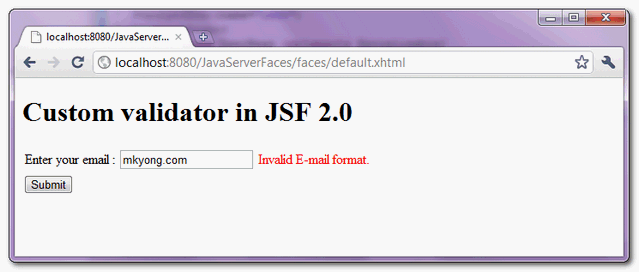
Validates email address via custom validator, if email address is invalid, return a error message.

Thank you so much
thanks … i’m really very grateful for this article.
Thanks man! Your tutorials are very easy to understand, everything is clear and everything works fine. I’ll visit your site every day from now 🙂
Hi,
in this example the error message hard coded in java, how to customize the error message using properties message bundle.
I’m learning Java and I have to thank you a milion times !
Great site !
Thanks
ru: ???????!
en: Thanks!
Works for me! Thanks!
Each time I try it, a new error message gets added to the popup instead of just showing it once. Any idea why?
Valeu demais!
thanks man!
issue got fixed.small mistake from my side, forgot to update the message on ajax request.
Validation working but message is not displaying if required=”false” for email field.
Please find the code snippet below
<p:inputText autocomplete="off" id="emailId" value="#{backingBean.emailID}" > <f:validator validatorId="ldapmanager.EmailValidator"/> </p:inputText> <p:message id="errEmailId" for="emailId"/>Validation working but message is not displaying if required=”false” for email field.
Please find the code snippet below
I love you man.
Thank you for your small tutorial. Each time I’m looking quickly for something in JSF 2, you always show up first in Google and I found what I search. Continue your great works!!
Really very good blog. Thanks
I have a rich:datatable. I want to validate mandatory input fields in table. I want to show only one message for all mandatory field ie “please give some value for mandatory fields”.
Please tell me how to achieve this.
Hello sir i tried with same code for my application but i m getting error:
I am getting the same! using JSF 2.0 with primefaces
I think you will find it is the
@FacesValidator(“com.mkyong.EmailValidator”)
line -it must point to the correct package that contains your validator!
megan
Thanks for the tip.I started with JSF and this is a nice one.