The format of an email address is local-part@domain. Look at this email address [email protected]
local-part= mkyong@= @domain= example.com
The formal definitions of an email address are in RFC 5322 and RFC 3696. However, this article will not follow the above RFC for email validation. The official email "local-part" is too complex (supports too many special characters, symbols, comments, quotes…) to implement via regex. Most companies or websites choose only to allow certain special characters like dot (.), underscore (_), and hyphen (-).
This article will show a few ways to validate an email address via regex:
- Email Regex – Simple
- Email Regex – Strict
- Email Regex – Non-Latin or Unicode characters
- Apache Commons Validation v1.7
1. Email Regex – Simple Validation.
This example uses a simple regex ^(.+)@(\S+)$ to validate an email address. It checks to ensure the email contains at least one character, an @ symbol, then a non whitespace character.
Email regex explanation:
^                       #start of the line
  (                     #   start of group #1
    .+                  #     any characters (matches Unicode), must contains one or more (+)
  )                     #   end of group   #1
    @                   #     must contains a "@" symbol
      (                 #         start of group #2
        \S+             #           non white space characters, must contains one or more (+)
      )                 #         end of group #2
$                       #end of the line
1.1 A Java example using the above regex for email validation.
package com.mkyong.regex.email;

import java.util.regex.Matcher;
import java.util.regex.Pattern;

public class EmailValidatorSimple {

    private static final String EMAIL_PATTERN = "^(.+)@(\\S+)$";

    private static final Pattern pattern = Pattern.compile(EMAIL_PATTERN);

    public static boolean isValid(final String email) {
        Matcher matcher = pattern.matcher(email);
        return matcher.matches();
    }

}
1.2 Below is a JUnit 5 unit tests to test some valid and invalid emails.
package com.mkyong.regex;

import com.mkyong.regex.email.EmailValidatorSimple;
import com.mkyong.regex.email.EmailValidatorStrict;
import org.junit.jupiter.params.ParameterizedTest;
import org.junit.jupiter.params.provider.MethodSource;

import java.util.stream.Stream;

import static org.junit.jupiter.api.Assertions.assertFalse;
import static org.junit.jupiter.api.Assertions.assertTrue;

public class EmailValidatorSimpleTest {

    @ParameterizedTest(name = "#{index} - Run test with email = {0}")
    @MethodSource("validEmailProvider")
    void test_email_valid(String email) {
        assertTrue(EmailValidatorSimple.isValid(email));
    }

    @ParameterizedTest(name = "#{index} - Run test with email = {0}")
    @MethodSource("invalidEmailProvider")
    void test_email_invalid(String email) {
        assertFalse(EmailValidatorSimple.isValid(email));
    }

    // Valid email addresses
    static Stream<String> validEmailProvider() {
        return Stream.of(
                "[email protected]",                // simple
                "[email protected]",              // .co.uk
                "hello-.+_=#|@example.com",         // special characters
                "[email protected]",                    // local-part one letter
                "h@com",                            // domain one letter
                "我買@屋企.香港"                      // unicode, chinese characters
        );
    }

    // Invalid email addresses
    static Stream<String> invalidEmailProvider() {
        return Stream.of(
                "hello",                            // email need at least one @
                "hello@ "                           // domain cant end with space (whitespace)
        );
    }

}
The above email regex didn’t check much and filter only the weird or invalid emails. Furthermore, the dot matches the internationalization or Unicode email address.
2. Email Regex – Strict Validation.
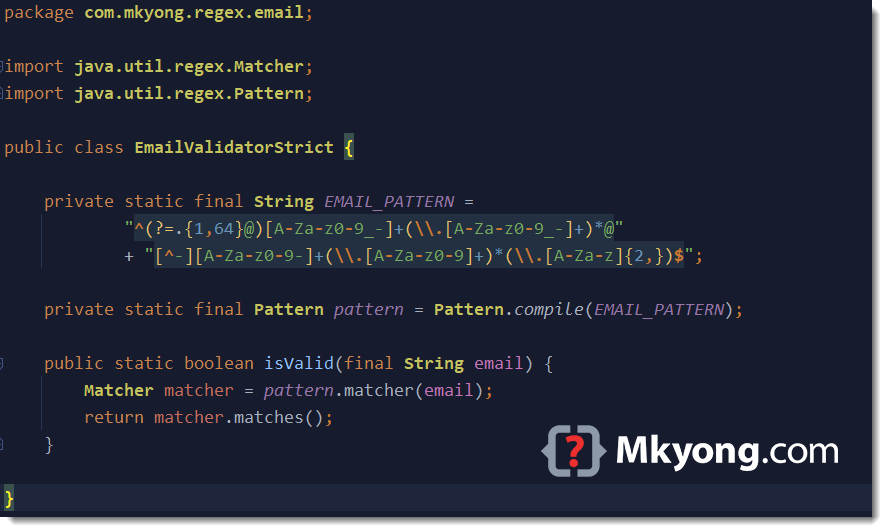
^(?=.{1,64}@)[A-Za-z0-9_-]+(\\.[A-Za-z0-9_-]+)*@[^-][A-Za-z0-9-]+(\\.[A-Za-z0-9-]+)*(\\.[A-Za-z]{2,})$
This email regex is a bit complex and meets the following email requirements:
local-part
- uppercase and lowercase Latin letters A to Z and a to z
- digits 0 to 9
- Allow dot (.), underscore (_) and hyphen (-)
- dot (.) is not the first or last character
- dot (.) does not appear consecutively, e.g. [email protected] is not allowed
- Max 64 characters
In email local-part, many special characters like #$%&'*+-/=? are technically valid, but most mail servers or web applications do not accept all of them. This email regex only accepts the general dot (.), underscore (_), and hyphen (-).
domain
- uppercase and lowercase Latin letters A to Z and a to z
- digits 0 to 9
- hyphen (-) is not the first or last character
- dot (.) is not the first or last character
- dot (.) does not appear consecutively
- tld min 2 characters
This email regex is not fully compliant with the RFC 5322 or RFC 3696. It follows some of the general guidelines on what is valid local-part and domain of an email address.
Below are samples of valid email addresses.
[email protected]
[email protected]             // .co.uk, 2 tld
[email protected]          // -
[email protected]          // .
[email protected]          // _
[email protected]                   // local-part one letter
[email protected]           // domain contains a hyphen -
[email protected]   // domain contains two hyphens - -
[email protected]   // domain contains . -
[email protected]    // local-part contains . -
Below are samples of invalid email addresses.
hello                            // email need at least one @
hello@[email protected]           // email doesn't allow more than one @
[email protected]               // local-part can't start with a dot .
[email protected]               // local-part can't end with a dot .
[email protected]         // local part don't allow dot . appear consecutively
[email protected]          // local-part don't allow special characters like !+
[email protected]                  // domain tld min 2 chars
[email protected]               // domain doesn't allow dot . appear consecutively
[email protected]                       // domain doesn't start with a dot .
[email protected].                      // domain doesn't end with a dot .
[email protected]               // domain doesn't allow to start with a hyphen -
[email protected]               // domain doesn't allow to end with a hyphen -
hello@example_example.com        // domain doesn't allow underscore
1234567890123456789012345678901234567890123456789012345678901234xx@example.com // local part is longer than 64 characters
Revisit the email regex again.
^(?=.{1,64}@)[A-Za-z0-9_-]+(\\.[A-Za-z0-9_-]+)*@[^-][A-Za-z0-9-]+(\\.[A-Za-z0-9-]+)*(\\.[A-Za-z]{2,})$
Email regex explanation.
(?=.{1,64}@)            # local-part min 1 max 64

[A-Za-z0-9_-]+          # Start with chars in the bracket [ ], one or more (+)
                        # dot (.) not in the bracket[], it can't start with a dot (.)

(\\.[A-Za-z0-9_-]+)*	 # follow by a dot (.), then chars in the bracket [ ] one or more (+)
                        # * means this is optional
                        # this rule for two dots (.)

@                       # must contains a @ symbol

[^-]                    # domain can't start with a hyphen (-)

[A-Za-z0-9-]+           # Start with chars in the bracket [ ], one or more (+)

(\\.[A-Za-z0-9-]+)*      # follow by a dot (.), optional

(\\.[A-Za-z]{2,})       # the last tld, chars in the bracket [ ], min 2
2.1 A Java example using the above regex for email validation.
package com.mkyong.regex.email;

import java.util.regex.Matcher;
import java.util.regex.Pattern;

public class EmailValidatorStrict {

    private static final String EMAIL_PATTERN =
            "^(?=.{1,64}@)[A-Za-z0-9_-]+(\\.[A-Za-z0-9_-]+)*@"
            + "[^-][A-Za-z0-9-]+(\\.[A-Za-z0-9-]+)*(\\.[A-Za-z]{2,})$";

    private static final Pattern pattern = Pattern.compile(EMAIL_PATTERN);

    public static boolean isValid(final String email) {
        Matcher matcher = pattern.matcher(email);
        return matcher.matches();
    }

}
2.2 Unit tests.
package com.mkyong.regex;

import com.mkyong.regex.email.EmailValidatorStrict;
import org.junit.jupiter.params.ParameterizedTest;
import org.junit.jupiter.params.provider.MethodSource;

import java.util.stream.Stream;

import static org.junit.jupiter.api.Assertions.assertTrue;
import static org.junit.jupiter.api.Assertions.assertFalse;

public class EmailValidatorStrictTest {

    @ParameterizedTest(name = "#{index} - Run test with email = {0}")
    @MethodSource("validEmailProvider")
    void test_email_valid(String email) {
        assertTrue(EmailValidatorStrict.isValid(email));
    }

    @ParameterizedTest(name = "#{index} - Run test with email = {0}")
    @MethodSource("invalidEmailProvider")
    void test_email_invalid(String email) {
        assertFalse(EmailValidatorStrict.isValid(email));
    }

    // Valid email addresses
    static Stream<String> validEmailProvider() {
        return Stream.of(
                "[email protected]",                // simple
                "[email protected]",              // .co.uk, 2 tld
                "[email protected]",           // -
                "[email protected]",           // .
                "[email protected]",           // _
                "[email protected]",                    // local-part one letter
                "[email protected]",            // domain contains a hyphen -
                "[email protected]",    // domain contains two hyphens - -
                "[email protected]",    // domain contains . -
                "[email protected]");    // local-part contains . -
    }

    // Invalid email addresses
    static Stream<String> invalidEmailProvider() {
        return Stream.of(
                "我買@屋企.香港",                     // this regex doesn't support Unicode
                "hello",                            // email need at least one @
                "hello@[email protected]",           // email doesn't allow more than one @
                "[email protected]",               // local-part can't start with a dot .
                "[email protected]",               // local-part can't end with a dot .
                "[email protected]",         // local part don't allow dot . appear consecutively
                "[email protected]",          // local-part don't allow special characters like !+
                "[email protected]",                  // domain tld min 2 chars
                "[email protected]",               // domain doesn't allow dot . appear consecutively
                "[email protected]",                       // domain doesn't start with a dot .
                "[email protected].",                      // domain doesn't end with a dot .
                "[email protected]",               // domain doesn't allow to start with a hyphen -
                "[email protected]",               // domain doesn't allow to end with a hyphen -
                "hello@example_example.com",        // domain doesn't allow underscore
                "1234567890123456789012345678901234567890123456789012345678901234xx@example.com"); // local part is longer than 64 characters
    }

}
P.S If we want to support extra special characters like +=!$%| in local-part, just put it into the bracket []
[A-Za-z0-9_-+=!$%|]
Note
Please do not put too strict on the email validation as it will reject many valid emails. This email regex strict version is a good balance of what is considered a valid email in most cases.
P.S. This email regex strict version does not support Unicode.
3. Email Regex – Non-Latin or Unicode characters
For regex to support internationalization or Unicode or non-Latin email addresses, try to replace the character match A-Za-z with a \p{L}. Read this Unicode Regular Expressions.
Samples of Unicode email addresses
"我買@屋企.香港",                     // chinese characters
"二ノ宮@黒川.日本",                   // Japanese characters
Below regex updated the previous email regex strict version by replacing the A-Za-z with \\p{L} to support Unicode email address.
^(?=.{1,64}@)[\\p{L}0-9_-]+(\\.[\\p{L}0-9_-]+)*@[^-][\\p{L}0-9-]+(\\.[\\p{L}0-9-]+)*(\\.[\\p{L}]{2,})$
3.1 Java email regex validation, Unicode version.
package com.mkyong.regex.email;

import java.util.regex.Matcher;
import java.util.regex.Pattern;

public class EmailValidatorUnicode {

    private static final String EMAIL_PATTERN =
            "^(?=.{1,64}@)[\\p{L}0-9_-]+(\\.[\\p{L}0-9_-]+)*@"
            + "[^-][\\p{L}0-9-]+(\\.[\\p{L}0-9-]+)*(\\.[\\p{L}]{2,})$";

    private static final Pattern pattern = Pattern.compile(EMAIL_PATTERN);

    public static boolean isValid(final String email) {
        Matcher matcher = pattern.matcher(email);
        return matcher.matches();
    }

}
3.2 Unit tests.
  @ParameterizedTest(name = "#{index} - Run test with email = {0}")
  @MethodSource("validEmailProvider")
  void test_email_valid(String email) {
      assertTrue(EmailValidatorUnicode.isValid(email));
  }

  // Valid email addresses
  static Stream<String> validEmailProvider() {
      return Stream.of(
              "[email protected]",                // simple
              "[email protected]",              // .co.uk, 2 tld
              "[email protected]",           // -
              "[email protected]",           // .
              "[email protected]",           // _
              "[email protected]",                    // local-part one letter
              "[email protected]",            // domain contains a hyphen -
              "[email protected]",    // domain contains two hyphens - -
              "[email protected]",    // domain contains . -
              "[email protected]",     // local part contains . -
              "我買@屋企.香港",                     // chinese characters
              "二ノ宮@黒川.日本",                    // Japanese characters
              "δοκιμή@παράδειγμα.δοκιμή");        // Greek alphabet
  }
4. Apache Commons Validator – Email
This time we test the Apache Commons Validator to validate an email address.
  <dependency>
      <groupId>commons-validator</groupId>
      <artifactId>commons-validator</artifactId>
      <version>1.7</version>
  </dependency>
P.S The file size of the commons-validator-1.7.jar is around 190KB.
Internally, the commons-validator mixed-use of custom code and regex to validate an email address.
package org.apache.commons.validator.routines;

public class EmailValidator implements Serializable {

    //...

    public boolean isValid(String email) {
        if (email == null) {
            return false;
        }

        if (email.endsWith(".")) { // check this first - it's cheap!
            return false;
        }

        // Check the whole email address structure
        Matcher emailMatcher = EMAIL_PATTERN.matcher(email);
        if (!emailMatcher.matches()) {
            return false;
        }

        if (!isValidUser(emailMatcher.group(1))) {
            return false;
        }

        if (!isValidDomain(emailMatcher.group(2))) {
            return false;
        }

        return true;
    }

}
4.1 Java email validation using Apache Commons Validator.
package com.mkyong.regex.email;

import org.apache.commons.validator.routines.EmailValidator;

public class EmailValidatorApache {

    //doesn't consider local addresses as valid.
    //default, allowLocal = false, allowTld = false
    private static final EmailValidator validator = EmailValidator.getInstance();

    //private static final EmailValidator validator = EmailValidator.getInstance(true);
    //private static final EmailValidator validator = EmailValidator.getInstance(true, true);

    public static boolean isValid(final String email) {
        return validator.isValid(email);
    }

}
4.2 Unit tests.
package com.mkyong.regex;

import com.mkyong.regex.email.EmailValidatorApache;
import org.junit.jupiter.params.ParameterizedTest;
import org.junit.jupiter.params.provider.MethodSource;

import java.util.stream.Stream;

import static org.junit.jupiter.api.Assertions.assertFalse;
import static org.junit.jupiter.api.Assertions.assertTrue;

public class EmailValidatorApacheTest {

    @ParameterizedTest(name = "#{index} - Run test with email = {0}")
    @MethodSource("validEmailProvider")
    void test_email_valid(String email) {
        assertTrue(EmailValidatorApache.isValid(email));
    }

    @ParameterizedTest(name = "#{index} - Run test with email = {0}")
    @MethodSource("invalidEmailProvider")
    void test_email_invalid(String email) {
        assertFalse(EmailValidatorApache.isValid(email));
    }

    // Valid email addresses
    static Stream<String> validEmailProvider() {
        return Stream.of(
                "[email protected]",                // simple
                "[email protected]",              // .co.uk, 2 tld
                "hello!#$%&'*+-/=?^_`{|}[email protected]",  // many special chars
                "[email protected]",                    // local-part one letter
                "[email protected]",            // domain contains a hyphen -
                "[email protected]",    // domain contains two hyphens - -
                "[email protected]",    // domain contains . -
                "[email protected]",     // local part contains . -
                "我買@屋企.香港");                   // Support Unicode
    }

    // Invalid email addresses
    static Stream<String> invalidEmailProvider() {
        return Stream.of(

                "hello",                            // email need at least one @
                "hello@[email protected]",           // email don't allow more than one @
                "[email protected]",               // local-part can't start with a dot .
                "[email protected]",               // local-part can't end with a dot .
                "[email protected]",         // local part don't allow dot . appear consecutively
                // apache supports many special characters
                //"[email protected]",          // local-part don't allow special characters like !+
                "[email protected]",                  // domain tld min 2 chars
                "[email protected]",               // domain part don't allow dot . appear consecutively
                "[email protected]",                       // domain part don't start with a dot .
                "[email protected].",                      // domain part don't end with a dot .
                "[email protected]",               // domain part don't allow to start with a hyphen -
                "[email protected]",               // domain part don't allow to end with a hyphen -
                "hello@example_example.com",        // domain part don't allow underscore
                "1234567890123456789012345678901234567890123456789012345678901234xx@example.com"); // local part is longer than 64 characters
    }

}
Compare to the above email regex strict version. This commons-validator supports many special characters like !#$%&'*+-/=?^_{|}~, even the Unicode characters, and meets the general email guidelines which defined in example 2. If you don’t mind to include an extra 190KB library to validate emails, this commons-validator is a good choice.
P.S This commons-validator is not fully compliant with the RFC 5322 or RFC 3696.
Note
If you are interested in what an RFC822 email regex looks likes, please visit this RFC822 : regexp-based address validation.
Download Source Code
$ git clone https://github.com/mkyong/core-java
$ cd java-regex/email

The current unicode regex will not be able to validate Indian languages. For that, we have to change \\p{L} to \\pL\\pM.
The domain name cannot end in -, for example [email protected].
On the other hand, this same domain name should be no more than 63 characters, any ideas how to add it?
eMail-Validation without Regex
https://github.com/ea234/FkEMailValidator/tree/master/de/fk/email
English Version here
https://github.com/ea234/FkEMailValidator/blob/master/de/fk/email/FkEMail_ENGLISH_GOOGLE_TRANSLATE.java
You dont need a regular expression to validate an eMail adress.
One character domains don’t work – [email protected]
I am using “^[a-zA-Z0-9_!#$%&’*+/=?`{|}~^.-]+@[a-zA-Z0-9.-]+$”
Below are the result :
Valid Email Ids according to https://en.wikipedia.org/wiki/Email_address
[email protected] : true
[email protected] : true
[email protected] : true
[email protected] : true
[email protected] : true
[email protected] : true
[email protected] : true
[email protected] : true
9.carlosd’[email protected] : true
[email protected] : true
11.admin@mailserver1 : true
[email protected] : true
13.” “@example.org : false
14.”john..doe”@example.org : false
Invalid Email Ids according to https://en.wikipedia.org/wiki/Email_address
15.Abc.example.com : false
16.A@b@[email protected] : false
17.a”b(c)d,e:f;gi[j\k][email protected] : false
18.just”not”[email protected] : false
19.this is”not\[email protected] : false
20.this\ still”not\[email protected] : false
21.1234567890123456789012345678901234567890123456789012345678901234+x@example.com : true
[email protected] : true
[email protected] : true
But below email Ids are treating as Valid
1234567890123456789012345678901234567890123456789012345678901234+x@example.com
[email protected]
[email protected]
and below are treating as Invalid
” “@example.org
“john..doe”@example.org
What is the correct regular expression to validate above scenario ?
https://stackoverflow.com/questions/53299385/email-id-validation-according-to-rfc5322-and-https-en-wikipedia-org-wiki-email
What about the “Internationalization” chapter from https://en.wikipedia.org/wiki/Email_address ? From my point of view your pattern will not work with non US-ASCII adresses, right ?
We updated the example to support Unicode email via regex.
I tried this code with “email@goes_here.com” and it was deemed invalid. I guess it’s because of the underscore.
Is this valid to have an underscore in the email’s domain?
not working for example: [email protected]
to fix this I updated to this (one more dash): ^[_A-Za-z0-9-\+]+(\.[_A-Za-z0-9-]+)*@[A-Za-z0-9-]+(\.[A-Za-z0-9-]+)*(\.[A-Za-z]{2,})$
We updated the code to support the above case, thanks.
hii ,i want to restrict the user to use –(double dash) in email ,
lke “rishav–[email protected] ” should not be acceptable.
can u help me please?
Refer to example 2, remove the dash from the bracket. However, the dash is a valid character in the email local-part.
What about rah@[email protected].. Is it Valid?
I don’t think so..
it’s not valid…@ not come twise
I LOVE YOU MAN!!! you saved my life million times
Regex must be ^[a-zA-Z0-9.!#$%&’*+/=?^_`{|}~-]+@[a-zA-Z0-9-]+(?:.[a-zA-Z0-9-]+)*$
It’s from
http://www.w3.org/TR/html-markup/datatypes.html#form.data.emailaddress
it’s wrong. “*$” at the end should be “+$”. Without this, “john@john” without a top level domain would be valid.
Whatever you are doing, using regex for this is a very bad idea. Just read a few comments and you ll see dozens of non working cases.
Just use a known validator from apache commons:
EmailValidator.getInstance().isValid(emailString)
And thats it.
There are use cases you might not want to include fucking library for just email validation as like on android which is written in java.
Thank You 🙂
Found a problem while trying this: Inputs like “[email protected]” shouldn’t be valid.
Why isn’t this valid? My current email is in the same format. This is a valid email format.
Thank you for publishing this. It was of enormous help to me. I had to make some minor adjustments to make it work under Oracle. I hope this is of help:
‘^[_A-Za-z0-9+-]+(.[_A-Za-z0-9-]+)*@[A-Za-z0-9-]+(.[A-Za-z0-9]+)*(.[A-Za-z]{2,})$’
Thank you! Helped a lot =)
Thanks Dude
Thanks, nice post.
Thank You! Your regex is very valuable!
var filter =/^\w+([\.-]?\w+)*@\w+([\.-]?\w+)*(\.\w{2,3})+$/;
return (!filter.test(value)) ? false : true;
or
var filter = /^\s*[\w\-\+_]+(\.[\w\-\+_]+)*\@[\w\-\+_]+\.[\w\-\+_]+(\.[\w\-\+_]+)*\s*$/;
return (!filter.test(value)) ? false : true;
my choice
Try removing the wrapping slashes from the pattern and pass it to the RegExp constructor function as it follows :
var filter = new RegExp('^s*[w-+_]+(.[w-+_]+)*@[w-+_]+.[w-+_]+(.[w-+_]+)*s*$');

return(filter.test(value));
Perfect regex for email validation.
Thanks for the great tutorial! It’s just what I needed in my current learning project!
I incorporated it into a tutorial program from Oracle’s website. I had to modify a couple of things to return multiple email addresses from a string. Here is the modification:
Pattern.compile("[A-Za-z0-9.%+\\-]+@[A-Za-z0-9.\\-]+\\.[A-Za-z\\S]{2,4}");I took the “$” from the end to allow for email addresses before the end of the string and used “/S” to disallow white space after the email address.
Here’s your unit test: http://en.wikipedia.org/wiki/Email_address#Valid_email_addresses
Hi MKYong. Thanks for your tutorial. I used your regular expression to validate email address in my js file. It always returning false when ever i check a valid email address.
For example, I my code
var mailID=”[email protected]”
var regex = /^[_A-Za-z0-9-\\+]+(\\.[_A-Za-z0-9-]+)*@[A-Za-z0-9-]+(\\.[A-Za-z0-9]+)*(\\.[A-Za-z]{2,})$/;
alert(regex.test(mailID));
It is throwing false. Please let me know what is the problem.
See my reply and make your changes accordingly. See if it works for you.
I have changed pattern in this way.
In first level TLD checking it is allowed “-” because [email protected] is a valid email address.
^ #start of the line
[_A-Za-z0-9-\\+]+ # must start with string in the bracket [ ], must contains one or more (+)
( # start of group #1
\\.[_A-Za-z0-9-]+ # follow by a dot “.” and string in the bracket [ ], must contains one or more (+)
)* # end of group #1, this group is optional (*)
@ # must contains a “@” symbol
[A-Za-z0-9-]+ # follow by string in the bracket [ ], must contains one or more (+)
( # start of group #2 – first level TLD checking
\\.[A-Za-z0-9-]+ # follow by a dot “.” and string in the bracket [ ], must contains one or more (+)
)* # end of group #2, this group is optional (*)
( # start of group #3 – second level TLD checking
\\.[A-Za-z]{2,} # follow by a dot “.” and string in the bracket [ ], with minimum length of 2
) # end of group #3
$ #end of the line
All regular expression attempts to validate the email format based on Latin characters are broken these days. They do not support internationalized domain names which were available since May 2010. Yes, you read it right, non-Latin characters are since then allowed in domain names and thus also email addresses.
See also: http://stackoverflow.com/a/12824163/157882
Thanks, it’s useful to me
Hi mkyong,
Can you suggest me a good book to learn write RegEx from scratch? Thanks in advance.
Regards,
John Ortiz
This is a good resource to start: http://www.regular-expressions.info/
John, if you are using Java, try this tutorial online.
http://docs.oracle.com/javase/tutorial/essential/regex/
Though a dumb question.
I would like to know how the caret(^) at the start and ($) at the end affects the regex?
Thanks
Mit,
I hope you’ve fond you’re answer already, but the ^ matches the beginning of a line, and the $ matches the end of a line. ‘^foo’ matches the first line but not the second:
foo
superfoo
Wonderful article. Just need one help. i want to restrict hyphen(-) and underscore(_) also from repeating more than two consecutive times like dot(.) please guide me
Thanx buddy it worked fine for me
Hi, your regex works well except for a little oversight in the domain check. It doesn’t allow for hyphens. For example the following email will not validate: [email protected]
Use Java mail API to validate email address, which is the easiest way to validate email address in java. You will be find the answer from here How To Validate Email Address using Java Mail API
According to http://tools.ietf.org/html/rfc3696#page-5 the following characters are legal in the local part of an E-Mail address:
! # $ % & ‘ * + – / = ? ^ _`. { | } ~
Thanks for the inputs, I still prefer filter out those weird-but-valid characters.
Hi,
This validation works fine but it is not validating if i give like this.
Example:[email protected]
Please anybody give solution for this.
Thanks
Sireesha
Thanks a lot…. 🙂
Great stuff, thanks! Really helped me.
Turns out this somehow ended up being contributed to Struts. You might be interested in seeing how it turned out; https://issues.apache.org/jira/browse/WW-2805
Final version, we use, covering emails, we received so far, is:
^[_A-Za-z0-9-+]+(\\.[_A-Za-z0-9-+]+)*@[A-Za-z0-9-]+(\\.[A-Za-z0-9-]+)*(\\.[A-Za-z]{2,})$If somebody will get emails which can’t be fit in this regexp – please post in this thread.
This regexp leaves out a character, which I need in my regexp/validator, meaning &
Is there any way to use this in the regexp?
What do you mean by “leaves out a character”?
BTW I use simple caching class – for efficiency and to compile patterns only once:
import java.util.Hashtable;
import java.util.regex.*;

public class RegMatcher {

    private static Hashtable cache = new Hashtable();

    /**
     * We use null for 'All' - not to make extra matching with ".*" - when no need
     */
    public static boolean matches(String string, String pattern) throws Exception{
            if(pattern==null) //use null to match with everything for efficiency
            return true;  //('All' - the most frequent value been transformed to null)

        Pattern p = (Pattern)cache.get(pattern);

        if(p==null){
            p = Pattern.compile(pattern);
            cache.put(pattern, p);
        }
        return p.matcher(string).matches();
    }
}
Usage:
public void testMatchesEmail() throws Exception{ assertTrue(RegMatcher.matches("[email protected]", Constants.EMAIL_VALIDATION_PATTERN)); assertFalse(RegMatcher.matches("a@b", Constants.EMAIL_VALIDATION_PATTERN)); assertTrue(RegMatcher.matches("[email protected]", Constants.EMAIL_VALIDATION_PATTERN)); assertFalse(RegMatcher.matches("ab.c", Constants.EMAIL_VALIDATION_PATTERN)); assertFalse(RegMatcher.matches("a@BBB@c", Constants.EMAIL_VALIDATION_PATTERN)); assertFalse(RegMatcher.matches("@b.c", Constants.EMAIL_VALIDATION_PATTERN)); assertFalse(RegMatcher.matches("AAAa@", Constants.EMAIL_VALIDATION_PATTERN)); assertTrue(RegMatcher.matches("[email protected]", Constants.EMAIL_VALIDATION_PATTERN)); assertFalse(RegMatcher.matches("sdsfs@org", Constants.EMAIL_VALIDATION_PATTERN)); assertTrue(RegMatcher.matches("[email protected]", Constants.EMAIL_VALIDATION_PATTERN)); assertFalse(RegMatcher.matches("O'Henry@org", Constants.EMAIL_VALIDATION_PATTERN)); }Lots:
[email protected]
customer/[email protected]
[email protected]
!def!xyz%[email protected]
all legal according to http://tools.ietf.org/html/rfc3696#page-5
In spite of fairly simple being of the java.util.regex I am still struggling to make it work, but having read through this article along with the codes in the comment section I will give it a go again tonight…thnaks for the code MKYong
package proj2;
import java.util.regex.*;
import java.io.*;
public class SecondStage {

     public static void main(String[] aArgs) throws IOException {

        FileWriter fValid= new FileWriter("/home/webonise/valid.txt");
        FileWriter fInvalid= new FileWriter("/home/webonise/invalid.txt");

       String strRe=new String("^([a-z0-9._%+-])+@[a-z0-9.-]+\\.(?:[A-Z]{2}|com|org|net|edu|gov|mil|biz|vsnl|yahoo|gmail|info|mobi|name|aero|asia|jobs|museum)+$");
       Pattern p = Pattern.compile(strRe,Pattern.CASE_INSENSITIVE |
		       Pattern.UNICODE_CASE | Pattern.MULTILINE);

       try {

       BufferedReader in = new BufferedReader(new FileReader("/home/webonise/users.csv"));

       String str2=";";
       String str1="\"";
       String str;

       String[] x=new String[2];
       while ((str = in.readLine()) != null)
       {

           String trial[];
           trial= str.split(str2);
           try
           {

               for(int i=0;i<trial.length;i++)
               {
                  x[i]=trial[i].replaceAll(str1,"");
                  x[i]=x[i].replaceAll(" ","");
               }

                 Matcher m = p.matcher(x[1]);
                 if(m.matches())
                 {
                      fValid.write(str+"\n");
                 }
                 else
                 {
                     fInvalid.write(str+"\n");
                  }
           }
           catch(Exception e)
           {
                e.printStackTrace();
           }
       }
       fValid.close();
       fInvalid.close();

       in.close();
       } catch (IOException e) {
       System.out.println("IO Exception : "+e);
       }
  }
}
I think this wld help shorter and easier code…..valid and email stored in two separate file from *.csv file
Thanks for your invaluable sharing
that saved me a lot of time…
Thanks a lot
here is how i used it :
//==================================//
public String validateEmail(JTextField input)throws NullPointerException {
final String EMAIL_PATTERN =
“^[_A-Za-z0-9-\+]+(\.[_A-Za-z0-9-]+)*@”
+ “[A-Za-z0-9-]+(\.[A-Za-z0-9]+)*(\.[A-Za-z]{2,})$”;
if (!(input.getText().matches(EMAIL_PATTERN))) {
return “Not a Valid Email address”;
}
else{
return “The Email id is valid .”;
}
}
Hi everyone!
mkyoug, thnks very much for this expression.
Learning to use regex and to satisfy the + and – characters, I slightly modified your code.
here is the final regex which seem to work correctly
^[_A-Za-z0-9-+]+(\\.[_A-Za-z0-9-+]+)*@[A-Za-z0-9-]+(\\.[A-Za-z0-9]+)*(\\.[A-Za-z]{2,})$Cheers everyone,
Yashvin
From Mauritius.
Hi Yashvin,
Thanks for sharing your code 🙂
This one worked really well and catered for gmail ‘plused’ addresses e.g. [email protected] – I have however added
: an aditional – to cater for @nz.blah-stuff.com – the “nz.” made yours error
: I also added the 4 limit at the end otherwise @blah.asdfasdf was valid – however it makes no sense – make it 5 or 6 if you like but it’ll just add a little more validation 🙂
[_A-Za-z0-9-+]+(\\.[_A-Za-z0-9-+]+)*@[A-Za-z0-9-]+(\\.[A-Za-z0-9-]+)*(\\.[A-Za-z]{2,4})
Thanks a heap for this one!!!!
Note: I tested this on http://www.cis.upenn.edu/~matuszek/General/RegexTester/regex-tester.html (however I had to change the double \\ to a single \ ).
Simon
Not yet, the email address:
[email protected]
will be filtered as not valid.
You are returning false on the valid case:
[email protected]
Gmail parses e-mails sent to it with a + character; [email protected] will receive the above e-mail, but it will be filtered as a “100” e-mail.
This is useful functionality when submitting valid e-mails to potential spam processes; for example a business promotion. You can see if your e-mail is getting re-sold. Unfortunately for the consumer, many validators disallow the + character.
It is not possible to validate an emailadress with a regular expression in the general case. The only way to validate an emailadress is to send a mail and wait for a response.
The best you can do with a regexp is to validate that the syntax is correct as defined in rfc2822 but the regexp that covers that is about one page long and much more complicated than your example. To make matters worse only a few syntactically correct emailadresses actually have someone or something that receives mail on it.
My advice is that if you have to check that someone gives you an emailadress do not try to hard. Make do with checking for an @-sign and perhaps at least one dot in the domain (this of course forbids uucp-style adresses) or even that the length of the string is large enough to be able to contain an email adress.
OK, this is a nice exercise to play around with but do not under any circumstances use it in a real world application!
Sorry for the rant but I have seen too many that uses these simplistic measures to validate webforms and unknowingly forbids people to contact them because their emailadresses contains “strange” characters.
hi stefan,
Thanks for sharing your personal experience and advise.
I sort of agree about not validating email addresses with a regex. In my opinion any email validation done with a regex should be done to simply prompt the user to double check what they have entered. There really are only a couple of things you can check with confidence and that is things like the address contains an @ symbol and a mx record exists for the part after the @ symbol.
P.S. Don’t forget about RFC5322.