In JSF, “f:attribute” tag allow you to pass a attribute value to a component, or a parameter to a component via action listener. For example,
1. Assign a attribute value to a component.
<h:commandButton">
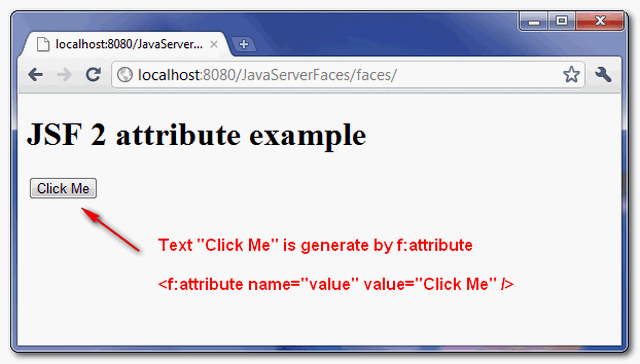
    <f:attribute name="value" value="Click Me" />
</h:commandButton>

//is equal to

<h:commandButton value="Click Me" />
2. Assign parameter to a component and get it back via action listener.
<h:commandButton actionListener="#{user.attrListener}" >
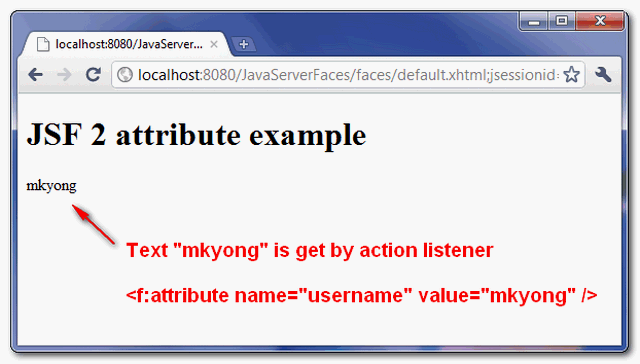
    <f:attribute name="username" value="mkyong" />
</h:commandButton>
@ManagedBean(name="user")
@SessionScoped
public class UserBean{

  //action listener event
  public void attrListener(ActionEvent event){

	nickname = (String)event.getComponent().getAttributes().get("username");

  }
JSF f:attribute example
Ok, let’s see a full example in JSF 2.0.
1. Managed Bean
A managed bean named “user”, with an action listener method.
package com.mkyong;

import javax.faces.bean.ManagedBean;
import javax.faces.bean.SessionScoped;
import javax.faces.event.ActionEvent;

@ManagedBean(name="user")
@SessionScoped
public class UserBean{

	public String nickname;

	//action listener event
	public void attrListener(ActionEvent event){

		nickname = (String)event.getComponent().getAttributes().get("username");

	}

	public String outcome(){
		return "result";
	}

	public String getNickname() {
		return nickname;
	}

	public void setNickname(String nickname) {
		this.nickname = nickname;
	}
}
2. JSF Page
JSF pages to show the use of “f:attribute” tag to pass a attribute value to a “h:commandButton” component.
default.xhtml
<?xml version="1.0" encoding="UTF-8"?>
<!DOCTYPE html PUBLIC "-//W3C//DTD XHTML 1.0 Transitional//EN"
"http://www.w3.org/TR/xhtml1/DTD/xhtml1-transitional.dtd">
<html xmlns="http://www.w3.org/1999/xhtml"
      xmlns:h="http://java.sun.com/jsf/html"
      xmlns:f="http://java.sun.com/jsf/core"
      >

    <h:body>

    	<h1>JSF 2 attribute example</h1>

	<h:form id="form">

	  <h:commandButton action="#{user.outcome}"
			actionListener="#{user.attrListener}" >

		<f:attribute name="username" value="mkyong" />
		<f:attribute name="value" value="Click Me" />

	  </h:commandButton>

	</h:form>

    </h:body>
</html>
result.xhtml
<?xml version="1.0" encoding="UTF-8"?>
<!DOCTYPE html PUBLIC "-//W3C//DTD XHTML 1.0 Transitional//EN"
"http://www.w3.org/TR/xhtml1/DTD/xhtml1-transitional.dtd">
<html xmlns="http://www.w3.org/1999/xhtml"
      xmlns:h="http://java.sun.com/jsf/html"
      >

    <h:body>

    	<h1>JSF 2 attribute example</h1>

		#{user.nickname}

    </h:body>

</html>
3. Demo
Here’s the result.
Download Source Code
Download It – JSF-2-Attribute-Example.zip (10KB)

Thanks you mkyong. Its helped me alot.
This is wrong. It’s not supported until JSF 2.2
Nice and Really Helpful………
It is simple, straight and to the point good small examples for real time use. Good work. and thank you for sharing knowledge.
Please correct the first example: