In JSF, “f:setPropertyActionListener” tag is allow you to set a value directly into the property of your backing bean. For example,
<h:commandButton action="#{user.outcome}" value="Submit">
    <f:setPropertyActionListener target="#{user.username}" value="mkyong" />
</h:commandButton>
In above JSF code snippets, if the button is clicked, it will set the “mkyong” value to the “username” property via setUsername() method.
@ManagedBean(name="user")
@SessionScoped
public class UserBean{

	public String username;

	public void setUsername(String username) {
		this.username = username;
	}

}
JSF f:setPropertyActionListener example
Ok, let’s see a full example in JSF 2.0.
1. Managed Bean
A super simple managed bean named “user”.
package com.mkyong;

import javax.faces.bean.ManagedBean;
import javax.faces.bean.SessionScoped;

@ManagedBean(name="user")
@SessionScoped
public class UserBean{

	public String username;

	public String outcome(){
		return "result";
	}

	public String getUsername() {
		return username;
	}

	public void setUsername(String username) {
		this.username = username;
	}

}
2. JSF Page
JSF page to show the use of “f:setPropertyActionListener” to set a value “mkyong” directly into the property “username” of your backing bean.
default.xhtml
<?xml version="1.0" encoding="UTF-8"?>
<!DOCTYPE html PUBLIC "-//W3C//DTD XHTML 1.0 Transitional//EN"
"http://www.w3.org/TR/xhtml1/DTD/xhtml1-transitional.dtd">
<html xmlns="http://www.w3.org/1999/xhtml"
      xmlns:h="http://java.sun.com/jsf/html"
      xmlns:f="http://java.sun.com/jsf/core"
      >

    <h:body>

    	<h1>JSF 2 setPropertyActionListener example</h1>

	<h:form id="form">

	  <h:commandButton action="#{user.outcome}" value="Click Me">

	      <f:setPropertyActionListener target="#{user.username}" value="mkyong" />

	  </h:commandButton>

	</h:form>

    </h:body>
</html>
result.xhtml
<?xml version="1.0" encoding="UTF-8"?>
<!DOCTYPE html PUBLIC "-//W3C//DTD XHTML 1.0 Transitional//EN"
"http://www.w3.org/TR/xhtml1/DTD/xhtml1-transitional.dtd">
<html xmlns="http://www.w3.org/1999/xhtml"
      xmlns:h="http://java.sun.com/jsf/html"
      >

    <h:body>

    	<h1>JSF 2 setPropertyActionListener example</h1>

	#{user.username}

    </h:body>

</html>
3. Demo
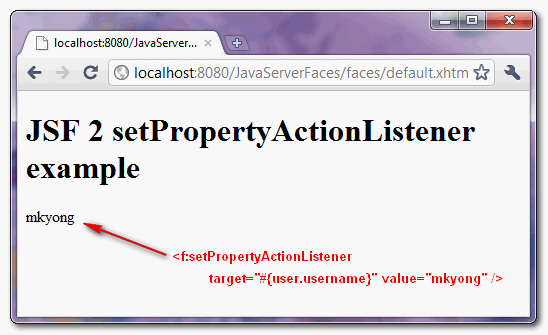
Here’s the result after button is clicked.
Download Source Code
Download It – JSF-2-setPropertyActionListener-Example.zip (9KB)

Hi, I have a problem whit weblogic 10.3.6… setPropertyActionListener dont work, throw error : Error Parsing: #
thanks for your help
the web site is very interesting over Java. (y)
Hi,
Thanks for the post. It helped me a lot. I tried your example in my application and on clicking the command button for the first time I am not getting the value and but on subsequent clicks i am getting. What wrong am i doing
Sorry my codes didn’t show…
here is the code
<h:inputText name="title" value="#{movie.title}" size="30"/>Thank you!
I have a question on how to save value that I got on result.xhtml.
I am using
after this code, I want to grab this title and save it into my DB. I looked into HttpServletRequest request = (HttpServletRequest)FacesContext.getCurrentInstance().getExternalContext().getRequest();
But luck….please help me
Thank you
How to call f:setpropertyListener before actionListener if we don’t want to submit page but want to set property value before calling actionListener
Hi, my
are
… How can I do in taht case?
🙂
Never mind, I did it with a
object type.
Thanks anyway. 🙂
good job, keep writing about JSF please. You are a expert.
thanks.
I believe deleting your porn cookies will help. It seems that you get direct adds according to cookies you are using 🙂
No sex no sex adds 🙂
Enjoy!
BTW, I didn’t get any sex adds and I think this blog is very useful!
Hi,
This is very good when you have session scope.
What happens if I want in one page to show a list of let’s say users, and upon clicking on a specific user to redirect to a different page that is handled by a request scope backing bean? how can I do it?
Thanks in advance.
Hi mk:
I am trying to do something just like this but my main problem is I don’t want to hard code the value attribute in the
I have a value in #{param.report} and it displays on the page 1 when I display my page, then what I want to do is send it to the backing bean by saying:
then on page 2 say #{controls.param1} and have the value show on page 2
it is blank though, however if I replace the value with some simple text it displays on page 2 fine, is it impossible to send a variable through f:setPropertyActionListener?
looks like the code I typed got removed
f:setpropertyActionListener target=”#{controls.param1} value=”#{param.report}”
fails
f:setpropertyActionListener target=”#{controls.param1} value=”boo!”
works
I am having the same issue. i need to send a global javascript variable in the value of the actionlistener, but it wants a literal value.
dear sir i am very glad to see your style of delivering the knowledge and i feel that is the best one but one think is bad at your page you give the sex links on your page and that thing divert the concentration because this is educational website not the sexual one so remove the irrelevant things from your web page and be the better one range i will be thankful to you.
hi, may i know where you see the “sex links”?
I really never seen this “Sex Links” you talking about , and this site is the most relevant educational webSite.
Thank you Mr Mkyong for this pertinent work 🙂