Since JSF 2.0, it’s very easy to create a reusable component, known as composite components. In this tutorial, we show you how to create a simple composite components (stored as “register.xhtml“), which is an user registration form, includes name and email text fields (h:inputText) and a submit button (h:commandButton). In addition, we also show you how to use it.
Create a Composite Components
Here’s the steps to create a composite components :
1. Composite Namespace
Create a .xhtml file, and declared the composite namespace.
<html xmlns="http://www.w3.org/1999/xhtml"
      //...
      xmlns:composite="http://java.sun.com/jsf/composite">
</html>
2. Interface & Implementation
Uses composite tags composite:interface, composite:attribute and composite:implementation, to define content of the composite component. For example,
<html xmlns="http://www.w3.org/1999/xhtml"
      //...
      xmlns:composite="http://java.sun.com/jsf/composite">

	  <composite:interface>
			<composite:attribute name="anything" />
	  </composite:interface>

	  <composite:implementation>
			#{cc.attrs.anything}
	  </composite:implementation>
</html>
The composite:interface tag is used to declare the configurable values which are expose to the developer who use it. And composite:implementation tag is declares all the XHTML markups, which are the content of the composite component, inside the composite:implementation tag, you can access composite:interface attribute with the expression #{cc.attrs.attributeName}.
3. Resources Folder
Put composite components (“.xhtml” file) into JSF’s resources folder, see figure 1:
Figure 1 : Directory structure of this example.
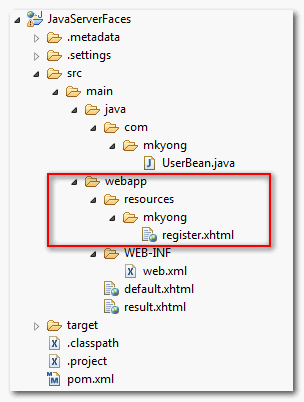
In this case, you put the “register.xhtml” composite components into a folder named “mkyong”.
4. Complete Example
Done, let see a complete example of “register.xhtml”.
File : register.xhtml
<?xml version="1.0" encoding="UTF-8"?>
<!DOCTYPE html PUBLIC "-//W3C//DTD XHTML 1.0 Transitional//EN"
"http://www.w3.org/TR/xhtml1/DTD/xhtml1-transitional.dtd">
<html xmlns="http://www.w3.org/1999/xhtml"
      xmlns:h="http://java.sun.com/jsf/html"
      xmlns:f="http://java.sun.com/jsf/core"
      xmlns:composite="http://java.sun.com/jsf/composite"
      >

    <composite:interface>

    	<composite:attribute name="nameLable" />
    	<composite:attribute name="nameValue" />
    	<composite:attribute name="emailLable" />
    	<composite:attribute name="emailValue" />

   	<composite:attribute name="registerButtonText" />
    	<composite:attribute name="registerButtonAction"
    		method-signature="java.lang.String action()" />

    </composite:interface>

    <composite:implementation>

	<h:form>

		<h:message for="textPanel" style="color:red;" />

		<h:panelGrid columns="2" id="textPanel">

			#{cc.attrs.nameLable} :
			<h:inputText id="name" value="#{cc.attrs.nameValue}" />

			#{cc.attrs.emailLable} :
			<h:inputText id="email" value="#{cc.attrs.emailValue}" />

		</h:panelGrid>

		<h:commandButton action="#{cc.attrs.registerButtonAction}"
			value="#{cc.attrs.registerButtonText}"
		/>

	</h:form>

    </composite:implementation>

</html>
Use a Composite Components
You just created a composite component “register.xhtml”, and now we show you how to use it.
1. Composite Component Access Path
Refer to figure 1 above; the “register.xhtml” file is under the folder “mkyong”. Here’s how you access it :
<html xmlns="http://www.w3.org/1999/xhtml"
      ///...
      xmlns:mkyong="http://java.sun.com/jsf/composite/mkyong"
      >
	  <mkyong:register />
</html>
The folder name of the composite components is defined the component access path, for example, if you put your “register.xhtml” file under folder named “abc”, then you should access it like this :
<html xmlns="http://www.w3.org/1999/xhtml"
      ///...
      xmlns:mkyong="http://java.sun.com/jsf/composite/abc"
      >
	  <mkyong:register />
</html>
2. Complete Example
Let’s see a complete example to show the use of “register.xhtml” composite components.
File : default.xhtml
<?xml version="1.0" encoding="UTF-8"?>
<!DOCTYPE html PUBLIC "-//W3C//DTD XHTML 1.0 Transitional//EN"
"http://www.w3.org/TR/xhtml1/DTD/xhtml1-transitional.dtd">
<html xmlns="http://www.w3.org/1999/xhtml"
      xmlns:h="http://java.sun.com/jsf/html"
      xmlns:mkyong="http://java.sun.com/jsf/composite/mkyong"
      >

    <h:body>

    	<h1>Composite Components in JSF 2.0</h1>

	<mkyong:register
		nameLable="Name"
		nameValue="#{user.name}"
		emailLable="E-mail"
		emailValue="#{user.email}"

		registerButtonText="Register"
		registerButtonAction="#{user.registerAction}"
	 />

    </h:body>

</html>
You are allowed to pass either hard-coded value or backing method or property into the composite component via exposed attributes, when the form is submitted, JSF will do all the backing bean binding automatically.
P.S Here’s the “user” managed or backing bean, for those who are interested.
package com.mkyong;

import javax.faces.bean.ManagedBean;
import javax.faces.bean.SessionScoped;

@ManagedBean(name="user")
@SessionScoped
public class UserBean{

	public String name;
	public String email;

	//getter and setter methods for name and email

	public String registerAction(){
		return "result";
	}
}
Demo
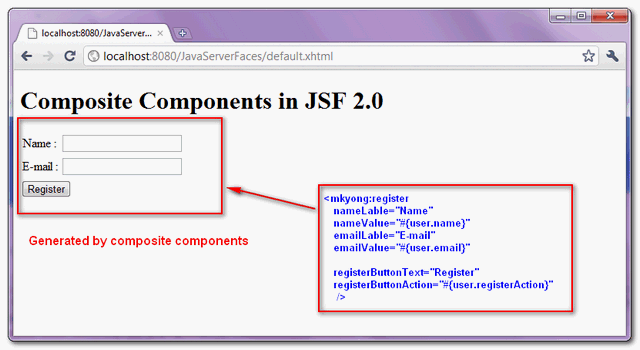
Here’s the result.
URL : http://localhost:8080/JavaServerFaces/default.xhtml

hi,how to use Composite Components in p:dataTable ,
when I used it outside p:dataTable, Composite Components was valid.
when I used it inside p:dataTable, Composite Components was invalid.
hi, how do with f:facet?
Typo: Lable
Has worked like a charm! The best tutorial I could find to Composite Components in the web. Short, precise and practical. Thank you!!
Hi mkyong,
I have a problem with passing ajx listner to the composite component. the using of composite component works fine with the method:
public void onNodeSelect(NodeSelectEvent event) {
}
but it not works with the throws Exception syntax
public void onNodeSelect(NodeSelectEvent event) throws Exception {
any idea?!
Hi mkyong,
thanks for your great article!
I’m here wondering what’s the advantages and disadvantages for custom tags mentioned in previous section (https://mkyong.com/jsf2/custom-tags-in-jsf-2-0/) compared with composite components here. Can you shed the light on it?
Thanks in advance!
Hi mkyong,
I depend a lot on your blogs.
I am currently trying to develop composite components.
However after doing some basic stuff I was looking for
the schema for http://java.sun.com/jsf/composite namespace
and could not get it.
That would help me in getting IDE tag completion etc.
Can you send me any pointers regarding the same.
regards
For all those whose page has the inclusion of the composite element having the error that “the name space cannot be found”, you MUST create the resources folder under your “Web Pages” folder. It has to be the same level as your WEB-INF folder. All along I had the impression that the “resources” folder was optional; and was specific to certain types of project. I was using the Java Enterprise application which wasn’t so explicit.
Thank you mkyong too~
Thank you for all these tutorials. Many Google searches about Java EE results your website. It is very helpful.
Great help. Thank you for all off your work.
hi, great resource. i’m facing a problem with faces.
launcher.xhtml

this form uses "thing"

<html xmlns="http://www.w3.org/1999/xhtml"
      xmlns:composite="http://java.sun.com/jsf/composite"
      xmlns:f="http://java.sun.com/jsf/core"
      xmlns:h="http://java.sun.com/jsf/html"
      xmlns:p="http://primefaces.org/ui"
      xmlns:ui="http://java.sun.com/jsf/facelets"
      xmlns:custom="http://java.sun.com/jsf/composite/components">
<h:form id="form">
<p:panelGrid
id="pgid"
columns="2">
    <h:outputText value="title"/>
    <h:outputText value="#{bean.value}"/>
</p:panelGrid>

<custom:thing
via="#{bean.via1}"
viaListener="#{bean.via2Listener()}"
vias="#{bean.vias1}">
</h:form>

thing.xhtml

<p:selectOneMenu
            process="@this"
            value="#{cc.attrs.via}">
                <p:ajax
                listener="#{cc.attrs.viaListener}"
                update="form:pgid"
                />
                <f:selectItems value="#{cc.attrs.vias}"/>
            </p:selectOneMenu>
faces can´t find form:pgid. tried with and without prepending “form”. thanks
Hey mkyong, I made use of your tutorial, thank you .
Hello,
I also work with composite components, but in combination with other fields and text outside the component.
What I do is… I put a table on the jsf page that has 2 columns and multiple rows. The first column is a component and the second column contains plain text.
When you submit the page without ajax and come back to the same page than all components are placed after the text.
It is as jsf parses first all normal tags, text,… and after that the components.
Pressing F5 puts everything back normal.
Someone any idea?
I works like a charm, now is much much easier to built my own composite components.
Thank you for the post.
I tried the example in both JSF 2.0/Weblogic and Mojarra JSF 2.1.11/Tomcat. But cc.attrs cannot be evaluated. Did you encounter this problem before? Have your code been tested in the environments listed above yet?
Hi Yong, this is very good article,
can you please give an example to hide if some of the defined fileds in register.xml not required in some jsf pages.
like my requirement is to hide some fileds in some pages
Hello,
I’m having problem to create the component dynamically.
What am I doing wrong?
FacesContext context = FacesContext.getCurrentInstance();
Resource resource = context.getApplication().getResourceHandler().createResource(“date.xhtml”, “util”);
DynamicFieldList compositeComponent = (DynamicFieldList)context.getApplication().createComponent(context, resource);
UIPanel facetComponent = (UIPanel) context.getApplication().createComponent(UIPanel.COMPONENT_TYPE);
facetComponent.setRendererType(“javax.faces.Group”);
compositeComponent.getFacets().put(UIComponent.COMPOSITE_FACET_NAME, facetComponent);
context.getViewRoot().getChildren().add(compositeComponent);
No error occurs, the more the component is not displayed
Hey mk
I am trying to extend the selectItems tag of core jsf 2.0
i wrote a class which extends SelectItems and then added an attribute title for tooltip
i added xml suggested by you (using 1.1 DTD)
i added context param as per your advice
still i am getting
Hi,
I have different application structure.
src
web
resources/mykong/register.xhtml
web-inf
I have added resource folder in web/resources/mykong/register.xhtml
1. added name space xmlns:mkyong=”http://java.sun.com/jsf/composite/mkyong” jsf page.
2.called register in one the jsf page.
But i am unable to see component?
Please if anyone has an idea.
Hello,
I create my own component (a panel) :
On my xhtml i use like this
And then when i use the method findComponent with the id “toto”, but this method didn’t find the UIInput with id “toto”.
If i remove my component around the inputText, the method findComponent find the UIInput.
Have you got any idea about this problem ?
Thanks for you help.
Sorry for the double post but it seems that the HTML pre markup doesn’t work.
Can’t read your code, try post at javanullpointer.com
I’ve sent you another post with the contact form. Hope this will work. Thanks for you help.
I will try to post on javanullpointer.com too.