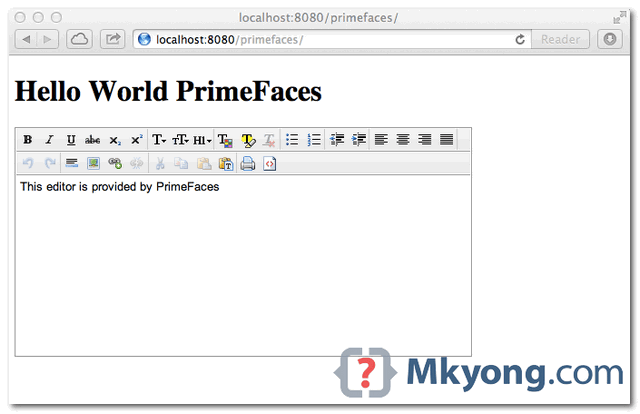
In this tutorial, we will show you how to create a JSF 2 + PrimeFaces wed project, the final output is display a “hello world” string in PrimeFaces editor component.
Tools used :
- JSF 2.1.11
- Primefaces 3.3
- Eclipse 4.2
- Maven 3
- Tested on Tomcat 7
PrimeFaces only requires a JAVA 5+ runtime and a JSF 2.x implementation as mandatory dependencies.
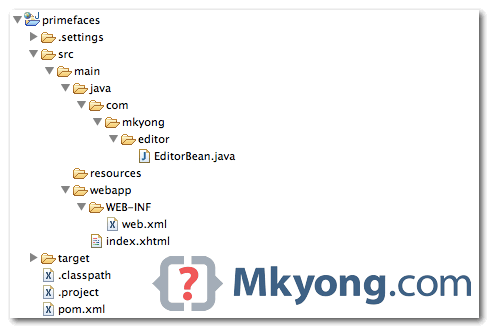
1. Project Directory
Final project directory.
2. Project Dependency
To use PrimeFaces, you only need single primefaces-{version}.jar, but this jar is not available on Maven central repository, So, you need to declare PrimeFaces own repository :
Refer here : PrimeFaces download reference
	<repository>
		<id>prime-repo</id>
		<name>Prime Repo</name>
		<url>http://repository.primefaces.org</url>
	</repository>

	<dependency>
		<groupId>org.primefaces</groupId>
		<artifactId>primefaces</artifactId>
		<version>3.3</version>
	</dependency>
File : pom.xml – Add JSF 2 and Primefaces dependencies.
<project xmlns="http://maven.apache.org/POM/4.0.0"
	xmlns:xsi="http://www.w3.org/2001/XMLSchema-instance"
	xsi:schemaLocation="http://maven.apache.org/POM/4.0.0
	http://maven.apache.org/maven-v4_0_0.xsd">
	<modelVersion>4.0.0</modelVersion>
	<groupId>com.mkyong.core</groupId>
	<artifactId>primefaces</artifactId>
	<packaging>war</packaging>
	<version>1.0-SNAPSHOT</version>
	<name>primefaces Maven Webapp</name>
	<url>http://maven.apache.org</url>

	<repositories>
		<repository>
			<id>prime-repo</id>
			<name>Prime Repo</name>
			<url>http://repository.primefaces.org</url>
		</repository>
	</repositories>

	<dependencies>

		<!-- PrimeFaces -->
		<dependency>
			<groupId>org.primefaces</groupId>
			<artifactId>primefaces</artifactId>
			<version>3.3</version>
		</dependency>

		<!-- JSF 2 -->
		<dependency>
			<groupId>com.sun.faces</groupId>
			<artifactId>jsf-api</artifactId>
			<version>2.1.11</version>
		</dependency>
		<dependency>
			<groupId>com.sun.faces</groupId>
			<artifactId>jsf-impl</artifactId>
			<version>2.1.11</version>
		</dependency>

		<dependency>
			<groupId>javax.servlet</groupId>
			<artifactId>jstl</artifactId>
			<version>1.2</version>
		</dependency>

		<dependency>
			<groupId>javax.servlet</groupId>
			<artifactId>servlet-api</artifactId>
			<version>2.5</version>
		</dependency>

		<dependency>
			<groupId>javax.servlet.jsp</groupId>
			<artifactId>jsp-api</artifactId>
			<version>2.1</version>
		</dependency>

		<!-- EL -->
		<dependency>
			<groupId>org.glassfish.web</groupId>
			<artifactId>el-impl</artifactId>
			<version>2.2</version>
		</dependency>

		<!-- Tomcat 6 need this
		<dependency>
			<groupId>com.sun.el</groupId>
			<artifactId>el-ri</artifactId>
			<version>1.0</version>
		</dependency>
		-->

	</dependencies>
	<build>
	 <plugins>
		<plugin>
			<groupId>org.apache.maven.plugins</groupId>
			<artifactId>maven-compiler-plugin</artifactId>
			<version>2.3.2</version>
			<configuration>
				<source>1.6</source>
				<target>1.6</target>
			</configuration>
		</plugin>
	 </plugins>
	</build>
</project>
3. Editor Bean
Create a simple bean, to provide data for PrimeFaces editor component later.
File : EditorBean.java
package com.mkyong.editor;

import javax.faces.bean.ManagedBean;

@ManagedBean(name = "editor")
public class EditorBean {

	private String value = "This editor is provided by PrimeFaces";

	public String getValue() {
		return value;
	}

	public void setValue(String value) {
		this.value = value;
	}
}
4. Web Page
To use PrimeFaces components, just declares this namespace xmlns:p="http://primefaces.org/ui", and start use it, simple.
File : index.xhtml
<?xml version="1.0" encoding="UTF-8"?>
<!DOCTYPE html PUBLIC "-//W3C//DTD XHTML 1.0 Transitional//EN"
"http://www.w3.org/TR/xhtml1/DTD/xhtml1-transitional.dtd">
<html xmlns="http://www.w3.org/1999/xhtml"
	xmlns:h="http://java.sun.com/jsf/html"
	xmlns:f="http://java.sun.com/jsf/core"
	xmlns:ui="http://java.sun.com/jsf/facelets"
	xmlns:p="http://primefaces.org/ui">

<h:head>
</h:head>
<h:body>
	<h1>Hello World PrimeFaces</h1>

	<h:form>
	   <p:editor value="#{editor.value}" />
	</h:form>

</h:body>
</html>
5. Configuration
PrimeFaces does not require any mandatory configuration
See web.xml below, only for JSF configuration.
File : web.xml
<?xml version="1.0" encoding="UTF-8"?>
<web-app xmlns:xsi="http://www.w3.org/2001/XMLSchema-instance"
	xmlns="http://java.sun.com/xml/ns/javaee"
	xmlns:web="http://java.sun.com/xml/ns/javaee/web-app_2_5.xsd"
	xsi:schemaLocation="http://java.sun.com/xml/ns/javaee
	http://java.sun.com/xml/ns/javaee/web-app_2_5.xsd"
	id="WebApp_ID" version="2.5">

  <display-name>PrimeFaces Web Application</display-name>

  	<!-- Change to "Production" when you are ready to deploy -->
	<context-param>
		<param-name>javax.faces.PROJECT_STAGE</param-name>
		<param-value>Development</param-value>
	</context-param>

	<!-- Welcome page -->
	<welcome-file-list>
		<welcome-file>faces/index.xhtml</welcome-file>
	</welcome-file-list>

	<!-- JSF mapping -->
	<servlet>
		<servlet-name>Faces Servlet</servlet-name>
		<servlet-class>javax.faces.webapp.FacesServlet</servlet-class>
		<load-on-startup>1</load-on-startup>
	</servlet>

	<!-- Map these files with JSF -->
	<servlet-mapping>
		<servlet-name>Faces Servlet</servlet-name>
		<url-pattern>/faces/*</url-pattern>
	</servlet-mapping>
	<servlet-mapping>
		<servlet-name>Faces Servlet</servlet-name>
		<url-pattern>*.jsf</url-pattern>
	</servlet-mapping>
	<servlet-mapping>
		<servlet-name>Faces Servlet</servlet-name>
		<url-pattern>*.faces</url-pattern>
	</servlet-mapping>
	<servlet-mapping>
		<servlet-name>Faces Servlet</servlet-name>
		<url-pattern>*.xhtml</url-pattern>
	</servlet-mapping>

</web-app>
6. Demo
See final output. http://localhost:8080/primefaces/

Deployed the war file in JBoss but when hitting the URL it is saying not found http://localhost:8080/primefaces
Great job sir
I think is a good tutorial but is missing the deployment part.
Did you use mvn plugin to deploy to tomcat? did you generate .WAR and manually deployed?
Thanks
great mkyong! it works!
Great!!
??? ?? ???? ??? ???????? ???? ?? ?????
Hey, i work with tomcat but the message: “This editor is provided by PrimeFaces” doesnt appears into the editor….
To avoid : java.lang.ClassNotFoundException: javax.faces.webapp.FacesServlet
FacesServlet belongs to the jsf-api package
They are not in the war
To avoid this :project> proprerty ==> Deployement Assembly> Add
Then Java build path Entries> Next, and chosseMaven dependencies and finish
thx it’s work
Thanks for the great article.
However, this prime faces editor example doesn’t work for IE 11. The text formatting tool bar items appear disabled. Any ideas how to fix?
Sir Your above code works fine with tomcat .. But I am using IBM WASCE and Eclipse on which it is not publishing can u suggest some solutions ?
Grazie di esistere !
Hi Mr. Yong
I am getting this warning when I run this project:
Warning: This page calls for XML namespace http://primefaces.org/ui declared with prefix p but no taglibrary exists for that namespace.
What can I do?
Thanks
I created a new project with the same files and all is right. Thanks
Add prime faces jar to Tomcat (or any other web server’s) lib folder
Hi Mr. Yong I am getting the following message:
Warning: This page calls for XML namespace http://primefaces.org/ui declared with prefix p but no taglibrary exists for that namespace.
What can I do?
I created a new project with the same files and all is right. Thanks
Hi mkyong,
I’m quite new to the Primefaces and urgently need some help from professionals such as you. Thank you in advance for your time.
I have a simple JSF2.0 Dynamic Web Project (not Maven) using Myfaces JSF Core API library and running on Tomcat7 with Eclipse Juno.
Due to the need of connecting to Database, I added the JPA2.0 to project facelet using Eclipselink as provider. So the structure is somehow like JPA->backing bean files->xhtml files.
Everything seems fine so far, I can get data in the .java tester class. However when I try to run the xhtml pages, it always cause tomcat ‘Java heap’ problem and cannot start (popup error dialog: Server Tomcat v7.0 Server at localhost was unable to start within 45 seconds. If the server requires more time, try increasing the timeout in the server editor.)
After some testing, I found the error is because I have eclipselink.jar file in the WEB-INF/lib. If I remove this jar file, the page renders without problem. However, without this library file, some pages which need the backing bean parameters got error (javax.persistence.PersistenceException – No Persistence provider for EntityManager named xxx)
So I have no solution for my current situation. One hand I need the eclipselink.jar file to make my pages able to ‘read/write’ from the backing bean, on the other hand I cannot include this specific library because it seems ‘clash’ withe PrimeFaces library/configuration.
Would you kindly provide me some advice or any other alternative solutions?
Thanks again for your help.
Regards, Josh.
Hello mkyong
Thanks for all the nice articles.
Once I add the primeface repository like this…..
prime-repo
PrimeFaces Maven Repository
http://repository.primefaces.org
default
Maven build give me logs like below… in which all my local projects are getting downloaded from the primefaces repository instead of my local machine.
How can I fix this ?
Thanks in advance.
Downloading: http://repository.primefaces.org/…..MY_PACKAGES…/0.0.1-SNAPSHOT/maven-metadata.xml
Downloading: http://repository.primefaces.org/…..MY_PACKAGES…/0.0.1-SNAPSHOT/maven-metadata.xml
Downloading: http://repository.primefaces.org/…..MY_PACKAGES…/0.0.1-SNAPSHOT/maven-metadata.xml
Downloading: https://code.lds.org/nexus/content/groups/main-repo/…..MY_PACKAGES…/0.0.1-SNAPSHOT/maven-metadata.xml
Downloading: http://repository.primefaces.org/…..MY_PACKAGES…/0.0.1-SNAPSHOT/maven-metadata.xml
Downloading: https://code.lds.org/nexus/content/groups/main-repo/…..MY_PACKAGES…/0.0.1-SNAPSHOT/maven-metadata.xml
Downloading: http://repository.primefaces.org/…..MY_PACKAGES…/0.0.1-SNAPSHOT/maven-metadata.xml
Downloading: http://repository.primefaces.org/…..MY_PACKAGES…/0.0.1-SNAPSHOT/maven-metadata.xml
Thanks Mykyong, you not only taught me how to set up a PrimeFaces project, but also taught me a bit about Maven. I really enjoy your tutorials, you get to the main points and don’t waste time on irrelevant stuff. Cheers
Very Good. Thanks
Hello mkyong,
First come talk that his work was excellent. But I would like to know what I need to change this pom to the war, also run the JBoss EAP 5.1.
Thank you
Thanks so much Mkyong. I’ve been banging my head with this for a while and found your article and example made it very clear finally.
Thanks for sharing this example. However, I had small issue with jsf-api.jar when I tried with ‘mvn compile’. I checked the maven repository ‘search.maven.org’ to navigate the exact group id, artifact id, version to be used for jsf-api.jar. Thereby modified the pom.xml to the below and it worked great.
com.sun.faces
jsf-api
2.2.0-m10
Great. Worked. Just added the jars to lib folder for running it in eclipse local tomcat instance.
Hi, Yong
I deploy your demo helloworld project into tomcat7.0.29 and got following error. I verified that the file jsf-impl-2.1.11.jar does not contain class javax.faces.webapp.FacesServlet, what’s the problem, thanks.
java.lang.ClassNotFoundException: javax.faces.webapp.FacesServlet
at org.apache.catalina.loader.WebappClassLoader.loadClass(WebappClassLoader.java:1711)
at org.apache.catalina.loader.WebappClassLoader.loadClass(WebappClassLoader.java:1556)
at org.apache.catalina.core.DefaultInstanceManager.loadClass(DefaultInstanceManager.java:532)
at org.apache.catalina.core.DefaultInstanceManager.loadClassMaybePrivileged(DefaultInstanceManager.java:514)
at org.apache.catalina.core.DefaultInstanceManager.newInstance(DefaultInstanceManager.java:133)
at org.apache.catalina.core.StandardWrapper.loadServlet(StandardWrapper.java:1136)
at org.apache.catalina.core.StandardWrapper.load(StandardWrapper.java:1080)
at org.apache.catalina.core.StandardContext.loadOnStartup(StandardContext.java:5027)
at org.apache.catalina.core.StandardContext.startInternal(StandardContext.java:5314)
at org.apache.catalina.util.LifecycleBase.start(LifecycleBase.java:150)
at org.apache.catalina.core.ContainerBase$StartChild.call(ContainerBase.java:1559)
at org.apache.catalina.core.ContainerBase$StartChild.call(ContainerBase.java:1549)
at java.util.concurrent.FutureTask$Sync.innerRun(FutureTask.java:334)
at java.util.concurrent.FutureTask.run(FutureTask.java:166)
at java.util.concurrent.ThreadPoolExecutor.runWorker(ThreadPoolExecutor.java:1110)
at java.util.concurrent.ThreadPoolExecutor$Worker.run(ThreadPoolExecutor.java:603)
at java.lang.Thread.run(Thread.java:722)
change jsf-impl and jsf-api ‘s version to 2.0.1 resolved this issue. but I have no idea why you are ok with the version 2.1.11 of jsf-impl in you pom.xml
I’m a new comer to JSF and PrimeFaces. I have a table with many row; and a command button was disabled, requirement is when clicking on data row, the button is enabled, and when clicking outside of table, the button is disabled.
I don’t know can PrimeFaces or JSF do this ? Or i have to do with JQUERY?
Please help me. Thank in advance!
go to primefaces website’s Demo part.
A lot of existing code there for you.
Hi Mkyong,
I am facing same problem as Amandeep. Can you suggest how to deploy it as a WAS app?
Hi Mkyong
i have a problem.
Loged
Warning: This page calls for XML namespace http://primefaces.org/ui declared with prefix p but no taglibrary exists for that namespace
why?, my proyect show this error and o don´t have idea…
please help´me!!
Hi mkyong.
This is a great sample project. I am having tough time deploying this to WAS 8 server. Can you tell me if i require additional dependencies in the pom to make this work?
Appreciate the help
Actually, you don?t have to add, but to quit the JSF 2 jars. I have the problem that I cannot deploy this example in WAS, and I find out that it was because WAS already have a JSF implementation, so the jars that are contained in the project were making a conflict with the ones that WAS already have. Just quit them from the pom and deploy.
Hope it can help you
i have tried your example but when i download the primefaces jar file, i dont know where i have to paste it.
Paste it on C:\Program Files\NetBeans 7.1.2\java\modules\ext then go to your project properties and add the main .jar file to the compile tab.
Hey Mykong.. I have one issue with the primefaces if you can help.. we are getting view expired exception when we navigate back using browser button using the primefaces and jsf2. can you guide me how to fix it
I would like to ask regarding the maven pom file. I am currently trying out primefaces and I use maven to create the project. In the pom file, I only have primefaces defined in the dependency and then deploy to Glassfish. By looking at your pom file, is it necessary to define the JSF2 and EL dependencies?
The dependencies I defined are as below:
<dependencies> <dependency> <groupId>javax</groupId> <artifactId>javaee-web-api</artifactId> <version>6.0</version> <scope>provided</scope> </dependency> <dependency> <groupId>org.primefaces</groupId> <artifactId>primefaces</artifactId> <version>3.2</version> </dependency> <dependency> <groupId>com.oracle</groupId> <artifactId>ojdbc14</artifactId> <version>10.2.0.5</version> </dependency> </dependencies>Above example is deployed on Tomcat 6 or 7, so the JSF and EL dependencies are required.
For Glassfish, it already bundled with required JSF and EL jars, so the declare at pom file is no longer required.
Ooh.. ok.. now I understand.. Thanks 🙂
Great!
Thanks.