Technology: Primefaces it’s java based web framework to develop web applications using java. It’s one of the compliance frameworks for JSF, there are many other frameworks like omnifaces, richfaces. Primefaces has rich UI components. In this tutorial primefaces, maven, java8, glasifish servers are used. Use case: If you want to open a new page by […]

Read more PrimeFaces – Open Window By Dropdown Selection

See a simple JSF example : <h:form id="signup-form"> <h:inputText id="email" value="#{beanBean.email}" /> </h:form> It will generates following HTML code : <input id="signup-form:email" type="text" /> Uses jQuery selector to get the email id, but failed. <script> jQuery(document).ready(function($) { $(‘#signup-form:email’).checkEmailFormat(); }); </script> Solution This is a well-known problem to integrate JSF and jQuery – the colon “:” […]

Read more How to get JSF id via jQuery

To validate email, uses JSF <f:validateRegex>, and puts following regular expression. This regex should be able to validates most of the email format, and I’m using it for few projects. Email Regular Expression ^[_A-Za-z0-9-\+]+(\.[_A-Za-z0-9-]+)*@[A-Za-z0-9-]+(\.[A-Za-z0-9]+)*(\.[A-Za-z]{2,})$ P.S For detail explanation, refer to this how to validate email address with regular expression. In this tutorial, we will show […]

Read more PrimeFaces + JSF Email validator example

In PrimeFaces, your can use <p:watermark> to display watermark effect on input field. This watermark component is using HTML5 placeholder attribute in supported browsers like Safari, Chrome and Firefox, and fall back to JavaScript solution for non-support browser like IE. Display watermark text in input field <p:inputText id="username" required="true" label="username" size="40" value="#{userBean.username}" /> <p:watermark for="username" […]

Read more PrimeFaces – Watermark on text input

Often times, you may need to override default PrimeFaces CSS with your pretty customize values. In this example, we will show you how to override PrimeFaces error message style. Debug with FireBug, the PF’s error messages style are from primefaces.css primefaces.css .ui-message-info, .ui-message-error, .ui-message-warn, .ui-message-fatal { border: 1px solid; margin: 0px 5px; padding: 2px 5px; […]

Read more How to override PrimeFaces CSS?

The PrimeFaces showcase is showing how to use the entire 100+ PrimeFaces components, which is impressive! Actually, you can download the entire PrimeFaces showcase web application (in war) and source code, and deploy on your local server for testing or further study. Here we show you how. 1. Visit Maven Repository The entire PrimeFaces showcase […]

Read more Download PrimeFaces ShowCase and Source Code

In this tutorial, we will show you how to use PrimeFaces extensions – Maven plugin, to compress and combine JavaScript and CSS files, a web resources optimization example, to make web site load faster. Tool tested : PrimeFaces 3.3 PrimeFaces-Extensions 0.5 Maven 3.0.3 Note This guide is example-driven, for detail explanation and all other plugin […]

Read more PrimeFaces compress and combine JavaScript and CSS

By default, PrimeFaces will return total of four files, 2 css files and 2 Javascript files. <link type="text/css" rel="stylesheet" href="/primefaces/faces/javax.faces.resource/theme.css?ln=primefaces-aristo" /> <link type="text/css" rel="stylesheet" href="/primefaces/faces/javax.faces.resource/primefaces.css?ln=primefaces" /> <script type="text/javascript" src="/primefaces/faces/javax.faces.resource/jquery/jquery.js?ln=primefaces"></script> <script type="text/javascript" src="/primefaces/faces/javax.faces.resource/primefaces.js?ln=primefaces"></script> Some people don’t like the default PrimeFaces CSS file and wonder how to remove it? Solution You are allow to remove only the […]

Read more Remove all default CSS styling from PrimeFaces

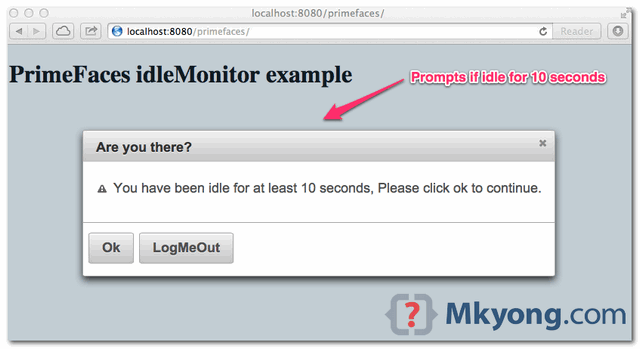
Recently, testing on PrimeFaces’ idleMonitor component. <!DOCTYPE html> <html xmlns="http://www.w3.org/1999/xhtml" xmlns:h="http://java.sun.com/jsf/html" xmlns:f="http://java.sun.com/jsf/core" xmlns:ui="http://java.sun.com/jsf/facelets" xmlns:p="http://primefaces.org/ui"> <h:head> </h:head> <h:body> <h1>PrimeFaces and idleMonitor</h1> <p:growl id="messages" showDetail="true" sticky="true" /> <p:idleMonitor timeout="10000" update="messages"> <p:ajax event="idle" listener="#{idleBean.idleListener}" update="messages" /> </p:idleMonitor> </h:body> </html> Problem After 10 seconds, console prompts java.io.IOException: Not in GZIP format? That’s weird, what GZIP to do iwith idleMonitor […]

Read more PrimeFaces : java.io.IOException: Not in GZIP format