
mkyong

mkyong

Software Engineer • Writer • Dad

20+ years hands-on, writing about Java, Spring, and AI. Every code example here is tested.

1,960 posts

Posts by mkyong

In JSF, <h:selectOneListbox /> tag is used to render a single select listbox – HTML select element with “size” attribute. //JSF… <h:selectOneListbox value="#{user.favYear1}"> <f:selectItem itemValue="2000" itemLabel="Year1 – 2000" /> <f:selectItem itemValue="2010" itemLabel="Year1 – 2010" /> <f:selectItem itemValue="2020" itemLabel="Year1 – 2020" /> </h:selectOneListbox> //HTML output… <select name="j_idt6:j_idt8" size="3"> <option value="2000">Year1 – 2000</option> <option value="2010">Year1 – 2010</option> […]
Read more JSF 2 listbox example

Problem In JSF 2.0 web application, during server initialization, it hits following warning message WARNING: JSF1063: WARNING! Setting non-serializable attribute value into HttpSession (key: user, value class: com.mkyong.UserBean). UserBean.java package com.mkyong; @ManagedBean(name="user") @SessionScoped public class UserBean{ //… } Solution The “UserBean” is not serializable. To get rid of this warning message, just make this bean […]

Read more WARNING: JSF1063: WARNING! Setting non-serializable attribute value into HttpSession

In JSF, “h:selectOneRadio” tag is used to render a set of HTML input element of type “radio“, and format it with HTML table and label tag. //JSF… <h:selectOneRadio value="#{user.favColor1}"> <f:selectItem itemValue="Red" itemLabel="Color1 – Red" /> <f:selectItem itemValue="Green" itemLabel="Color1 – Green" /> <f:selectItem itemValue="Blue" itemLabel="Color1 – Blue" /> </h:selectOneRadio> //HTML output… <table> <tr> <td> <input type="radio" […]

Read more JSF 2 radio buttons example

In JSF, <h:selectBooleanCheckbox /> tag is used to render a single HTML input element of “checkbox” type. //JSF… <h:selectBooleanCheckbox value="#{user.rememberMe}" /> Remember Me //HTML output… <input type="checkbox" name="j_idt6:j_idt8" /> Remember Me While <h:selectManyCheckbox /> tag is used to render a set of HTML input element of type “checkbox”, and format it with HTML table and […]

Read more JSF 2 checkboxes example

In JSF 2.0, both <h:button /> and <h:commandButton /> tags are used to render HTML input element of type button, with different mechanism to handle the navigation. 1. JSF h:commandButton example The “h:commandButton” tag is released since JSF 1.x, you can declare the bean, which return the navigation outcome in the “action” attribute. If browser’s […]

Read more JSF 2 button and commandButton example

In JSF 2.0, you can use <h:outputStylesheet /> output a css file. For example, <h:outputStylesheet library="css" name="style.css" /> It will generate following HTML output… <link type="text/css" rel="stylesheet" href="/JavaServerFaces/faces/javax.faces.resource/style.css?ln=css" /> JSF outputStylesheet example An example to show the use of JSF 2 <h:outputStylesheet /> to render a “style.css” file, locate in the “resources/css” folder, see figure […]

Read more How to include cascading style sheets (CSS) in JSF

In JSF 2.0, you can use <h:outputScript /> tag to render a HTML “script” element, and link it to a js file. For example, <h:outputScript library="js" name="common.js" /> It will generate following HTML output… <script type="text/javascript" src="/JavaServerFaces/faces/javax.faces.resource/common.js?ln=js"> </script> JSF outputScript example An example to show you how to use <h:outputScript /> to render a “common.js“, […]

Read more How to include JavaScript file in JSF

In JSF, you can use <h:graphicImage /> tag to render a HTML “img” element. For example, an image named “sofa.png” in a resources folder, see figure below : 1. JSF 1.x graphicImage In JSF 1.x you can hard-coded above image URL directly in the “value” attribute : JSF… <h:graphicImage value="resources/images/sofa.png" /> HTML output… <img src="resources/images/sofa.png;" […]

Read more JSF 2 graphicImage example

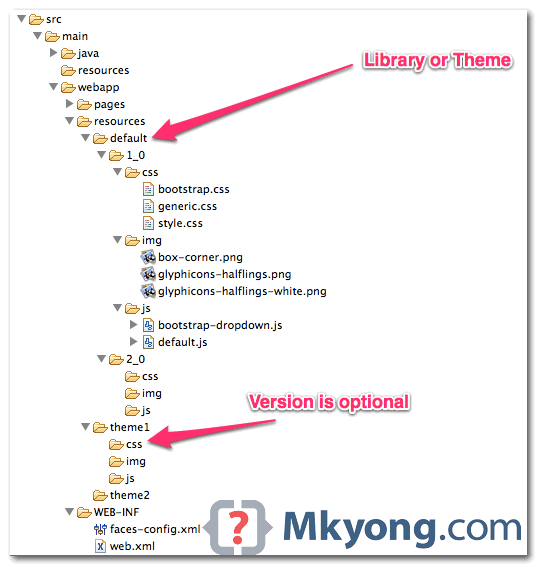
In JSF 2.0, all your web resources files like css, images or JavaScript, should put in “resources” folder, under the root of your web application (same folder level with “WEB-INF“). The sub-folder under “resources” folder is consider as “library” or “project theme“, later you can reference those “resources” with library attribute. This new JSF resources […]

Read more Resources (library) in JSF 2.0

In JSF web application, “h:outputFormat” tag is similar with “h:outputText” tag, but with extra function to render parameterized message. For example, <h:outputFormat value="param0 : {0}, param1 : {1}" > <f:param value="Number 1" /> <f:param value="Number 2" /> </h:outputFormat> It will output the following result param0 : Number 1, param1 : Number 2 {0} match to […]

Read more JSF 2 outputFormat example

In JSF 2.0 web application, “h:outputText” tag is the most common used tag to display plain text, and it doesn’t generate any extra HTML elements. See example… 1. Managed Bean A managed bean, provide some text for demonstration. import javax.faces.bean.ManagedBean; import javax.faces.bean.SessionScoped; @ManagedBean(name="user") @SessionScoped public class UserBean{ public String text = "This is Text!"; public […]

Read more JSF 2 outputText example

In some cases, you may need to pass a new hidden value to a backing bean. Generally, there are two ways : 1. HTML Tag + getRequestParameterMap() Render hidden field with plain HTML input, hard-coded new hidden value and access in backing bean via getRequestParameterMap() method. JSF… <h:form id="myForm"> <input type="hidden" name="hidden1" value="this is hidden2" […]

Read more How to pass new hidden value to backing bean in JSF

In JSF, you can use the <h:inputHidden /> tag to render a HTML hidden value field. For example, JSF tag… <h:inputHidden value="some text" /> Render this HTML code… <input type="hidden" name="random value" value="some text" /> JSF hidden field example A JSF 2 example to render a hidden field via <h:inputHidden /> tag, and access the […]

Read more JSF 2 hidden value example

In JavaScript, you can use following two ways to get hidden field value in a form : document.getElementById(‘hidden field id’).value document.formName.elements[‘hidden field name’].value See an example here… <html> <body> <script type="text/javascript"> function printIt(){ alert(document.getElementById(‘abcId’).value); alert(document.formName.elements[‘abcName’].value); } </script> <h1>Access Hidden value in JavaScript</h1> <form name="formName"> <input type=hidden id="abcId" name="abcName" value="Wall Street! Money Never Sleep"/> <input type=button […]

Read more How to get hidden field value in JavaScript

In JSF, you can use the <h:inputTextarea /> tag to render a HTML textarea field. For example, JSF tag… <h:inputTextarea cols="30" rows="10" /> Render this HTML code… <textarea name="random value" cols="30" rows="10"></textarea> JSF textarea example A full JSF 2 example to render a textarea field via <h:inputTextarea /> tag. 1. Managed Bean A managed bean, […]

Read more JSF 2 textarea example

In JSF, you can use the <h:inputSecret /> tag to render a HTML input of type=”password”, password field. For example, JSF tag… <h:inputSecret /> Render this HTML code… <input type="password" name="j_idt6:j_idt7" /> P.S The name attribute value is randomly generated by JSF. JSF password example A full JSF 2 example to render a password input […]

Read more JSF 2 password example

In JSF, you can use the <h:inputText /> tag to render a HTML input of type=”text”, text box. For example, JSF tag… <h:inputText /> Render this HTML code… <input type="text" name="j_idt6:j_idt7" /> P.S The name attribute value is randomly generated by JSF. JSF textbox example A full JSF 2 example to render a textbox input […]

Read more JSF 2 textbox example

By default, JSF will performs a server page forward while navigating to another page. See following example to differentiate between page forward and page redirect. A “start.xhtml” page, with a button navigate to “page1.xhtml” page. 1. Page Forward Here’s how the page forward works : Browser send a “GET” request to URL : http://localhost:8080/JavaServerFaces/faces/start.xhtml. JSF […]

Read more JSF : Page Forward vs Page Redirect

Here’s a guide to show the use of DirectX Diagnostic Tool to check Microsoft DirectX version that install on your computer. 1. Click “Start” or “Windows button“, click “Run“. For Windows 7, the “Run” is equal to the “Search programs and files” text box. 2. Type “dxdiag“, and then click OK. If this is the […]

Read more How to check DirectX version that install on your computer?

In JSF navigation rule, you may encounter a situation where two separate actions return a same “outcome” in a single page. In this case, you can use “from-action” element to differentiate the two navigation cases. See following example : 1. Managed Bean A managed bean, with two actions which return a same outcome – “success”. […]

Read more JSF “from-action” navigation rule example

JSF 2 comes with a very flexible conditional navigation rule to solve the complex page navigation flow, see the following conditional navigation rule example : 1. JSF Page A simple JSF page, with a button to move from this page to the payment page. start.xhtml <?xml version="1.0" encoding="UTF-8"?> <!DOCTYPE html PUBLIC "-//W3C//DTD XHTML 1.0 Transitional//EN" […]

Read more Conditional Navigation Rule in JSF 2.0

In JSF 1.2, all the page navigation are required to declare in the “faces-config.xml” file like this : … <navigation-rule> <from-view-id>page1.xhtml</from-view-id> <navigation-case> <from-outcome>page2</from-outcome> <to-view-id>/page2.xhtml</to-view-id> </navigation-case> </navigation-rule> … In JSF 2, it treats “outcome” as the page name, for example, navigate to “page1.xhtml”, you have to put the “outcome” as “page1”. This mechanism is called “Implicit […]

Read more Implicit Navigation in JSF 2.0

In JSF 2.0, a new @ManagedProperty annotation is used to dependency injection (DI) a managed bean into the property of another managed bean. Let see a @ManagedProperty example : MessageBean.java – A managed bean named “message“. import java.io.Serializable; import javax.faces.bean.ManagedBean; import javax.faces.bean.SessionScoped; @ManagedBean(name="message") @SessionScoped public class MessageBean implements Serializable { //business logic and whatever methods… […]

Read more Injecting Managed beans in JSF 2.0

Problem In JSF 2.0, while using the @ManagedProperty annotation to DI the bean into the field of another bean, HelloBean.java @ManagedBean @SessionScoped public class HelloBean implements Serializable { @ManagedProperty(value="#{message}") private MessageBean messageBean; MessageBean.java @ManagedBean(name="message") @SessionScoped public class MessageBean implements Serializable { It hits the following error message. An Error Occurred: Unable to create managed bean […]

Read more JSF 2.0 : managed bean x does not exist, Check that appropriate getter and/or setter methods exist

Problem In JSF, the faces-config.xml file can used to includes manages beans, navigation rules or any JSF faces configurations. But, putting all the configurations into a single faces-config.xml file will cause this file become huge very fast, and causing a serious maintainability issue. Solution Actually, you can split the faces-config.xml into multiple smaller files, each […]

Read more How to split faces-config.xml into multiple files?

Problem A JSF’s button with Ajax support… <h:outputText id="output" value="#{helloBean.sayWelcome}" /> <h:form> <h:inputText id="name" value="#{helloBean.name}"></h:inputText> <h:commandButton value="Welcome Me"> <f:ajax execute="name" render="output" /> </h:commandButton> </h:form> When this page is displayed, it prompts the following error message javax.faces.FacesException: <f:ajax> contains an unknown id ‘output’ – cannot locate it in the context of the component j_idt8 Obviously, the […]

Read more JSF 2.0 : <f:ajax> contains an unknown id

Problem Using Eclipse Helios (3.6) and developing JSF 2.0 web application. In .xhtml file, when i pressed on the “Ctrl + Space” combination keys to call the code assist for JSF tag, it prompts nothing? It look like the code assist for JSF tag is not working properly in the .xhtml file extension? Solution In […]

Read more Eclipse IDE : .xhtml code assist is not working for JSF tag

Problem In Eclipse 3.5 or early version, in order to deployed the Maven dependencies to the correct “/WEB-INF/lib” folder, you have to configure the dependencies via “Java EE Module Dependencies”, and the updated “.classpath” file will look like following : File : “.classpath”, by Java EE Module Dependencies… … <classpathentry kind="var" path="M2_REPO/javax/servlet/jsp/jsp-api/2.1/jsp-api-2.1.jar" sourcepath="M2_REPO/javax/servlet/jsp/jsp-api/2.1/jsp-api-2.1-sources.jar"> <attributes> <attribute […]

Read more Eclipse : Web Deployment Assembly & Maven dependencies issue

In Eclipse Galileo (3.5) or Ganymede (3.4) or older version, you can control the project packaging structure via the “Java EE Module Dependencies” option, so that the project dependencies are deployed to the correct folder. However, in the latest Eclipse Helios (3.6), the “Java EE Module Dependencies” is replaced by “Web Deployment Assembly“, which provide […]

Read more Eclipse : Java EE Module Dependencies is replaced by Web Deployment Assembly

Normally, when you use Maven command mvn eclipse:eclipse to convert existing Java project to support Eclipse project, Maven will create the entire dependency classpath by using the M2_REPO variable, which is not defined in Eclipse by default. Nothing special, M2_REPO is just a normal “classpath variable” in Eclipse to find your local Maven repository. Here, […]

Read more How to add M2_REPO classpath variable to Eclipse IDE

By default, Maven 2 uses JDK 1.4, Maven 3 uses JDK 1.5 to compile the project, which is very old. Fortunately, Maven comes with a Compiler Plugin, which tell Maven to compile the project source with a particular JDK version. Solution Configure the plugin compiler directly. (Tested with Maven 2 and 3) pom.xml <project> <build> […]

Read more How to compile Maven project with different JDK version?

Problem Using Eclipse Ganymede (3.4) , developing JSF 2.0 web application. However when open the xhtml file with the Eclipse web page editor , it prompts a dialog box and saying … Unsupported content type in editor To associate file extension with a supported content type, please see Content Types Preference Page. P.S The .xhtml […]

Read more Eclipse IDE : Unsupported content type in editor