Latest Eclipse IDE is required to support the hibernate tools plug-in. However my “svn+ssh” is not working correctly after updated to the latest Eclipse IDE and Subeclipse version of 1.6.x. While i initial the “svn+ssh” access connection in Eclipse IDE, i had encountered the following error message.
Network connection closed unexpectedly
svn: Connection closed unexpectedly
The “svn+ssh” is working fine in my old Eclipse IDE and Subeclipse. So, i suspect this may due to the Eclipse IDE and Subeclipse compatible problem? I keep trying the following combination
1) Eclipse IDE for Java EE Developers + Subeclipse version of 1.6.x
2) Eclipse IDE for Java EE Developers + Subeclipse version of 1.4.x
3) Eclipse IDE for Java Developers + Subeclipse version of 1.6.x
4) Eclipse IDE for Java Developers + Subeclipse version of 1.4.x
5) Eclipse Classic 3.5.0 + Subeclipse version of 1.6.x
6) Eclipse Classic 3.5.0 + Subeclipse version of 1.4.x
The result is…..SAME
Network connection closed unexpectedly
svn: Connection closed unexpectedly
What the fuck, all combination is not working. Thanks i still have my old Eclipse IDE configuration settings, and i find out my working svn version is using JavaHL (JNI) 1.5.4
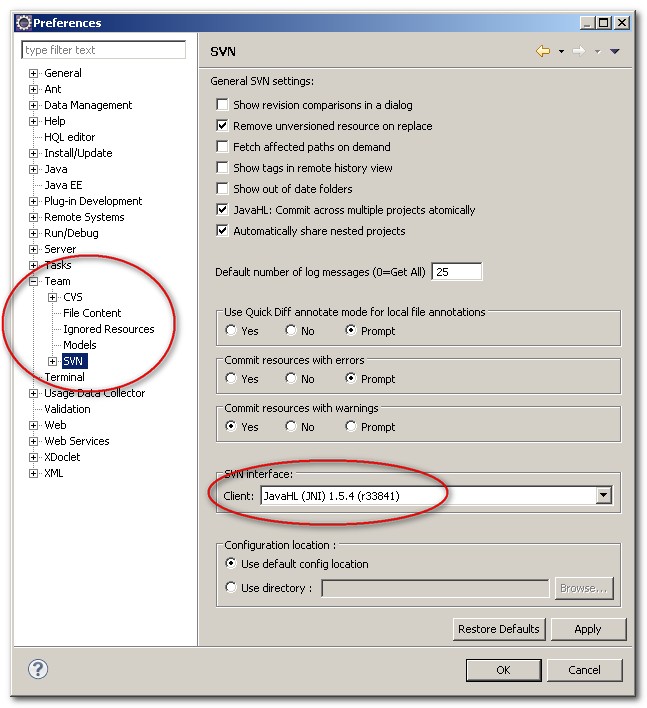
The older version of Subeclipse is working , we can still get the old version in the following URL
Achieve Subeclipse version
http://subclipse.tigris.org/servlets/ProjectDocumentList?folderID=5146&expandFolder=5146&folderID=2240
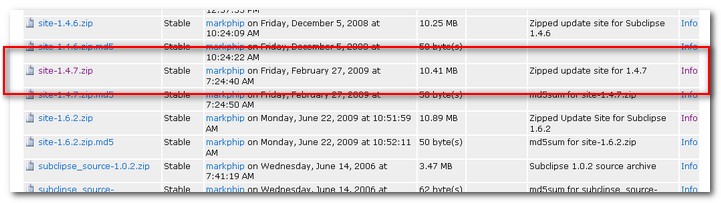
I get a copy of “site-1.4.7.zip” file, installed into my Eclipse IDE manually and the connection error is gone. The solution is using an older version of Subeclipse. Latest version wont work. Funny ~
Latest Subeclipse version
http://subclipse.tigris.org/servlets/ProjectProcess?pageID=p4wYuA
http://subclipse.tigris.org/update_1.4.x
http://subclipse.tigris.org/update_1.6.x
Do not update to the latest Subeclipse version , even it’s in stable released, all is not working for the “svn+ssh” connection in Eclipse IDE. Hope the author can fix it as soon as possible.

OK. Here’s how I fixed this (on Mac OS X, but fix should work on any client)
This particular issue arises when you are using a non-standard port (let’s say 12001 for sake of example) for your SSH server.
Apparently the SVN client experiences syntax errors when given a port address on a command line like this one:
svn list svn+ssh://[email protected]:12001/home/username/svn/myproject
So, to fix this, you need to create a client-side config file for SSH like this:
cd ~
cd .ssh
vi config (create a config file like the one that follows)
:w
:q
Config file located in ~/.ssh/config:
Host domain.com
User username
Port 12001
Then, issue your svn+ssh command WITHOUT the port like this:
svn list svn+ssh://[email protected]/home/username/svn/myproject
That’s it!
Hope that helps.
Rick
Hi rick, really appreciated your invaluable sharing 🙂
Hi Yong!! Thank you for your post. I was stuck on this issue for a few days too and i didnt find any bugs filed on the tigris site.