In the terminal, we can type mariadb -V (uppercase V) to display the current MariaDB version installed on the server. Terminal $ mariadb -V mariadb Ver 15.1 Distrib 10.5.19-MariaDB, for debian-linux-gnu (x86_64) using EditLine wrapper The above output show MariaDB version 10.5.19 is installed on the server. Server System Variables Alternatively, we can connect to […]

Read more How to check MariaDB version

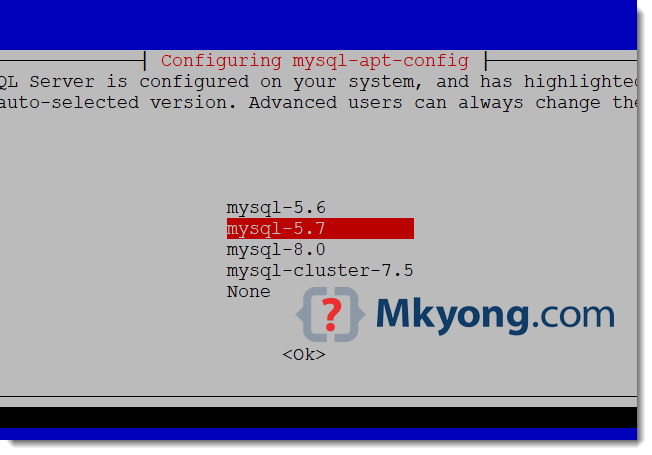
On Debian 9.5, the MySQL package is still the old MySQL 5.5. This little guide show you how to upgrade it to MySQL 5.7 1. Download MySQL APT 1.1 Get the MySQL APT and select MySQL 5.7 $ wget https://dev.mysql.com/get/mysql-apt-config_0.8.10-1_all.deb $ sudo gdebi mysql-apt-config_0.8.10-1_all.deb 1.2 Below “configuration mysql-apt-config” screen will be prompted, clicks the first […]

Read more Upgrade MySQL 5.5 to MySQL 5.7

Try to log into the MySQL server, but it prompts the following error message: Terminal $ mysql ERROR 1045 (28000): Access denied for user ‘root’@’localhost’ (using password: NO) 1. Solution – (using password: NO) The user ‘root’ need a password to log into the MySQL server. To solve it, please provide a password with -p […]

Read more ERROR 1045 (28000): Access denied for user ‘root’@’localhost’ (using password: NO)

Start a Spring Boot application and making a JDBC connection, hits the following warning messages on console : Fri Feb 10 18:43:02 SGT 2017 WARN: Establishing SSL connection without server’s identity verification is not recommended. According to MySQL 5.5.45+, 5.6.26+ and 5.7.6+ requirements SSL connection must be established by default if explicit option isn’t set. […]

Read more MySQL – Establishing SSL connection without server’s identity verification is not recommended

This tutorial will show you how to back up and restore (import or export) MySQL / MariaDB database or tables. Table of contents: 1. MySQL – Backup or export databases and tables 2. MySQL – Restore or import databases and tables 3. Backup and Restore MySQL 4. References 1. MySQL – Backup or export databases […]

Read more How to backup and restore (import and export) MySQL database or table

While i using my little fancy program to simulate millions of data in MySQL database for volumn testing, my program straight hit the following error after execute few seconds. Caused by: com.mysql.jdbc.exceptions.jdbc4.MySQLSyntaxErrorException: User ‘mkyong’ has exceeded the ‘max_questions’ resource (current value: 1000) at com.mysql.jdbc.Util.handleNewInstance(Util.java:406) at com.mysql.jdbc.Util.getInstance(Util.java:381) at com.mysql.jdbc.SQLError.createSQLException(SQLError.java:1030) at com.mysql.jdbc.SQLError.createSQLException(SQLError.java:956) at com.mysql.jdbc.MysqlIO.checkErrorPacket(MysqlIO.java:3536) at com.mysql.jdbc.MysqlIO.checkErrorPacket(MysqlIO.java:3468) at […]

Read more MySQL Error – exceeded the ‘max_questions’ resource (current value: 1000)

Often times, the following error is happened. This is due to the MySQL resource monitor feature, the “max_questions” means “Number of queries the user can execute within one hour”. MySQL Error – exceeded the ‘max_questions’ resource (current value: 1000) Here i will demonstrate how to update or modify the ‘max_questions’ value in MySQL. 1) Log […]

Read more How to modify the ‘max_questions’ resource value in MySQL?