On Debian 9.5, the MySQL package is still the old MySQL 5.5. This little guide show you how to upgrade it to MySQL 5.7
1. Download MySQL APT
1.1 Get the MySQL APT and select MySQL 5.7
$ wget https://dev.mysql.com/get/mysql-apt-config_0.8.10-1_all.deb
$ sudo gdebi mysql-apt-config_0.8.10-1_all.deb
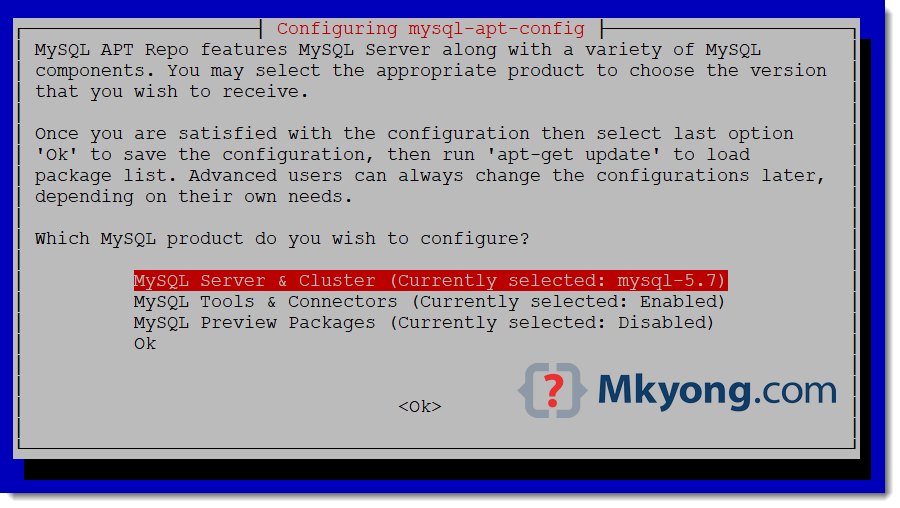
1.2 Below “configuration mysql-apt-config” screen will be prompted, clicks the first MySQL Server & Cluster option :
1.3 Select MySQL 5.7
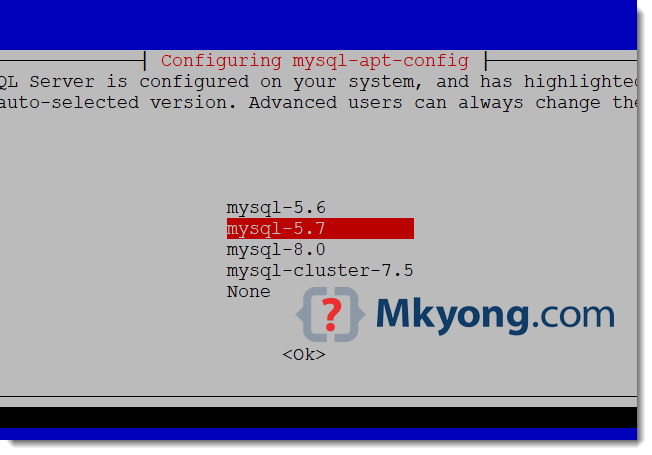
Now, the MySQL package is upgraded to 5.7
2. Install MySQL 5.7
2.1 Start update and install.
$ sudo apt-get update
$ sudo apt-get install mysql-server

$ mysql -V
mysql  Ver 14.14 Distrib 5.7.24, for Linux (x86_64) using  EditLine wrapper
The MySQL server 5.7 is installed.
3. Upgrade MySQL 5.5 to MySQL 5.7
3.1 If you installed the MySQL 5.5 previously and just upgraded to MySQL 5.7, please do mysql_upgrade
# Upgrade MySQL system tables and etc
$ sudo mysql_upgrade -u root -p

# Restart mysql
$ sudo service mysql restart
Done.

No comments yet. Be the first to leave a comment!