The Micronaut framework is a modern, JVM-based, full-stack framework designed for building microservices and serverless applications. It is lightweight, fast, and provides native cloud support, making it an excellent choice for developers looking for high performance and scalability.
In this tutorial, we will walk through creating a simple "Hello, World!" application using the Micronaut framework.
Table of contents
- 1. Setting Up the Micronaut Project
- 2. Review the Generated Project Structure
- 3. Understanding the Maven Configuration
- 4. Creating a Default Page Controller
- 5. Creating a Hello World Controller
- 6. Running the Application
- 7. Testing the Application
- 8. Build and Run the JAR
- 9. Download Source Code
- 10. Conclusion
- 11. References
Technologies used:
- Java 21
- Micronaut 4.7.6
- Maven 3.x
1. Setting Up the Micronaut Project
We can create a Micronaut project using the Micronaut CLI. Open the terminal and run the following command:
mn create-app com.mkyong.helloworld --build=maven --lang=java
This will create a new Micronaut application with the package com.mkyong.helloworld. Alternatively, we can use Micronaut Launch to generate our project via a web interface.
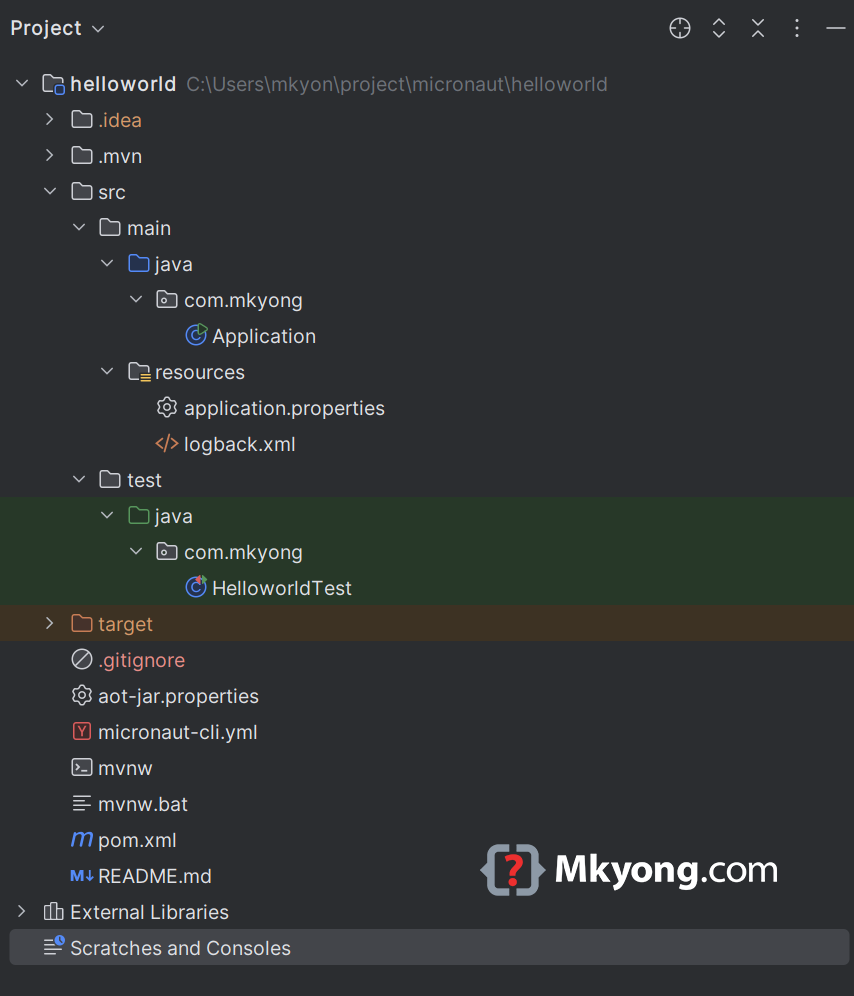
2. Review the Generated Project Structure
A standard maven project structure is generated.
3. Understanding the Maven Configuration
Micronaut relies on key dependencies such as netty, jackson, logback, and junit 5. Below is the pom.xml configuration.
<?xml version="1.0" encoding="UTF-8"?>
<project xmlns="http://maven.apache.org/POM/4.0.0" xmlns:xsi="http://www.w3.org/2001/XMLSchema-instance"
         xsi:schemaLocation="http://maven.apache.org/POM/4.0.0 http://maven.apache.org/xsd/maven-4.0.0.xsd">
  <modelVersion>4.0.0</modelVersion>
  <groupId>com.mkyong</groupId>
  <artifactId>helloworld</artifactId>
  <version>0.1</version>
  <packaging>${packaging}</packaging>

  <parent>
    <groupId>io.micronaut.platform</groupId>
    <artifactId>micronaut-parent</artifactId>
    <version>4.7.6</version>
  </parent>
  <properties>
    <packaging>jar</packaging>
    <jdk.version>21</jdk.version>
    <release.version>21</release.version>
    <micronaut.version>4.7.6</micronaut.version>
    <micronaut.runtime>netty</micronaut.runtime>
    <micronaut.aot.enabled>false</micronaut.aot.enabled>
    <micronaut.aot.packageName>com.mkyong.aot.generated</micronaut.aot.packageName>
    <exec.mainClass>com.mkyong.Application</exec.mainClass>
  </properties>

  <repositories>
    <repository>
      <id>central</id>
      <url>https://repo.maven.apache.org/maven2</url>
    </repository>
  </repositories>

  <dependencies>
    <dependency>
      <groupId>io.micronaut</groupId>
      <artifactId>micronaut-http-server-netty</artifactId>
      <scope>compile</scope>
    </dependency>
    <dependency>
      <groupId>io.micronaut.serde</groupId>
      <artifactId>micronaut-serde-jackson</artifactId>
      <scope>compile</scope>
    </dependency>
    <dependency>
      <groupId>ch.qos.logback</groupId>
      <artifactId>logback-classic</artifactId>
      <scope>runtime</scope>
    </dependency>
    <dependency>
      <groupId>io.micronaut</groupId>
      <artifactId>micronaut-http-client</artifactId>
      <scope>test</scope>
    </dependency>
    <dependency>
      <groupId>io.micronaut.test</groupId>
      <artifactId>micronaut-test-junit5</artifactId>
      <scope>test</scope>
    </dependency>
    <dependency>
      <groupId>org.junit.jupiter</groupId>
      <artifactId>junit-jupiter-api</artifactId>
      <scope>test</scope>
    </dependency>
    <dependency>
      <groupId>org.junit.jupiter</groupId>
      <artifactId>junit-jupiter-engine</artifactId>
      <scope>test</scope>
    </dependency>
  </dependencies>
  <build>
    <plugins>
      <plugin>
        <groupId>io.micronaut.maven</groupId>
        <artifactId>micronaut-maven-plugin</artifactId>
        <configuration>
          <configFile>aot-${packaging}.properties</configFile>
        </configuration>
      </plugin>
      <plugin>
        <groupId>org.apache.maven.plugins</groupId>
        <artifactId>maven-enforcer-plugin</artifactId>
      </plugin>
      <plugin>
        <groupId>org.apache.maven.plugins</groupId>
        <artifactId>maven-compiler-plugin</artifactId>
        <configuration>
          <!-- Uncomment to enable incremental compilation -->
          <!-- <useIncrementalCompilation>false</useIncrementalCompilation> -->

          <annotationProcessorPaths combine.children="append">
            <path>
              <groupId>io.micronaut</groupId>
              <artifactId>micronaut-http-validation</artifactId>
              <version>${micronaut.core.version}</version>
            </path>
            <path>
              <groupId>io.micronaut.serde</groupId>
              <artifactId>micronaut-serde-processor</artifactId>
              <version>${micronaut.serialization.version}</version>
              <exclusions>
                <exclusion>
                  <groupId>io.micronaut</groupId>
                  <artifactId>micronaut-inject</artifactId>
                </exclusion>
              </exclusions>
            </path>
          </annotationProcessorPaths>
          <compilerArgs>
            <arg>-Amicronaut.processing.group=com.mkyong</arg>
            <arg>-Amicronaut.processing.module=helloworld</arg>
          </compilerArgs>
        </configuration>
      </plugin>
    </plugins>
  </build>

    <pluginRepositories>
       <pluginRepository>
           <id>central</id>
           <url>https://repo.maven.apache.org/maven2</url>
       </pluginRepository>
       <pluginRepository>
           <id>ossrh</id>
           <url>https://oss.sonatype.org/content/repositories/snapshots</url>
           <snapshots>
               <enabled>true</enabled>
           </snapshots>
       </pluginRepository>
    </pluginRepositories>
</project>
4. Creating a Default Page Controller
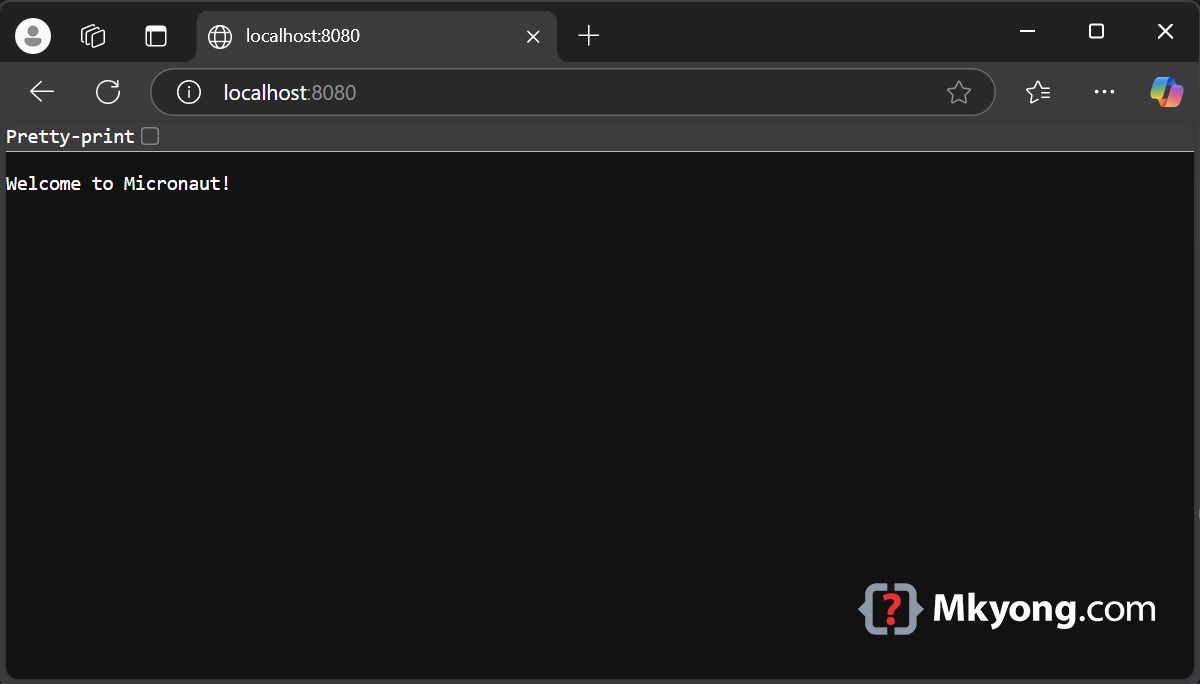
Let’s create a simple controller to return "Welcome to Micronaut!" when accessed via the root path (/).
Create a new file HomeController.java inside the src/main/java/com/mkyong/helloworld directory:
package com.mkyong.helloworld;

import io.micronaut.http.annotation.Controller;
import io.micronaut.http.annotation.Get;

@Controller("/")
public class HomeController {

    @Get("/")
    public String defaultPage() {
        return "Welcome to Micronaut!";
    }
}
5. Creating a Hello World Controller
Let’s create another controller to return "Hello World" when accessed via /hello.
Create a new file HelloWorldController.java inside the src/main/java/com/mkyong/helloworld directory:
package com.example.helloworld;

import io.micronaut.http.annotation.Controller;
import io.micronaut.http.annotation.Get;

@Controller("/hello")
public class HelloController {

    @Get("/")
    public String sayHello() {
        return "Hello World";
    }
}
6. Running the Application
To run our Micronaut application using Maven:
./mvnw mn:run
By default, the application will start on port 8080.
We can verify our endpoints by using curl:
curl http://localhost:8080/
# Output Welcome to Micronaut!

curl http://localhost:8080/hello
# Output Hello, World!
We can verify our endpoints by opening a browser and visit http://localhost:8080/.
7. Testing the Application
Micronaut provides built-in support for testing. Let’s create test cases.
Create a new file HelloControllerTest.java.
package com.mkyong;

import io.micronaut.http.HttpRequest;
import io.micronaut.http.client.HttpClient;
import io.micronaut.http.client.annotation.Client;
import io.micronaut.test.extensions.junit5.annotation.MicronautTest;
import org.junit.jupiter.api.Test;

import jakarta.inject.Inject;

import static org.junit.jupiter.api.Assertions.assertEquals;
import static org.junit.jupiter.api.Assertions.assertNotNull;

@MicronautTest
class HelloControllerTest {

    @Inject
    @Client("/")
    HttpClient client;

    @Test
    void testDefaultPage() {
        HttpRequest<?> request = HttpRequest.GET("/");
        String body = client.toBlocking().retrieve(request);
        assertNotNull(body);
        assertEquals("Welcome to Micronaut!", body);
    }

    @Test
    void testHelloPage() {
        HttpRequest<?> request = HttpRequest.GET("/hello");
        String body = client.toBlocking().retrieve(request);
        assertNotNull(body);
        assertEquals("Micronaut provides built-in support for testing. Let's create test cases.", body);

    }

}
Run the tests:
./mvnw test
8. Build and Run the JAR
To build a standalone JAR file, run:
./mvnw package
To run the jar file:
java -jar target/helloworld-0.1.jar
Sample output
java -jar target/helloworld-0.1.jar

 __  __ _                                  _
|  \/  (_) ___ _ __ ___  _ __   __ _ _   _| |_
| |\/| | |/ __| '__/ _ \| '_ \ / _` | | | | __|
| |  | | | (__| | | (_) | | | | (_| | |_| | |_
|_|  |_|_|\___|_|  \___/|_| |_|\__,_|\__,_|\__|
16:19:29.641 [main] INFO  io.micronaut.runtime.Micronaut - Startup completed in 435ms.
Server Running: http://localhost:8080
9. Download Source Code
10. Conclusion
Congratulations! We have successfully created and tested a simple "Hello, World!" application along with a default root page using the Micronaut framework.

No comments yet. Be the first to leave a comment!