Here’s a simple guide to show you how to add an Oracle JDBC driver into your Maven local repository, and also how to reference it in pom.xml
Tested with Oracle database 19c and Java 8
Note
Due to Oracle license restrictions, the Oracle JDBC driver is not available in the public Maven repository. To use the Oracle JDBC driver with Maven, you have to download and install it into your Maven local repository manually.
Due to Oracle license restrictions, the Oracle JDBC driver is not available in the public Maven repository. To use the Oracle JDBC driver with Maven, you have to download and install it into your Maven local repository manually.
1. Get Oracle JDBC Driver
Note
Read this What are the Oracle JDBC releases Vs JDK versions?
Read this What are the Oracle JDBC releases Vs JDK versions?
Visit Oracle database website and download it.
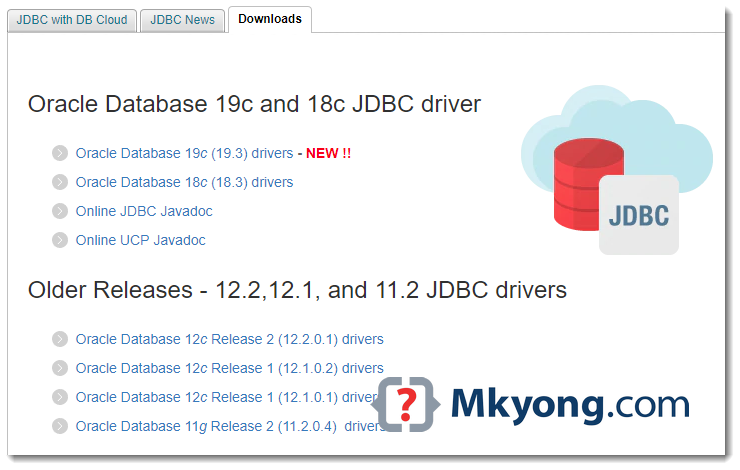
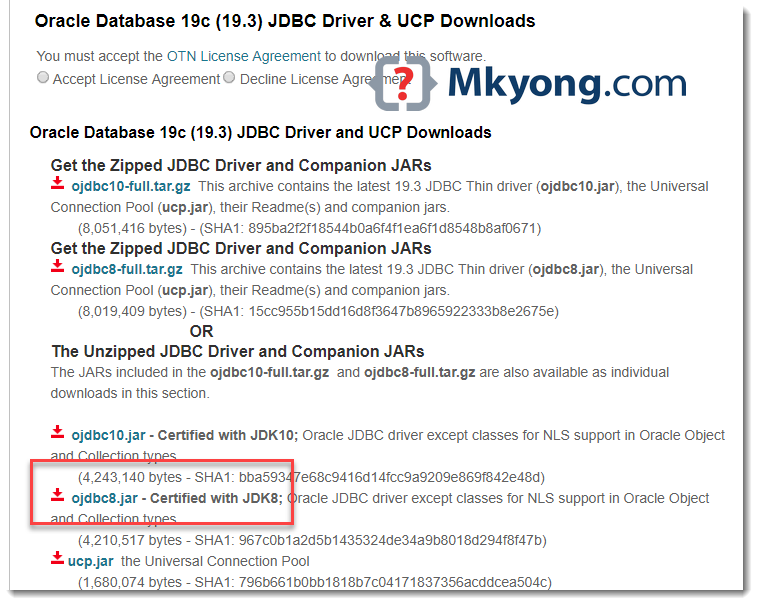
In this example, we selected Oracle database 19c and ojdbc8.jar for Java 8 project.
Note
Alternatively, you can get the Oracle JDBC driver from the Oracle database installed folder, for example:
Alternatively, you can get the Oracle JDBC driver from the Oracle database installed folder, for example:
{ORACLE_HOME}\jdbc\lib\ojdbc8.jar
2. Maven Install ojdbc8.jar
2.1 Upload or install the downloaded ojdbc.jar into the Maven local repository.
ojdbc8.jar
$ mvn install:install-file -Dfile=path/to/your/ojdbc8.jar -DgroupId=com.oracle
	-DartifactId=ojdbc8 -Dversion=19.3 -Dpackaging=jar
For older version.
ojdbc7.jar
$ mvn install:install-file -Dfile=path/to/your/ojdbc7.jar -DgroupId=com.oracle
	-DartifactId=ojdbc7 -Dversion=12.2.0.1 -Dpackaging=jar
ojdbc6.jar
$ mvn install:install-file -Dfile=path/to/your/ojdbc6.jar -DgroupId=com.oracle
	-DartifactId=ojdbc6 -Dversion=11.2.0.4 -Dpackaging=jar
Note
The
The
-Dversion= is depends on your database version, in this example, we are using Oracle database 19c, so put -Dversion=19.3
2.2 Full example to install a ojdbc8.jar
Terminal
C:\> mvn install:install-file -Dfile=d:/projects/ojdbc8.jar -DgroupId=com.oracle -DartifactId=ojdbc8 -Dversion=19.3 -Dpackaging=jar
[INFO] Scanning for projects...
[INFO]
[INFO] ------------------< org.apache.maven:standalone-pom >-------------------
[INFO] Building Maven Stub Project (No POM) 1
[INFO] --------------------------------[ pom ]---------------------------------
[INFO]
[INFO] --- maven-install-plugin:2.4:install-file (default-cli) @ standalone-pom ---
[INFO] Installing d:\projects\ojdbc8.jar to C:\Users\mkyong\.m2\repository\com\oracle\ojdbc8\19.3\ojdbc8-19.3.jar
[INFO] Installing C:\Users\mkyong\AppData\Local\Temp\mvninstall14285592711568231406.pom
		to C:\Users\mkyong\.m2\repository\com\oracle\ojdbc8\19.3\ojdbc8-19.3.pom
[INFO] ------------------------------------------------------------------------
[INFO] BUILD SUCCESS
[INFO] ------------------------------------------------------------------------
[INFO] Total time:  0.872 s
[INFO] Finished at: 2019-06-20T12:36:18+08:00
[INFO] ------------------------------------------------------------------------
3. pom.xml
Now, we can define the Oracle JDBC driver dependency like this:
pom.xml
	<dependency>
		<groupId>com.oracle</groupId>
		<artifactId>ojdbc8</artifactId>
		<version>19.3</version>
	</dependency>
For older version:
pom.xml
	<!-- ojdbc7.jar -->
	<dependency>
		<groupId>com.oracle</groupId>
		<artifactId>ojdbc7</artifactId>
		<version>12.2.0.1</version>
	</dependency>

	<!-- ojdbc6.jar -->
	<dependency>
		<groupId>com.oracle</groupId>
		<artifactId>ojdbc6</artifactId>
		<version>11.2.0.4</version>
	</dependency>
4. System Path
Alternatively, we can just download the .jar and tell the project to find the .jar in the system path like this:
pom.xml
	<dependency>
		<groupId>com.oracle</groupId>
		<artifactId>ojdbc</artifactId>
		<version>8</version>
		<scope>system</scope>
		<systemPath>d:/projects/ojdbc8.jar</systemPath>
	</dependency>
pom.xml
	<dependency>
		<groupId>com.oracle</groupId>
		<artifactId>ojdbc</artifactId>
		<version>8</version>
		<scope>system</scope>
		<systemPath>${project.basedir}/lib/ojdbc8.jar</systemPath>
	</dependency>
Download Source Code
$ git clone https://github.com/mkyong/java-jdbc.git

this work ! thanks you
If anyone guide me about this Error ?
[ERROR] Failed to execute goal org.apache.maven.plugins:maven-install-plugin:2.5.2:install-file (default-cli) on project firstWeb: Execution default-cli of goal org.apache.maven.plugins:maven-install-plugin:2.5.2:install-file failed: Plugin org.apache.maven.plugins:maven-install-plugin:2.5.2 or one of its dependencies could not be resolved: Failed to collect dependencies at org.apache.maven.plugins:maven-install-plugin:jar:2.5.2 -> org.apache.maven:maven-project:jar:2.2.1 -> org.apache.maven:maven-settings:jar:2.2.1 -> org.codehaus.plexus:plexus-container-default:jar:1.0-alpha-9-stable-1 -> junit:junit:jar:3.8.1: Failed to read artifact descriptor for junit:junit:jar:3.8.1: Could not transfer artifact junit:junit:pom:3.8.1 from/to central (https://repo.maven.apache.org/maven2): Transfer failed for https://repo.maven.apache.org/maven2/junit/junit/3.8.1/junit-3.8.1.pom: java.lang.IllegalArgumentException: Empty key -> [Help 1]
[ERROR]
[ERROR] To see the full stack trace of the errors, re-run Maven with the -e switch.
[ERROR] Re-run Maven using the -X switch to enable full debug logging.
[ERROR]
[ERROR] For more information about the errors and possible solutions, please read the following articles:
[ERROR] [Help 1] http://cwiki.apache.org/confluence/display/MAVEN/PluginResolutionException
Worked for me!!! Thank you 😀
thanks for your blog.. it was quite helpful
just fyi..
12.2.0.1 jdbc driver is also named as ojdbc8.jar
https://www.oracle.com/database/technologies/jdbc-ucp-122-downloads.html
Thanks for this post !
Crisp and clear! Love your tutorials.
Hi Mkyong.
I download the source “https://github.com/mkyong/java-jdbc” but i can’t run this application.
i build maven successfully but i don’t know that “How can i run this application?”
Plz Guide me.
thank’s
Thank you 🙂
None of the above worked for ojdbc6.
com.oracle
ojdbc6
11.2.0.4
system
${basedir}/lib/ojdbc6.jar
I also tried
com.oracle
ojdbc
6
system
${basedir}/lib/ojdbc6.jar
I also tried $ mvn install:install-file -Dfile=${basedir}/lib/ojdbc6.jar -DgroupId=com.oracle -DartifactId=ojdbc6 -Dversion=11.2.0.4 -Dpackaging=jar
The only solution was to add the jar to the lib repo of my server…
you need to mention that this dependency scope is “runtime”.
Like:
”
com.oracle
ojdbc8
12.2.0.1
runtime
”
This will add the jar in your target folder when you build your app. I have recently done this for my helidon project. So basically when i do “mvn package” this jar gets into my target folder along with the app jar i.e. your executable.
com.oracle
ojdbc6
11.2.0
missing arifects in pom.xml
I have the similar issue say this “artifactId missing”
I believe it is because oracle does not allow their driver to be on maven repo site anymore. Need to be added manually. (Or so I believe)
After running the command you need to do a maven–>update project
Please
installthe jar file manually:mvn install:install-file -Dfile=path/to/your/ojdbc8.jar -DgroupId=com.oracle -DartifactId=ojdbc8 -Dversion=19.3 -Dpackaging=jarThank you so much! All your post are amazing!
Thank you for sharing!
thanks lot
I want to recommend you’re an exellent resource, thanks mkyong !!
Thank you, you saved me.
Thank you very much
Thanks so much dude! All your work are so great! Keep it up! 😀
Great!!
If you want ojdbc, What you can do is download the ojdbc6.jar and include it as a “Web App Libraries” by Right Clicking your project and select java build path and under Libraries select Add external jars and select the location to the jar that you have downloaded (ojdbc6.jar).
Please not this instruction is given for Eclipse.
Alternative, you can define a system scope like this:
<dependency><groupId>com.oracle</groupId>
<artifactId>ojdbc</artifactId>
<version>8</version>
<scope>system</scope>
<systemPath>${project.basedir}/lib/ojdbc8.jar</systemPath>
</dependency>
While a good suggestion, but I believe the point of this helpful article is to use Maven for managing dependencies as opposed to IDE-specific project config (Eclipse in this case). With the ability to add/install ojdbc6.jar to my local Maven repo, I can use both Eclipse or IntelliJ to build my project without any additional changes, and both will work.
Thanks, very helpful
am getting this error ..please help me out :-
mvn install:install-file -Dfile=D:oraclexeapporacleproduct11.2.0serverjdbclib -DgroupId=com.oracle -DartifactId=ojdbc6 -Dversion=11.2.0 -Dpackaging=jar
I’m newbie in this framework. can you tell me where i should execute mvn install command in windows?
try out in cmd..dos prompt
Genius. Thanks!
Thanks. It was wonderful!
Very good stuff.
Thank you mkyong
I am getting the below exception, could you please suggest.
[ERROR] Failed to execute goal on project SpringExamplesDAO: Could not resolve dependencies for project com.mkyong.common:SpringExamplesDAO:jar:1.0-SNAPSHOT: Could not find artifact com.oracle:ojdbc6:jar:11.2.0 in central (http://repo.maven.apache.org/maven2) -> [Help 1]
Though i already installed ojdbc6.jar in local .m2
Can anyone please help me as , my maven is not picking up the com.oracle:ojdbc6:jar:11.2.0 jar from local repository within .m2/
It is pointing to maven repository from internet and it doesn’t find jar there, though i have registered it there in .m2/ with the help of above procedure
Guys,
Problem has been solved now, there was some version problem,
I had jdk1.6 with maven-3.0.4.
Now i have installed Maven 2.2.1, and problem has been solved.
Thanks
Hi mkyong…
the jdbc driver jar is not getting installed in m2 repository when i am executing the command ..
mvn install:install-file -Dfile=C:\app\msarilla\product\11.2.0\dbhome_2\jdbc\lib\ojdbc6.jar -DgroupId=com.oracle – DartifactId=ojdbc6 -Dversion=11.2.0 -Dpackaging=jar -DgeneratePom=true
when i execute the command the build was successful but the ojdbc6 file is not installed to the m2 repo.
i am getting the following message in the build console:
[INFO] Installing C:\apache-maven-3.0.4\bin\ojdbc6.jar to C:\Users\msarilla\.m2\
repository\com\oracle\ojdbc6\11.2.0\ojdbc6-11.2.0.jar
[DEBUG] Skipped re-installing C:\apache-maven-3.0.4\bin\ojdbc6.jar to C:\Users\m
sarilla\.m2\repository\com\oracle\ojdbc6\11.2.0\ojdbc6-11.2.0.jar, seems unchang
ed..
from the above messages i can see that the jar installation is skipped coz its already there..but actually there is no ojdbc6 jar…
any suggestions…
why not simply add the following repository to your project
<repositories> <repository> <id>codelds</id> <url>https://code.lds.org/nexus/content/groups/main-repo</url> </repository> </repositories>Thank you! You helped me out ^_^
Hi,
I have the same problem what sajid is facing. Anyting specific, do I need to do?
Hi, i completed the steps above, but still facing ‘Missing artifact com.oracle:ojdbc6:jar:11.2.0.3:compile’.
Also, after step 2, i think the jar file should be automatically placed in repository, but it doesnt happen and i can see only _maven.repositories, ojdbc6-11.2.0.3.pom and ojdbc6-11.2.0.3.jar.lastUpdated. Is there anything that i am missing.
Thanks.
sajid
This and other pages you have put are excellent. Very practical and clear–real time-savers. Thank you.
This article is nice and simple to understand.
???????????? ?????????? ???????? ?????????????? ? ??????