In JSF, “h:dataTable” tag is used to display data in a HTML table format. The following JSF 2.0 example show you how to use “h:dataTable” tag to loop over an array of “order” object, and display it in a HTML table format.
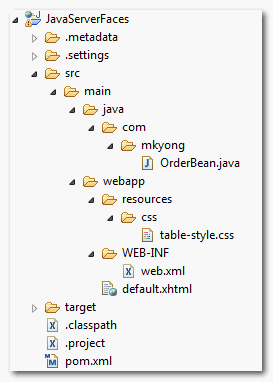
1. Project Folder
Project folder structure of this example.
2. Managed bean
A managed bean named “order”, initialized the array object for later use.
OrderBean.java
package com.mkyong;

import java.io.Serializable;
import java.math.BigDecimal;
import javax.faces.bean.ManagedBean;
import javax.faces.bean.SessionScoped;

@ManagedBean(name="order")
@SessionScoped
public class OrderBean implements Serializable{

	private static final long serialVersionUID = 1L;

	private static final Order[] orderList = new Order[] {

		new Order("A0001", "Intel CPU",
				new BigDecimal("700.00"), 1),
		new Order("A0002", "Harddisk 10TB",
				new BigDecimal("500.00"), 2),
		new Order("A0003", "Dell Laptop",
				new BigDecimal("11600.00"), 8),
		new Order("A0004", "Samsung LCD",
				new BigDecimal("5200.00"), 3),
		new Order("A0005", "A4Tech Mouse",
				new BigDecimal("100.00"), 10)
	};

	public Order[] getOrderList() {

		return orderList;

	}

	public static class Order{

		String orderNo;
		String productName;
		BigDecimal price;
		int qty;

		public Order(String orderNo, String productName,
                                BigDecimal price, int qty) {

			this.orderNo = orderNo;
			this.productName = productName;
			this.price = price;
			this.qty = qty;
		}

		//getter and setter methods
	}
}
3. CSS
Create a CSS file to style the table layout.
table-style.css
.order-table{
	border-collapse:collapse;
}

.order-table-header{
	text-align:center;
	background:none repeat scroll 0 0 #E5E5E5;
	border-bottom:1px solid #BBBBBB;
	padding:16px;
}

.order-table-odd-row{
	text-align:center;
	background:none repeat scroll 0 0 #FFFFFFF;
	border-top:1px solid #BBBBBB;
}

.order-table-even-row{
	text-align:center;
	background:none repeat scroll 0 0 #F9F9F9;
	border-top:1px solid #BBBBBB;
}
4. h:dataTable
A JSF 2.0 xhtml page to show the use of “h:dataTable” tag to loop over the array of “order” object. This example should be self-explanatory.
default.xhtml
<?xml version="1.0" encoding="UTF-8"?>
<!DOCTYPE html PUBLIC "-//W3C//DTD XHTML 1.0 Transitional//EN"
"http://www.w3.org/TR/xhtml1/DTD/xhtml1-transitional.dtd">
<html xmlns="http://www.w3.org/1999/xhtml"
      xmlns:h="http://java.sun.com/jsf/html"
      xmlns:f="http://java.sun.com/jsf/core"
      xmlns:ui="http://java.sun.com/jsf/facelets"
      >
    <h:head>
    	<h:outputStylesheet library="css" name="table-style.css"  />
    </h:head>
    <h:body>

    	<h1>JSF 2 dataTable example</h1>

    		<h:dataTable value="#{order.orderList}" var="o"
    			styleClass="order-table"
    			headerClass="order-table-header"
    			rowClasses="order-table-odd-row,order-table-even-row"
    		>

    			<h:column>
    				<!-- column header -->
    				<f:facet name="header">Order No</f:facet>
    				<!-- row record -->
    				#{o.orderNo}
    			</h:column>

    			<h:column>
    				<f:facet name="header">Product Name</f:facet>
    				#{o.productName}
    			</h:column>

    			<h:column>
    				<f:facet name="header">Price</f:facet>
    				#{o.price}
    			</h:column>

    			<h:column>
    				<f:facet name="header">Quantity</f:facet>
    				#{o.qty}
    			</h:column>

    		</h:dataTable>

    </h:body>
</html>
Generate this HTML output
<!DOCTYPE html PUBLIC "-//W3C//DTD XHTML 1.0 Transitional//EN"
"http://www.w3.org/TR/xhtml1/DTD/xhtml1-transitional.dtd">
<html xmlns="http://www.w3.org/1999/xhtml">
	<head>
	   <link type="text/css" rel="stylesheet"
	      href="/JavaServerFaces/faces/javax.faces.resource/table-style.css?ln=css" />
	</head>
	<body>

	<h1>JSF 2 dataTable example</h1>

	<table class="order-table">

  	  <thead>
		<tr>
		<th class="order-table-header" scope="col">Order No</th>
		<th class="order-table-header" scope="col">Product Name</th>
		<th class="order-table-header" scope="col">Price</th>
		<th class="order-table-header" scope="col">Quantity</th>
		</tr>
	  </thead>

	  <tbody>
		<tr class="order-table-odd-row">
			<td>A0001</td>
			<td>Intel CPU</td>
			<td>700.00</td>
			<td>1</td>
		</tr>
		<tr class="order-table-even-row">
			<td>A0002</td>
			<td>Harddisk 10TB</td>
			<td>500.00</td>
			<td>2</td>
		</tr>
		<tr class="order-table-odd-row">
			<td>A0003</td>
			<td>Dell Laptop</td>
			<td>11600.00</td>
			<td>8</td>
		</tr>
		<tr class="order-table-even-row">
			<td>A0004</td>
			<td>Samsung LCD</td>
			<td>5200.00</td>
			<td>3</td>
		</tr>
		<tr class="order-table-odd-row">
			<td>A0005</td>
			<td>A4Tech Mouse</td>
			<td>100.00</td>
			<td>10</td>
		</tr>
	  </tbody>
	 </table>
      </body>
</html>
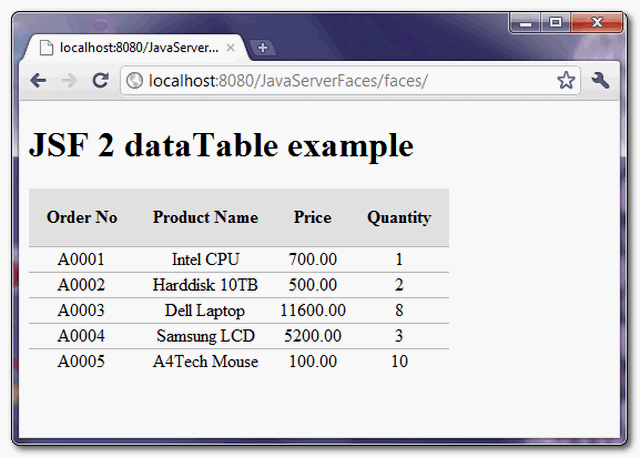
6. Demo
URL : http://localhost:8080/JavaServerFaces/default.xhtml
Download It – JSF-2-DataTable-Example.zip (11KB)

Please provide me idea of how to populate my json file to primefaces datable
Hi MKyong,
Could you please explain how to submit all rows from a datatable to the database. I heard I have to use an array in the submit button? But how do I do that?
Thanks a lot
Wim
Hi MKyong,
Could you please explain how to apply width attribute in percentage(e.g.width:70%) to component in inside jsf datatable?
I have tried with many ways ( e.g. component attribute,CSS), but it couldn’t work.
i would like to know if the datatable can be added filter function
So it is use this tag [ Order No ] to add a header~~Thank YOU a lot!
what is the use of order.properties file here? i am unable to understand that y r u using it and where r u using it. please help
u r nor making its entry in faces-config.xml and neither using
whats the purpose of using order.properties here then
Order No #{o.orderNo} Product Name #{o.productName} Price #{o.price} Quantitynjn #{o.qty}
I applied all getterand setter methord but got this as output please help
You could refresh and run starting file like index.xhtml
this a good video to help you
http://j2eeandroid.blogspot.com/2014/10/jsf-2-tutorial-datatable-part-1.html
http://j2eeandroid.blogspot.com/2014/10/jsf-2-tutorial-datatable-part-2.html
how to use <datascroller ??
Great example thanks
thanks Mkyong… Cheers from Sri lanka ..!
Thx dude!
there is any examples available for data table with pagination
Nice article. Since the article was written, however, there has been a library of classes released that work with DataTables on the Java platform. Check out JED at http://jed-datatables.ca/jed/
thx! the example help me!
hello sir,
I tried Your JSF 2 DATATABLE Example its Working fine, But Css file is not applying fine
please reply,I m new to JSF.
Thanx in Advance
is there any way to add component dynamically on JSP page through which we can take input also. those components should be configurable via DB or some configuration file.
Thanks
you can find some more details in the below in the link,”http://javadomain.in/jsf-datatable-example/”
Many Thanks!”The Java EE 6 Tutorial vol. I ” is not a tutorial.
Hi! how to filter with primefaces datatable?
Thanks!!!!!!!!!!!!Your posts are very interestings an usefuls.
Thanks!!!
thanks great!
Hi,
First of all Thanks a lot for giving such a website.
What is the use of inside the tag . I know here we are using it for telling the column name. In primefaces column, it has a attribute called headerText through which we can tell the column name. Mydoubt is when i export that entire p:dataTable(which uses ) to excel using dataExpoter in primefaces, the column-name or headerText is not exported. but when i use the f:facet tag in side (in primefaces) the column-name or header-text is exported. so what is the role of this f:facet tag here? waht does this f:facet tag does in general?
Thanks in advance.
Regards,
Mohamed Uvais M
Hi,
First of all Thanks a lot for giving such a website.
What is the use of inside the . I know here we are using it for telling the column name. In primefaces column, it has a attribute called headerText through which we can tell the column name. Mydoubt is when i export that entire p:dataTable(which uses ) to excel using dataExpoter in primefaces, the column-name or headerText is not exported. but when i use the f:facet tag in side (in primefaces) the column-name or header-text is exported. so what is the role of this f:facet tag here? waht does this f:facet tag does in general?
Thanks in advance.
Regards,
Mohamed Uvais M
why the method “OrderList” is called three times, I think should be called only once. is this a bug?
I think the element: var=o doesn’t work. You know why ?
I am getting following error..
action=”#{order.deleteAction(o)}” Error Parsing: #{order.deleteAction(o)}
When I refreshed test page 1 time, getOrderList() called 3 times. Why?
I encountered the same “problem” that getOrderList() get called three times, I found a good explaination here:
http://stackoverflow.com/questions/2090033/why-jsf-calls-getters-multiple-times
Hi,
I apply your tutorial and I have an error :
The error arrives during the redirection on the default.xhtml page
I think the element: var=o doesn’t work. You know why ?
I work on Netbeans 7.1.1.
with JSF 2.0.
and GlassFish 3.1.2.
Sorry I’m a noob !
Just forget to implements getters and setter.
How to change the background color of a cell according to the value contained in it? Any hint or suggestion to do this in JSF 2.0 without using any other framework?
Tks
Hi everybody,
I’vo got a scrolling problem and I wonder if you can help me.
I took the original example, extended the table to be bigger than the screen in hight and width and added scrolling by adding the following to the css:
tbody {
height: 350px;
width: 400px;
overflow: auto;
}
It works fine for vertical scrolling and does not work for horizontal scrolling in the latest version of FireFox (IE I don’t know). Most of the horizontal scrolling is done by the browser and only a tiny portion is done by the css scrollbar.
Of course I’d want the table to fit on the screen and use only the css based scroll bar (and not the one of the browser). Any ideas / suggestions would really be appriciated!
Lutz