A popular common error for new Java users.
Terminal
C:\Users\mkyong>javac
'javac' is not recognized as an internal or external command,
operable program or batch file.

C:\Users\mkyong>java -version
'java' is not recognized as an internal or external command,
operable program or batch file.
1. Solution
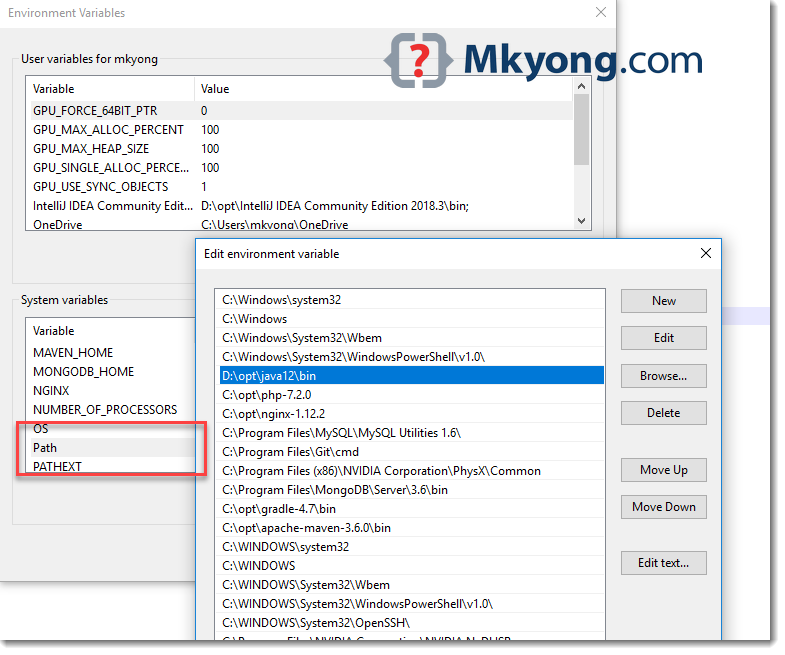
To fix it, update the system variable PATH to JDK_folder\bin
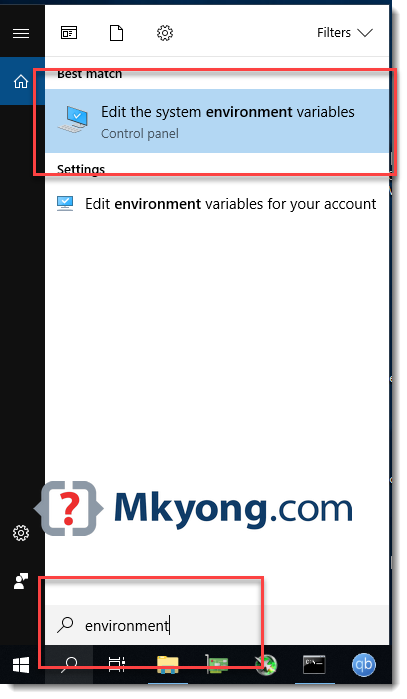
1. Press Windows keys + S to open a Windows search box, types environment
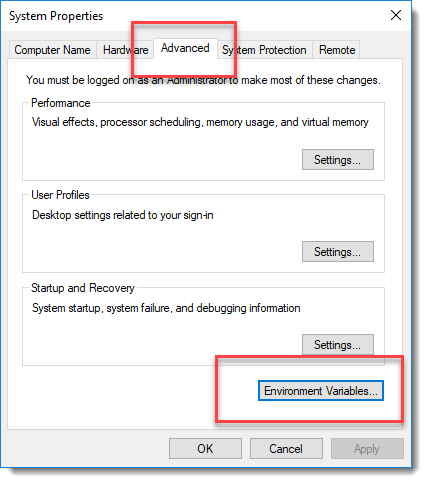
2. System Properties dialog, Advanced tab -> Environment Variables
3. In Environment Variables dialog, add a new JDK_folder\bin into the system properties PATH
Terminal
C:\projects\>javac -version
javac 12
Note
You may interest at this How to set JAVA_HOME on Windows 10
You may interest at this How to set JAVA_HOME on Windows 10

I solved My problem. Thanks 🙂