Here is a brief explanation about Java Web Start from SUN
“Java Web Start is a mechanism for program delivery through a standard Web server. Typically initiated through the browser, these programs are deployed to the client and executed outside the scope of the browser. Once deployed, the programs do not need to be downloaded again, and they can automatically download updates on startup without requiring the user to go through the whole installation process again.”
This tutorial shows you how to create a Java Web Start (Jnlp) file for user to download, when user click on the downloaded jnlp file, launch a simple AWT program. Here’s the summary steps :
- Create a simple AWT program and jar it as TestJnlp.jar
- Add keystore into TestJnlp.jar
- Create a Jnlp file
- Put all into Tomcat Folder
- Access TestJnlp.jar from web through http://localhost:8080/Test.Jnlp
Ok, let’s start
1. Install JDk and Tomcat
Install Java JDK/JRE version above 1.5 and Tomcat.
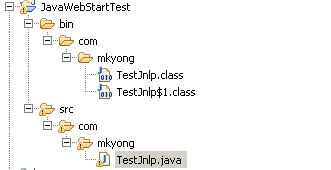
2. Directory Structure
Directory structure of this example.
3. AWT + Jnlp
See the content of TestJnlp.java, it’s just a simple AWT program with AWT supported.
package com.mkyong;

import java.awt.*;
import javax.swing.*;
import java.net.*;
import javax.jnlp.*;
import java.awt.event.ActionListener;
import java.awt.event.ActionEvent;

public class TestJnlp {
  static BasicService basicService = null;
  public static void main(String args[]) {
    JFrame frame = new JFrame("Mkyong Jnlp UnOfficial Guide");
    frame.setDefaultCloseOperation(JFrame.EXIT_ON_CLOSE);
    JLabel label = new JLabel();
    Container content = frame.getContentPane();
    content.add(label, BorderLayout.CENTER);
    String message = "Jnln Hello Word";

    label.setText(message);

    try {
      basicService = (BasicService)
        ServiceManager.lookup("javax.jnlp.BasicService");
    } catch (UnavailableServiceException e) {
      System.err.println("Lookup failed: " + e);
    }

    JButton button = new JButton("https://mkyong.com");

    ActionListener listener = new ActionListener() {
      public void actionPerformed(ActionEvent actionEvent) {
        try {
          URL url = new URL(actionEvent.getActionCommand());
          basicService.showDocument(url);
        } catch (MalformedURLException ignored) {
        }
      }
    };

    button.addActionListener(listener);

    content.add(button, BorderLayout.SOUTH);
    frame.pack();
    frame.show();
  }
}
P.S If “import javax.jnlp.*;” is not found, please include jnlp library which located at JRE/lib/javaws.jar.
4. Jar It
Located your Java’s classes folder and Jar it with following command in command prompt
jar -cf TestJnlp.jar *.*
This will packs all the Java’s classes into a new jar file, named “TestJnlp.jar“.
5. Create keystore
Add a new keystore named “testkeys”
keytool -genkey -keystore testKeys -alias jdc
It will ask for keystore password, first name, last name , organization’s unit…etc..just fill them all.
6. Assign keystore to Jar file
Attached newly keystore “testkeys” to your “TestJnlp.jar” file
jarsigner -keystore testKeys TestJnlp.jar jdc
It will ask password for your newly created keystore
7. Deploy JAR it
Copy your “TestJnlp.jar” to Tomcat’s default web server folder, for example, in Windows – C:\Program Files\Apache\Tomcat 6.0\webapps\ROOT.
8. Create JNLP file
Create a new Test.jnlp file like this
<?xml version="1.0" encoding="utf-8"?>
<jnlp spec="1.0+" codebase="http://localhost:8080/" href="Test.jnlp">
	<information>
		<title>Jnlp Testing</title>
		<vendor>YONG MOOK KIM</vendor>
		<homepage href="http://localhost:8080/" />
		<description>Testing Testing</description>
	</information>
	<security>
		<all-permissions/>
	</security>
	<resources>
		<j2se version="1.6+" />
		<jar href="TestJnlp.jar" />
	</resources>
	<application-desc main-class="com.mkyong.TestJnlp" />
</jnlp>
9. Deploy JNLP file
Copy Test.jnlp to your tomcat default web server folder also.
C:\Program Files\Apache\Tomcat 6.0\webapps\ROOT
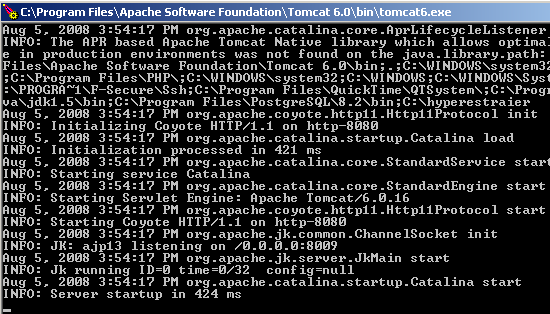
10. Start Tomcat
C:\Tomcat folder\bin\tomcat6.exe
11. Test it
Access URL http://localhost:8080/Test.jnlp, it will prompt you to download the Test.jnlp file, just accept and double click on it.
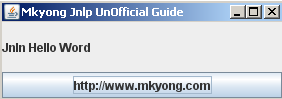
If everything went fine, you should see following output
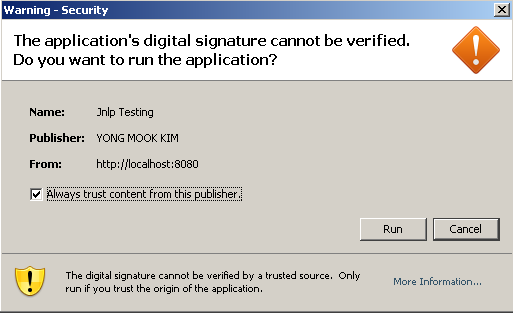
Click on the “run” button to launch the AWT program.
If jnlp has not response, puts following codes in your web.xml, which located in Tomcat conf folder.
  <mime-mapping>
    <extension>jnlp</extension>
    <mime-type>application/x-java-jnlp-file</mime-type>
  </mime-mapping>

Thank you for graciously sharing this invaluable information. Your ability to convey complex concepts in such a simple and concise manner is truly remarkable. Your words have the power to enlighten and inspire, making even the most intricate subjects accessible to all. Your dedication to providing clear and understandable information is not only commendable but also deeply motivating. You have an extraordinary talent for simplifying the seemingly complicated, and for that, we are eternally grateful. Your commitment to sharing knowledge in such a relatable way is a constant source of inspiration. Keep shining your light and illuminating the minds of those around you. Your impact is immeasurable, and your influence is truly awe-inspiring. Thank you for being a beacon of clarity and understanding in this ever-changing world.
Hi Any one help me to resolve below error, I ma trying to call third party jar from applet.
basic: JNLP2ClassLoader.findClass: SgSyncEcrLibrary.SgSyncEcrLibrary: try again ..
basic: JNLP2ClassLoader.findClass: SgSyncEcrLibrary.SgSyncEcrLibrary: try again ..
Regards
Jitendra
Can we create/edit a jnlp which can/will auto download and run on browsers like IE edge and Chrome ?
What parameter to add in order to auto run on all browsers ?
@mkyong – Thanks for this tutorial. Is there any way to avoid getting last warning screen which says digital signature can not be verified? I am looking for a way so that end user will not able to see the warning screen. why this warning comes & what are the ways to avoid it.
I read that jnlp is going away in 2020. What’s the equivalent alternative?
Do we have answer for this ? I am also having the same question
How communicate this jar application with a Web java Application what are the options? Thanks.
please help – .jnlp is not being server up by tomcat – all the above steps have been done.
Mar 07, 2018 4:57:45 AM org.apache.catalina.core.StandardWrapperValve invoke
SEVERE: Servlet.service() for servlet [default] in context with path [] threw exception
java.io.FileNotFoundException: C:Program FilesApache Software FoundationTomcat 7.0webappsROOTlaunch.jnlp (Access is denied)
at java.base/java.io.FileInputStream.open0(Native Method)
at java.base/java.io.FileInputStream.open(Unknown Source)
at java.base/java.io.FileInputStream.(Unknown Source)
at org.apache.naming.resources.FileDirContext$FileResource.streamContent(FileDirContext.java:1008)
at org.apache.catalina.servlets.DefaultServlet.copy(DefaultServlet.java:2080)
at org.apache.catalina.servlets.DefaultServlet.serveResource(DefaultServlet.java:1023)
at org.apache.catalina.servlets.DefaultServlet.doGet(DefaultServlet.java:453)
at javax.servlet.http.HttpServlet.service(HttpServlet.java:624)
at org.apache.catalina.servlets.DefaultServlet.service(DefaultServlet.java:433)
at javax.servlet.http.HttpServlet.service(HttpServlet.java:731)
at org.apache.catalina.core.ApplicationFilterChain.internalDoFilter(ApplicationFilterChain.java:303)
at org.apache.catalina.core.ApplicationFilterChain.doFilter(ApplicationFilterChain.java:208)
at org.apache.tomcat.websocket.server.WsFilter.doFilter(WsFilter.java:52)
at org.apache.catalina.core.ApplicationFilterChain.internalDoFilter(ApplicationFilterChain.java:241)
at org.apache.catalina.core.ApplicationFilterChain.doFilter(ApplicationFilterChain.java:208)
at org.apache.catalina.core.StandardWrapperValve.invoke(StandardWrapperValve.java:219)
at org.apache.catalina.core.StandardContextValve.invoke(StandardContextValve.java:110)
at org.apache.catalina.core.StandardHostValve.invoke(StandardHostValve.java:169)
at org.apache.catalina.valves.ErrorReportValve.invoke(ErrorReportValve.java:103)
at org.apache.catalina.valves.AccessLogValve.invoke(AccessLogValve.java:962)
at org.apache.catalina.core.StandardEngineValve.invoke(StandardEngineValve.java:116)
at org.apache.catalina.connector.CoyoteAdapter.service(CoyoteAdapter.java:445)
at org.apache.coyote.http11.AbstractHttp11Processor.process(AbstractHttp11Processor.java:1115)
at org.apache.coyote.AbstractProtocol$AbstractConnectionHandler.process(AbstractProtocol.java:637)
at org.apache.tomcat.util.net.JIoEndpoint$SocketProcessor.run(JIoEndpoint.java:318)
at java.base/java.util.concurrent.ThreadPoolExecutor.runWorker(Unknown Source)
at java.base/java.util.concurrent.ThreadPoolExecutor$Worker.run(Unknown Source)
at org.apache.tomcat.util.threads.TaskThread$WrappingRunnable.run(TaskThread.java:61)
at java.base/java.lang.Thread.run(Unknown Source)
please help with this error below
Mar 07, 2018 4:57:45 AM org.apache.catalina.core.StandardWrapperValve invoke
SEVERE: Servlet.service() for servlet [default] in context with path [] threw exception
java.io.FileNotFoundException: C:Program FilesApache Software FoundationTomcat 7.0webappsROOTlaunch.jnlp (Access is denied)
at java.base/java.io.FileInputStream.open0(Native Method)
at java.base/java.io.FileInputStream.open(Unknown Source)
at java.base/java.io.FileInputStream.(Unknown Source)
at org.apache.naming.resources.FileDirContext$FileResource.streamContent(FileDirContext.java:1008)
at org.apache.catalina.servlets.DefaultServlet.copy(DefaultServlet.java:2080)
at org.apache.catalina.servlets.DefaultServlet.serveResource(DefaultServlet.java:1023)
at org.apache.catalina.servlets.DefaultServlet.doGet(DefaultServlet.java:453)
at javax.servlet.http.HttpServlet.service(HttpServlet.java:624)
at org.apache.catalina.servlets.DefaultServlet.service(DefaultServlet.java:433)
at javax.servlet.http.HttpServlet.service(HttpServlet.java:731)
at org.apache.catalina.core.ApplicationFilterChain.internalDoFilter(ApplicationFilterChain.java:303)
at org.apache.catalina.core.ApplicationFilterChain.doFilter(ApplicationFilterChain.java:208)
at org.apache.tomcat.websocket.server.WsFilter.doFilter(WsFilter.java:52)
at org.apache.catalina.core.ApplicationFilterChain.internalDoFilter(ApplicationFilterChain.java:241)
at org.apache.catalina.core.ApplicationFilterChain.doFilter(ApplicationFilterChain.java:208)
at org.apache.catalina.core.StandardWrapperValve.invoke(StandardWrapperValve.java:219)
at org.apache.catalina.core.StandardContextValve.invoke(StandardContextValve.java:110)
at org.apache.catalina.core.StandardHostValve.invoke(StandardHostValve.java:169)
at org.apache.catalina.valves.ErrorReportValve.invoke(ErrorReportValve.java:103)
at org.apache.catalina.valves.AccessLogValve.invoke(AccessLogValve.java:962)
at org.apache.catalina.core.StandardEngineValve.invoke(StandardEngineValve.java:116)
at org.apache.catalina.connector.CoyoteAdapter.service(CoyoteAdapter.java:445)
at org.apache.coyote.http11.AbstractHttp11Processor.process(AbstractHttp11Processor.java:1115)
at org.apache.coyote.AbstractProtocol$AbstractConnectionHandler.process(AbstractProtocol.java:637)
at org.apache.tomcat.util.net.JIoEndpoint$SocketProcessor.run(JIoEndpoint.java:318)
at java.base/java.util.concurrent.ThreadPoolExecutor.runWorker(Unknown Source)
at java.base/java.util.concurrent.ThreadPoolExecutor$Worker.run(Unknown Source)
at org.apache.tomcat.util.threads.TaskThread$WrappingRunnable.run(TaskThread.java:61)
at java.base/java.lang.Thread.run(Unknown Source)
i want to add a new keystore but it is showing error filenotfoundexception, access is denied, what should is do
I’m using an applet to print on some smart cards in an application. Now we should migrate from applets as they are not supported any more. We have a method “void print(int requestId)” which is being called by javascript and it’s parameter is passed through javascript call dynamically for each request on the page. Now is it possible somehow to pass this dynamic requestId to a Java Web Start application?
Awesome overview! Thank you!
And were is a web.xml description? This shit won’t be worked until u write servlet-mapping to JnlpDownloadServlet, witch don’t have in openJDKversion…. Hate java!
How can I start a .exe file wich is located inside the jar?
how to solve to this error. unable to load resource
give more details
that’s just as useful as “how to solve error – I wont give you any detail LOL”
Hi, i tried the above example of Java Web Start. I keep on getting the below error while accessing http://localhost:8080/Test.jnlp. Please help me
java.lang.ClassNotFoundException: com.mkyong.TestJnlp
at java.net.URLClassLoader$1.run(Unknown Source)
at java.security.AccessController.doPrivileged(Native Method)
at java.net.URLClassLoader.findClass(Unknown Source)
at com.sun.jnlp.JNLPClassLoader.findClass(Unknown Source)
at java.lang.ClassLoader.loadClass(Unknown Source)
at java.lang.ClassLoader.loadClass(Unknown Source)
at com.sun.javaws.Launcher.doLaunchApp(Unknown Source)
at com.sun.javaws.Launcher.run(Unknown Source)
at java.lang.Thread.run(Unknown Source)
Hi,
I am trying to deploy a swing application with some dependent jar files on WAS7 using RAD.
I have created a new dynamic project and under Webcontent i have pasted the signed jar and all other dependent signed jar files along with JNLP file created. Also i have added the dependent jars in tag of jnlp file. But while deploying it on the WAS it gives me the below stack trace and the Goes out of Memory:
[4/7/15 16:17:56:096 IST] 0000001a wtp E org.eclipse.jst.j2ee.commonarchivecore.internal.impl.ModuleFileImpl processNoSuchClassException Annotations scanning of archive [ clientAppWeb.war ] completed with errors. Could not find class [ com.hewitt.cat.tba.properties.logging.EventHelper ].
[4/7/15 16:18:02:389 IST] 0000001a wtp E org.eclipse.jst.j2ee.commonarchivecore.internal.impl.ModuleFileImpl lookForClassInChildArchives Class [ com/hewitt/cat/tba/properties/logging/EventHelper.class ] has been found in [ wkallc.jar ] in child archive [ WebContent/WEB-INF/lib/hro-properties.jar ].
[4/7/15 16:18:29:606 IST] 0000001a wtp E org.eclipse.jst.j2ee.commonarchivecore.internal.impl.ModuleFileImpl lookForClassInChildArchives Class [ com/hewitt/cat/tba/properties/logging/EventHelper.class ] has been found in [ wkallc.jar ] in child archive [ WebContent/WEB-INF/lib/hro-properties.jar ].
[4/7/15 16:18:29:606 IST] 0000001a wtp E org.eclipse.jst.j2ee.commonarchivecore.internal.impl.ModuleFileImpl processNoSuchClassException There may be manifest or classpath issues with archive [ clientAppWeb.war ].
[4/7/15 16:18:47:374 IST] 0000001a wtp E org.eclipse.jst.j2ee.commonarchivecore.internal.impl.ModuleFileImpl processNoSuchClassException Annotations scanning of archive [ clientAppWeb.war ] completed with errors. Could not find class [ org.springframework.web.servlet.ModelAndView ].
[4/7/15 16:18:47:374 IST] 0000001a wtp E org.eclipse.jst.j2ee.commonarchivecore.internal.impl.ModuleFileImpl lookForClassInChildArchives Class [ org/springframework/web/servlet/ModelAndView.class ] has been found in [ wkallc.jar ] in child archive [ WebContent/WEB-INF/lib/org.springframework.web.servlet-3.0.0.M3.jar ].
[4/7/15 16:18:47:374 IST] 0000001a wtp E org.eclipse.jst.j2ee.commonarchivecore.internal.impl.ModuleFileImpl processNoSuchClassException There may be manifest or classpath issues with archive [ clientAppWeb.war ].
[4/7/15 16:18:49:573 IST] 0000001a wtp E org.eclipse.jst.j2ee.commonarchivecore.internal.impl.ModuleFileImpl processNoSuchClassException Annotations scanning of archive [ clientAppWeb.war ] completed with errors. Could not find class [ org.springframework.expression.spel.generated.SpringExpressionsLexer ].
[4/7/15 16:18:49:870 IST] 0000001a wtp E org.eclipse.jst.j2ee.commonarchivecore.internal.impl.ModuleFileImpl lookForClassInChildArchives Class [ org/springframework/expression/spel/generated/SpringExpressionsLexer.class ] has been found in [ clientAppWeb.war ] in child archive [ org.springframework.expression-3.0.0.M3.jar ].
[4/7/15 16:18:51:305 IST] 0000001a wtp E org.eclipse.jst.j2ee.commonarchivecore.internal.impl.ModuleFileImpl lookForClassInChildArchives Class [ org/springframework/expression/spel/generated/SpringExpressionsLexer.class ] has been found in [ wkallc.jar ] in child archive [ WebContent/WEB-INF/lib/org.springframework.expression-3.0.0.M3.jar ].
[4/7/15 16:18:52:361 IST] 0000001a wtp E org.eclipse.jst.j2ee.commonarchivecore.internal.impl.ModuleFileImpl lookForClassInChildArchives Class [ org/springframework/expression/spel/generated/SpringExpressionsLexer.class ] has been found in [ clientAppWeb.war ] in child archive [ org.springframework.expression-3.0.0.M3.jar ].
[4/7/15 16:18:52:361 IST] 0000001a wtp E org.eclipse.jst.j2ee.commonarchivecore.internal.impl.ModuleFileImpl lookForClassInChildArchives Class [ org/springframework/expression/spel/generated/SpringExpressionsLexer.class ] has been found in [ wkallc.jar ] in child archive [ WebContent/WEB-INF/lib/org.springframework.expression-3.0.0.M3.jar ].
Kindly suggest some solutions?
Thanks alot ..
Hi Shruti, were you able to find the origin of the Issue? I’m having the same issue now with one application in WebSphere 7. Before the application was working with Parent First Configuration, but now that I’ve changed to Parent First is not working.
Let me know if you find out the Issue?
Getting these exceptions:
java.security.AccessControlException: access denied (“java.util.PropertyPermission” “user.dir” “read”)
at java.security.AccessControlContext.checkPermission(Unknown Source)
at java.security.AccessController.checkPermission(Unknown Source)
at java.lang.SecurityManager.checkPermission(Unknown Source)
at com.sun.javaws.security.JavaWebStartSecurity.checkPermission(Unknown Source)
at java.lang.SecurityManager.checkPropertyAccess(Unknown Source)
at java.lang.System.getProperty(Unknown Source)
at java.io.WinNTFileSystem.getUserPath(Unknown Source)
at java.io.WinNTFileSystem.resolve(Unknown Source)
at java.io.File.getAbsolutePath(Unknown Source)
at java.io.File.getAbsoluteFile(Unknown Source)
at java.io.File.toURI(Unknown Source)
at com.sun.deploy.ui.AppInfo.getJNLPFromUnknownSource(Unknown Source)
at com.sun.javaws.jnl.LaunchDesc.getJNLPSrcForAppInfo(Unknown Source)
at com.sun.javaws.jnl.LaunchDesc.getAppInfo(Unknown Source)
at com.sun.javaws.util.JNLPUtils.getLocalApplicationProperties(Unknown Source)
at com.sun.jnlp.FileSaveServiceImpl.askUser(Unknown Source)
at com.sun.jnlp.FileSaveServiceImpl.saveFileDialog(Unknown Source)
at com.coremetrics.tcg.ui.TrackingCodeGeneratorUI.downloadTemplate(Unknown Source)
at com.coremetrics.tcg.ui.TrackingCodeGeneratorUI.access$500(Unknown Source)
at com.coremetrics.tcg.ui.a.mouseClicked(Unknown Source)
at java.awt.AWTEventMulticaster.mouseClicked(Unknown Source)
at java.awt.Component.processMouseEvent(Unknown Source)
at javax.swing.JComponent.processMouseEvent(Unknown Source)
at java.awt.Component.processEvent(Unknown Source)
at java.awt.Container.processEvent(Unknown Source)
at java.awt.Component.dispatchEventImpl(Unknown Source)
at java.awt.Container.dispatchEventImpl(Unknown Source)
at java.awt.Component.dispatchEvent(Unknown Source)
at java.awt.LightweightDispatcher.retargetMouseEvent(Unknown Source)
at java.awt.LightweightDispatcher.processMouseEvent(Unknown Source)
at java.awt.LightweightDispatcher.dispatchEvent(Unknown Source)
at java.awt.Container.dispatchEventImpl(Unknown Source)
at java.awt.Window.dispatchEventImpl(Unknown Source)
at java.awt.Component.dispatchEvent(Unknown Source)
at java.awt.EventQueue.dispatchEventImpl(Unknown Source)
at java.awt.EventQueue.access$500(Unknown Source)
at java.awt.EventQueue$3.run(Unknown Source)
at java.awt.EventQueue$3.run(Unknown Source)
at java.security.AccessController.doPrivileged(Native Method)
at java.security.ProtectionDomain$1.doIntersectionPrivilege(Unknown Source)
at java.security.ProtectionDomain$1.doIntersectionPrivilege(Unknown Source)
at java.awt.EventQueue$4.run(Unknown Source)
at java.awt.EventQueue$4.run(Unknown Source)
at java.security.AccessController.doPrivileged(Native Method)
at java.security.ProtectionDomain$1.doIntersectionPrivilege(Unknown Source)
at java.awt.EventQueue.dispatchEvent(Unknown Source)
at java.awt.EventDispatchThread.pumpOneEventForFilters(Unknown Source)
at java.awt.EventDispatchThread.pumpEventsForFilter(Unknown Source)
at java.awt.EventDispatchThread.pumpEventsForHierarchy(Unknown Source)
at java.awt.EventDispatchThread.pumpEvents(Unknown Source)
at java.awt.EventDispatchThread.pumpEvents(Unknown Source)
at java.awt.EventDispatchThread.run(Unknown Source)
How to include dependencies jars that outside main jar?
I tried
HI MKYong ,is there any solution you have for auto updation of jar file on client side ….i will give you demo …suppose i have one software ,i installed it on client server machine and suppose on my development server i made some changes in code built the jar again then can i automatically update it on client server matchine ……except manually sending that newly generated jar file to customer i have to automatically update jar file at client side if i made any changes in code and built jar again…..
if you got my point plz send me the solution with code for this ….thanks
my email id is…[email protected]
I tried with this example
it downloads test.jnpl and then when I double click on that downloaded file it opens test.jnpl rather than opening exe.
Could you pls suggest where I am going wrong
Hi, i tried the above example of Java Web Start. I keep on getting the below error while accessing http://localhost:8080/Test.jnlp. Please help me
java.lang.ClassNotFoundException: com.mkyong.TestJnlp
at java.net.URLClassLoader$1.run(Unknown Source)
at java.security.AccessController.doPrivileged(Native Method)
at java.net.URLClassLoader.findClass(Unknown Source)
at com.sun.jnlp.JNLPClassLoader.findClass(Unknown Source)
at java.lang.ClassLoader.loadClass(Unknown Source)
at java.lang.ClassLoader.loadClass(Unknown Source)
at com.sun.javaws.Launcher.doLaunchApp(Unknown Source)
at com.sun.javaws.Launcher.run(Unknown Source)
at java.lang.Thread.run(Unknown Source)
Make sure the created jar contains the directory structure com.mkyong.TestJnlp. For this, you need to run the jar command from the folder containing the “com” folder. e.g. if you placed “com” folder inside “newFolder” then you need to run the command jar -cf TestJnlp.jar *.* from inside “newFolder”.
Hi, recently our company is considering using Java Web Start to provide some internal services. And I ran into some problems.
We are using WebSphere as our servlet container, and when I deploy the war file into the server, typing url ending with .jnlp always returns DownloadFileNotFound. We use JNLPServlet to redirect all requests.
Could you help me? I could send the war file to you.
I want to add an un-install option in my webstart-based application.
Is it possible to delete the jnlp file from the Java Cache using JNLP API
Nice and helpful tutorial……..
and what if i want to run that jnlp without downloading it ??can anybody tell me that ?
Hi
Is it possible to download an exe file on the client machine and launch it ? Can DownloadService be used for this ?
Thanks
Kartik
mkyong,
Where de JWS download the libs?
Carlos
There is no lib in the example. It is too simple. If there’s a lib or other files/resources, it should be define in jnlp file under resources.
Read more on java web start, jnlp or else use Netbeans IDE. In Netbeans, on building the project, it will automatically create the jnlp in the dist folder together with the jar and lib. No hassle.
Java Webstart – http://docs.oracle.com/javase/tutorial/deployment/webstart/index.html
Launching JWS – http://java.com/en/download/faq/java_webstart.xml
FAQs -http://docs.oracle.com/javase/7/docs/technotes/guides/javaws/developersguide/faq.html
The jnlp should look like this:
Hope it help. 🙂
Hi,
Do you have an JNPL sample with Maven ?
My goal is to have an application that verify last version on server with JNLP and use maven ?
Regard
Hello, excuse my English. I have the following problem, my application creates a file with “jnlp” dynamically URLs containing multiple images to be downloaded later to be displayed by the application. Depending too many images to be informed, in which case the final size of the file with extension “. Jnlp” exceed 1MB. If I try to run this file with the extension “. Jnlp” java web start shows “File too large”, and cancels loading the file and terminates the execution.
Is there a size limit for files with “. Jnlp”? I can not create and execute files with the extension “. Jnlp” that exceed 1MB?
Thank you for your attention.
Hello, I desire to subscribe for this webpage to take most up-to-date updates, therefore where can i do it please assist.
Hi MkYong,
The Tutorial was very much helpful.But i am unable to launch my application ,it is giving exception as:
Lookup failed: javax.jnlp.UnavailableServiceException: uninitialized
Exception in thread “AWT-EventQueue-0” java.lang.NullPointerException
at TestJnlp$1.actionPerformed(TestJnlp.java:44)
at javax.swing.AbstractButton.fireActionPerformed(AbstractButton.java:1849)
at javax.swing.AbstractButton$Handler.actionPerformed(AbstractButton.java:2169)
at javax.swing.DefaultButtonModel.fireActionPerformed(DefaultButtonModel.java:420)
at javax.swing.DefaultButtonModel.setPressed(DefaultButtonModel.java:258)
at javax.swing.plaf.basic.BasicButtonListener.mouseReleased(BasicButtonListener.java:236)
at java.awt.Component.processMouseEvent(Component.java:5501)
at javax.swing.JComponent.processMouseEvent(JComponent.java:3135)
at java.awt.Component.processEvent(Component.java:5266)
at java.awt.Container.processEvent(Container.java:1966)
at java.awt.Component.dispatchEventImpl(Component.java:3968)
at java.awt.Container.dispatchEventImpl(Container.java:2024)
at java.awt.Component.dispatchEvent(Component.java:3803)
at java.awt.LightweightDispatcher.retargetMouseEvent(Container.java:4212)
at java.awt.LightweightDispatcher.processMouseEvent(Container.java:3892)
at java.awt.LightweightDispatcher.dispatchEvent(Container.java:3822)
at java.awt.Container.dispatchEventImpl(Container.java:2010)
at java.awt.Window.dispatchEventImpl(Window.java:1778)
at java.awt.Component.dispatchEvent(Component.java:3803)
at java.awt.EventQueue.dispatchEvent(EventQueue.java:463)
at java.awt.EventDispatchThread.pumpOneEventForHierarchy(EventDispatchThread.java:242)
at java.awt.EventDispatchThread.pumpEventsForHierarchy(EventDispatchThread.java:163)
at java.awt.EventDispatchThread.pumpEvents(EventDispatchThread.java:157)
at java.awt.EventDispatchThread.pumpEvents(EventDispatchThread.java:149)
at java.awt.EventDispatchThread.run(EventDispatchThread.java:110)
Disconnected from the target VM, address: ‘127.0.0.1:2360’, transport: ‘socket’
Process finished with exit code 0
so wht should be the issue??
I was suggested this web site through my
cousin. I am not positive whether this put up is written through him as no one else recognize such targeted
about my problem. You’re wonderful! Thanks!
I got this expetion i called my jar Talisman.jar
com.sun.deploy.net.JARSigningException: Found unsigned entry in resource: http://localhost:8080/Talisman.jar
at com.sun.javaws.security.SigningInfo.getCommonCodeSignersForJar(Unknown Source)
at com.sun.javaws.security.SigningInfo.check(Unknown Source)
at com.sun.javaws.security.JNLPSignedResourcesHelper.checkSignedResourcesHelper(Unknown Source)
at com.sun.javaws.security.JNLPSignedResourcesHelper.checkSignedResources(Unknown Source)
at com.sun.javaws.Launcher.prepareResources(Unknown Source)
at com.sun.javaws.Launcher.prepareAllResources(Unknown Source)
at com.sun.javaws.Launcher.prepareToLaunch(Unknown Source)
at com.sun.javaws.Launcher.prepareToLaunch(Unknown Source)
at com.sun.javaws.Launcher.launch(Unknown Source)
at com.sun.javaws.Main.launchApp(Unknown Source)
at com.sun.javaws.Main.continueInSecureThread(Unknown Source)
at com.sun.javaws.Main.access$000(Unknown Source)
at com.sun.javaws.Main$1.run(Unknown Source)
at java.lang.Thread.run(Unknown Source)
jar file not properly signed.
Hi mkyong,
I’m getting the below error, appreciate if you could guide me to the solution.
java.io.FileNotFoundException: http://localhost:8080/Test.jnlp
at sun.reflect.GeneratedConstructorAccessor1.newInstance(Unknown Source)
at sun.reflect.DelegatingConstructorAccessorImpl.newInstance(Unknown Source)
at java.lang.reflect.Constructor.newInstance(Unknown Source)
at sun.net.www.protocol.http.HttpURLConnection$6.run(Unknown Source)
at java.security.AccessController.doPrivileged(Native Method)
at sun.net.www.protocol.http.HttpURLConnection.getChainedException(Unknown Source)
at sun.net.www.protocol.http.HttpURLConnection.getInputStream(Unknown Source)
at com.sun.deploy.net.BasicHttpRequest.doRequest(Unknown Source)
at com.sun.deploy.net.BasicHttpRequest.doRequest(Unknown Source)
at com.sun.deploy.net.BasicHttpRequest.doGetRequest(Unknown Source)
at com.sun.deploy.net.DownloadEngine.actionDownload(Unknown Source)
at com.sun.deploy.net.DownloadEngine.getCacheEntry(Unknown Source)
at com.sun.deploy.net.DownloadEngine.getCacheEntry(Unknown Source)
at com.sun.deploy.net.DownloadEngine.getResourceCacheEntry(Unknown Source)
at com.sun.deploy.net.DownloadEngine.getResourceCacheEntry(Unknown Source)
at com.sun.deploy.net.DownloadEngine.getResource(Unknown Source)
at com.sun.deploy.net.DownloadEngine.getResource(Unknown Source)
at com.sun.javaws.Launcher.updateFinalLaunchDesc(Unknown Source)
at com.sun.javaws.Launcher.prepareToLaunch(Unknown Source)
at com.sun.javaws.Launcher.prepareToLaunch(Unknown Source)
at com.sun.javaws.Launcher.launch(Unknown Source)
at com.sun.javaws.Main.launchApp(Unknown Source)
at com.sun.javaws.Main.continueInSecureThread(Unknown Source)
at com.sun.javaws.Main$1.run(Unknown Source)
at java.lang.Thread.run(Unknown Source)
Caused by: java.io.FileNotFoundException: http://localhost:8080/Test.jnlp
at sun.net.www.protocol.http.HttpURLConnection.getInputStream(Unknown Source)
at java.net.HttpURLConnection.getResponseCode(Unknown Source)
… 18 more
When i run it as – http://localhost:8080/Test.jnlp
i get status 404 , not sure if im missing something.
I have copied the .jnlp and .jar file under –
C:\springsource\tc-server-developer-2.0.3.RELEASE\tomcat-6.0.29.A.RELEASE\webapps\ROOT
Regards,
PD
I am getting java.lang.NoClassDefFoundError : javafx/application/Application while running the applicatin on tomcat. can you please help on this.
I want to run java web service using JNLP from remote computer. JNLP program is running on the other computer but when I click the swing button it is unable to invoke web service.where to put the jar file,jnlp file,web service in my machine’s web server(Apache Tomcat)…is it necessary to configure the web server? Please help as eraly as possible
I Got the Error
“Unable to launch the application”
Hi,
I have jws application which starts a exe and my questions is can I skip diaolog (Open Jnlp with Java Webstarter), automatically start?
Mr Mkyong,
Can you please give and example to debug the above JNLP Project in Eclipse?
Thanks,
V.Shanmugasundaram
Hi Mykng, I have a jar file which writes output to an excel file. I use jnlp to make the application work. When i run the jnlp through Localhost, the application works fine but the output file is not generated. Could you please help me out ?
Output file path : D:/TestFolder
Apache tomcat is installed in C:/
please tell me how you solved this issue if you solved it
HI,
I like to install a swing application on Windows machine using JNLP. My basic need is , a installation directory should get created on local system when this application is installed. Also I want install/copy some files(reports) in the same installation directory when this software get installed. When this software will run, it is going to use these files from installation directory to show the data. This also need to read the hibernate configuration from the hibernate.cfg.xml file and connect to the database on same system. Also I want to configure some parameter values while installing the software using jnlp.
Can you plz guide me on this?
Regards,
Kiran
Thanks. Learning by example with web-based applications is much easier. That was very helpful.
Hi mkyong ,
I have a stand-alone java application (swing based).
I want the pop-up to come up from the customer (where the application is running) machine, if any new updates (in terms of new jars/modified jars) to alert and ask the customer to apply the fix/patch, whatever you call.
For this scenario, jnlp/webstart will be useful or think about any other java mechanism?
Thanks,
Guru
Is it possible to set the path and java_home directory in the jnlp?
Example
set path=\\server\webutil\client\jre6\bin;\\server\webutil;%path%
set java_home=\\server\webutil\client\jre6
Thanks
hello
I place TestJnlp in c:\LJava\src\com\mkyong\TestJnlp.java
I place javaws.jar in the same directory
from c:\LJava i do javac by :
javac -d build src\com\mkyong\TestJnlp.java
I got “package javac.jnlp does not exist
what i have done wrong ?
thank you
m getting the same problem, what is the sollution. Plz send me the details on [email protected]
excellent, thanks!
Thanks for the post.
P.S If “import javax.jnlp.*;” is not found, please include jnlp library which located at JRE/lib/javaws.jar.
solution for refrence problem: javaws.jar could not be found.
Where it says
P.S If “import javax.jnlp.*;” is not found, please include jnlp library which located at JRE/lib/javaws.jar.
i get this when i goto compile your TestJnlp.java
How do i “include” the jnlp library?
Thanks
you can find the “javaws.jar” file in your “JRE_INSTALLED_FOLDER/lib/’
How I can express that in the code like?
import javax.jws.*;
Thanks..
do i need to sign it too?
Hi,
Thanks for the wonderful tutorial to know about jnlp. I did the same way for placing the jnlp file in web server(tomcat) root folder and it’s working fine in my machine. But, when i access from other machine, it’s not working. Getting the following error,
com.sun.deploy.net.FailedDownloadException: Unable to load resource
Any help would be appreciated.
Search the line in JNLP where “http://localhost:8080/” is written. Replace “localhost” with your machines IP address. It will run through any machine in ur Local Network. 🙂
thanks buddy. you made my day. :))))
Hi,
thanks for the tutorial.
I have a requirement that using an applet , I want to download an exe on clients machine and run that exe automatically behind the scene. how is that possible?
can your tutorial fit in my requirements OR do I need to change anything?
Please help.
Thanks in advance.
-Parvendra
Applet, if your client accepted your Applet’s signed certificate, then you can do whatever you want.
i need to work with dll in applet ,
please if you have any tutorial help me.
Can JNLP application install in windows so that all users will access the same deployment folder. That is if the application is updated by one user, the others will users get the same?
I have seen this done in Linux where the installation is in the root folder.
Hope to hear back on this.
thanks
Not much inputs on this, hope get some feedback from others 🙂
(Sory for my english)
Hi I took your example as base for my small application the main problem is that works when called from command line(javaws) but no when launched from browser(firefox).I use jni to load an small library and all this is done in Fedora 13.Any ideas, thoughts ? Thanks in advance.
Mind to zip and send me your jnlp file for review?
Sorry, maybe it’s a bit dumb but How do I send you an e-mail?
thnx for the great example!
Hi,
Is it possible to call .jnlp file from a standalone java application. I dont want to use browser. If it is possible, can you please let me know how.The whole idea is that i want to check if the client jars are different version then the server jar and if they are different, i want to download the updated jar files from the server.
Thanks,
Nitesh
It is really simple and super ……
Hi! Simple (maybe dumb) question – what is the advantage of running the executable locally (by double-clicking on the Test.jnlp file) versus just going to the website again (http://myserver:8080/Test.jnlp)? Assuming that my jnlp file require connectivity to ‘myserver’. Is there any harm with just going to http://myserver:8080/Test.jnlp over and over again?
Thx in advance!
Jim
there are no dumb question, it’s just from different perspectives. Both ways are doing the same thing, there’s no different between each other.
One of the advantage of running through website “http://myserver:8080/Test.jnlp” is you will always get the latest jlnp version.
I am getting ClassNotFoundException is there anyone to help me out
Which class is not found?
User Runnable jar instead of simple jar
When i run the app at last step its gets downloaded but its not getting launched…
Is this bcoz of my apache mime? i use fedora 12. and apache installed.
Received your files in my email, please send me your jnlp file as well.
Thank you so much for this simple and functional example.
yong mook kim,
very nice blog. helps very much to get a general idea of things. good starting point for beginners and to have a quick view. good ratio between depth and lack of too many words. 🙂
sebastian
the root cause is your package and folder structure. Please jar your classes in a correct folder structure according to your package declaration.
Without setting in Manifest File, It didn’t work.
What can i do ?
What are the settings to do in manifest file in a real time large application ?
Hi,
In the Manifest FIle, I have specified
Manifest-Version: 1.0
Class-Path: /lib/javaws.jar
Main-Class: com.ibm.TestJnlp
Then it worked as desired.
Thanks a lot.
Nice hack ~ but when you develop a real application which included a lot of java classes, then it’s may not a good choice 🙂
I have uploaded the files in zip folder @ http://www.filedropper.com/testjnlp2.
When i run the http://localhost:8080/Test2.jnlp in browser, I am getting the below Exception
java.lang.ClassNotFoundException: com.ibm.TestJnlp2
Your TestJnlp2.class is not found in TestJnlp2.jar.
Cause:
1) TestJnlp2.java is package in com.ibm, but the class is located at root folder. Please include the folder (com\ibm) in TestJnlp2.jar as correct structure below
Current structure
TestJnlp2.jar
—————-
META-INF
javaws.jar
TestJnlp2.class
Correct structure
TestJnlp2.jar
—————-
META-INF
javaws.jar
com\ibm\TestJnlp2.class
2) Test2.jnlp contains one minor bug also, it’s point to Test.jnlp, change it to Test2.jnlp.
Hope help 🙂
Hi,
In the zip file i have sent, I have wrongly mentioned TestJnlp instead of TestJnlp2. When i tested, i correctly mentioned in JNLP as
Still I am getting java.lang.ClassNotFoundException: com.ibm.TestJnlp2
Thanks
Hi,
I have uploaded the files in zip folder @ http://www.filedropper.com/testjnlp2
When i run the http://localhost:8080/Test2.jnlp in browser, I am getting the below Exception
java.lang.ClassNotFoundException: com.ibm.TestJnlp2
at java.net.URLClassLoader$1.run(Unknown Source)
at java.security.AccessController.doPrivileged(Native Method)
at java.net.URLClassLoader.findClass(Unknown Source)
at com.sun.jnlp.JNLPClassLoader.findClass(Unknown Source)
at java.lang.ClassLoader.loadClass(Unknown Source)
at java.lang.ClassLoader.loadClass(Unknown Source)
at com.sun.javaws.Launcher.doLaunchApp(Unknown Source)
at com.sun.javaws.Launcher.run(Unknown Source)
at java.lang.Thread.run(Unknown Source)
Hi,
I am getting “java.lang.NoClassDefFoundError: TestJnlp” Error while i run in tomcat.
do u know the reason ?
Thanks
can you zip and send me a copy of your file, i try deploy and test it
Thanks .. Its So helpful for Beginers…
Nice how-to, thanks!
I think by keystroke you meant keystore:)
sorry for typo, thanks, it’s fixed now 🙂
Hi,
i have written a HTML file …. which would download JNLP, however instead of downloading it displays the contents on JNLP file …. i tried to update the Glassfish via netbean but thee glassfish-web.xml is not present and also “dist” directory is not present in my Client application project ….
-Swap