In IntelliJ IDEA, we need to enable this auto-generate serialVersionUID option manually.
P.S Tested with IntelliJ IDEA 2019.3.4, it should work the same in other versions.
Intellij IDEA Settings
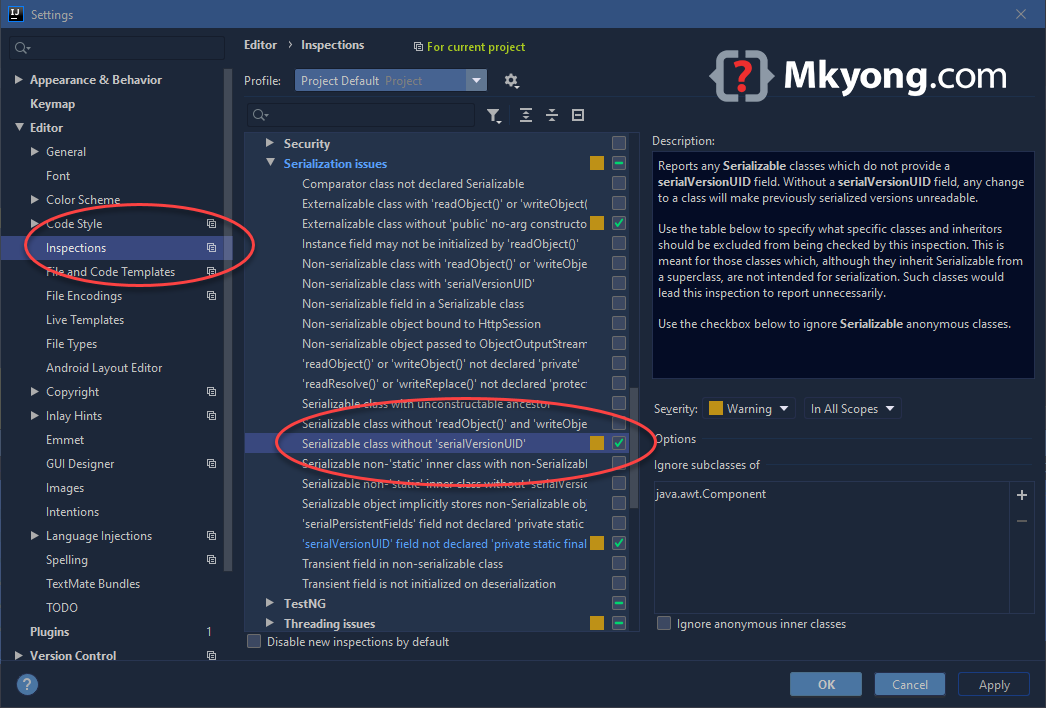
File -> Settings -> Editor -> Inspections -> Java -> Serialization issues:
Find serialization class without serialVersionUID and check it.
Back to the editor, clicks on the class name, ALT + ENTER (Windows), it will prompts the Add serialVersionUID field option.
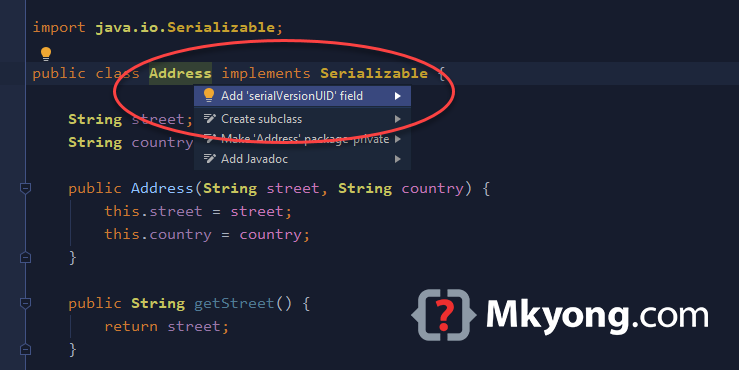
A new serialVersionUID is auto-generated.
public class Address implements Serializable {

    private static final long serialVersionUID = -2338626292552177485L;

}
Done.

In IntelliJ IDEA 2021.3 (Ultimate Edition) it’s moved to IntelliJ IDEA -> Preferences -> Editor -> Inspections -> JVM languages
Maybe better approach:
Double pressing [Shift]. In the appearing dialog chose the Actions menu and type ‘Serializable class without’ and select the item to toggle it on/off.
thx
In IntelliJ IDEA 2021.3 (Ultimate Edition) it’s moved to IntelliJ IDEA -> Preferences -> Editor -> Inspections -> JVM languages
it has been moved to File -> Settings -> Editor -> Inspections -> Jbm -> Serialization issues:
* File -> Settings -> Editor -> Inspections -> Jvm -> Serialization issues:
Nice
Thank you, I’m starting with Intellij and this is very tricky
Thank you!
Thank you. Quite helpful, since in my terminal for serialver, it was showing – command not found : serialver