Problem
Android development with Eclipse IDE, sometime it hit following “adb” error message and caused the application fail to start?
[2011-11-22 15:17:07 - HelloWorld] ------------------------------
[2011-11-22 15:17:07 - HelloWorld] Android Launch!
[2011-11-22 15:17:07 - HelloWorld] The connection to adb is down, and a severe error has occured.
[2011-11-22 15:17:07 - HelloWorld] You must restart adb and Eclipse.
[2011-11-22 15:17:07 - HelloWorld] Please ensure that adb is correctly located at
   'C:\Android\android-sdk\platform-tools\adb.exe' and can be executed.
P.S Restart Eclipse will not get rid of the error message.
Solution
In some cases, Android project may get crashed or shutdown abnormally, and caused the “adb.exe” to function abnormally.
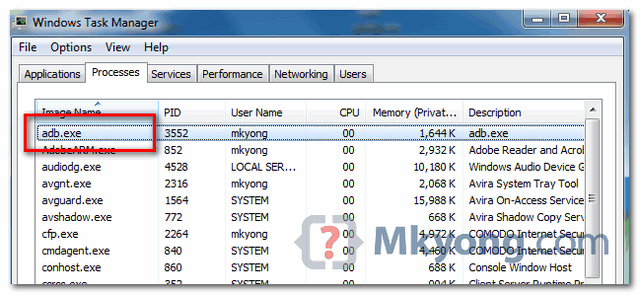
To solve it, just restart the “adb.exe” process. Restart the Eclipse will not shut down the “adb.exe” process automatically, you need to kill it manually.
For example, in Windows, just use task manager to kill the process.

adb.exe process doesnot exist in taskbar . please tell can be done in this situation
my task manager has not adb.exe
ThankYou Sirji……..!!! You are great
adb start-server worked well with me
Thanks a lot
thank you
thanks a lot…u helped me lot of times when i’m stuck in programming
🙂
Thank you so much. This works for me. but when I run my android app, I got following error
[2013-01-16 12:42:54 – AndroidSample] ——————————
[2013-01-16 12:42:54 – AndroidSample] Android Launch!
[2013-01-16 12:42:54 – AndroidSample] adb is running normally.
[2013-01-16 12:42:54 – AndroidSample] Could not find AndroidSample.apk!
plz help me.
Check in bin folder whether .apk is generated or not
it’s works.. tanx alot..
Hi tried this way didn’t work so I uninstall Android SDK Platform-tool from SDK manager and re install it and works.
Reinstalling the SDK Platform-tool finally did the job… Great thanks!