In Android, the AnalogClock is a two-handed clock, one for hour indicator and the other for minute indicator. The DigitalClock is look like your normal digital watch on hand, which display hours, minutes and seconds in digital format.
Both AnalogClock and DigitalClock are UNABLE to modify the time, if you want to change the time, use “TimePicker” instead.
P.S This project is developed in Eclipse 3.7, and tested with Android 2.3.3.
1. AnalogClock and DigitalClock
Open “res/layout/main.xml” file, add AnalogClock and DigitalClock in XML.
File : res/layout/main.xml
<?xml version="1.0" encoding="utf-8"?>
<LinearLayout xmlns:android="http://schemas.android.com/apk/res/android"
    android:layout_width="fill_parent"
    android:layout_height="fill_parent"
    android:orientation="vertical" >

    <TextView
        android:id="@+id/textView1"
        android:layout_width="wrap_content"
        android:layout_height="wrap_content"
        android:text="Analog Clock"
        android:textAppearance="?android:attr/textAppearanceLarge" />

    <AnalogClock
        android:id="@+id/analogClock1"
        android:layout_width="wrap_content"
        android:layout_height="wrap_content" />

    <TextView
        android:id="@+id/textView2"
        android:layout_width="wrap_content"
        android:layout_height="wrap_content"
        android:text="Digital Clock"
        android:textAppearance="?android:attr/textAppearanceLarge" />

    <DigitalClock
        android:id="@+id/digitalClock1"
        android:layout_width="wrap_content"
        android:layout_height="wrap_content"
        android:text="DigitalClock" />

</LinearLayout>
2. Code Code
No idea what can i do with AnalogClock or DigitalClock.
File : MyAndroidAppActivity.java
package com.mkyong.android;

import android.app.Activity;
import android.os.Bundle;
import android.widget.AnalogClock;
import android.widget.DigitalClock;

public class MyAndroidAppActivity extends Activity {

	@Override
	public void onCreate(Bundle savedInstanceState) {
		super.onCreate(savedInstanceState);
		setContentView(R.layout.main);

		AnalogClock ac = (AnalogClock) findViewById(R.id.analogClock1);
		//what can i do with AnalogClock?

		DigitalClock dc = (DigitalClock) findViewById(R.id.digitalClock1);
		//what can i do with DigitalClock also? for display only

	}

}
3. Demo
Run the application.
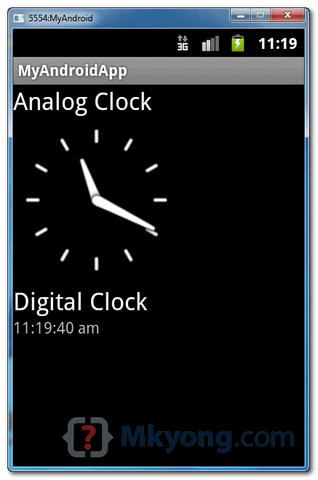
1. This is how AnalogClock and DigitalClock look like :
Download Source Code
Download it – Android-AnalogClock-DigitalClock-Example.zip (15 KB)

you are the beeeest 😛
this is my code mr. mkyong can you help me please
public class DateTimePickerDialog extends AlertDialog.Builder {
private DatePicker _dpDate;
private TimePicker _tpTime;
//GETTERS
public DateTime getDate(){
//Date picker getMonth is zero base, so we need to add 1 as joda datetime accepts 1-12
return new DateTime(_dpDate.getYear(), _dpDate.getMonth() + 1, _dpDate.getDayOfMonth(), _tpTime.getCurrentHour(), _tpTime.getCurrentMinute());
}
public String getFormattedDate(){
return (String) DateFormat.format(“MM-dd-yyyy hh:mm”, getDate().getMillis());
}
//setters
public void setDate(DateTime dt){
}
sir mykong can u please help me how to set current date,present date and previous date of my datetimepickerdialog scheduler to my android using jodatime
Thanks for the example, even this http://www.compiletimeerror.com/2013/08/analog-and-digital-clock-in-android.html might help, have a look..
how toopen url in android web browser
i do it but it define error
ple send right java and xml coad
i am make “url is show web site ”
but is no run in my anroid emulator
so what do i
or u send proper coad of “how to create url page “
Is there any way i can move the hour and minute hands manually?
I actually want to move my minute hand with the value of the coutdown timer in my program. Is there anyway for that?
It would be really helpful, Thank You
Owais Ahmed
I need source code to display analog clock in one activity and digital clock in one activity..
I mean, if I click 1st button, it should display analog clock.. If I click second button, it should display digital clock..
Split the layout file into two layouts, one for the analog clock and the other for the digital clock. link them with new activities instead of one.
For example, for the analog clock:
Its activity:
package com.mkyong.android;
import android.app.Activity;
import android.os.Bundle;
import android.widget.AnalogClock;
public class analogClock extends Activity {
@Override
public void onCreate(Bundle savedInstanceState) {
super.onCreate(savedInstanceState);
setContentView(R.layout.main);
AnalogClock ac = (AnalogClock) findViewById(R.id.analogClock1);
//what can i do with AnalogClock?
}
}
How can I customize time format of DigitalClock ? I just want to show hh:mm instead of hh:mm:ss a (default).
i want to build digital clock that holds just 360 seconds , i mean the user have to answer the question in 360 seconds , what have i write in activity
DigitalClock timer;
public void initialized(){
timer=(DigitalClock)findViewById(R.id.dcTimer);
}
thank you for helping
Thanks!!! It help me a lot! =)
In this example, where we use this ac and dc local variables. while iam running this application on eclipse it will showing an error like ac and dc variables are not used.
package com.mkyong.android;
import android.app.Activity;
import android.os.Bundle;
import android.widget.AnalogClock;
import android.widget.DigitalClock;
public class MyAndroidAppActivity extends Activity {
@Override
public void onCreate(Bundle savedInstanceState) {
super.onCreate(savedInstanceState);
setContentView(R.layout.main);
AnalogClock ac = (AnalogClock) findViewById(R.id.analogClock1);
//what can i do with AnalogClock?
DigitalClock dc = (DigitalClock) findViewById(R.id.digitalClock1);
//what can i do with DigitalClock also? for display only
It’s warning, not error. Indeed, both ac and dc are not used 🙂 , i just demonstrate how to get the clock ~
import android.app.Activity;
import android.os.Bundle;
import android.widget.AnalogClock;
import android.widget.DigitalClock;
public class MyAndroidAppActivity extends Activity {
@Override
public void onCreate(Bundle savedInstanceState) {
super.onCreate(savedInstanceState);
setContentView(R.layout.main);
AnalogClock ac = (AnalogClock) findViewById(R.id.analogClock1);
//what can i do with AnalogClock?
DigitalClock dc = (DigitalClock) findViewById(R.id.digitalClock1);
//what can i do with DigitalClock also? for display only
in this example ac dc variable declare above @overrite in eclipse and then use so error will not come…
is it possible to have a button that swaps between an analog and digital clock, so that only one is viewed at a time? would appreciate if you could show me some code if possible. thanks
yeah… by using intent…we can make another page for digital or analog clock and just make a button on first page for going to second page…by intent..