In JAX-RS, you can use @FormParam annotation to bind HTML form parameters value to a Java method. The following example show you how to do it :
1. HTML Form
See a simple HTML form with “post” method.
<html>
<body>
	<h1>JAX-RS @FormQuery Testing</h1>

	<form action="rest/user/add" method="post">
		<p>
			Name : <input type="text" name="name" />
		</p>
		<p>
			Age : <input type="text" name="age" />
		</p>
		<input type="submit" value="Add User" />
	</form>

</body>
</html>
2. @FormParam Example
Example to use @FormParam to get above HTML form parameter values.
import javax.ws.rs.FormParam;
import javax.ws.rs.POST;
import javax.ws.rs.Path;
import javax.ws.rs.core.Response;

@Path("/user")
public class UserService {

	@POST
	@Path("/add")
	public Response addUser(
		@FormParam("name") String name,
		@FormParam("age") int age) {

		return Response.status(200)
			.entity("addUser is called, name : " + name + ", age : " + age)
			.build();

	}

}
3. Demo
Access HTML Page. URL : http://localhost:8080/RESTfulExample/UserForm.html
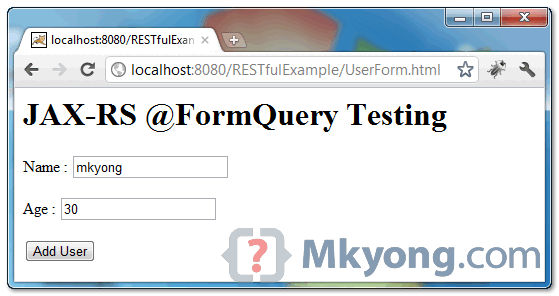
When “add user” button is clicked, it will redirect to URL : http://localhost:8080/RESTfulExample/rest/user/add
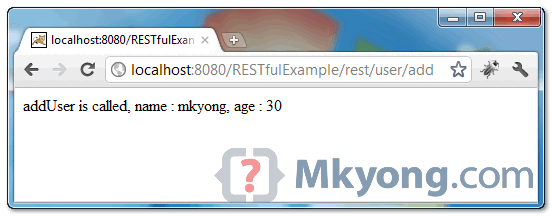
and display the following output :
addUser is called, name : mkyong 123, age : 12
Download Source Code
Download it – JAX-RS-FormParam-Example.zip (6 KB)

How can I do this, with an File Upload? Is there a way without extra Dependencies?
Hi,
How can I call this rest-end point using HTTPClient or RestTemplate.
Any reference.
Thanks
Hello , i think it’s more approprier to return an 201 then a 200 http response for a Post
“201
CREATED when a resource is successfully created using POST or PUT request. Returns link to the newly created resource using the location header.” and thanks for the contribution
Hi when I am running this example in my eclipse env,
In my firefox browser I am getting a message like
//Start
HTTP Status 415 – Unsupported Media Type
type Status report
message Unsupported Media Type
description The server refused this request because the request entity is in a format not supported by the requested resource for the requested method.
//End
What else should I do get this problem solved
I found a solution to this problem
Here the code works with jboss server, but I was using the tomcat server so I did the change as below
@POST
@Path(“/add”)
@Produces(MediaType.TEXT_HTML)
@Consumes(MediaType.APPLICATION_FORM_URLENCODED)
public Response addUser(……)
HI
There is version issue In rest-easy pom.xml file please use below dependency.with the previous version i didn’t get any response when i hit the ADD User Button i was getting this exception javax.ws.rs.NotFoundException: RESTEASY003210: Could not find resource. When i change the rest-easy pom file version it’s resolved
org.jboss.resteasy
resteasy-jaxrs
3.0.4.Final
Thank you Mkyong. Four years old and still helps =)
Mkyong nice tutorial but I am not able to deploy it. I am using jetty in my eclipse to run it. I can access the form this way http://localhost:8080/UserForm.html and it is throwing error Could not find resource for relative : /user/add of full path: http://localhost:8080/rest/user/add
Hi MK Yong,
Your all tutorials are great, simple and always helpful for me, but against this tutorial I have little question, can we pass object parameter to @FormParam() ? if yes then how? please guide and suggest any helpful material.
When i pass any object like this:
User user = new User();
Form form = new Form();
signupForm.add(“user”, user);
Client client = Client.create();
WebResource service = client.resource(getBaseURI());
ClientResponse response = service.path(“somePath”).type(MediaType.APPLICATION_JSON)
.accept(MediaType.APPLICATION_JSON)
.post(ClientResponse.class, form);
It throws an exception,
org.codehaus.jackson.JsonParseException: Unexpected character (‘u’ (code 117)): expected a valid value (number, String, array, object, ‘true’, ‘false’ or ‘null’)
at [Source: org.apache.catalina.connector.CoyoteInputStream@10ede48; line: 1, column: 2]
Kindly get me out of it, i will be grateful.
Regards,
Haseeb
So nice and simple. easy to learn examples. It was so helpful.
Thanks and Good work.
This tutorial was very useful to me, thank you! You have a good website with simple, clean code, I will most likely be here again 🙂 Cheers
i am new for writing test cases for RESTFul web services. I liked ur example very much and i want to know how to write testcases for your example. I will be thankful if you provide the solution.
Hey,
Your site comes up a lot in my google searches and you are always helpful. While reading this post I had an idea.
What if you could generate your forms from the javax.ws.rs.FormParam annotation data? With an ant script you could easily work that into the build. That would ensure that your html never gets out of sync with the backend.
Is there such a thing? It would basically be like xdocs but reading the annotations.
Anyway, keep up the good work! your time and effort are greatly appreciated! 🙂
Andrew
public Response addUser(
@FormParam(“id”) int id,
@FormParam(“name”) String name,
@FormParam(“price”) float price) {
String output=”Product added successfuly! Id: “+id+” Name: ” + name+” Price: “+price;
//return Response.ok(” Product added successfuly! Id: “+id+” Name: ” + name+” Price: “+price)
return Response.status(200).entity(output).build();
}
this is my code data cannot return .anybody can help me
Thank you for your continued contribution.
Hey,
cool example.
using @FormParam as part of a web service makes your web service bound to the web client ie. Html form. But a web service should be accessible form multiple clients eg. java console client, web client…etc u got me? so how can i read input parameters to the add() method, but not necessarily from the Html form on the web?
thanks
We can use JAX-RS form class in our standalone java application as
Form form = new Form();
Entity entity = Entity.form(form);
Response response = target.request(MediaType.APPLICATION_JSON).post(entity);
Find the link for complete example
http://www.concretepage.com/webservices/resteasy-3/jax-rs-resteasy-3-formparam-annotation-example