This tutorial show you how to use JAXB to convert object to XML in Jersey, and return it back to user.
1. Dependency
To integrate JAXB with Jersey, no extra dependency is required. Just include “jersey-server.jar” will do.
2. JAXB Annotation
Annotate object with JAXB annotation, for conversion later.
import javax.xml.bind.annotation.XmlAttribute;
import javax.xml.bind.annotation.XmlElement;
import javax.xml.bind.annotation.XmlRootElement;

@XmlRootElement(name = "customer")
public class Customer {

	String name;
	int pin;

	@XmlElement
	public String getName() {
		return name;
	}

	public void setName(String name) {
		this.name = name;
	}

	@XmlAttribute
	public int getPin() {
		return pin;
	}

	public void setPin(int pin) {
		this.pin = pin;
	}

}
Above object will convert into following XML format.
  <customer pin="value">
	<name>value</name>
  </customer>
3. Jersey and XML
To return a XML file, annotate the method with @Produces(MediaType.APPLICATION_XML). Jersey will convert the JAXB annotated object into XML file automatically.
import javax.ws.rs.GET;
import javax.ws.rs.Path;
import javax.ws.rs.PathParam;
import javax.ws.rs.Produces;
import javax.ws.rs.core.MediaType;
import com.mkyong.Customer;

@Path("/xml/customer")
public class XMLService {

	@GET
	@Path("/{pin}")
	@Produces(MediaType.APPLICATION_XML)
	public Customer getCustomerInXML(@PathParam("pin") int pin) {

		Customer customer = new Customer();
		customer.setName("mkyong");
		customer.setPin(pin);

		return customer;

	}

}
4. Demo
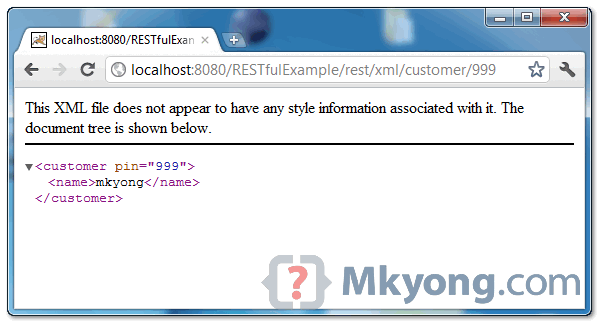
When URI pattern “xml/customer/{param value}” is requested, a formatted XML file will be returned.
URL : http://localhost:8080/RESTfulExample/rest/xml/customer/999
Download Source Code
Download it – XML-Support-Jersey-Example.zip (6 KB)

Instead of manually creating the values, how can you get the values from a API/URI?
Any advice on how to set this up in terms of dependencies or registering any features? I’m getting an exception: org.glassfish.jersey.message.internal.MessageBodyProviderNotFoundException: MessageBodyWriter not found for media type=application/xml
Hello did you got the answer for the issue?
org.glassfish.jersey.media
jersey-media-jaxb
${jersey.version}
Previous comment is a maven dependency to fix the problem
how to convert xml to java object example in jersey
Hi,
I found this tutorials very helpful,
but I have a question that
suppose I want this kind of output for xml than how can I do???
means I want attributes in subelement using ur technique to generate xml authomatically..
I know how to generate it mannually.
#customer pin=”value”#
#Name name=”name”/#
#/customer#
This can be achieved by addin reference of another class in main class (rool element for xml). Here is sample snippet of code:
package org.msharma.jaxrs.jersey.l5;
import javax.xml.bind.annotation.XmlAttribute;
import javax.xml.bind.annotation.XmlElement;
import javax.xml.bind.annotation.XmlRootElement;
import javax.xml.bind.annotation.XmlValue;
@XmlRootElement(name=”student”)
public class Student2 {
private int id;
private Firstname firstName;
private String lastName;
private int age;
public Student2(){ }
public Student2(String firstname, String lastName, int age, int id){
firstName= new Firstname();
firstName.setFname(firstname);
firstName.setDesc(“”+id);
this.lastName = lastName;
this.age = age;
this.id = id;
}
public int getId() {
return id;
}
@XmlAttribute(name=”id”)
public void setId(int id) {
this.id = id;
}
public String getLastName() {
return lastName;
}
@XmlElement(name=”lname”)
public void setLastName(String lastName) {
this.lastName = lastName;
}
public int getAge() {
return age;
}
@XmlElement(name=”age”)
public void setAge(int age) {
this.age = age;
}
public Firstname getFirstName() {
return firstName;
}
@XmlElement
public void setFirstName(Firstname firstName) {
this.firstName = firstName;
}
@Override
public String toString() {
return new StringBuffer(” First Name : “).append(this.firstName.getFname())
.append(” Last Name : “).append(this.lastName)
.append(” Age : “).append(this.age).append(” ID : “)
.append(this.id).toString();
}
}
class Firstname {
String fname;
String desc;
public String getFname() {
return fname;
}
@XmlAttribute(name=”ffname”)
public void setFname(String fname) {
this.fname = fname;
}
public String getDesc() {
return desc;
}
@XmlValue
public void setDesc(String desc) {
this.desc = desc;
}
}
Your example is always simple and easy to understand, very good for beginners, thanks.
Great example. Thank you very much.
Desired output. Please see my first comment.
Hi,
How I can Choose to return only specific fields instead of complete Bean?
e.g. In above example how can I return only below output?
though my bean has 2 members, I want to return only one (pin) but not name?
Is it possible?
Thanks
Kunal Handa
Very helpful, thank you!
How can we reply a list containing objects instead of a single object? I am a newbie to this technology, help of any sort is appreciated 🙂 Thanks in advanced.
How would you use a post method on the client side? to post xml, I only find post json.
Thanks