JSF 2 convertNumber example

In JSF, “f:convertNumber” is a standard converter, which converts String into a specified “Number” format. In addition, it’s also used as a validator to make sure the input value is a valid number. See following common used examples : Note : Assuming #{receipt.amount} contains a “0.1” value. 1. minFractionDigits attribute <h:outputText value="#{receipt.amount}" > <f:convertNumber minFractionDigits="2" …

Read more

JSF 2 dataTable sorting example – DataModel

In the previous JSF 2 dataTable sorting example, showed the simplest way, a custom comparator to sort a list and display in dataTable. DataModel Decorator In this example, it shows another way to sort the list in dataTable, which is mentioned in the “Core JavaServer Faces (3rd Edition)“, called DataModel Decorator. 1. DataModel Create a …

Read more

JSF 2 dataTable sorting example

Here’s the idea to sort a JSF dataTable list : 1. Column Header Put a commandLink in the column header, if this link is clicked, sort the dataTable list. <h:column> <f:facet name="header"> <h:commandLink action="#{order.sortByOrderNo}"> Order No </h:commandLink> </f:facet> #{o.orderNo} </h:column> 2. Implementation In the managed bean, uses Collections.sort() and custom comparator to sort the list. …

Read more

JSF 2 repeat tag example

The ui:repeat is always uses as an alternative to h:dataTable, to loop over array or list to display the data in HTML table format. See following examples : 1. h:dataTable In dataTable, JSF helps you to generate all the HTML table tags. <h:dataTable value="#{order.orderList}" var="o"> <h:column> #{o.orderNo} </h:column> <h:column> #{o.productName} </h:column> <h:column> #{o.price} </h:column> <h:column> …

Read more

How to display dataTable row numbers in JSF

JSF dataTable does not contains any method to display the currently selected row numbers. However, you can hack it with javax.faces.model.DataModel class, which has a getRowIndex() method to return the currently selected row number. JSF + DataModel Here’s a JSF 2.0 example to show you how to use DataModel to return the currently selected row …

Read more

How to delete row in JSF dataTable

This example is enhancing the previous JSF 2 dataTable example, by adding a “delete” function to delete the row in dataTable. Delete Concept The overall concept is quite simple : 1. Assign a “Delete” link to the end of each row. //… <h:dataTable value="#{order.orderList}" var="o"> <h:column> <f:facet name="header">Action</f:facet> <h:commandLink value="Delete" action="#{order.deleteAction(o)}" /> </h:column> 2. If …

Read more

How to add row in JSF dataTable

This example is enhancing previous delete dataTable row example, by adding a “add” function to add a row in dataTable. Here’s a JSF 2.0 example to show you how to add a row in dataTable. 1. Managed Bean A managed bean named “order”, self-explanatory. package com.mkyong; import java.io.Serializable; import java.math.BigDecimal; import java.util.ArrayList; import java.util.Arrays; import …

Read more

How to update row in JSF dataTable

This example is enhancing the previous JSF 2 dataTable example, by adding a “update” function to update row in dataTable. Update Concept The overall concept is quite simple : 1. Add a “ediatble” property to keep track the row edit status. //… public class Order{ String orderNo; String productName; BigDecimal price; int qty; boolean editable; …

Read more

How to pass parameters in method expression – JSF 2.0

Since JSF 2.0, you are allow to pass parameter values in method expression like “#{bean.method(param)}“, but this feature will raising a “EL parsing error” on Tomcat server. For example, Managed Bean @ManagedBean(name="order") @SessionScoped public class OrderBean implements Serializable{ public String editAction(String id) { //… } } JSF page //… <h:commandLink value="Edit" action="#{order.editAction(123)}" /> //… If …

Read more

JSF 2 dataTable example

In JSF, “h:dataTable” tag is used to display data in a HTML table format. The following JSF 2.0 example show you how to use “h:dataTable” tag to loop over an array of “order” object, and display it in a HTML table format. 1. Project Folder Project folder structure of this example. 2. Managed bean A …

Read more

How to use comments in JSF 2.0

Problem In JSF 2.0, comment out a JSF tag like this JSF… <?xml version="1.0" encoding="UTF-8"?> <!DOCTYPE html PUBLIC "-//W3C//DTD XHTML 1.0 Transitional//EN" "http://www.w3.org/TR/xhtml1/DTD/xhtml1-transitional.dtd"> <html xmlns="http://www.w3.org/1999/xhtml" xmlns:h="http://java.sun.com/jsf/html" > <h:body> <!– <h:commandButton type="button" value="#{msg.buttonLabel}" /> –> </h:body> </html> But JSF still process the value expression and output the result to the generated HTML page. Assuming that #{msg.buttonLabel} …

Read more

Custom tags in JSF 2.0

In JSF 2.0, you are allow to create your custom tag to render a pre-defined content. A custom tag is look like a normal JSF tag, and uses “ui:composition” to insert content into the page. Here’s the summary steps to create a custom tag in JSF 2.0. Uses :ui:compisition” tag to create a predefined content …

Read more

How to pass parameters to JSF 2.0 template file?

In JSF 2.0 web application, you can use “ui:param” facelets tag to pass parameters to an include file or a template file. 1. Parameter in “ui:include” Example to pass a “tagLine” parameter to an include file. <ui:insert name="header" > <ui:include src="/template/common/commonHeader.xhtml"> <ui:param name="tagLine" value="JSF a day, bug away" /> </ui:include> </ui:insert> In the commonHeader.xhtml file, …

Read more

JSF 2 Templating with Facelets example

In web application, most pages are follow a similar web interface layout and styling, for example, same header and footer. In JSF 2.0, you can use Facelets tags to provide a standard web interface layout easily, in fact, it’s look similar with Apache Tiles framework. In this example, it shows the use of 4 Facelets …

Read more

JSF 2 multiple select dropdown box example

In JSF, <h:selectManyMenu /> tag is used to render a multiple select dropdown box – HTML select element with “multiple” and “size=1” attribute. //JSF… <h:selectManyMenu value="#{user.favCoffee1}"> <f:selectItem itemValue="Cream Latte" itemLabel="Coffee3 – Cream Latte" /> <f:selectItem itemValue="Extreme Mocha" itemLabel="Coffee3 – Extreme Mocha" /> <f:selectItem itemValue="Buena Vista" itemLabel="Coffee3 – Buena Vista" /> </h:selectManyMenu> //HTML output… <select name="j_idt6:j_idt8" …

Read more

JSF 2 dropdown box example

In JSF, <h:selectOneMenu /> tag is used to render a dropdown box – HTML select element with “size=1” attribute. //JSF… <h:selectOneMenu value="#{user.favCoffee1}"> <f:selectItem itemValue="Cream Latte" itemLabel="Coffee3 – Cream Latte" /> <f:selectItem itemValue="Extreme Mocha" itemLabel="Coffee3 – Extreme Mocha" /> <f:selectItem itemValue="Buena Vista" itemLabel="Coffee3 – Buena Vista" /> </h:selectOneMenu> //HTML output… <select name="j_idt6:j_idt8" size="1"> <option value="Cream Latte">Coffee3 …

Read more

JSF 2 multiple select listbox example

In JSF, <h:selectManyListbox /> tag is used to render a multiple select listbox – HTML select element with “multiple” and “size” attribute. //JSF… <h:selectManyListbox value="#{user.favFood1}"> <f:selectItem itemValue="Fry Checken" itemLabel="Food1 – Fry Checken" /> <f:selectItem itemValue="Tomyam Soup" itemLabel="Food1 – Tomyam Soup" /> <f:selectItem itemValue="Mixed Rice" itemLabel="Food1 – Mixed Rice" /> </h:selectManyListbox> //HTML output… <select name="j_idt6:j_idt8" multiple="multiple" …

Read more

JSF 2 listbox example

In JSF, <h:selectOneListbox /> tag is used to render a single select listbox – HTML select element with “size” attribute. //JSF… <h:selectOneListbox value="#{user.favYear1}"> <f:selectItem itemValue="2000" itemLabel="Year1 – 2000" /> <f:selectItem itemValue="2010" itemLabel="Year1 – 2010" /> <f:selectItem itemValue="2020" itemLabel="Year1 – 2020" /> </h:selectOneListbox> //HTML output… <select name="j_idt6:j_idt8" size="3"> <option value="2000">Year1 – 2000</option> <option value="2010">Year1 – 2010</option> …

Read more

WARNING: JSF1063: WARNING! Setting non-serializable attribute value into HttpSession

Problem In JSF 2.0 web application, during server initialization, it hits following warning message WARNING: JSF1063: WARNING! Setting non-serializable attribute value into HttpSession (key: user, value class: com.mkyong.UserBean). UserBean.java package com.mkyong; @ManagedBean(name="user") @SessionScoped public class UserBean{ //… } Solution The “UserBean” is not serializable. To get rid of this warning message, just make this bean …

Read more

JSF 2 radio buttons example

In JSF, “h:selectOneRadio” tag is used to render a set of HTML input element of type “radio“, and format it with HTML table and label tag. //JSF… <h:selectOneRadio value="#{user.favColor1}"> <f:selectItem itemValue="Red" itemLabel="Color1 – Red" /> <f:selectItem itemValue="Green" itemLabel="Color1 – Green" /> <f:selectItem itemValue="Blue" itemLabel="Color1 – Blue" /> </h:selectOneRadio> //HTML output… <table> <tr> <td> <input type="radio" …

Read more

JSF 2 checkboxes example

In JSF, <h:selectBooleanCheckbox /> tag is used to render a single HTML input element of “checkbox” type. //JSF… <h:selectBooleanCheckbox value="#{user.rememberMe}" /> Remember Me //HTML output… <input type="checkbox" name="j_idt6:j_idt8" /> Remember Me While <h:selectManyCheckbox /> tag is used to render a set of HTML input element of type “checkbox”, and format it with HTML table and …

Read more

JSF 2 link, commandLink and outputLink example

In JSF, <h:link />, <h:commandLink /> and <h:outputLink /> tags are used to render a HTML “a” anchor element, see below examples to understand the different among them. Note In below examples, assume “/JavaServerFaces/” is the root of your project context URL. 1. JSF h:link example The “h:link” tag is a new tag in JSF …

Read more

JSF 2 button and commandButton example

In JSF 2.0, both <h:button /> and <h:commandButton /> tags are used to render HTML input element of type button, with different mechanism to handle the navigation. 1. JSF h:commandButton example The “h:commandButton” tag is released since JSF 1.x, you can declare the bean, which return the navigation outcome in the “action” attribute. If browser’s …

Read more

How to include cascading style sheets (CSS) in JSF

In JSF 2.0, you can use <h:outputStylesheet /> output a css file. For example, <h:outputStylesheet library="css" name="style.css" /> It will generate following HTML output… <link type="text/css" rel="stylesheet" href="/JavaServerFaces/faces/javax.faces.resource/style.css?ln=css" /> JSF outputStylesheet example An example to show the use of JSF 2 <h:outputStylesheet /> to render a “style.css” file, locate in the “resources/css” folder, see figure …

Read more

How to include JavaScript file in JSF

In JSF 2.0, you can use <h:outputScript /> tag to render a HTML “script” element, and link it to a js file. For example, <h:outputScript library="js" name="common.js" /> It will generate following HTML output… <script type="text/javascript" src="/JavaServerFaces/faces/javax.faces.resource/common.js?ln=js"> </script> JSF outputScript example An example to show you how to use <h:outputScript /> to render a “common.js“, …

Read more

JSF 2 graphicImage example

In JSF, you can use <h:graphicImage /> tag to render a HTML “img” element. For example, an image named “sofa.png” in a resources folder, see figure below : 1. JSF 1.x graphicImage In JSF 1.x you can hard-coded above image URL directly in the “value” attribute : JSF… <h:graphicImage value="resources/images/sofa.png" /> HTML output… <img src="resources/images/sofa.png;" …

Read more

Resources (library) in JSF 2.0

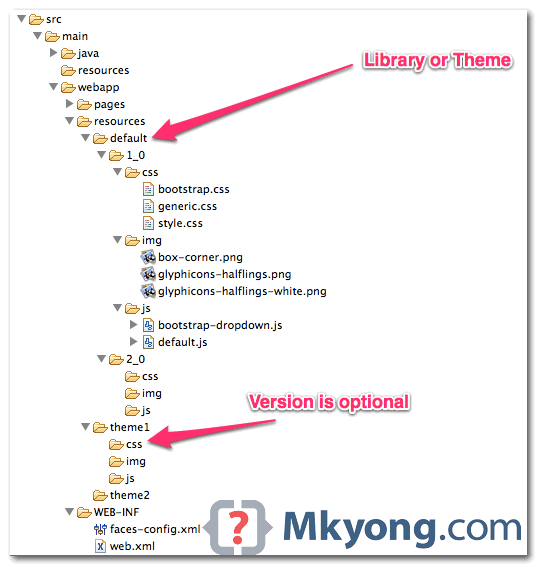
In JSF 2.0, all your web resources files like css, images or JavaScript, should put in “resources” folder, under the root of your web application (same folder level with “WEB-INF“). The sub-folder under “resources” folder is consider as “library” or “project theme“, later you can reference those “resources” with library attribute. This new JSF resources …

Read more

JSF 2 outputFormat example

In JSF web application, “h:outputFormat” tag is similar with “h:outputText” tag, but with extra function to render parameterized message. For example, <h:outputFormat value="param0 : {0}, param1 : {1}" > <f:param value="Number 1" /> <f:param value="Number 2" /> </h:outputFormat> It will output the following result param0 : Number 1, param1 : Number 2 {0} match to …

Read more

JSF 2 outputText example

In JSF 2.0 web application, “h:outputText” tag is the most common used tag to display plain text, and it doesn’t generate any extra HTML elements. See example… 1. Managed Bean A managed bean, provide some text for demonstration. import javax.faces.bean.ManagedBean; import javax.faces.bean.SessionScoped; @ManagedBean(name="user") @SessionScoped public class UserBean{ public String text = "This is Text!"; public …

Read more

How to pass new hidden value to backing bean in JSF

In some cases, you may need to pass a new hidden value to a backing bean. Generally, there are two ways : 1. HTML Tag + getRequestParameterMap() Render hidden field with plain HTML input, hard-coded new hidden value and access in backing bean via getRequestParameterMap() method. JSF… <h:form id="myForm"> <input type="hidden" name="hidden1" value="this is hidden2" …

Read more

JSF 2 hidden value example

In JSF, you can use the <h:inputHidden /> tag to render a HTML hidden value field. For example, JSF tag… <h:inputHidden value="some text" /> Render this HTML code… <input type="hidden" name="random value" value="some text" /> JSF hidden field example A JSF 2 example to render a hidden field via <h:inputHidden /> tag, and access the …

Read more

JSF 2 textarea example

In JSF, you can use the <h:inputTextarea /> tag to render a HTML textarea field. For example, JSF tag… <h:inputTextarea cols="30" rows="10" /> Render this HTML code… <textarea name="random value" cols="30" rows="10"></textarea> JSF textarea example A full JSF 2 example to render a textarea field via <h:inputTextarea /> tag. 1. Managed Bean A managed bean, …

Read more

JSF 2 password example

In JSF, you can use the <h:inputSecret /> tag to render a HTML input of type=”password”, password field. For example, JSF tag… <h:inputSecret /> Render this HTML code… <input type="password" name="j_idt6:j_idt7" /> P.S The name attribute value is randomly generated by JSF. JSF password example A full JSF 2 example to render a password input …

Read more

JSF 2 textbox example

In JSF, you can use the <h:inputText /> tag to render a HTML input of type=”text”, text box. For example, JSF tag… <h:inputText /> Render this HTML code… <input type="text" name="j_idt6:j_idt7" /> P.S The name attribute value is randomly generated by JSF. JSF textbox example A full JSF 2 example to render a textbox input …

Read more

Where is JSF 2 taglib JavaDoc?

Problem Often times, you need to know the detail attribute of a JSF HTML form tag, e.g f:inputText. The JSF 2 tag library JavaDoc is very hard to find, even Google didn’t return any result of it? Solution Actually, JavaServer(TM) Faces, both 1.x or 2.x are available at this JSF official website. Unfortunately, JSF official …

Read more

How to add a global navigation rule in JSF?

Problem A global navigation rule is a rule that applies to all pages. For example, apply a “logout” navigation rule that every pages are allow to access. Is there a way to configure it in JSF? Solution In JSF, wildcard is supported in navigation rule, you can use a “*” to specify a navigation rule …

Read more

JSF : Page Forward vs Page Redirect

By default, JSF will performs a server page forward while navigating to another page. See following example to differentiate between page forward and page redirect. A “start.xhtml” page, with a button navigate to “page1.xhtml” page. 1. Page Forward Here’s how the page forward works : Browser send a “GET” request to URL : http://localhost:8080/JavaServerFaces/faces/start.xhtml. JSF …

Read more

JSF “from-action” navigation rule example

In JSF navigation rule, you may encounter a situation where two separate actions return a same “outcome” in a single page. In this case, you can use “from-action” element to differentiate the two navigation cases. See following example : 1. Managed Bean A managed bean, with two actions which return a same outcome – “success”. …

Read more

Conditional Navigation Rule in JSF 2.0

JSF 2 comes with a very flexible conditional navigation rule to solve the complex page navigation flow, see the following conditional navigation rule example : 1. JSF Page A simple JSF page, with a button to move from this page to the payment page. start.xhtml <?xml version="1.0" encoding="UTF-8"?> <!DOCTYPE html PUBLIC "-//W3C//DTD XHTML 1.0 Transitional//EN" …

Read more

Implicit Navigation in JSF 2.0

In JSF 1.2, all the page navigation are required to declare in the “faces-config.xml” file like this : … <navigation-rule> <from-view-id>page1.xhtml</from-view-id> <navigation-case> <from-outcome>page2</from-outcome> <to-view-id>/page2.xhtml</to-view-id> </navigation-case> </navigation-rule> … In JSF 2, it treats “outcome” as the page name, for example, navigate to “page1.xhtml”, you have to put the “outcome” as “page1”. This mechanism is called “Implicit …

Read more