In web application, most pages are follow a similar web interface layout and styling, for example, same header and footer. In JSF 2.0, you can use Facelets tags to provide a standard web interface layout easily, in fact, it’s look similar with Apache Tiles framework.
In this example, it shows the use of 4 Facelets tags to build page from a template :
- ui:insert – Used in template file, it defines content that is going to replace by the file that load the template. The content can be replace with “ui:define” tag.
- ui:define – Defines content that is inserted into template with a matching “ui:insert” tag.
- ui:include – Similar to JSP’s “jsp:include”, includes content from another XHTML page.
- ui:composition – If used with “template” attribute, the specified template is loaded, and the children of this tag defines the template layout; Otherwise, it’s a group of elements, that can be inserted somewhere. In addition, JSF removes all tags “outside” of “ui:composition” tag.
1. Template Layout
In JSF 2.0, a template file is just a normal XHTML file, with few JSF facelets tags to define the template layout.
File : commonLayout.xhtml
<?xml version="1.0" encoding="UTF-8"?>
<!DOCTYPE html PUBLIC "-//W3C//DTD XHTML 1.0 Transitional//EN"
"http://www.w3.org/TR/xhtml1/DTD/xhtml1-transitional.dtd">
<html xmlns="http://www.w3.org/1999/xhtml"
      xmlns:h="http://java.sun.com/jsf/html"
      xmlns:ui="http://java.sun.com/jsf/facelets"
      >

    <h:head>
	<h:outputStylesheet name="common-style.css" library="css" />
    </h:head>

    <h:body>

	<div id="page">

	    <div id="header">
		<ui:insert name="header" >
		  <ui:include src="/template/common/commonHeader.xhtml" />
		</ui:insert>
	    </div>

	    <div id="content">
	  	<ui:insert name="content" >
	 	  <ui:include src="/template/common/commonContent.xhtml" />
	   	</ui:insert>
	    </div>

	    <div id="footer">
	    	<ui:insert name="footer" >
	    	  <ui:include src="/template/common/commonFooter.xhtml" />
	    	</ui:insert>
    	    </div>

        </div>

    </h:body>
</html>
In this template, it defines a standard web layout :
- Uses “h:outputStylesheet” tag to include a CSS file in head to styling the whole page layout.
- Uses “ui:insert” tag to define three replaceable sections : header, content and footer.
- Uses “ui:include” tag to provide a default content if no replacement is specified when the template is used.
2. Header, Content and Footer
Three default page content.
File : commonHeader.xhtml
<?xml version="1.0" encoding="UTF-8"?>
<!DOCTYPE html PUBLIC "-//W3C//DTD XHTML 1.0 Transitional//EN"
"http://www.w3.org/TR/xhtml1/DTD/xhtml1-transitional.dtd">
<html xmlns="http://www.w3.org/1999/xhtml"
      xmlns:ui="http://java.sun.com/jsf/facelets"
      >
    <body>
	    <ui:composition>

		<h1>This is default header</h1>

	    </ui:composition>
    </body>
</html>
File : commonContent.xhtml
<?xml version="1.0" encoding="UTF-8"?>
<!DOCTYPE html PUBLIC "-//W3C//DTD XHTML 1.0 Transitional//EN"
"http://www.w3.org/TR/xhtml1/DTD/xhtml1-transitional.dtd">
<html xmlns="http://www.w3.org/1999/xhtml"
      xmlns:ui="http://java.sun.com/jsf/facelets"
      >
    <body>
	    <ui:composition>

		<h1>This is default content</h1>

	    </ui:composition>
    </body>
</html>
File : commonFooter.xhtml
<?xml version="1.0" encoding="UTF-8"?>
<!DOCTYPE html PUBLIC "-//W3C//DTD XHTML 1.0 Transitional//EN"
"http://www.w3.org/TR/xhtml1/DTD/xhtml1-transitional.dtd">
<html xmlns="http://www.w3.org/1999/xhtml"
      xmlns:ui="http://java.sun.com/jsf/facelets"
      >
    <body>
	    <ui:composition>

		<h1>This is default footer</h1>

	    </ui:composition>
    </body>
</html>
When these pages are insert into the template file, all the tags outside of the “ui:composition” will be removed. For example,
File : commonHeader.xhtml
<?xml version="1.0" encoding="UTF-8"?>
<!DOCTYPE html PUBLIC "-//W3C//DTD XHTML 1.0 Transitional//EN"
"http://www.w3.org/TR/xhtml1/DTD/xhtml1-transitional.dtd">
<html xmlns="http://www.w3.org/1999/xhtml"
      xmlns:ui="http://java.sun.com/jsf/facelets"
      >
    <body>
	    ALL TAGS ABOVE THIS LINE WILL BE REMOVED BY JSF
	    <ui:composition>

		<h1>This is default header</h1>

	    </ui:composition>
	    ALL TAGS BELOW THIS LINE WILL BE REMOVED BY JSF
    </body>
</html>
JSF only takes following elements and insert into the template file
<ui:composition>

	<h1>This is default header</h1>

</ui:composition>
When insert into the “commonLayout” template , it became…
File : commonLayout.xhtml
	...
    <h:body>

	<div id="page">

	    <div id="header">
		<h1>This is default header</h1>
	    </div>
	...
3. Using Template
To make use of an existing template, eg. “commonLayout.xhtml“, you use “ui:composition” tag with a “template” attribute. See following two examples :
File : default.xhtml
<?xml version="1.0" encoding="UTF-8"?>
<!DOCTYPE html PUBLIC "-//W3C//DTD XHTML 1.0 Transitional//EN"
"http://www.w3.org/TR/xhtml1/DTD/xhtml1-transitional.dtd">
<html xmlns="http://www.w3.org/1999/xhtml"
      xmlns:h="http://java.sun.com/jsf/html"
      xmlns:ui="http://java.sun.com/jsf/facelets"
      >
    <h:body>

    	<ui:composition template="template/common/commonLayout.xhtml">

    	</ui:composition>

    </h:body>

</html>
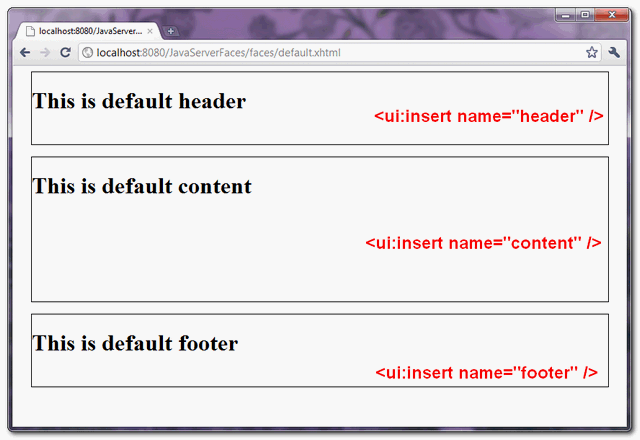
This JSF page load “commonLayout.xhtml” template and display all the default page content.
File : page1.xhtml
<?xml version="1.0" encoding="UTF-8"?>
<!DOCTYPE html PUBLIC "-//W3C//DTD XHTML 1.0 Transitional//EN"
"http://www.w3.org/TR/xhtml1/DTD/xhtml1-transitional.dtd">
<html xmlns="http://www.w3.org/1999/xhtml"
      xmlns:h="http://java.sun.com/jsf/html"
      xmlns:ui="http://java.sun.com/jsf/facelets"
      >
    <h:body>

    	<ui:composition template="/template/common/commonLayout.xhtml">

    		<ui:define name="content">
    			<h2>This is page1 content</h2>
    		</ui:define>

		<ui:define name="footer">
    			<h2>This is page1 Footer</h2>
    		</ui:define>

    	</ui:composition>

    </h:body>

</html>
This JSF page load a “commonLayout.xhtml” template and use “ui:define” tag to override the the “ui:insert” tag, which defined in the template file.
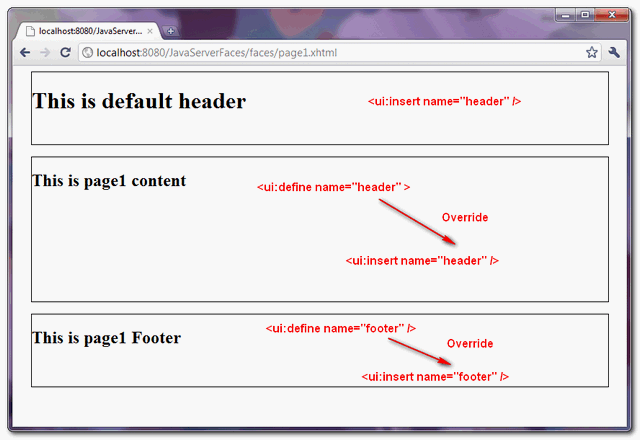
As long as the name of the “ui:define” tag is matched to the name of the “ui:insert” tag, which defined in template, the “ui:insert” content is replaced.

THANKS , i got it how include file jquery stadalone on a JSF Composition and call my fucntions .
Best teacher (guru) in JAVA world.
Hello, Mkyong. Are you still around? Please, I have one quick question.
This is great tutorial, this helps solve the problem of PrimeFaces . I wanted the Center Pane height to expand as per content then followed by the Footer Pane. This was not possible with standard p:layout without specifying height for each layoutUnit.
Thanks again.
Thanks mkyong. The Eclipse JSF2 tutorial is not as good as this.
why there is no replies from mkyoung????
This is a fantastic example that I’ve made work for me, but I have a real problem.
One of my ‘ui:define content’ pages is doing a file upload which requires the << h:form to be enctype='multipart/form-data". This all works well and I can navigate all my pages until I actually select the content page that is doing the file upload. Even the file upload works fine, but when I then try to navigate away from that page I get the following error
the request doesn't contain a multipart/form-data or multipart/mixed stream, content type header is application/x-www-form-urlencoded; charset=UTF-8
I tried creating a whole layout.xhtml page just for that content page but it didn't seem to make any difference.
Anyone else have such a problem?
Hello Sir, first of all i want to thank you for such a nice tutorial. I just implemented my code using your tutorial and everything worked fine as expected. But when i look the source code of my sample page in which i use the commonLayout.xhtml then i found two html tags and two body tags as the commonLayout.xhtml and the sample page both have the html and body tags. so its repeating. I am newbie so please tell me if m missing something..thanks in advance..
I believe I’ve implemented this correctly in Eclipse, but even with page1.xhtml, I’m not getting the substitution for the default… but rather all 3 defaults? Anyone else have this problem? Normally, you return the page you want to load from a Java String method in the Bean, like “return page1.xhtml”. I guess I’m not getting how the example program would know to load page1.xhtml… over say page2.xhtml would have it’s own “content”.
I figured it out. Some sort of button on the default content sends the user to a bean and the next page, page1.xhtml in this case is displayed with the substituted content.
Do you know if it’s possible to have a template inside another template? For example I need to have the center zone split into a toolbar and a content zone.
Your explanations and examples are fabulous. Excellent work man (Y).. Thanks again
Thanks !
–
Ketan
And again a search takes me to another of your fantastic pages. I would like just to tell you how much I/we appreciate your fine examples. So thank you!
Thank U very much, this is a simple and very beneficial description to including mechanism. Thanks again.
Thanks a lot.
how does the web.xml file appear in this program? can you please explain every line?
lose, lose.
Thanks a lot. you saved my day..
Hi
I am new in jsf,have to work on new project .Need page rendering features like tiles so want to know should i go for tiles or jsf has same functionality like tiles has.
how we can avoid the page refresh for header and footer area
The clearest example I found till now about templates. It definitely make me understand the use of them. Thanks.
This tutorial is great! Thank you so much.
Thanks, very helpful tutorial 🙂
very helpful tutorial. Thanks MKYong.
Nice article. page1.xhtml content part is replaced by right?
page1 content is replaced by ui:define content but not ui:define header ?
only those ui:define with the same name as ui:insert is replaced for the template. Since no ui:define for header, the header from the template is used instead.
Thank u very much!very good tutorial from mkyong.
Thanks for this very simple and easy to understand tutorial!
Never seen such a clear article!
Keep up the good work 😉
The most simplest and easiest post to understand the concept. Thanks.
I am having a JavaScript in commonHeader, Now will it render/work in default.xhtml and page1.xhtml. Or i need to include it in commonLayout.xhtml
Mkyong Sir, I am having a JavaScript in commonHeader, now will it render/work in default.xhtml, page1.xhtml. Or i need to keep that in these two pages or somewhere else like commonLayout.xhtml
Your examples are so clear and so instructive,thanks..
Great Tutorials
Couldn’t stop to say “thanks” for the easy writeup.
Nice and clean code. Good examples, easy to follow.
you explained it very easy and clear
thank you
Thanks…
You explain this concept in a good and easy way.
Hi mkyong, Is a templates concept replaces tiles concept?
Hi.
Great tutorial,
I have been using facelets but there is something I couldn’t do it.
If you take a composition like you use in your tutorial, and add a button like you have in your page for “print” in “header section” in commonHeader.xhtml.
Is there a way to indicate you want to print the content, just the content, in the “content section”????. In my case I show in that section different contents, so I don’t want to print the hole page (or composition).
Thanks
David.
this is nice great go damn tutorial Mkyong
thx bro…
Hi Mkyong nice tutorial. I have a question is it possible to update the content part asynchronously (ajax)? I tried the example it does preserve the parts of your template but the whole page gets refreshed. Is it possible that only parts of the templates are refreshed? Thanks in advance.
This is a nice, basic article. However, for a real beginner who wants to do this hands-on, there’s not a list of JARs and other details to accomplish it in, say, Eclipse or NetBeans. Obviously, you know how to do that. Could you list the JARs and their origins?
Sorry for the missing information, you can download this project (Maven + Eclipse project), all the JARs are listed in the pom.xml file. Alternatively, you can find all the JARs in this article – https://mkyong.com/jsf2/jsf-2-0-hello-world-example/
Hi… can we use tiles with JSF2.0? If so how?
like yr demo..cool
Hi, i have a question. You wrote that in page2.xhtml we can override template’s CONTENT with
and put some xhtml code there. but if i have, for example, content2.xhtml, and i want to include it – i must write
Can i solve my question in such way?
write code
ui:define name=”content”
ui:insert name=”content”
ui:include src=”/template/common/content2.xhtml”
ui:insert
ui:define
What about getting the browsers in quirks mode with that xml prolog before the doctype?!
Hi, great article here!
This is something essential to a well structured web app and it’s very well explained! I just like to include as a note that to have the “h:outputStylesheet” to work, the css file must be inside the “resources” folder, otherwise it won’t pick it up (at least here on my tests / researches that’s what I could conclude). It would be cool if you can add this as a note to the article!
Thank you very much!
Thanks Flavio